1. Introducció
The Ashfly 500X Digital Coin Magnifying Glass with Light is a versatile tool designed for detailed observation and magnification. It features a 500x optical magnification, adjustable LED lighting, and the ability to capture photos and videos. This device can be used handheld or with its integrated stand, and offers PC connectivity for larger display options. It is suitable for various applications including reading, inspection, and examining small objects like coins, banknotes, and jewelry.

Image: The Ashfly 500X Digital Coin Magnifying Glass with Light, illustrating its handheld use, desktop stand configuration, and connectivity to an external monitor for magnified viewing.
2. Contingut del paquet
- Ashfly 500X Digital Coin Magnifying Glass with Light (Model 379)
- Cable de càrrega USB-C
- Manual d'usuari
- Microfiber Cleaning Cloth (may be included)
3. Producte acabatview
Familiarize yourself with the components of your magnifying glass:
- Lent principal: Provides 500x optical magnification.
- Pantalla HD de 2 polzades: Displays magnified images and videos.
- Botó d'encesa: Encén/apaga el dispositiu.
- Zoom Buttons (+/-): Adjusts magnification levels.
- Botó foto/vídeo: Captures images or records video.
- Botó de la galeria: Accesses saved photos and videos.
- Llums LED ajustables: 8 LEDs with three brightness levels for illumination.
- Port USB-C: For charging and PC connectivity.
- Ranura per a targetes Micro SD: For expandable storage (TF card not included).
- Suport plegable: Allows for hands-free desktop use.

Imatge: Una imatge detallada view of the device's side, highlighting the USB-C charging port, Micro SD card slot, and various control buttons.
4. Configuració
4.1. Càrrega del dispositiu
The device is equipped with a 400mAh lithium battery. To charge, connect the provided USB-C cable to the USB-C port on the device and plug the other end into a compatible USB power source. The device supports charging while in use.
4.2. Inserció d'una targeta Micro SD (opcional)
To record videos or store more than 200 photos, a TF (Micro SD) card is required (not included). Before inserting, ensure the device is powered off. Format the Micro SD card to the XFAT format using a computer before first use to prevent errors during saving. Insert the formatted card into the Micro SD card slot until it clicks into place.
5. Instruccions de funcionament
5.1. Encendre/apagar
Press and hold the Power Button for a few seconds to turn the device on. The screen will display a welcome message and then show the live view. To turn off, press and hold the Power Button again.
5.2. Basic Magnification (Handheld Use)
Hold the device over the object you wish to magnify. For optimal clarity, place the lens directly on the object. Use the zoom buttons (+/-) to adjust the magnification level up to 500x. The fixed-focus lens requires the object to be held in front of the lens for best results.

Image: A user holding the Ashfly Digital Magnifying Glass over a map, demonstrating its handheld operation.
5.3. Desktop Use (Foldable Stand)
For hands-free operation, fold out the integrated stand. Place the device on a flat surface with the object positioned beneath the lens. This allows for stable viewing and detailed work.

Image: The device shown in its folded desktop stand position, ready for hands-free use.
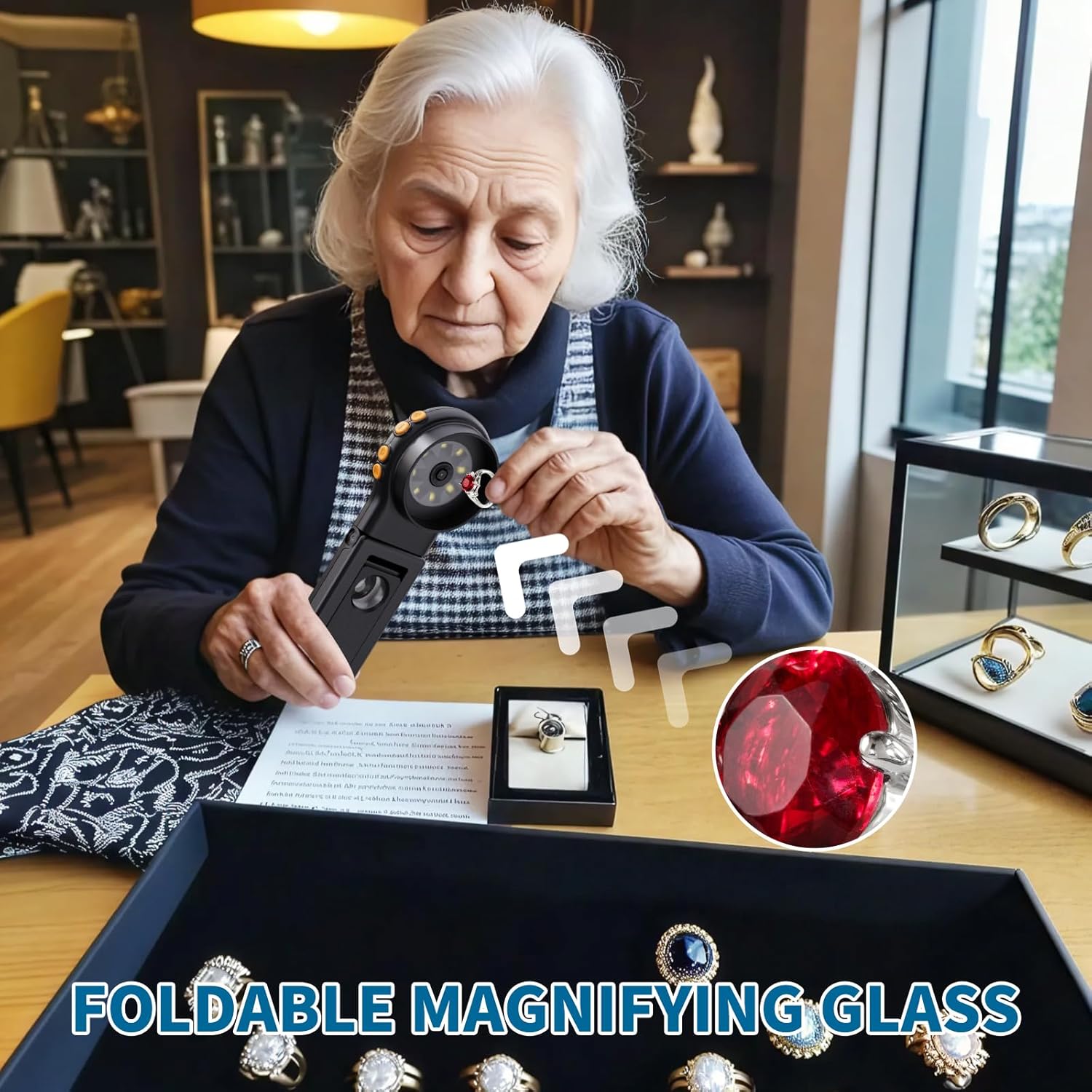
Image: A user inspecting jewelry with the magnifying glass set up in its desktop stand, providing a stable viewplataforma d'ing.
5.4. Adjusting LED Lighting
The device features 8 adjustable LED lights. Press the dedicated light button to cycle through three brightness levels, ensuring clear visibility in various lighting conditions.

Imatge: Un primer pla view of the device's lens area, highlighting the 8 adjustable LED lights for illumination.
5.5. Captura de fotos i vídeos
Press the Photo/Video Button to capture a still image. The device's built-in memory can store up to 200 photos. To record video, long-press the Photo/Video Button. Video recording requires an inserted TF card.

Image: A visual representation of the device's digital enlargement feature, showing a stamp magnified at 10x, 200x, and 500x.
5.6. PC Connectivity
Connect the device to a Windows or Mac computer using the USB-C cable to view magnified images on a larger monitor. This feature allows for collaborative viewanàlisi detallada.
5.7. Viewing Saved Media
Press the Gallery Button to browse captured photos and videos. Use the navigation buttons to scroll through your media files.
Video: Demonstrates the basic operation of the magnifying glass with light, including powering on, adjusting magnification, and capturing images.
Video: Shows the handheld use of the coin microscope, focusing on details of a coin.
6. Manteniment
6.1. Neteja
Use the provided microfiber cleaning cloth to gently wipe the lens and screen. Avoid using abrasive materials or chemical cleaners, which may damage the surfaces.
6.2. Emmagatzematge
Store the device in a cool, dry place away from direct sunlight and extreme temperatures. When not in use, ensure the device is powered off to conserve battery life.
7. Solució De Problemes
- El dispositiu no s'encén: Ensure the battery is charged. Connect the USB-C cable to a power source and try again.
- Imatge borrosa: The device uses a fixed-focus lens. Ensure the object is positioned correctly in front of the lens for optimal clarity. Adjust the distance between the lens and the object until the image is clear.
- Cannot save photos/videos to SD card: Ensure the Micro SD card is inserted correctly and formatted to XFAT. The device must be powered off before inserting the card.
- Problemes de connexió amb l'ordinador: Verify the USB-C cable is securely connected to both the device and the computer. Ensure your computer's operating system recognizes the device.
8. Especificacions
| Marca | Mosca de cendra |
| Número de model | 379 (inskam379B) |
| Ampliació | Ampliació òptica 500x |
| Mida de la pantalla | Pantalla HD de 2 polzades |
| Il·luminació | 8 Adjustable LED Lights (3 brightness levels) |
| Bateria | 400mAh Lithium Battery (rechargeable via USB) |
| Emmagatzematge | Built-in memory (200 photos), Micro SD card slot (TF card not included) |
| Connectivitat | USB-C (for charging and PC connection) |
| Dimensions | 7.8 x 3.74 x 1.54 polzades |
| Pes de l'article | 3.26 unces (92.5 grams) |
| Material | Glass and Plastic |
9. Garantia i Suport
For warranty information, technical support, or any inquiries regarding your Ashfly 500X Digital Coin Magnifying Glass, please refer to the product packaging or contact Ashfly customer service directly. Keep your purchase receipt for any warranty claims.


