1. Introducció
The Novation Launchkey 49 White MK4 is a powerful and versatile MIDI keyboard controller designed for seamless integration with Digital Audio Workstations (DAWs). It features 49 semi-weighted keys, 16 polyphonic-aftertouch pads, and an intuitively arranged control surface. This manual provides comprehensive instructions for setting up, operating, and maintaining your Launchkey 49 MK4 to maximize your creative workflow.

Figure 1: Novation Launchkey 49 White MK4 MIDI Keyboard Controller.
2. Característiques
- 49 tecles semiponderades: Provides a responsive and expressive playing experience.
- 16 Polyphonic Aftertouch Pads: FSR drum pads designed for drumming, clip launching, and more, with polyphonic aftertouch for nuanced control.
- Deep DAW Integration: Seamlessly works with major DAWs including Ableton Live, Logic, Cubase, Reason, Reaper, FL Studio, and Ardour, offering intuitive control over mixer, devices, and effects.
- Powerful Creative Tools: Includes a unique Arpeggiator, Chord Modes for creating progressions, Scale Mode to ensure you stay in key, and a Chord Detector displayed on the OLED screen.
- NKS-Ready: Seamless integration with Native Instruments software for hands-on control via Native Kontrol Standard.
- Included Software Bundle: Comes with Ableton Live Lite, Cubase LE, sounds from GForce, Klevgrand, Orchestral Tools, Native Instruments, and Melodics lessons.
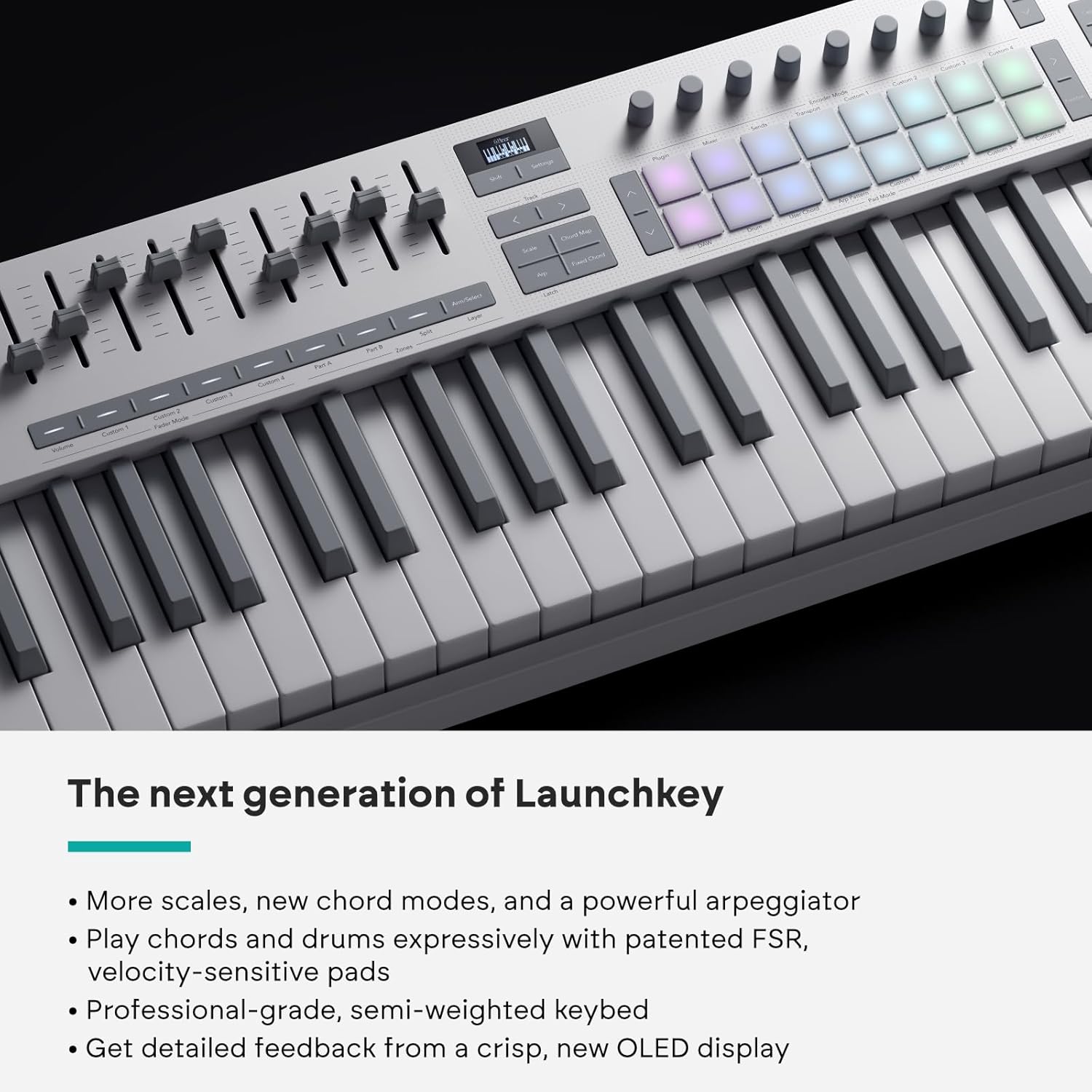
Figura 2: Detallada view of the Launchkey 49's control surface, highlighting the pads and knobs.
3. Què hi ha a la caixa
- Novation Launchkey 49 White MK4 MIDI Keyboard Controller
- Cable USB
- Full d'informació de seguretat
4. Configuració
4.1. Connecting Your Launchkey 49 MK4
- Connect the provided USB cable from the Launchkey 49 MK4's USB Type C port to an available USB port on your computer (PC or Mac).
- The Launchkey 49 MK4 is USB-powered and does not require an external power supply.
- For MIDI connectivity with external hardware, use a standard MIDI cable (not included) to connect the MIDI OUT port on the Launchkey to the MIDI IN port on your MIDI device.
4.2. Software Installation and DAW Integration
To fully utilize your Launchkey 49 MK4, it is recommended to install the included software and configure it with your preferred DAW.
- Visit the Novation website (refer to the safety information sheet for the exact URL) to register your product and download the latest drivers and bundled software (Ableton Live Lite, Cubase LE, etc.).
- Follow the on-screen instructions for software installation.
- Open your Digital Audio Workstation (DAW) (e.g., Ableton Live, Logic Pro, FL Studio).
- Navigate to your DAW's preferences or settings menu (usually under "MIDI" or "Control Surfaces").
- Select the Novation Launchkey 49 MK4 as a control surface and ensure its MIDI input and output ports are enabled. Specific setup instructions for popular DAWs can be found on the Novation support weblloc.

Figure 3: The Launchkey 49 MK4 seamlessly integrates with your studio setup for music production.
5. Instruccions de funcionament
5.1. Keyboard and Pads
- Tecles semiponderades: Play melodies, chords, and basslines with expressive velocity sensitivity.
- Coixinets RGB: The 16 velocity-sensitive pads can be used for drumming, launching clips in Ableton Live, triggering samples, or playing chords. They light up in different colors to provide visual feedback.
- Polyphonic Aftertouch: Apply pressure to the pads after the initial strike to modulate sound parameters, adding expressive depth to your performances.

Figure 4: The responsive pads offer dynamic control for drumming and clip launching.
5.2. Creative Modes
- Mode d'escala: Activates a mode where all played notes will automatically conform to a selected musical scale, preventing you from playing "wrong" notes. This is ideal for improvisation and composition.
- Chord Modes: Allows you to trigger full chords from a single key or pad. Explore various chord types and create complex progressions with ease. The Chord Detector feature displays played chords on the OLED screen.
- Arpegiador: Generate rhythmic patterns from held notes. The arpeggiator offers various modes, rates, and swing settings to create dynamic and evolving musical phrases.

Figure 5: Adjusting parameters using the rotary knobs for creative sound manipulation.
5.3. DAW Control
The Launchkey 49 MK4 provides dedicated controls for your DAW:
- Controls de transport: Dedicated buttons for Play, Stop, Record, Loop, and other transport functions.
- Control del mesclador: Use the faders and knobs to control volume, pan, sends, and other mixer parameters within your DAW.
- Control de dispositius i efectes: Map the knobs and faders to control parameters of virtual instruments and effects in your DAW for hands-on sound design.
- Session Navigation: Navigate through scenes and tracks in Ableton Live directly from the Launchkey.
6. Manteniment
- Mantingueu el dispositiu net netejant-lo amb un drap suau i sec. Eviteu utilitzar productes de neteja o dissolvents abrasius.
- Protect the Launchkey from dust, moisture, and extreme temperatures.
- Do not place heavy objects on the keyboard or pads.
- Emmagatzemar en un lloc fresc i sec quan no s'utilitzi.
7. Solució De Problemes
| Problema | Possible causa/solució |
|---|---|
| Device not recognized by computer/DAW. |
|
| Pads/Keys not responding. |
|
| DAW integration issues. |
|
8. Especificacions
- Nom del model: Launchkey 49 MK4 White
- Número de model de l'article: AMS-LAUNCHKEY-49-MK4-WH
- Nombre de claus: 49 Semi-Weighted
- Coixinets: 16 RGB Velocity-Sensitive Pads with Polyphonic Aftertouch
- Connectivitat: USB Type C, MIDI (5-pin DIN)
- Potència: Alimentat per bus USB
- Dispositius compatibles: PC, Mac
- Programari compatible: Ableton Live, Logic, Cubase, Reason, Reaper, FL Studio, Ardour, Native Instruments (NKS)
- Dimensions: 10.37 x 28.74 x 3.66 polzades (26.34 x 73.00 x 9.30 cm)
- Pes de l'article: 9.06 lliures (4.11 kg)
- Material del cos: Plàstic
- Color: Blanc
9. Garantia i Suport
For detailed warranty information and technical support, please visit the official Novation weblloc web o poseu-vos en contacte amb el servei d'atenció al client. Conserveu el comprovant de compra per a reclamacions de garantia.
Suport de Novation Weblloc: www.novationmusic.com/support


