Introducció
This user manual provides comprehensive instructions for the setup, operation, and maintenance of your Xiaomi TV F Pro 50. Please read this manual thoroughly before using the product to ensure proper functionality and safety. Keep this manual for future reference.

Imatge: Frontal view of the Xiaomi TV F Pro 50, showcasing els seus bisells prims i el suport.
1. Guia de configuració
1.1 Desembalatge i contingut del paquet
Traieu amb cura tots els components de l'embalatge. Assegureu-vos que hi hagi tots els elements que s'enumeren a continuació:
- Pantalla
- Cable d'alimentació
- Kit d'instruccions de seguretat i instal·lació
- Elements del suport
- Kit de cargols
- Comandament a distància Bluetooth

Imatge: Part posterior view of the Xiaomi TV F Pro 50, showing various input ports and mounting points.
1.2 Instal·lació física
You can install your Xiaomi TV F Pro 50 using the included stand or by wall-mounting it (wall mount kit sold separately).
1.2.1 Instal·lació de l'estand
- Col·loqueu la pantalla del televisor cara avall sobre una superfície suau i neta per evitar ratllades.
- Attach the stand elements to the designated slots at the bottom of the TV.
- Secure the stand elements using the provided screw kit. Ensure they are firmly tightened.
- Carefully lift the TV and place it on a stable, flat surface.
1.2.2 Muntatge a la paret (opcional)
For wall mounting, refer to the specific instructions provided with your wall mount kit. Note that the fixing area on the back of the TV for wall mounts is located low down, which may require specific bracket types or adjustments.
1.3 Engegada inicial i connexió de xarxa
- Connecteu el cable d'alimentació al televisor i després a una presa de corrent.
- Premeu el botó d'engegada del televisor o del comandament a distància per encendre el televisor.
- Follow the on-screen prompts for initial setup, including language selection and region.
- Connecteu-vos a la vostra xarxa:
- Wi-Fi: Seleccioneu la vostra xarxa Wi-Fi de la llista i introduïu la contrasenya.
- Ethernet: Connecteu un cable Ethernet des del vostre encaminador al port LAN del televisor.
- Sign in to your Amazon account to activate Fire TV features and access streaming services.

Image: The Fire TV interface displayed on the Xiaomi TV F Pro 50, showing various streaming app icons.
1.4 Emparellament del control remot
The included Bluetooth remote control needs to be paired with the TV for full functionality.
- Assegureu-vos que el comandament tingui piles noves.
- During initial setup, the TV will prompt you to pair the remote.
- Press and hold the Home button on the remote for approximately 10 seconds until the LED indicator on the remote starts flashing.
- The TV will detect and pair with the remote.

Image: The Bluetooth remote control for the Xiaomi TV F Pro 50, highlighting its voice control button.
2. Funcionament del televisor
2.1 Operacions bàsiques
- Encès/apagat: Premeu el botó d'engegada del comandament a distància o del televisor.
- Control de volum: Feu servir els botons de pujar/baixar el volum del comandament a distància.
- Selecció d'entrada: Use the Source button on the remote to switch between HDMI inputs, TV tuner, and other connected devices.
- Navegació: Use the directional pad and select button on the remote to navigate menus.
2.2 Funcions de Smart TV (Fire TV)
Your Xiaomi TV F Pro 50 comes with Fire TV built-in, providing access to a vast library of content and smart features.
- Accés a l'aplicació: Easily access popular streaming services like Netflix, Prime Video, Disney+, YouTube, and more directly from the home screen.
- Recomanacions personalitzades: Fire TV learns your viewing habits and provides tailored content suggestions.
- TV en directe: Access live TV channels through integrated services or connected tuners.
- Xiaomi TV+: Enjoy a wide selection of free live TV content, including news, entertainment, reality shows, and movies, without a subscription.

Image: The Xiaomi TV+ interface on the TV, displaying various free content options.
2.3 Control per veu amb Alexa
The integrated Alexa voice assistant allows for hands-free control and content discovery.
- Press the Alexa button on your remote control.
- Speak your command clearly, such as "Find action movies," "Play Netflix," "Set volume to 20," or "Switch to HDMI 1."
- You can also control compatible smart home devices using Alexa.

Image: The Alexa voice command interface on the TV, ready to receive voice input.
2.4 Funcions de pantalla i àudio
- Tecnologia QLED: Experience vibrant colors and enhanced contrast with Quantum Dot technology, delivering over a billion true-to-life colors.

Image: Illustration of QLED display technology with layers showing color enhancement.
- Resolució 4K UHD: Enjoy ultra-precise 4K resolution with exceptional detail and clarity.

Image: Visual representation of 4K UHD resolution, emphasizing detail.
- HDR10: Dynamic brightness and contrast adjustments for deeper blacks and brighter highlights.

Image: Side-by-side comparison demonstrating the enhanced contrast with HDR10.
- Mode cineasta: Activates an authentic cinematic experience, preserving the director's original vision.
Image: The TV displaying content in Filmmaker Mode, emphasizing cinematic quality.
- MEMC (Estimació de moviment, Compensació de moviment): Eliminates motion blur and judder for smoother viewing, especially during fast-paced scenes like sports or action movies.

Image: Visual explanation of MEMC technology, showing frames being interpolated for smoother motion.
- Low Blue Light & DC Dimming: Reduces blue light emission and flicker for enhanced eye comfort during prolonged viewing.

Image: A person comfortably watching the TV, illustrating the benefits of low blue light and DC dimming.
- Dolby Àudio i DTS:X: Enjoy immersive sound with rich highs and deep bass, providing a cinema-like audio experience.

Image: Illustration of the TV's audio system with sound waves, highlighting Dolby Audio and DTS:X support.
2.5 Connectivitat
- Apple AirPlay: Stream content directly from your iPhone, iPad, or Mac to your TV. Share photos, play videos, or mirror your screen wirelessly.

Image: The TV screen displaying content mirrored from an iPhone via Apple AirPlay.
- Bluetooth 5.0: Connecteu auriculars sense fil, barres de so o altres dispositius Bluetooth.
- Wi-Fi de doble banda: Ensures stable and fast wireless internet connection.
- Ports HDMI (x3): Connect gaming consoles, Blu-ray players, set-top boxes, and other HDMI-enabled devices.
- Port USB (x1): Connecteu unitats USB per a la reproducció de contingut multimèdia.
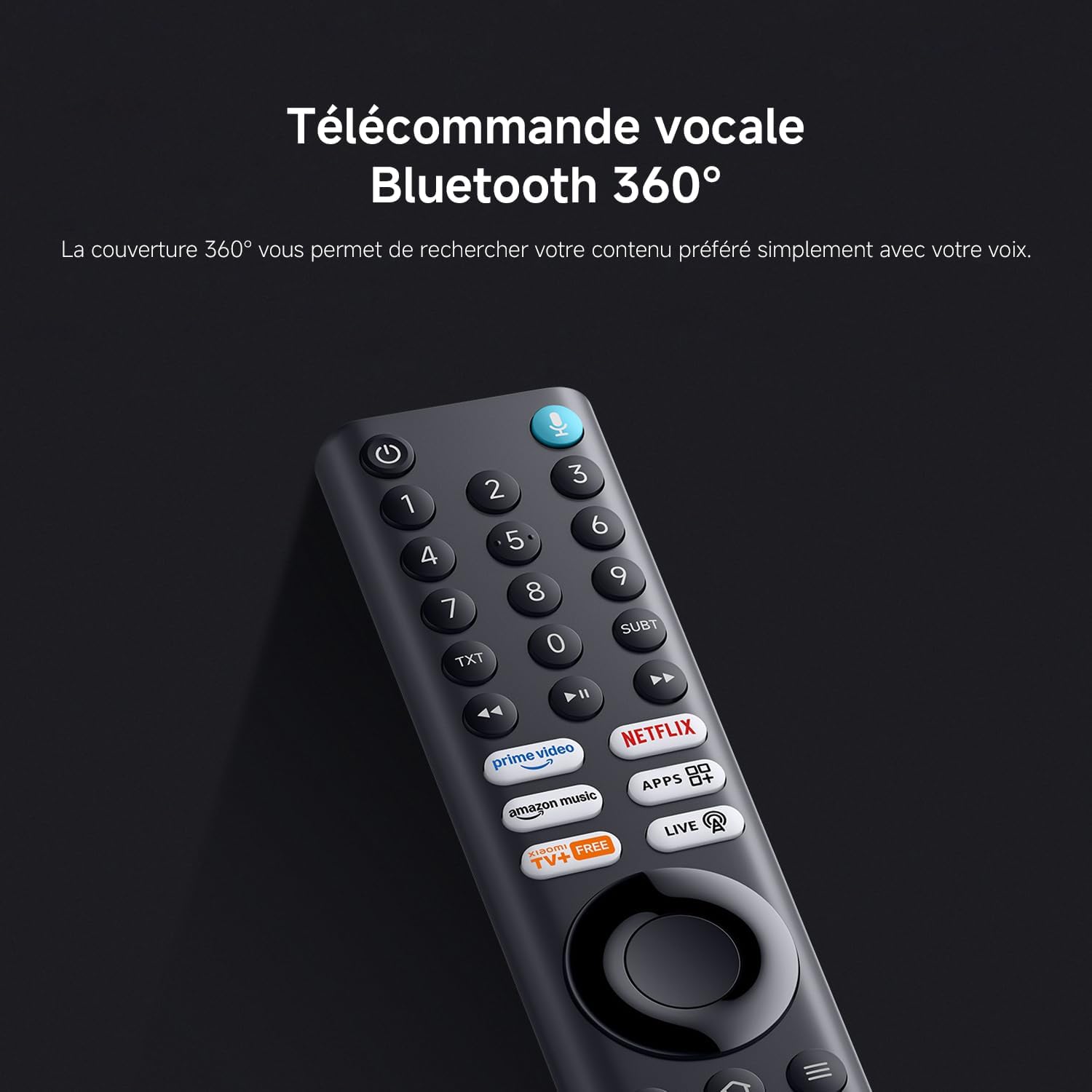
Image: Icons representing Bluetooth 5.0 and Dual-band Wi-Fi connectivity.
2.6 Característiques del joc
- Game Boost 120Hz Mode: Provides a smoother gaming experience with an enhanced refresh rate (120Hz via HDMI for 1080p resolution).

Image: Side-by-side comparison showing the difference between standard refresh rate and 120Hz Game Boost mode for gaming.
- Processador de quatre nuclis: Equipped with a 64-bit quad-core CPU and A55 quad-core CPU, offering impressive performance and faster response times for a smoother experience.

Image: An illustration of the TV's quad-core processor, highlighting its internal components.
3. Manteniment
3.1 Neteja del televisor
- Pantalla: Netegeu suaument la pantalla amb un drap suau i sense borrissol. Per a marques difícils, netegeu lleugerament.ampRenta el drap amb aigua o una solució de neteja de pantalles dissenyada específicament per a electrònica. No ruixis líquid directament sobre la pantalla.
- Exterior: Use a soft, dry cloth to wipe the TV frame and stand. Avoid abrasive cleaners or solvents.
- Ports: Ensure all ports are free of dust. Use compressed air if necessary, but do so carefully.
3.2 Actualitzacions de programari
Your TV may receive automatic software updates to improve performance and add new features. Ensure your TV is connected to the internet for these updates. You can also manually check for updates in the TV's settings menu.
3.3 Atenció general
- Eviteu col·locar el televisor sota la llum solar directa o a prop de fonts de calor.
- No bloquegeu les obertures de ventilació de la part posterior del televisor.
- Protect the TV from moisture and extreme temperatures.
- Desendolleu el televisor durant les tempestes o quan no el feu servir durant períodes prolongats.
4. Solució De Problemes
If you encounter issues with your Xiaomi TV F Pro 50, refer to the following common solutions:
| Problema | Possible causa/solució |
|---|---|
| Sense poder |
|
| Sense imatge / Pantalla negra |
|
| Sense so |
|
| El control remot no respon |
|
| Problemes de connexió de xarxa |
|
| Difficulty with Wall Mount Installation |
|
Si el problema persisteix després de provar aquestes solucions, poseu-vos en contacte amb l'atenció al client.
5. Especificacions tècniques
| Característica | Detall |
|---|---|
| Marca | XIAOMI |
| Número de model | L50MB-FPEU |
| Mida de la pantalla | 50 polzades / 127 cm |
| Tecnologia de visualització | QLED |
| Resolució | 4K UHD (3840 x 2160 píxels) |
| Freqüència d'actualització | 60 Hz (120 Hz in Game Boost mode for 1080p) |
| Suport HDR | HDR10 |
| Sistema operatiu | Fire TV |
| Assistent de veu | Alexa integrada |
| Tecnologia d'àudio | Dolby Àudio, DTS:X, DTS Virtual:X |
| Connectivitat | Bluetooth 5.0, Dual-band Wi-Fi, Ethernet, HDMI (x3), USB (x1) |
| Característiques especials | Apple AirPlay, MEMC, Filmmaker Mode, Low Blue Light, DC Dimming |
| Dimensions (L x A x A) | 111.1 x 28 x 70 cm (43.7 x 11 x 27.6 polzades) |
| Pes | 10.64 kg (23.46 lliures) |
| Classe d'eficiència energètica | F |
6. Garantia i Suport
6.1 Garantia del fabricant
Your Xiaomi TV F Pro 50 comes with a Two-year manufacturer's warrantyAquesta garantia cobreix els defectes de materials i de fabricació en condicions d'ús normal. Si us plau, conserveu el comprovant de compra per a reclamacions de garantia.
La garantia no cobreix els danys causats per mal ús, accidents, modificacions no autoritzades o desgast normal.
6.2 Atenció al client
Per a assistència tècnica, resolució de problemes més enllà d'aquest manual o consultes sobre garantia, poseu-vos en contacte amb el servei d'atenció al client de Xiaomi o visiteu el lloc web oficial de Xiaomi. weblloc. També podeu consultar el Botiga de la marca Xiaomi a Amazon per obtenir recursos addicionals.


