1. Introducció
Thank you for choosing the TNICER T4X Motorcycle Intercom. This device is designed to enhance your riding experience by providing clear communication, music playback, and navigation audio while on the road. Featuring advanced ENC (Environmental Noise Cancellation) technology, Bluetooth 5.2 connectivity, and IP67 waterproof rating, the T4X ensures reliable performance in various conditions. Please read this manual thoroughly before use to ensure proper operation and to maximize the product's potential.
2. Informació de seguretat
- Prioritzeu sempre la seguretat viària. No feu servir el dispositiu de manera que us distregui de la conducció.
- Assegureu-vos que el dispositiu estigui ben muntat al casc abans de conduir.
- Adjust volume to a level that allows you to hear ambient traffic sounds. Excessive volume can damage hearing and impair awareness.
- No intenteu desmuntar ni modificar el dispositiu. Això pot anul·lar la garantia i causar danys.
- Keep the device away from extreme temperatures, open flames, and corrosive substances.
- Eliminar les bateries segons la normativa local.
3. Contingut del paquet
Verifiqueu que tots els elements siguin presents al vostre paquet:
- T4X Main Unit
- Hard Microphone & Speaker Set
- Soft Microphone
- Manual d'usuari (japonès)
- Cable de càrrega USB-C
- 3M Adhesive Pads (for main unit and speakers)
- Rigid Mic Fixed Velcro
- Base de suport de muntatge
- Round Velcro (for speakers)
- Speaker Foam Pads
- Clip de metall
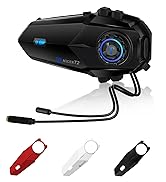
Image: All components included in the TNICER T4X package, laid out for identification.
4. Producte acabatview
The TNICER T4X features a sleek design with intuitive controls. Familiarize yourself with the main unit's buttons and ports:
- Power/Intercom Button: Used for powering on/off, initiating/ending intercom calls.
- Botó per pujar el volum: Increases volume, navigates menus.
- Botó per baixar el volum: Decreases volume, navigates menus.
- Botó multifunció: Controls music playback, phone calls, and voice assistant.
- Port de càrrega: Port USB-C per carregar.
- Port dels auriculars: Connects speakers and microphone.

Imatge: Frontal view of the TNICER T4X main unit, highlighting its buttons and indicator light.
5. Configuració
5.1. Càrrega del dispositiu
Before first use, fully charge the T4X unit.
- Connect the provided USB-C charging cable to the T4X charging port.
- Connecteu l'altre extrem del cable a un adaptador de corrent USB (no inclòs) o a un port USB de l'ordinador.
- L'indicador LED mostrarà l'estat de càrrega (per exemple, vermell per a la càrrega, blau per a la càrrega completa).
- Una càrrega completa triga aproximadament 1.5 hores.

Image: The TNICER T4X unit connected to a USB-C charging cable, illustrating its 1000mAh battery capacity and usage times (40 hours talk/music, 1.5 hours charge, 600 hours standby).
5.2. Instal·lació del casc
Choose between the metal clip or adhesive mount for securing the T4X to your helmet.
- Muntatge de la unitat d'intercomunicació:
- Clip metàl·lic: Slide the metal clip between the helmet shell and inner padding. Secure the T4X main unit to the clip.
- Muntatge adhesiu: Clean the desired area on the helmet surface. Attach the 3M adhesive pad to the mounting bracket base, then firmly press the base onto the helmet. Secure the T4X main unit to the bracket.
- Instal·lació d'altaveus:
- Attach the round Velcro pads to the inside of your helmet, aligning them with your ears.
- Attach the speakers to the Velcro pads. Ensure speakers are positioned directly over your ears for optimal sound.
- Microphone Installation:
- Hard Mic: Suitable for open-face or modular helmets. Attach the hard mic to the helmet's chin bar using the rigid mic fixed Velcro. Position it close to your mouth.
- Soft Mic: Suitable for full-face helmets. Route the soft mic inside the helmet, positioning it near your mouth.
- Connecta els auriculars: Plug the speaker and microphone cable into the headset port on the T4X main unit. Ensure it is firmly inserted.
6. Instruccions de funcionament
6.1. Encendre/apagar
- Encès: Press and hold the Power/Intercom Button for approximately 3 seconds until the LED indicator lights up and you hear a voice prompt.
- Apagar: Press and hold the Power/Intercom Button for approximately 3 seconds until the LED indicator turns off and you hear a voice prompt.
6.2. Control de volum
- Augmenta el volum: Premeu el botó de pujar el volum.
- Disminueix el volum: Premeu el botó per baixar el volum.
6.3. Emparellament Bluetooth (telèfon intel·ligent)
- Ensure the T4X is powered off.
- Press and hold the Power/Intercom Button for approximately 5-7 seconds until the LED indicator flashes red and blue alternately, indicating pairing mode.
- Al teu telèfon intel·ligent, activa el Bluetooth i cerca dispositius nous.
- Select "TNICER T4X" from the list of available devices.
- Once paired, the LED indicator will flash blue slowly, and you will hear a confirmation voice prompt.
6.4. Intercom Pairing (Multi-Unit)
The T4X supports one-touch automatic pairing for up to 8 riders within a 1000m range.

Image: A visual representation of multiple T4X units automatically pairing for group communication over a bridge, illustrating the one-touch pairing feature for up to 8 devices.
- Ensure all T4X units are powered off.
- On the first unit (Unit A), press and hold the Power/Intercom Button for 5-7 seconds to enter pairing mode (red and blue flashing).
- On the second unit (Unit B), press and hold the Power/Intercom Button for 5-7 seconds to enter pairing mode.
- Briefly press the Power/Intercom Button on Unit A. It will search for Unit B. Once connected, both units will flash blue slowly.
- To add more units (Unit C, D, etc.), repeat steps 2-4, pairing each new unit to an already connected unit.
- Reconnexió automàtica: If communication is interrupted due to distance or obstacles, the T4X will automatically reconnect when units are back within range.
6.5. Comunicació per intercomunicador
- Inicia l'intercomunicador: Briefly press the Power/Intercom Button on any paired unit.
- Finalitzar l'intercomunicador: Briefly press the Power/Intercom Button again.
6.6. Phone Functions
- Respon a la trucada: Briefly press the Multi-function Button.
- Finalitzar la trucada: Briefly press the Multi-function Button during a call.
- Rebutja la trucada: Press and hold the Multi-function Button for 2 seconds when a call comes in.
- Torna a marcar l'últim número: Premeu dues vegades el botó multifunció.
6.7. Reproducció de música
- Reproduir/pausa: Briefly press the Multi-function Button.
- Pista següent: Press the Volume Up Button for 2 seconds.
- Pista anterior: Press the Volume Down Button for 2 seconds.
- Compartir música: While playing music, briefly press the Multi-function Button and Volume Up Button simultaneously to share music with a connected intercom unit.
6.8. Ràdio FM

Image: A rider on a motorcycle, with graphics indicating FM radio functionality (76.0MHz to 108.0MHz) and voice command support (Siri, Google Assistant).
- Activar/desactivar l'FM: Press and hold the Volume Down Button for 2 seconds.
- Escaneja canals: Briefly press the Multi-function Button while FM is on.
- Canvia de canal: Press the Volume Up or Volume Down Button briefly.
6.9. Assistent de veu
- Activa l'Assistent de veu: Double-press the Volume Up Button. This will activate your smartphone's voice assistant (e.g., Siri, Google Assistant).
6.10. Sound Adjustment (Equalizer)
The T4X offers three sound profiles:

Image: A motorcycle rider with a helmet, overlaid with a graphic showing three distinct sound profiles: Bass Boost, Mid-range Boost, and Treble Boost, indicating customizable audio experience.
- Switch Sound Modes: Triple-press the Multi-function Button to cycle through Bass Boost, Mid-range Boost, and Treble Boost.
6.11. Ambient Sound Reception
This feature allows you to hear your surroundings without removing your helmet.
- Activate/Deactivate Ambient Sound: Press and hold the Volume Up Button for 2 seconds.
7. Manteniment
- Neteja: Netegeu el dispositiu amb un suau, damp tela. No utilitzeu productes químics aggressivs ni netejadors abrasius.
- Emmagatzematge: Store the device in a cool, dry place when not in use. Avoid direct sunlight and extreme temperatures.
- Cura de la bateria: For optimal battery life, charge the device at least once every three months if not used regularly.
8. Solució De Problemes
8.1. No Sound from Earphones or Microphone
If you experience issues with audio output or input:
- Solució 1: Ensure the cable connector is fully inserted into the main unit's jack. The earphone jack may be tight, requiring firm insertion.
- Solució 2: Try unplugging and re-plugging the earphone cable several times to ensure a secure connection.
- Solució 3: Check if the volume is turned up on both the intercom and your connected smartphone.
- Solució 4: Test with another headset if available to rule out a faulty headset.
8.2. L'intercomunicador no es connecta
- Ensure both units are in pairing mode (red and blue flashing) before initiating pairing.
- Make sure units are within the 1000m communication range.
- Try resetting both units to factory settings (refer to the full manual for specific steps) and re-pairing.
8.3. El dispositiu no s'encén
- Ensure the battery is charged. Connect to a charger and check the LED indicator.
- If the device is completely unresponsive, try a hard reset by holding the Power/Intercom button for an extended period (e.g., 10-15 seconds).
9. Especificacions
| Característica | Detall |
|---|---|
| Número de model | T4X |
| Versió Bluetooth | 5.2 |
| Cancel·lació de soroll | ENC (Cancel·lació de Soroll Ambiental) |
| Max Intercom Users | 8 riders |
| Max Intercom Range | 1000 metres |
| Capacitat de la bateria | Polímer de liti de 1000 mAh |
| Temps de reproducció de música | Fins a 40 hores |
| Temps de conversa | Fins a 40 hores |
| Temps d'espera | Fins a 700 hores |
| Temps de càrrega | Aprox. 1.5 hores |
| Classificació impermeable | IP67 |
| Pes | 44 grams |
| Dimensions (paquet) | 20.5 x 10.9 x 8.9 cm |
| Conector d'auriculars | Mini USB |
| Color | Blanc/Negre |
10. Garantia i Suport
10.1. Informació de la garantia
The TNICER T4X comes with a standard manufacturer's warranty. Please retain your proof of purchase for warranty claims. The warranty covers defects in materials and workmanship under normal use. It does not cover damage caused by misuse, accidents, unauthorized modifications, or natural disasters.
10.2. Atenció al client
For any questions, issues, or support needs regarding your TNICER T4X intercom, please contact our customer service team. You can typically find contact information on the product packaging or the official TNICER weblloc.
If purchased through Amazon, you can also contact the seller directly:
- Go to "Your Account" > "Your Orders".
- Find your order for the TNICER T4X.
- Click "Contact Seller" to send a message.
Alternatively, you may contact us via email at: tnicerservice@tognicer.com (Please include your order number in the email).


