1. Introducció
This manual provides detailed instructions for the setup, operation, and maintenance of your THOMSON Bluetooth Sound Bar (Model B210-black). Please read this manual thoroughly before using the product to ensure proper functionality and to maximize your audio experience.
2. Producte acabatview
2.1. Característiques clau
- Immersive 3D Sound & Deep Bass: 100W sound bar with 4 full-range speakers and 2 bass diaphragms for room-filling 3D surround sound.
- Connectivitat Bluetooth 5.3: Stable wireless streaming for audio from phones, tablets, and TVs.
- Versatile Connection Methods: Supports Bluetooth, USB, AUX, Optical, and ARC inputs.
- Personalized Audio Modes: Three EQ modes (Music, Movie, Game) to optimize listening experience.
- Opcions de control dual: Operate via the included remote control or the integrated touch screen on the sound bar.
2.2. Contingut del paquet
Assegureu-vos que tots els elements siguin presents al paquet:
- THOMSON Bluetooth Sound Bar (Model B210-black)
- Control remot
- Adaptador d'alimentació
- Manual d'usuari (aquest document)
- Audio Cables (e.g., Optical, AUX, HDMI ARC - check packaging for specific types)
Note: Specific cable types included may vary. Please check your packaging.

Image: THOMSON Bluetooth Sound Bar with its remote control and a smartphone connected via Bluetooth.
3. Configuració
3.1. Col·locació
Place the sound bar on a stable, flat surface in front of your TV or mount it on a wall. Ensure there are no obstructions in front of the speakers for optimal sound delivery.

Image: Proper placement of the sound bar below a television, demonstrating remote control usage.
3.2. Connexió a l'alimentació
- Connecteu l'adaptador de corrent al port DC IN de la part posterior de la barra de so.
- Connecteu l'altre extrem de l'adaptador d'alimentació a una presa de corrent.
3.3. Connexions d'àudio
The sound bar supports multiple audio input options. Choose the connection method that best suits your device.

Image: Rear panel connections of the sound bar, highlighting AUX, Optical, HDMI ARC, USB, and power input ports.

Image: The sound bar's compatibility with various devices such as projectors, PCs, game consoles, and smartphones.
- ARC HDMI: For optimal audio quality and control with your TV. Connect an HDMI cable from the sound bar's ARC port to your TV's HDMI ARC port. This allows you to control the sound bar volume with your TV remote.
- Òptic: Connect an optical cable from the sound bar's OPTICAL port to your TV's optical output.
- AUX: Connect a 3.5mm audio cable from the sound bar's AUX port to your device's audio output.
- USB: Inseriu una unitat USB al port USB per reproduir àudio files directament.
- Bluetooth: For wireless connection to Bluetooth-enabled devices. (See Section 4.1 for details).
4. Instruccions de funcionament
4.1. Connexió Bluetooth
- Enceneu la barra de so.
- Press the "MODE" button on the remote or the touch panel until "BT" (Bluetooth) mode is selected.
- On your device (smartphone, tablet, TV), enable Bluetooth and search for available devices.
- Select "THOMSON Sound Bar" from the list.
- Once paired, the sound bar will indicate a successful connection.

Image: Demonstrating Bluetooth connectivity for streaming audio from a smartphone to the sound bar.
4.2. Selecting Input Modes
Press the "MODE" button on the remote control or the touch panel on the sound bar to cycle through available input modes: Bluetooth, USB, AUX, Optical, and ARC.
4.3. Audio Equalizer (EQ) Modes
The sound bar features three preset EQ modes to optimize your listening experience:
- Mode de música: Millora la claredat musical i els greus.
- Mode pel·lícula: Optimizes dialogue and special effects for cinematic immersion.
- Mode de joc: Provides dynamic sound for gaming.
Press the "EQ" button on the remote control to switch between these modes.

Image: Visual representation of the sound bar's Music, Movie, and News (or Game) EQ modes.
4.4. Control de volum
- Use the Volume Up (+) and Volume Down (-) buttons on the remote control or the touch panel.
- In ARC mode, you may be able to control the sound bar volume using your TV's remote control.
- To mute the sound instantly, press the Mute button on the remote control.
5. Manteniment
- Neteja: Feu servir un drap suau i sec per netejar la superfície de la barra de so. No utilitzeu netejadors líquids ni materials abrasius.
- Emmagatzematge: Si guardeu la barra de so durant un període prolongat, desconnecteu-la de l'alimentació i guardeu-la en un lloc fresc i sec.
- Eviteu la humitat: Keep the sound bar away from water and high humidity.
6. Solució De Problemes
| Problema | Causa possible | Solució |
|---|---|---|
| Sense poder | Cable d'alimentació no connectat; Presa de corrent no activa. | Assegureu-vos que el cable d'alimentació estigui ben connectat. Proveu una altra presa de corrent. |
| Sense so | Incorrect input mode selected; Volume too low; Audio cable not connected properly. | Select the correct input mode (e.g., ARC, Optical, Bluetooth). Increase volume. Check audio cable connections. |
| S'ha produït un error en l'aparellament de Bluetooth | La barra de so no està en mode d'emparellament; Dispositiu massa lluny; Interferències. | Ensure sound bar is in Bluetooth mode. Move device closer. Restart both devices. |
| El comandament a distància no funciona | Batteries depleted; Obstruction between remote and sound bar. | Replace remote control batteries. Ensure clear line of sight to the sound bar's sensor. |
7. Especificacions
| Característica | Detall |
|---|---|
| Nom del model | TV Sound Bar (B210-black) |
| Marca | THOMSON |
| Tipus d'altaveu | Sound Bar with 3D audio capabilities |
| Configuració dels altaveus | 4 Full-Range Speakers, 2 Bass Diaphragms |
| Potència de sortida màxima dels altaveus | 100W (Total System Power) / 50 Watts (Individual Speaker Output) |
| Tecnologia de connectivitat | Bluetooth 5.3, HDMI ARC, Optical, AUX, USB |
| Dimensions del producte (L x A x A) | 36.5" de profunditat x 4.7" d'amplada x 2.9" d'alçada (aprox. 92.7 cm x 11.8 cm x 7.3 cm) |
| Pes de l'article | 11 lliures |
| Tipus de muntatge | Muntatge de paret, sobretaula |
| Components inclosos | Control remot |
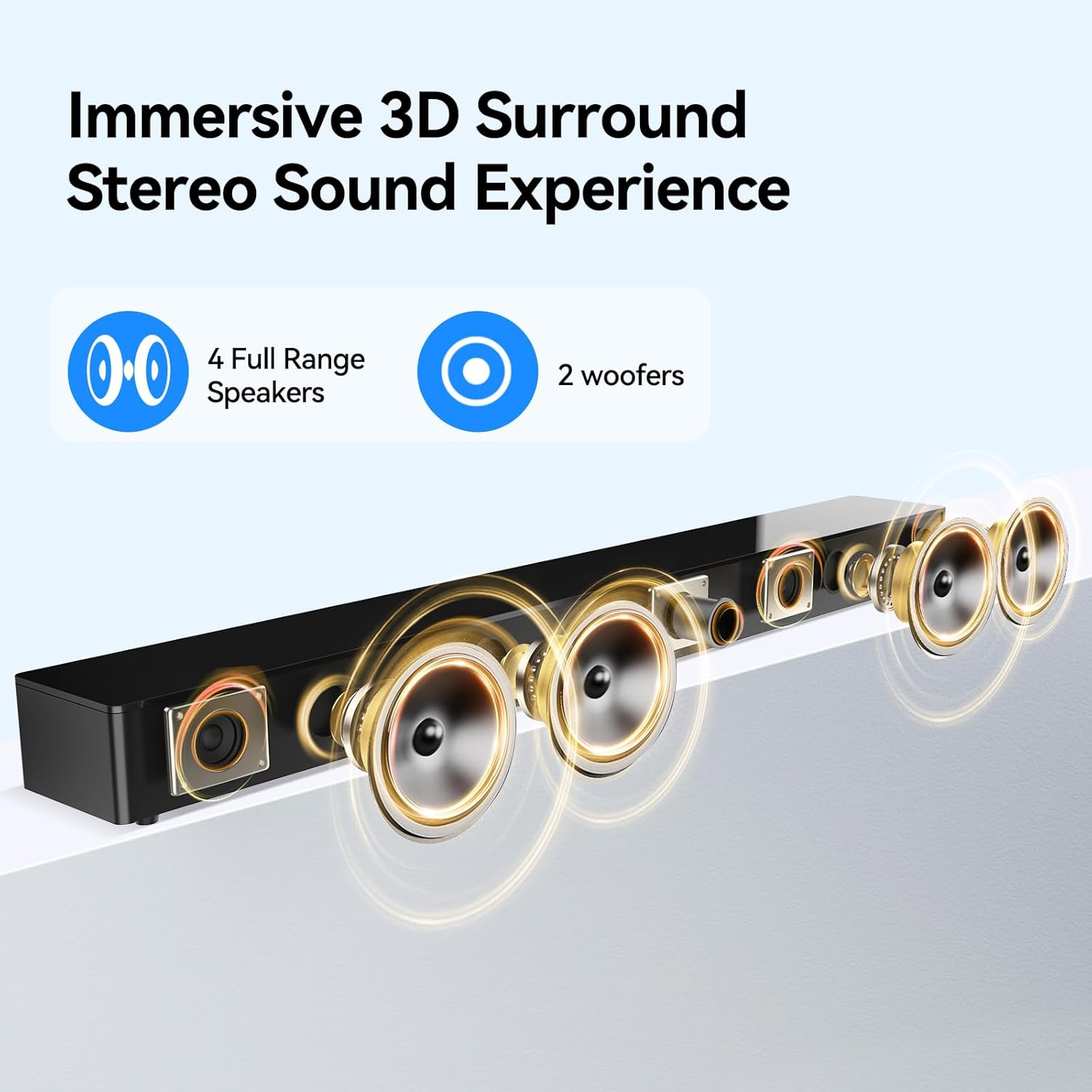
Image: Internal speaker configuration with 4 full-range speakers and 2 woofers.
8. Garantia i Suport
For warranty information and technical support, please refer to the warranty card included with your product or contact THOMSON customer service. Keep your purchase receipt for warranty claims.
Manufacturer: Maxtalent Manufacturer for THOMSON


