1. Introducció
This manual provides essential information for the safe and efficient use of your KOORUI G2711P 27-inch IPS Full HD Gaming Monitor. Please read it thoroughly before operating the device and retain it for future reference.
The KOORUI G2711P monitor features a 27-inch IPS non-glare panel with Full HD (1920x1080) resolution, a 200Hz refresh rate, and a 1ms MPRT response time, designed for an immersive gaming and viewing experience. It includes multiple connectivity options and eye-care features.

Imatge 1.1: Frontal view of the KOORUI G2711P 27-inch IPS Full HD Gaming Monitor.
2. Informació de seguretat
- No exposeu el monitor a la pluja ni a la humitat per evitar incendis o descàrregues elèctriques.
- No obriu el monitor casing. No hi ha peces a l'interior que l'usuari pugui reparar. Demaneu totes les tasques de manteniment a personal de servei qualificat.
- Col·loqueu el monitor sobre una superfície estable i plana per evitar que caigui.
- Assegureu-vos que hi hagi una ventilació adequada al voltant del monitor. No bloquegeu les obertures de ventilació.
- Feu servir només l'adaptador de corrent que s'inclou amb el monitor.
- Desendolleu el monitor de la presa de corrent durant tempestes o quan no el feu servir durant períodes prolongats.
3. Configuració
3.1 Desembalatge
Carefully remove all components from the packaging. Ensure all parts listed in the packing list are present and undamaged. Keep packaging materials for future transport or return.
3.2 Muntatge del suport
- Enganxeu la base del suport al coll del suport.
- Secure the assembled stand to the back of the monitor panel. Refer to the product images for visual guidance on the attachment method.

Image 3.1: Monitor dimensions and side view, illustrating the stand attachment area.
3.3 Connexió a un dispositiu
The monitor supports various input options:
- HDMI: Connect an HDMI cable from your computer or other device to one of the two HDMI 2.0 ports on the monitor.
- DisplayPort (DP): Connect a DisplayPort cable from your computer to the DP 1.4 port on the monitor.
- Audio Out (A/O): Connect external speakers or headphones to the audio output port if desired, as the monitor does not have built-in speakers.

Imatge 3.2: posterior view of the monitor showing HDMI, DisplayPort, and Audio Out connections, along with the 75x75mm VESA mount.
3.4 Connexió d'alimentació
Connect the power adapter to the monitor's power input, then plug the power cable into a wall outlet. The monitor is designed for 110V power input.
4. Instruccions de funcionament
4.1 Encès/Apagat
Press the power button, typically located on the back or bottom of the monitor, to turn the monitor on or off. An indicator light will show the power status.
4.2 Navegació pel menú en pantalla (OSD)
The monitor features a 5-way joystick for intuitive OSD menu navigation. This joystick allows you to access and adjust various display settings.
- Premeu el joystick: Confirmeu la selecció.
- Move joystick up/down: Adjust or select options.
- Move joystick left/right: Adjust or select options.
- Move joystick back (usually left): Exit menu or go back.

Image 4.1: Illustration of the 5-way joystick control for OSD menu navigation.
4.3 Configuració de la pantalla
- Resolució: The native resolution is 1920x1080 Full HD. Ensure your device is set to this resolution for optimal display quality.
- Freqüència d'actualització: The monitor supports up to 200Hz. Adjust your graphics card settings to utilize the higher refresh rate for smoother visuals.
- Temps de resposta (MPRT): The monitor features 1ms MPRT (Moving Picture Response Time) for reduced motion blur. This setting can usually be enabled or adjusted in the OSD menu.
- Sincronització adaptativa: This technology synchronizes the monitor's refresh rate with your graphics card's frame rate to eliminate screen tearing and stuttering. Enable it in the OSD menu and your graphics card control panel.
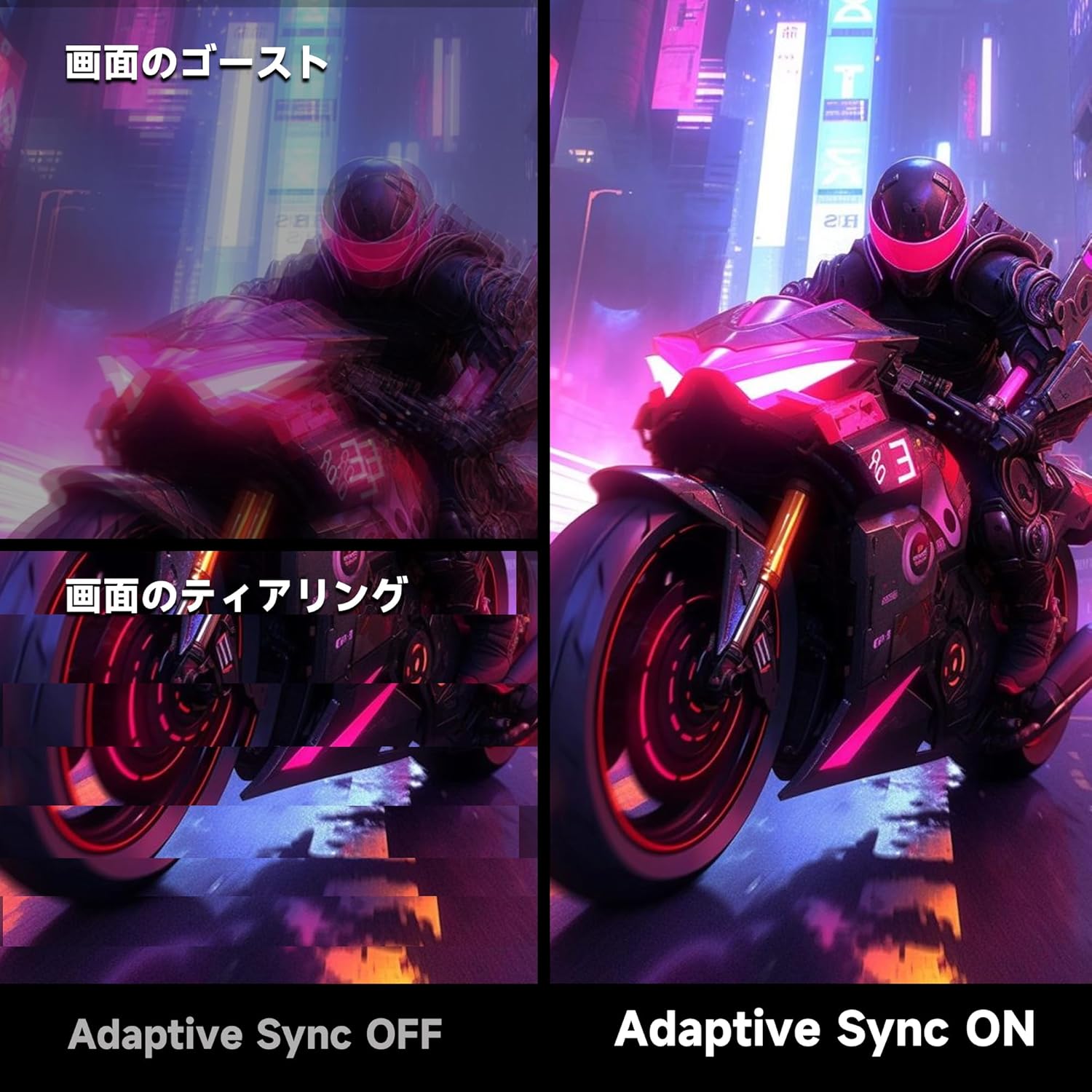
Image 4.2: Visual comparison demonstrating the effect of Adaptive Sync being OFF (showing ghosting and tearing) versus ON (smooth image).

Image 4.3: Comparison illustrating the difference in motion clarity between 200Hz 1ms MPRT and 75Hz 5ms settings.
- HDR 400: The monitor supports HDR 400 for enhanced contrast and color depth. Enable HDR in your operating system settings for compatible content.

Image 4.4: Visual representation of HDR 400 providing more impressive and vibrant images compared to standard HDR 10.
- Configuració de color: The monitor offers 93% DCI-P3 color gamut for accurate and vibrant color reproduction. Adjust brightness, contrast, and color temperature via the OSD menu.

Image 4.5: Display showing a wide range of colors, indicating 93% DCI-P3 color gamut coverage for accurate and vivid visuals.
- Característiques de la cura dels ulls: The monitor incorporates 'Blue Light Reduction' and 'Flicker-Free' technologies to minimize eye strain during prolonged use. These settings can be adjusted in the OSD menu.
- Crosshair Function: For shooting games, a built-in crosshair overlay can be enabled via the OSD menu to assist with aiming.

Image 4.6: A gaming scene demonstrating the monitor's crosshair function, which can be toggled ON or OFF to assist players in shooting games.
5. Manteniment
5.1 Neteja de la pantalla
Netegeu suaument la pantalla amb un drap suau i sense borrissol. Per a marques difícils, dampen the cloth with a small amount of screen cleaner specifically designed for monitors. Do not spray cleaner directly onto the screen.
5.2 Neteja de la Casing
Feu servir un drap suau i sec per netejar el monitor casing. Avoid using abrasive cleaners or solvents that may damage the surface.
6. Solució De Problemes
- Sense energia: Ensure the power cable is securely connected to both the monitor and the power outlet. Check if the power outlet is functioning.
- Sense senyal: Verifiqueu que el cable de vídeo (HDMI o DisplayPort) estigui connectat correctament tant al monitor com a l'ordinador. Assegureu-vos que la font d'entrada correcta estigui seleccionada al menú OSD del monitor.
- Pantalla parpellejant: Check the video cable connection. Try a different cable or port. Ensure your graphics card drivers are up to date.
- Image Distortion/Tearing: Ensure Adaptive Sync is enabled in both the monitor's OSD and your graphics card settings. Check for correct resolution and refresh rate settings.
- Poor Color Quality: Adjust color settings (brightness, contrast, color temperature) in the OSD menu. Ensure HDR is enabled for HDR content.
7. Especificacions
| Característica | Especificació |
|---|---|
| Marca | KOORUI |
| Model | G2711P |
| Mida de la pantalla | 27 polzades |
| Tipus de panell | IPS, Non-Glare |
| Resolució | 1920 x 1080 (Full HD) |
| Relació d'aspecte | 16:9 |
| Freqüència d'actualització | 200 Hz |
| Temps de resposta | 1ms MPRT (GTG) |
| Brillantor | 300 cd/m² |
| Relació de contrast | 1000:1 |
| Viewangle ing | 178° (Horitzontal/Vertical) |
| Gamma de colors | 93% DCI-P3 |
| Suport HDR | HDR 400 |
| Connectivitat | 2x HDMI 2.0, 1x DisplayPort 1.4, 1x Audio Out |
| Altaveus | No inclòs |
| Compatibilitat de muntatge VESA | 75x75mm |
| Dimensions (A x A x P) | 61.34 x 47.23 x 21.49 cm (amb suport) |
| Pes | 5.8 kg |
| Entrada de potència | 110 V |
8. Garantia
The KOORUI G2711P monitor screen is covered by a 1 any de garantia from the date of purchase. All other included accessories are covered by a 3 any de garantia. Please retain your proof of purchase for warranty claims. The warranty covers manufacturing defects and malfunctions under normal use conditions.
9. Suport
For technical assistance, troubleshooting, or warranty inquiries, please contact KOORUI customer support through the retailer where you purchased the product or visit the official KOORUI website for contact information. When contacting support, please have your monitor model number (G2711P) and proof of purchase readily available.


