1. Introducció
This manual provides detailed instructions for the installation, operation, and maintenance of your GIGABYTE GA-B760M D3HP WIFI6 motherboard. Designed for optimal performance and reliability, this motherboard supports Intel Core 14th, 13th, and 12th generation CPUs and features DDR5 memory support, PCIe 4.0 M.2 connectors, and Wi-Fi 6 connectivity. Please read this manual thoroughly before beginning installation to ensure proper setup and to maximize the lifespan of your product.
2. Característiques clau
- Suport de CPU: Compatible with Intel Core 14th, 13th, and 12th generation processors.
- Disseny de potència: Features a 4+1+1 phase hybrid digital VRM solution for stable power delivery.
- Memòria: Supports Dual Channel DDR5 memory with 4 DIMM slots and XMP memory module support.
- Emmagatzematge: Equipped with 2 PCIe 4.0 x4 M.2 connectors for high-speed storage.
- Xarxa: Includes GbE LAN and Wi-Fi 6 802.11ax for fast and reliable network connectivity.
3. Configuració i instal·lació
Before installing the motherboard, ensure your system is powered off and disconnected from the power source. Handle the motherboard by its edges to avoid static discharge.
3.1 Disseny de la placa base
Familiarize yourself with the layout of the motherboard components before proceeding with installation.

Figura 1: De dalt a baix view of the GIGABYTE GA-B760M D3HP WIFI6 motherboard, showing the CPU socket, DIMM slots, PCIe slots, and various headers.
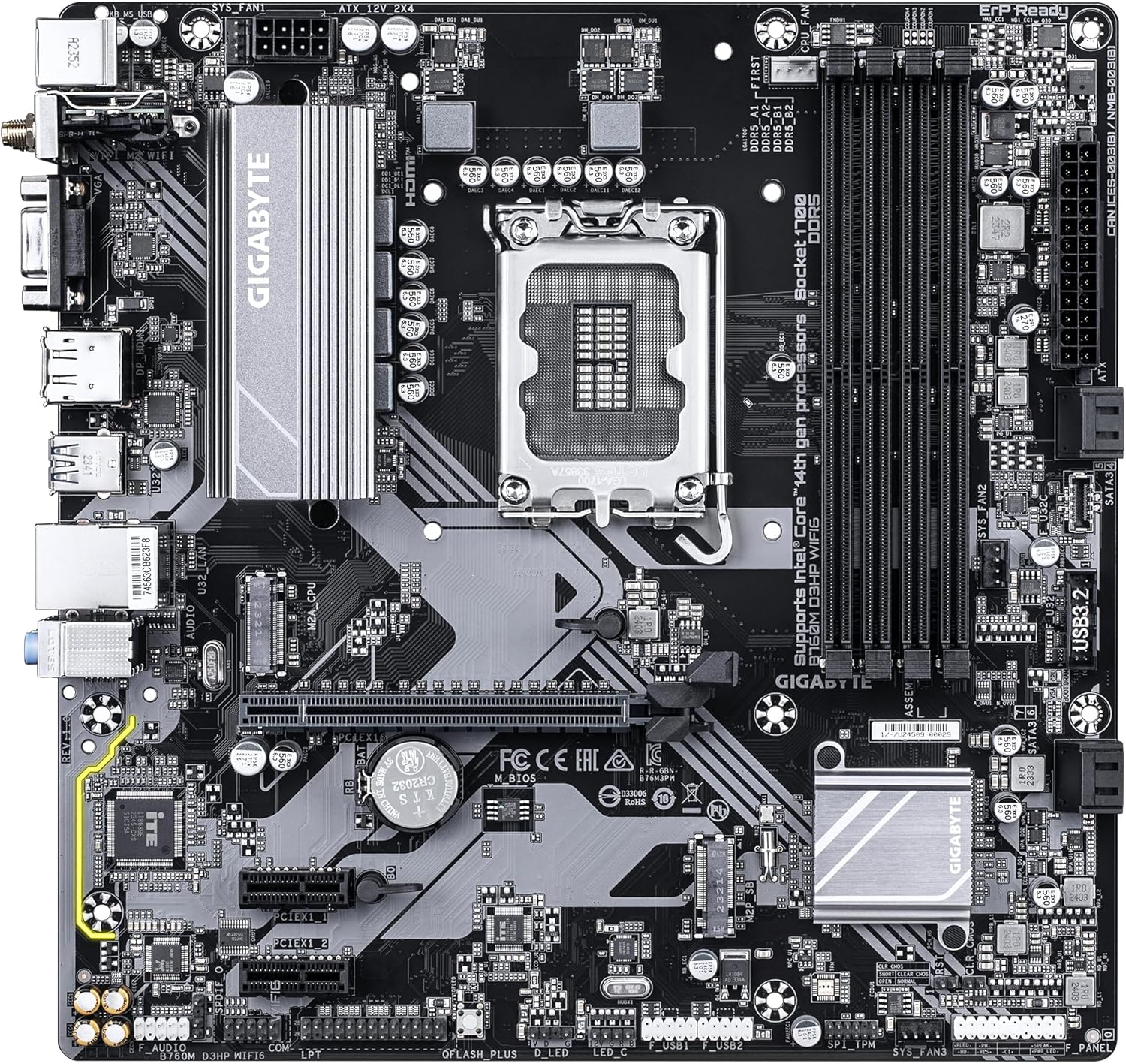
Figura 2: En angle view of the GIGABYTE GA-B760M D3HP WIFI6 motherboard, highlighting the heatsinks and overall component placement.
3.2 Instal·lació de la CPU
- Localitza el sòcol de la CPU LGA 1700 a la placa base.
- Obriu la palanca del sòcol de la CPU i aixequeu la placa de càrrega.
- Alineeu amb cura la CPU amb el sòcol, assegurant-vos que la marca triangular de la CPU coincideixi amb la marca del sòcol. No forceu la CPU al sòcol.
- Baixeu la placa de càrrega i fixeu-la amb la palanca.
- Apply thermal paste to the CPU and install the CPU cooler according to its manufacturer's instructions.
3.3 Instal·lació de memòria (RAM)
- Localitzeu les quatre ranures DIMM DDR5.
- Obriu els clips dels dos extrems de la ranura DIMM.
- Alineeu l'osca del mòdul de memòria DDR5 amb la clau de la ranura DIMM.
- Introduïu el mòdul de memòria fermament a la ranura fins que els clips encaixin al seu lloc. Assegureu-vos que tots dos clips estiguin tancats.
- For dual-channel configuration, refer to the motherboard's specific manual for recommended slot pairing.
3.4 Instal·lació de dispositius d'emmagatzematge (SSD M.2 i unitats SATA)
- SSD M.2: Locate the M.2 connectors. Remove the M.2 screw/standoff. Insert the M.2 SSD into the slot at a 30-degree angle. Push down the SSD and secure it with the screw/standoff.
- Unitats SATA: Connect SATA data cables from your storage drives (HDDs/SSDs) to the SATA ports on the motherboard. Connect power cables from your power supply to the drives.
3.5 Connexions d'alimentació
- Connecteu el connector d'alimentació principal ATX de 24 pins de la font d'alimentació al port corresponent de la placa base.
- Connect the 8-pin ATX 12V CPU power connector to the port near the CPU socket.
3.6 Panell frontal i connexions perifèriques
Connect your case's front panel connectors (power button, reset button, USB ports, audio jacks, LED indicators) to the corresponding headers on the motherboard. Refer to the motherboard's detailed manual for exact pin layouts.

Figura 3: Rear I/O panel of the GIGABYTE GA-B760M D3HP WIFI6 motherboard, showing USB ports, display outputs, audio jacks, Ethernet, and Wi-Fi antenna connectors.
4. Instruccions de funcionament
4.1 Configuració de la BIOS
Upon first boot, you may need to enter the BIOS (Basic Input/Output System) to configure settings such as boot order, date/time, and enable specific features. To enter BIOS, press the DEL key repeatedly during startup. The GIGABYTE UEFI BIOS provides an intuitive graphical interface for configuration.
4.2 Instal·lació del controlador
After installing your operating system, install the necessary drivers for the motherboard's components (chipset, audio, LAN, Wi-Fi, etc.). These drivers are typically provided on a support DVD or can be downloaded from the official GIGABYTE weblloc web per al model específic de la placa base.
5. Manteniment
- Neteja: Regularly clean dust from the motherboard and case fans using compressed air. Ensure the system is powered off and unplugged before cleaning.
- Actualitzacions de la BIOS: Revisa periòdicament el GIGABYTE website for BIOS updates. BIOS updates can improve system stability, compatibility, and performance. Follow the instructions provided by GIGABYTE carefully when updating the BIOS.
- Actualitzacions de controladors: Mantingueu els controladors actualitzats per garantir un rendiment òptim i la compatibilitat amb el programari i el maquinari nous.
6. Solució De Problemes
- Sense energia:
- Comproveu totes les connexions d'alimentació (ATX de 24 pins, CPU de 8 pins).
- Assegureu-vos que la font d'alimentació estigui encesa.
- Proveu la font d'alimentació amb un altre sistema o un provador de fonts d'alimentació.
- Sense pantalla:
- Ensure the monitor is connected to the graphics card (or integrated graphics port if no discrete GPU is used).
- Torneu a col·locar la targeta gràfica i els mòduls de memòria.
- Prova d'arrencar amb només una memòria RAM.
- Inestabilitat/Avaries del sistema:
- Comproveu les temperatures de la CPU i la GPU.
- Ensure all components are properly seated.
- Executeu eines de diagnòstic de memòria per comprovar si hi ha errors de RAM.
- Actualitza la BIOS i els controladors.
- Problemes de connectivitat de xarxa:
- For wired LAN, check the Ethernet cable and router connection.
- For Wi-Fi, ensure antennas are securely attached and drivers are installed.
- Verify network settings in the operating system.
7. Especificacions
| Característica | Detall |
|---|---|
| Marca | GIGABYTE |
| Nom del model | B760M D3HP WIFI6 |
| Socket de CPU | LGA 1700 |
| Processadors compatibles | Intel Core 14th Gen, Intel Core 13th Gen, Intel Core 12th Gen |
| Tipus de xipset | Intel B760 |
| Tecnologia de memòria RAM | DDR5 |
| Velocitat de rellotge de memòria | 5600 MHz |
| Dispositius compatibles | Personal Computer, Desktop Computer |
| Plataforma | Windows 10, Windows 11 |
| Dimensions del producte | 9.61 x 9.61 x 1.38 polzades |
| Pes de l'article | 2.2 lliures |
8. Garantia i Suport
Per obtenir informació sobre la garantia i assistència tècnica, consulteu la pàgina oficial de GIGABYTE. weblloc web o poseu-vos en contacte amb el servei d'atenció al client de GIGABYTE. Conserveu el comprovant de compra per a reclamacions de garantia.
Oficial de GIGABYTE Weblloc: www.gigabyte.com


