Introducció
The WAVLINK PD3.1 Docking Station UMD27PRO is a versatile USB-C docking solution designed to expand the connectivity of your Windows laptop. It supports multiple high-resolution displays, high-speed data transfer, and powerful charging capabilities, transforming your laptop into a comprehensive workstation.
Característiques principals:
- Sortida de triple pantalla: Connect up to three external monitors via 2 HDMI and 1 DisplayPort, supporting single 4K@144Hz/8K@30Hz (with DP1.4 or HDMI 2.1 with DSC) or dual 4K@60Hz.
- Subministrament d'energia de 140 W: Features a PD3.1-140W power adapter, providing up to 125W upstream charging to your laptop.
- Transferència de dades d'alta velocitat: Includes 1 USB-C 3.2 (10Gbps) port and 2 USB-A 3.0 (5Gbps) ports for rapid data exchange.
- Gigabit Ethernet: Garanteix una connectivitat de xarxa per cable estable i ràpida.
- Connectivitat d'àudio: Integrated 3.5mm combination audio jack for headphones or microphones.
- Àmplia compatibilitat: Plug-and-play support for Windows 11/10/8.1/8/7, Chrome OS, Linux, Harmony OS, and Android with OTG function.
Contingut del paquet
En desembalar, assegureu-vos que hi hagi tots els elements següents:
- WAVLINK PD3.1 Docking Station UMD27PRO
- Vertical Stand (Anodized Aluminum)
- PD3.1-140W Power Adapter
- Cable USB-C a USB-C
- Guia d'inici ràpid
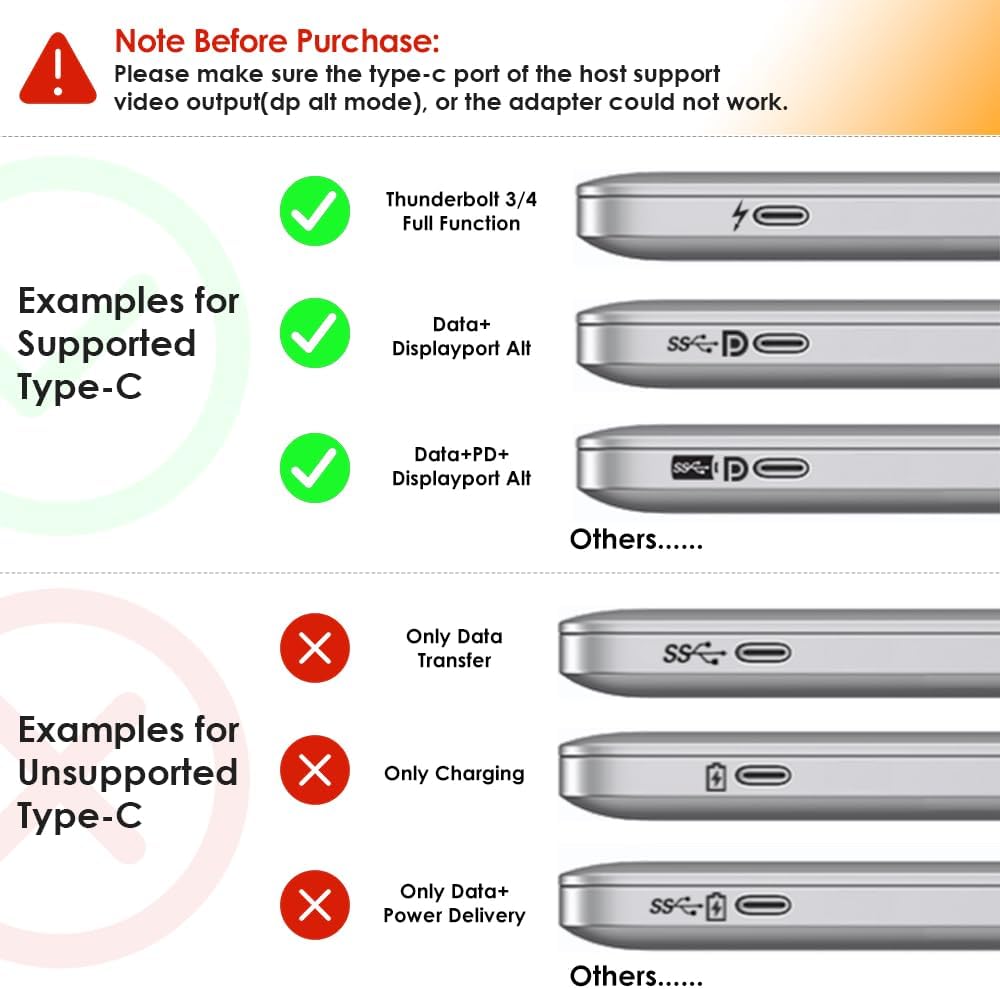
Image: The WAVLINK UMD27PRO Docking Station, its vertical stand, power adapter, USB-C cable, and quick start guide.
Guia de configuració
Follow these steps to set up your WAVLINK PD3.1 Docking Station:
- Col·loca el moll: Insert the docking station into its vertical stand for stable placement on your desk. The stand features rubber feet for stability.
- Connectar l'alimentació: Connect the PD3.1-140W power adapter to the "USB-C IN (140W Max)" port on the rear of the docking station, then plug the adapter into a power outlet.
- Connecta't al portàtil amfitrió: Use the provided USB-C to USB-C cable to connect the "USB-C Host Port" on the front of the docking station to a compatible USB-C port on your Windows laptop. Ensure your laptop's USB-C port supports video transmission and charging.
- Connecta les pantalles:
- Connect your primary monitor to the DisplayPort.
- Connect additional monitors to the HDMI ports (HDMI1, HDMI2).
- Assegureu-vos que els monitors estiguin encesos i configurats a la font d'entrada correcta.
- Connecteu els perifèrics:
- For wired internet, connect an Ethernet cable to the "Gigabit LAN Port".
- Plug USB devices (keyboard, mouse, external drives) into the available USB-A 3.0 (5Gbps) and USB-C 3.2 (10Gbps) ports.
- Connect headphones or a microphone to the 3.5mm audio jack.

Imatge: Davant i darrere views of the WAVLINK UMD27PRO Docking Station highlighting all available ports including USB-A, USB-C, 3.5mm audio, Gigabit LAN, DisplayPort, and HDMI.
Vídeo: Un overview of the WAVLINK PD3.1 Triple Display Dock, showcasing its ports and features.
Instruccions de funcionament
Display Configuration (Windows):
The docking station supports various display modes for Windows systems:
- Pantalla única: Up to 4K@144Hz or 8K@30Hz (under DP1.4 or HDMI 2.1 with DSC).
- Pantalla dual: Up to 4K@60Hz on both external monitors.
- Pantalla triple: Supports up to three external monitors simultaneously. Resolutions may vary based on your laptop's graphics card and DP/HDMI versions.
To configure your displays, right-click on your desktop, select "Display settings," and arrange your monitors as desired (Extend, Duplicate, or Second screen only).

Image: A laptop connected to a single external monitor displaying 4K@144Hz content, demonstrating immersive visual output.

Image: Diagrams illustrating dual and triple display setups for Windows, showing various resolution combinations under different DisplayPort versions.
Funcionalitat de càrrega:
The docking station provides up to 125W of power to charge your host laptop. Ensure your laptop's USB-C port supports charging via Power Delivery (PD) for this feature to work.

Image: The WAVLINK UMD27PRO Docking Station connected to a laptop, illustrating 125W fast charging capability.
Data Transfer and Network:
Utilize the USB-C 3.2 (10Gbps) and USB-A 3.0 (5Gbps) ports for connecting high-speed storage devices or other peripherals. The Gigabit Ethernet port provides a stable and fast internet connection, ideal for demanding online tasks.

Imatge: Primer pla view of the WAVLINK UMD27PRO Docking Station with various ports connected, including a USB-C device, Ethernet cable, and audio jack.
Important Compatibility Notes
- Mac US: This docking station is not compatible with any Mac OS computer.
- Host USB-C Port: Please ensure that the USB-C port on your host laptop supports video transmission (DP Alt Mode) and charging (Power Delivery). If not, the docking station's display and charging functions may not work.
- Limitacions de la targeta gràfica: Some Windows laptops may only support a maximum of 3 monitors (including the host screen) due to their internal graphics card limitations. Verify your computer's maximum monitor support.
- Resolution Requirements: To achieve 4K@144Hz or 8K@30Hz resolution, your laptop's USB-C port must support DP1.4 or HDMI2.1 with DSC. Lower specifications will result in reduced resolutions.
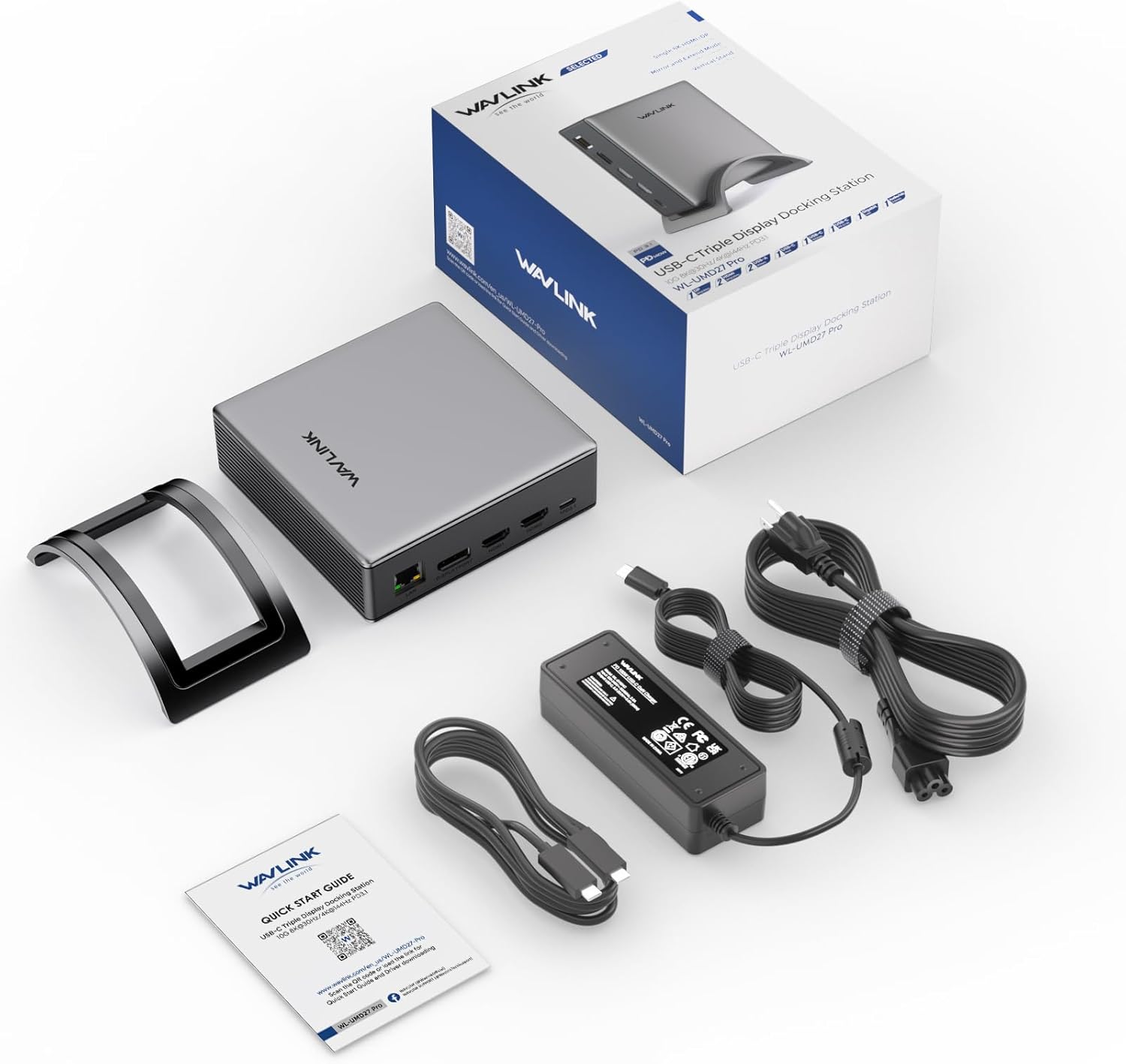
Image: Visual guide illustrating examples of supported USB-C ports (Thunderbolt 3/4, Data+DisplayPort Alt, Data+PD+DisplayPort Alt) and unsupported USB-C ports (Only Data Transfer, Only Charging, Only Data+Power Delivery).
Especificacions
| Característica | Detall |
|---|---|
| Número de model | UMD27PRO |
| Dimensions del producte | 5 x 4.6 x 1.5 polzades (12.7 x 11.7 x 3.8 cm) |
| Pes de l'article | 2.93 lliures (1.33 quilograms) |
| Color | Plata |
| Interfície del maquinari | 3.5mm Audio, DisplayPort, Ethernet, HDMI, USB 3.2 Gen 2 |
| Ports USB totals | 3 (1x USB-C 10Gbps, 2x USB-A 5Gbps) |
| Ports HDMI totals | 2 |
| DisplayPort | 1 |
| Wattage | 140 W (PD3.1) |
| Dispositius compatibles | Chrome OS, Dell, HP, Lenovo, Windows (Not compatible with Mac OS) |
Resolució de problemes
- Sense sortida de pantalla:
- Ensure your laptop's USB-C port supports DisplayPort Alternate Mode (DP Alt Mode).
- Check all cable connections between the dock, laptop, and monitors.
- Verify monitors are powered on and set to the correct input source.
- Actualitza els controladors gràfics del teu portàtil.
- Sense càrrega:
- Confirm your laptop's USB-C port supports Power Delivery (PD).
- Ensure the PD3.1-140W power adapter is correctly connected to the dock and a working power outlet.
- Connectivitat intermitent:
- Comproveu si hi ha connexions de cable soltes.
- Assegureu-vos que l'estació d'acoblament rebi l'alimentació adequada.
- Avoid overloading USB ports with too many high-power devices.
- Compatibilitat amb Mac OS: This docking station is specifically designed for Windows and other listed operating systems and does not support Mac OS.
Manteniment
To ensure the longevity and optimal performance of your WAVLINK PD3.1 Docking Station:
- Mantingueu el dispositiu en un lloc fresc i sec, allunyat de la llum solar directa i de temperatures extremes.
- Clean the exterior with a soft, dry cloth. Avoid using liquid cleaners or solvents.
- Do not block the ventilation grilles on the sides of the docking station to prevent overheating.
- Eviteu deixar caure o sotmetre el dispositiu a forts impactes.
Garantia i Suport
WAVLINK offers a 12 mesos de garantia for this product. For any inquiries or assistance, please contact WAVLINK customer service for fast response support.
You can find contact information and further support resources on the official WAVLINK weblloc web o a través de la vostra plataforma de compra.


