1. Introducció
This manual provides detailed instructions for the setup, operation, maintenance, and troubleshooting of your NIMO Mini PC Desktop, Model DNB1. Please read this manual thoroughly before using the device to ensure proper functionality and to maximize your user experience. Keep this manual for future reference.

Image 1.1: The NIMO Mini PC Desktop DNB1, a compact and powerful computing device.
2. Què hi ha a la caixa
Carefully unpack your NIMO Mini PC Desktop and verify that all items listed below are included:
- NIMO Mini PC Desktop (DNB1)
- Manual d'usuari (aquest document)
- Suport de muntatge
- Adaptador d'alimentació

Image 2.1: Contents of the NIMO Mini PC Desktop packaging, including the Mini PC, user manual, VESA mount, and power adapter.
3. Producte acabatview
The NIMO Mini PC Desktop DNB1 is designed for versatility and performance. Familiarize yourself with its various ports and features.
3.1. Front and Rear Panel Interfaces

Imatge 3.1: Detallada view of the NIMO Mini PC Desktop DNB1's interfaces, including USB, HDMI, LAN, Type-C, and power ports.
- Port DC-IN: Es connecta a l'adaptador de corrent.
- Ports USB 3.2 tipus A (x3): Per connectar perifèrics com ara teclats, ratolins i dispositius d'emmagatzematge externs.
- Ports HDMI 2.0 (x2): For connecting to displays, supporting up to 4K resolution.
- LAN Port (Gigabit Ethernet): Per a la connexió de xarxa amb cable.
- Port d'àudio: Per connectar auriculars o altaveus externs.
- Type-C Port (Multifunction): Supports data transfer and display output.
- Lector de targetes SD: Per llegir i escriure a targetes de memòria SD.
- Botó d'encesa: Per encendre o apagar el dispositiu.
- Botó de restabliment: Per reiniciar el dispositiu.
4. Guia de configuració
Follow these steps to set up your NIMO Mini PC Desktop.
4.1. Connexió inicial
- Connecteu els perifèrics: Connect your keyboard, mouse, and any other USB devices to the available USB 3.2 ports.
- Connecta la pantalla(es): Connect your monitor(s) to the HDMI 2.0 ports. The Mini PC supports up to three 4K displays simultaneously.
- Connecta la xarxa (opcional): For a wired internet connection, connect an Ethernet cable to the LAN port. For wireless, ensure your WiFi network is available during initial setup.
- Connectar l'alimentació: Plug the power adapter into the DC-IN port on the Mini PC, then plug the adapter into a power outlet.
4.2. Instal·lació del suport VESA
The included VESA mount allows you to attach the Mini PC to the back of a compatible monitor or to a wall, saving desk space.
- Attach the VESA bracket to the back of your monitor using the provided screws. Ensure the monitor has VESA mounting holes (typically 75x75mm or 100x100mm).
- Slide the NIMO Mini PC Desktop onto the mounted bracket until it clicks securely into place.
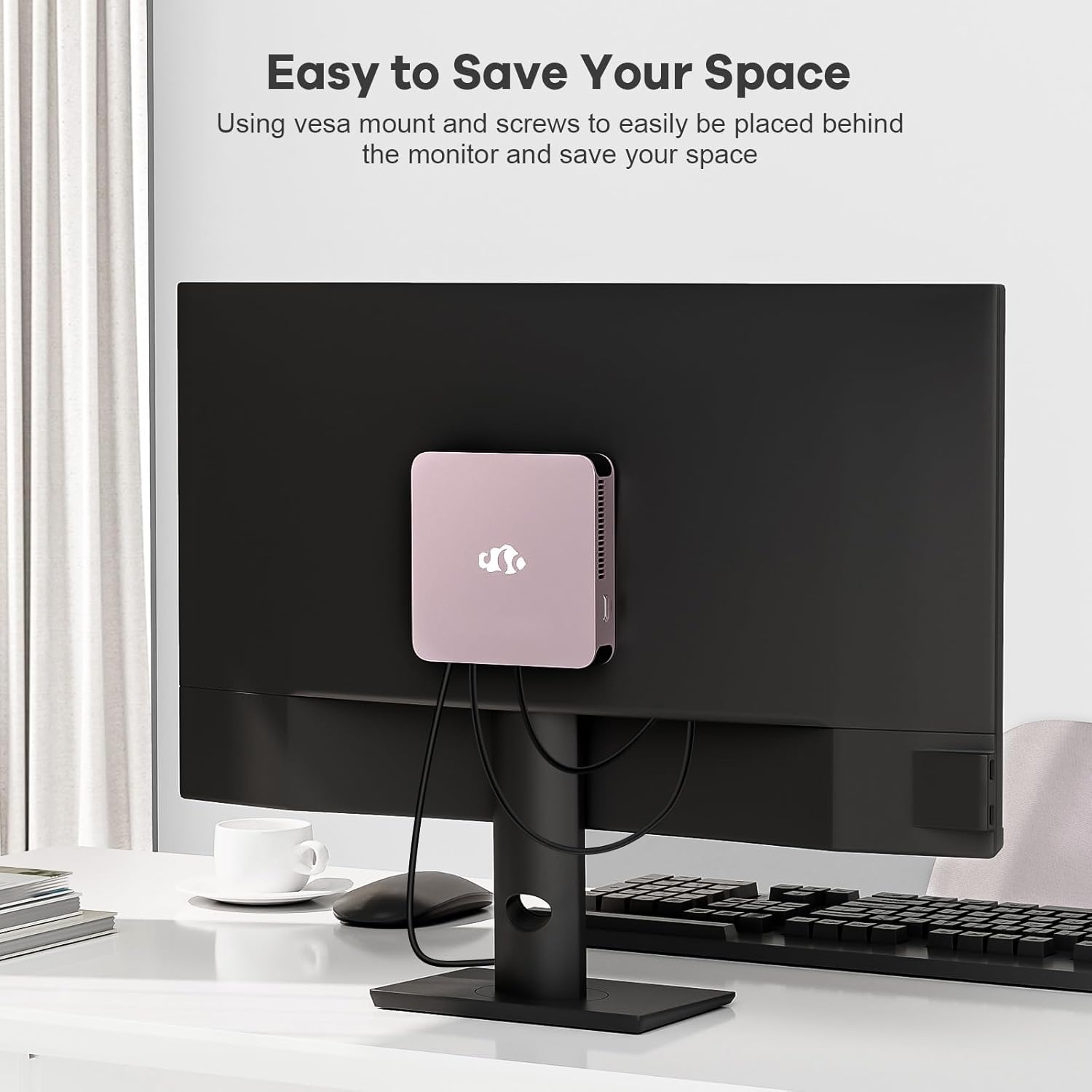
Image 4.1: The NIMO Mini PC Desktop DNB1 mounted on the back of a monitor using the VESA bracket, demonstrating space-saving placement.
5. Instruccions de funcionament
5.1. Encès / apagat
- Per encendre: Press the Power Button once. The power indicator light will illuminate.
- Per apagar: From the operating system, select 'Shut Down'. Alternatively, press and hold the Power Button for 5-7 seconds to force a shutdown (use only when necessary).
5.2. Initial Boot and Windows 11 Setup
Upon first power-on, the system will guide you through the Windows 11 setup process. Follow the on-screen prompts to configure language, region, network, and user accounts.
5.3. Connexió a xarxes
- Connexió per cable: If an Ethernet cable is connected to the LAN port, the system will automatically detect and connect to the wired network.
- Connexió sense fil (WiFi 6): Access the network settings in Windows 11, select your desired WiFi network, and enter the password.
- Bluetooth Connection (Bluetooth 5.2): Enable Bluetooth in Windows 11 settings, search for devices, and pair with your Bluetooth peripherals.
5.4. Using Multiple Displays
The NIMO Mini PC supports up to three 4K displays. Connect your monitors to the available HDMI and Type-C ports. Windows 11 display settings allow you to extend, duplicate, or show only on one display.

Image 5.1: The NIMO Mini PC Desktop DNB1 supporting a triple monitor 4K display setup, enhancing productivity and multimedia experiences.
6. Manteniment
Un manteniment adequat garanteix la longevitat i el rendiment òptim del vostre Mini PC.
- Neteja: Feu servir un drap suau i sec per netejar l'exterior del Mini PC. Per a la pols a les reixetes de ventilació, feu servir aire comprimit. No utilitzeu netejadors líquids directament sobre el dispositiu.
- Ventilació: Ensure the ventilation openings are not blocked to prevent overheating. Operate the device in a well-ventilated area.
- Actualitzacions de programari: Regularly update your Windows operating system and drivers to maintain security and performance.
- Còpia de seguretat de dades: Feu còpies de seguretat periòdiques de les dades importants en un disc dur extern o en un emmagatzematge al núvol.
7. Solució De Problemes
Aquesta secció tracta problemes comuns que podeu trobar.
7.1. Sense poder
- Assegureu-vos que l'adaptador de corrent estigui connectat correctament tant al Mini PC com a una presa de corrent que funcioni.
- Verifiqueu que la presa de corrent funciona connectant-hi un altre dispositiu.
- Comproveu si l'adaptador de corrent presenta algun dany visible.
7.2. Sense sortida de pantalla
- Confirm that the monitor is powered on and set to the correct input source (HDMI, Type-C).
- Check that the HDMI or Type-C cable is securely connected to both the Mini PC and the monitor.
- Prova un cable de pantalla o monitor diferent si estàs disponible.
7.3. Sense connexió a Internet
- Amb cable: Ensure the Ethernet cable is properly connected and your router/modem is working.
- Sense fil: Check WiFi settings in Windows 11, ensure WiFi is enabled, and you are connected to the correct network with the correct password. Restart your router/modem if necessary.
7.4. Els perifèrics no responen
- Prova de connectar el perifèric a un port USB diferent.
- Assegureu-vos que els controladors del perifèric estiguin instal·lats i actualitzats.
- Test the peripheral on another computer if possible.
8. Especificacions
Detailed technical specifications for the NIMO Mini PC Desktop DNB1.
| Característica | Especificació |
|---|---|
| Model | DNB1 |
| Processador | Intel 12th Gen N100 (up to 3.4 GHz) |
| Nuclis/fils | 4 nuclis / 4 fils |
| Gràfics | Gràfics Intel UHD |
| RAM | 16 GB DDR5 |
| Emmagatzematge | SSD PCIe de 512 GB |
| Resolució de pantalla màxima | 3840x2160 Pixels (4K) |
| Sortida de visualització | 2x HDMI 2.0, 1x Type-C (supports triple display) |
| Ports USB | 3x USB 3.2 Type-A, 1x USB Type-C |
| Xarxa | Gigabit Ethernet (LAN), WiFi 6 |
| Bluetooth | Bluetooth 5.2 |
| Sistema operatiu | Windows 11 |
| Pes de l'article | 1.76 lliures |
| Font d'alimentació | DC |

Image 8.1: Summary of key features including Intel 12th Gen N100 processor, 4K Ultra HD support, Bluetooth 5.2, LPDDR5, WiFi 6, and PCIe SSD.
9. Garantia i Suport
NIMO is committed to providing excellent customer service and product reliability.
- Política de devolució: You may request a return or exchange within 90 days of purchase.
- Suport tècnic: The NIMO Mini PC Desktop comes with 2 years of technical support. If you encounter any issues, please contact our dedicated customer support team for assistance.
For support, please refer to the contact information provided with your purchase or visit the official NIMO weblloc.


