1. Introducció
Thank you for choosing the Ewent EW3295 Backlit Wireless Keyboard. This full-size keyboard offers versatile connectivity options, including Bluetooth 5.0 and 2.4GHz wireless, allowing you to connect up to three devices simultaneously. Its slim design, silent keys, and adjustable backlight provide a comfortable and efficient typing experience. This manual provides detailed instructions for setup, operation, and maintenance to ensure optimal performance of your keyboard.

Figure 1.1: Slim and sturdy design of the EW3295 keyboard.
2. Característiques clau
- Wireless Multi-Device Connection: Connect up to 3 devices simultaneously via Bluetooth 5.0 (x2) or wireless 2.4 GHz. Easily switch between devices with just one button.
- Retroil·luminació ajustable: The keyboard's backlight is dimmable and can be turned off completely, ideal for various lighting conditions.
- Flat & Quiet Design: Flat, silent keys ensure a comfortable and low-noise typing experience, suitable for quiet environments.
- 12 tecles multimèdia: Quick access to functions like volume control, email, and other operations.
- Bateria recarregable de llarga durada: Equipped with a 300mAh lithium battery and intelligent energy-saving function for extended use.
- Àmplia compatibilitat: Compatible with Windows (XP, 7, 8.1, 10, 11) and Android, suitable for PCs, laptops, and tablets.
- Disseny resistent i durador: Made of high-density polycarbonate, lightweight yet durable, with a compact design.
- Italian Layout: Features an Italian QWERTY keyboard layout.
3. Contingut del paquet
Si us plau, comproveu el contingut del paquet en desempaquetar-lo:
- Ewent EW3295 Backlit Wireless Keyboard
- USB-A 2.4GHz Wireless Receiver
- Cable de càrrega USB-C a USB-A
- Manual d'usuari (aquest document)
4. Guia de configuració
4.1 Càrrega del teclat
The EW3295 keyboard is equipped with a built-in rechargeable 300mAh lithium battery. Before first use, it is recommended to fully charge the keyboard.
- Locate the USB Type-C charging port on the rear panel of the keyboard.
- Connect one end of the provided USB-C charging cable to the keyboard's USB-C port.
- Connect the other end of the USB-A cable to a USB power source (e.g., computer USB port, USB wall adapter).
- The charging indicator light (if present) will illuminate during charging and turn off when fully charged. A full charge takes less than 1 hour and provides over 1 month of use.

Figure 4.1: Rear panel of the keyboard with charging port and receiver compartment.
4.2 Connexió del teclat
The EW3295 keyboard supports three connection modes: 2.4GHz wireless and two Bluetooth 5.0 channels (BT1, BT2). You can connect up to three devices and switch between them.
Connexió sense fil 4.2.1 de 2.4 GHz
- Locate the USB-A wireless receiver, typically stored in a compartment on the rear panel of the keyboard.
- Plug the USB-A receiver into an available USB port on your computer or device.
- Premeu el botó Fn + 1 keys on the keyboard to switch to 2.4GHz mode. The indicator light for channel 1 will illuminate.
- El teclat s'hauria de connectar automàticament al dispositiu.

Figure 4.2: Ewent EW3295 keyboard and its USB wireless receiver.
4.2.2 Connexió Bluetooth (BT1 / BT2)
- Premeu el botó Fn + 2 keys to select Bluetooth channel 1 (BT1) or Fn + 3 keys to select Bluetooth channel 2 (BT2). The corresponding indicator light will flash, indicating pairing mode.
- On your device (PC, laptop, tablet), enable Bluetooth and search for new devices.
- Select "EW3295" or a similar name from the list of available Bluetooth devices.
- Follow any on-screen prompts to complete the pairing process. Once connected, the indicator light will stop flashing and remain solid.
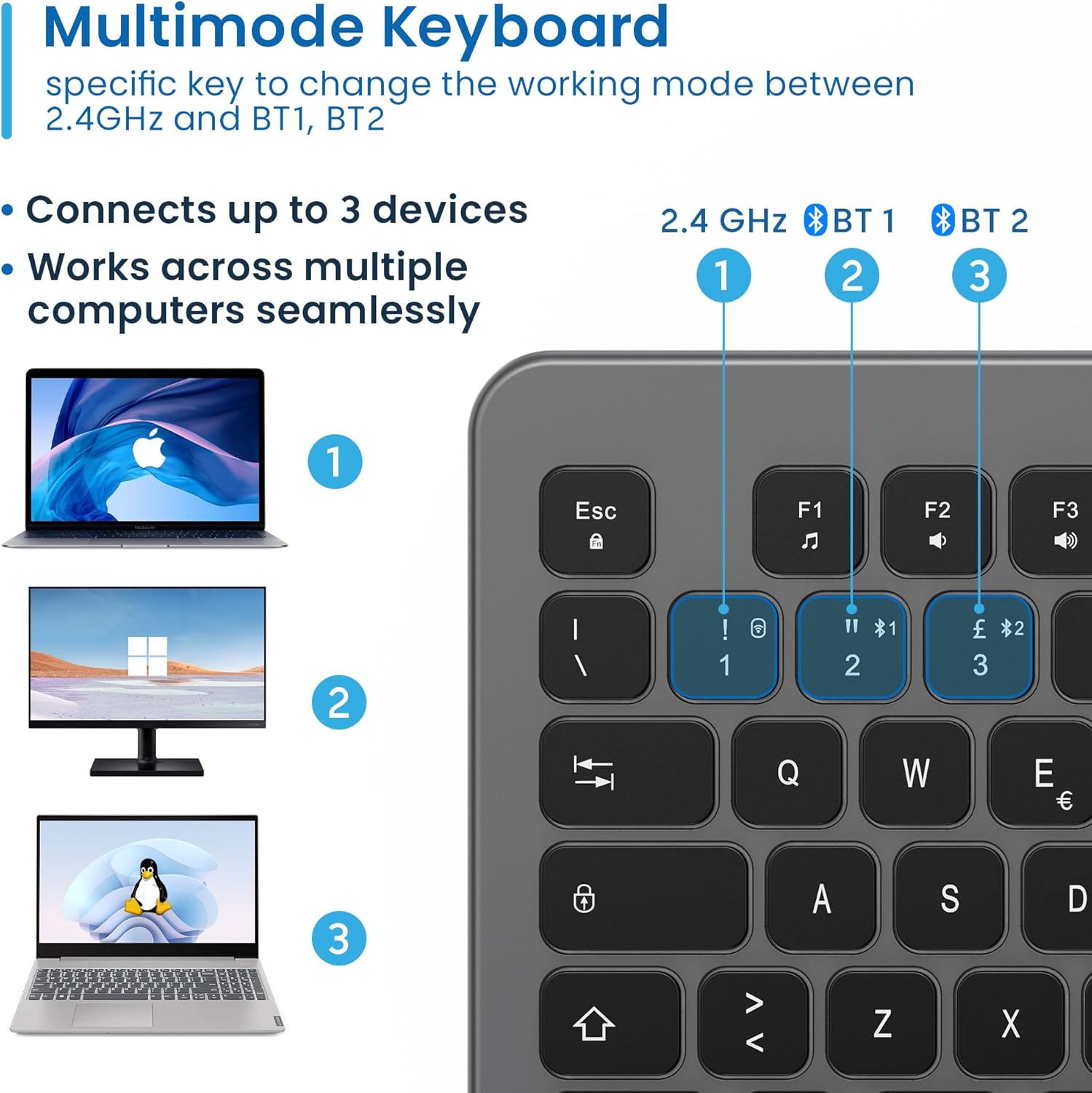
Figure 4.3: Multi-device connectivity options for the EW3295 keyboard.
4.2.3 Canvi entre dispositius connectats
Once multiple devices are paired, you can easily switch between them:
- Premeu Fn + 1 to switch to the 2.4GHz connected device.
- Premeu Fn + 2 to switch to the Bluetooth 1 connected device.
- Premeu Fn + 3 to switch to the Bluetooth 2 connected device.
5. Instruccions de funcionament
5.1 Mecanografia bàsica
The EW3295 features a full-size Italian QWERTY layout. Its flat and silent keys provide a comfortable and precise typing experience, reducing noise in quiet environments.

Figure 5.1: Illuminated Italian QWERTY Keyboard Layout.

Figure 5.2: Silent keys for reduced noise.
Control de retroiluminació 5.2
The keyboard features an adjustable backlight for improved visibility in low-light conditions.
- Il·luminació de fons ON/OFF: Premeu el botó Bloc Scorr key (often labeled with a lightbulb icon) to toggle the backlight on or off.
- Backlight Brightness Up: Premeu Fn + Pag ↑ to increase backlight brightness.
- Backlight Brightness Down: Premeu Fn + Pag ↓ to decrease backlight brightness.
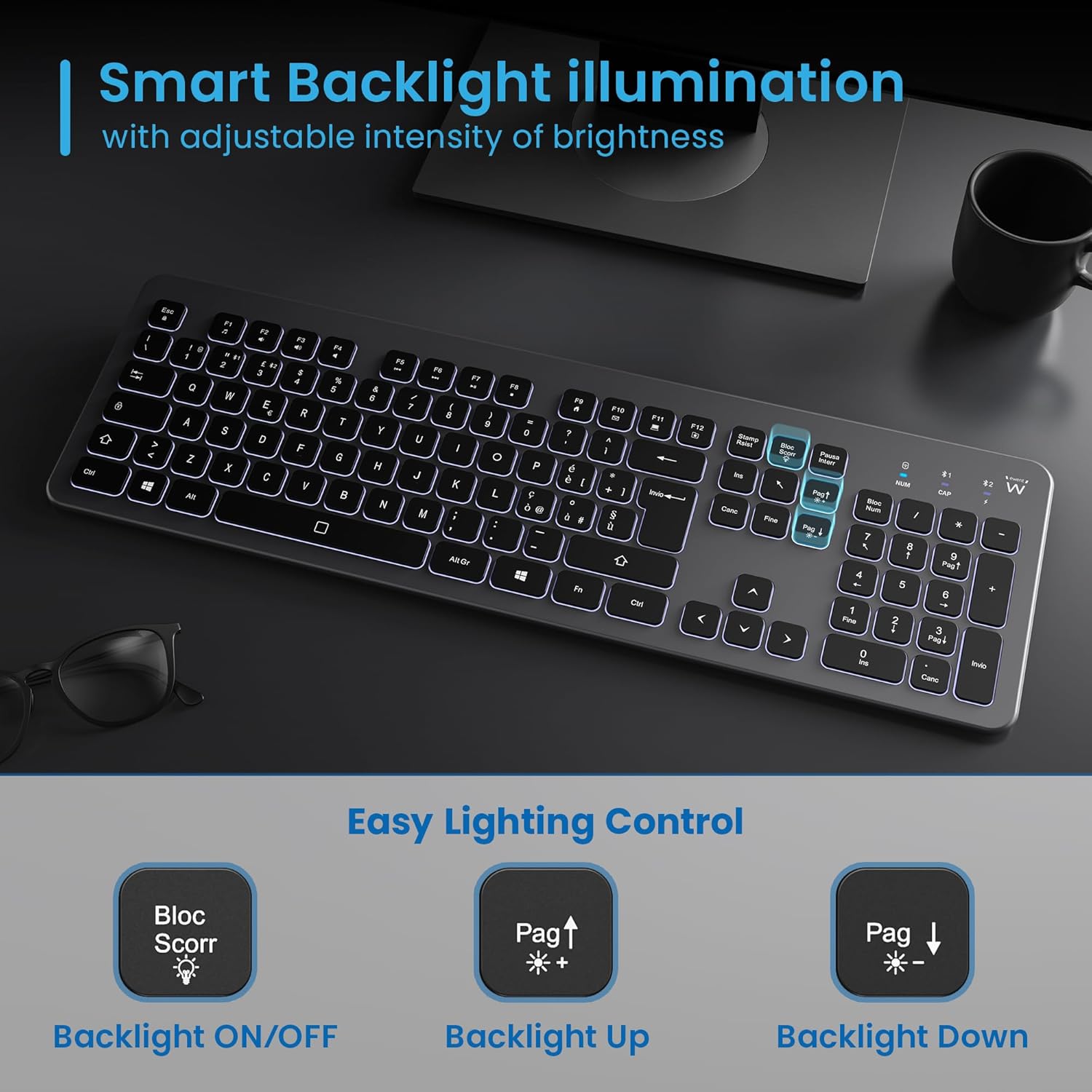
Figure 5.3: Backlight control keys.
5.3 Tecles multimèdia
The keyboard includes 12 dedicated multimedia keys (F1-F12) that provide quick access to various functions. To use these functions, press the Fn simultàniament amb la tecla F desitjada.
| Combinació de tecles | Funció |
|---|---|
| Fn + F1 | Reproductor multimèdia |
| Fn + F2 | Baixa el volum |
| Fn + F3 | Puja el volum |
| Fn + F4 | Silenciar |
| Fn + F5 | Pista anterior |
| Fn + F6 | Pista següent |
| Fn + F7 | Reproduir/Pausa |
| Fn + F8 | Atureu-vos |
| Fn + F9 | Pàgina d'inici |
| Fn + F10 | Correu electrònic |
| Fn + F11 | El meu ordinador |
| Fn + F12 | Calculadora |
6. Manteniment i cura
Un manteniment adequat garanteix la longevitat i el rendiment òptim del teclat.
- Neteja: Feu servir un drap suau, sec i sense borrissol per netejar la superfície del teclat. Per a la brutícia persistent, netegeu lleugerament.ampNetegeu el drap amb aigua o un netejador suau i no abrasiu. Eviteu la humitat excessiva.
- Eviteu líquids: No vessiu líquids sobre el teclat. En cas de vessament accidental, desconnecteu immediatament el teclat i deixeu-lo assecar completament abans de tornar-lo a utilitzar.
- Emmagatzematge: Quan no l'utilitzeu durant períodes prolongats, guardeu el teclat en un lloc fresc i sec, allunyat de la llum solar directa i de temperatures extremes.
- Cura de la bateria: To prolong battery life, avoid fully discharging the battery frequently. Charge the keyboard when the low battery indicator appears.
- Emmagatzematge del receptor: When transporting the keyboard, store the USB wireless receiver in its dedicated compartment on the rear panel to prevent loss.
7. Solució De Problemes
If you encounter issues with your EW3295 keyboard, please refer to the following common solutions:
| Problema | Causa possible | Solució |
|---|---|---|
| Keyboard not responding (2.4GHz) | Low battery; Receiver not plugged in; Incorrect channel selected. | Charge the keyboard; Ensure USB receiver is securely plugged in; Press Fn + 1 to select 2.4GHz mode. |
| El teclat no respon (Bluetooth) | Low battery; Bluetooth not enabled on device; Not paired; Incorrect channel selected. | Charge the keyboard; Enable Bluetooth on your device; Re-pair the keyboard (see Section 4.2.2); Press Fn + 2 or Fn + 3 per seleccionar el canal Bluetooth correcte. |
| La llum de fons no funciona | Backlight turned off; Low battery. | Premeu Bloc Scorr to turn on/off; Increase brightness with Fn + Pag ↑; Charge the keyboard. |
| Les tecles són enganxoses o no responen | Dirt or debris under keys; Physical damage. | Clean the keyboard (see Section 6); If physical damage, contact support. |
| Durada de la bateria curta | Frequent backlight use; Battery degradation over time. | Reduce backlight brightness or turn it off when not needed; Ensure full charge cycles. |
8. Especificacions
| Característica | Detall |
|---|---|
| Nom del model | Tastiera Wireless Retroilluminata EW3295 |
| Número de model de l'article | EW3295 |
| Marca | Ewent |
| Tecnologia de connectivitat | Bluetooth 5.0 (x2), 2.4GHz Wireless |
| Descripció del teclat | Multimedia, Full-size, Italian Layout |
| Dispositius compatibles | PC (Windows XP, 7, 8.1, 10, 11), Android |
| Tipus de bateria | Bateria de liti recarregable de 300 mAh |
| Llum de fons | Intensitat ajustable |
| Dimensions (L x A x A) | Aprox. 432 mm x 122 mm x 22 mm |
| Pes | Aprox. 390 g |
| Material | High-density Polycarbonate |

Figura 8.1: Dimensions i pes del teclat.
9. Informació de la garantia
Ewent products are designed and manufactured to the highest quality standards. This product is covered by a limited warranty from the date of purchase. Please refer to the warranty card included with your product or visit the official Ewent weblloc web per obtenir els termes i condicions detallats de la garantia específics per a la vostra regió. La garantia normalment cobreix defectes de materials i fabricació en condicions d'ús normal.
10. Atenció al client
For technical support, troubleshooting assistance, or any questions regarding your Ewent EW3295 keyboard, please contact Ewent customer support. You can typically find contact information (phone, email, support portal) on the official Ewent weblloc o a l'embalatge del producte.
Please have your product model number (EW3295) and purchase details ready when contacting support.


