1. Introducció i finalview
Thank you for choosing the DDup External Portable CD Player for Car. This device is designed to upgrade your car's audio system, delivering rich, distortion-free sound from your favorite CDs. It supports multiple media formats and offers versatile connectivity options via USB and AUX input. This manual provides detailed instructions for setup, operation, maintenance, and troubleshooting to ensure optimal performance and longevity of your CD player.

DDup Portable CD Player with included accessories. This image displays the DDup portable CD player in white, with its lid open revealing a CD. Alongside the player are its accessories: a USB-A to USB-C cable, a USB extension cable, a 3.5mm AUX audio cable, and a remote control.
2. Característiques del producte
- Anti-Skip & Shockproof Playback: Equipped with advanced shockproof technology and four anti-skid rubber feet to prevent disc skipping on bumpy roads. The magnetic adsorption cover and internal pin-shaped locking cylinder protect the disc for clear playback.
- USB Connection Mode: Allows direct connection to your vehicle's USB port for automatic disc detection and playback. Includes an extended USB cable and Type-C adapter for broad compatibility.
- AUX Connection Mode: Connects to your car's AUX port using the provided audio cable, powered via a USB port. The included remote control functions exclusively in AUX mode.
- Àudio d'alta fidelitat: Features an upgraded professional-grade chip for enhanced readability, compatibility, and anti-interference, ensuring crisp, distortion-free sound. Supports CD/CD-R/CD-RW/MP3/WMA/WAV formats. Note: Not compatible with Blu-ray or DVD discs.
- Compatibilitat àmplia de vehicles: Suitable for most car stereos that support WAV/MP3 playback. Also compatible with laptops, PCs, smart TVs, and other devices.

Key features of the DDup Portable CD Player for Car. An image highlighting the main features of the portable CD player, including its compact body design, lossless audio quality, USB connection, AUX connection, anti-skip design, and enhanced cooling system. The player is shown placed in a car's center console.
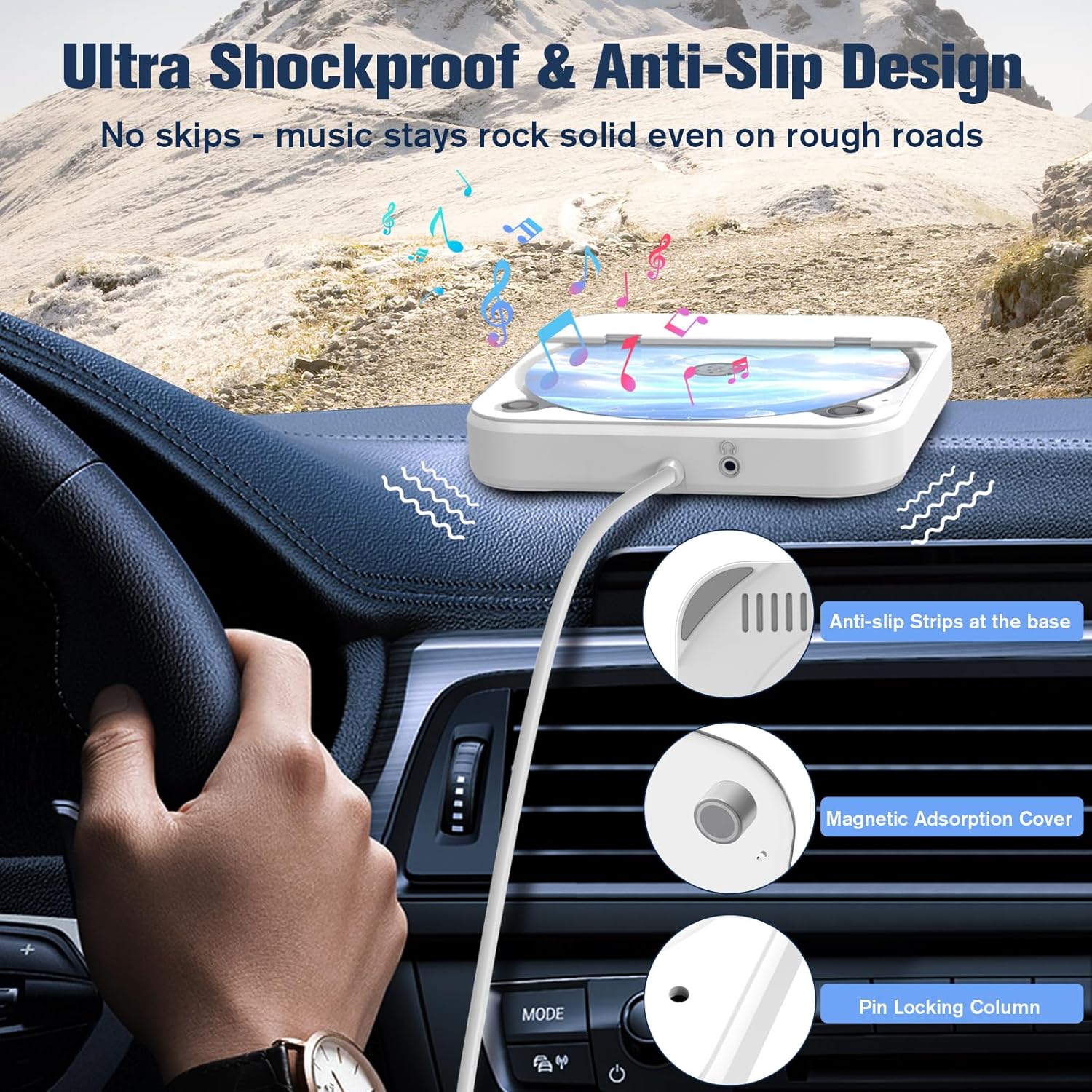
Anti-skip and shockproof design features of the DDup CD player. This image illustrates the anti-skip and shockproof mechanisms of the CD player, showing the anti-slip strips at the base, the magnetic adsorption cover, and the internal pin locking column designed to secure the disc during playback in a moving vehicle.

Internal professional-grade chip for lossless audio decoding. A close-up image of the internal professional-grade chip responsible for lossless audio decoding, emphasizing the technology that restores original CD sound quality. Supported disc formats (CD/CD-R/CD-RW/MP3/WAV) are noted, along with a disclaimer that Blu-ray or DVD discs are not compatible.
3. Contingut del paquet
Si us plau, verifiqueu que tots els elements siguin presents al vostre paquet:
- DDup External Portable CD Player (KC-606)
- Cable d'extensió USB
- Adaptador USB tipus C
- Cable d'àudio AUX de 3.5 mm
- Control remot
4. Instruccions de configuració
4.1. USB Connection Mode (For cars supporting WAV/MP3 playback via USB)
- Connect the USB end of the CD player's cable to your vehicle's USB port. Use the provided USB extension cable and Type-C adapter if necessary for compatibility or reach.
- Your car stereo should automatically detect the CD player and begin playing discs. No additional setup is typically required.
- Insert a compatible CD (CD/CD-R/CD-RW/MP3/WAV) into the CD player.

USB connection setup for the DDup Portable CD Player in a car. A visual guide demonstrating how to connect the portable CD player using the USB connection. The image shows the player connected to a car's USB port via the included USB extension cable and a USB Type-C converter, with the car's infotainment screen displaying media options.
4.2. AUX Connection Mode (For cars not supporting WAV/MP3 playback via USB or for remote control functionality)
- Connect the USB end of the CD player's cable to a car USB port or a power USB adapter (e.g., car charger) to power the unit.
- Use the provided 3.5mm AUX audio cable to connect the AUX port on the CD player to the AUX input port in your car.
- On your car stereo, select the AUX input mode.
- Insert a compatible CD (CD/CD-R/CD-RW/MP3/WAV) into the CD player.
- The included remote control will function in this mode to control playback.
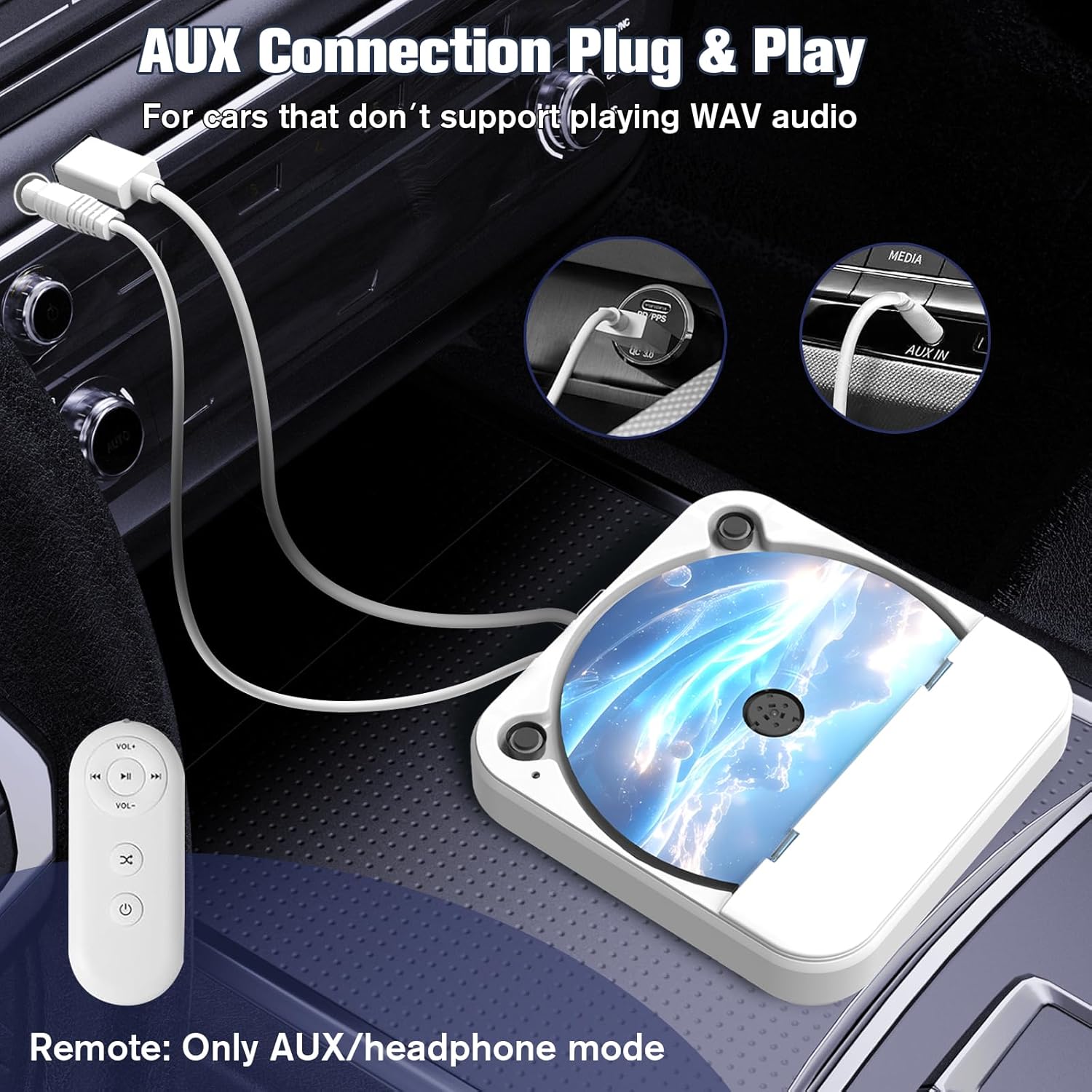
AUX connection setup for the DDup Portable CD Player in a car. This image illustrates the AUX connection method for the portable CD player. It shows the player connected to the car's AUX input and a USB power source (like a car charger) for power. The remote control, which functions only in AUX mode, is also visible.
5. Instruccions de funcionament
5.1. Inserció d'un CD
- Gently lift the magnetic adsorption cover of the CD player.
- Place the CD onto the spindle with the label side facing up. Ensure the CD is seated correctly.
- Close the cover firmly until the magnetic adsorption engages. The internal pin locking column will secure the disc.
5.2. Playback Controls (via Car Stereo or Remote)
Once connected and a CD is inserted, playback will typically begin automatically. Control functions such as Play/Pause, Skip Track, and Volume will be managed through your car's stereo system when using USB mode. In AUX mode, the included remote control can be used for these functions.
- Reproduir/pausa: Press the Play/Pause button on your car stereo or the remote.
- Pista següent: Press the Next Track button on your car stereo or the remote.
- Pista anterior: Press the Previous Track button on your car stereo or the remote.
- Volum: Adjust volume using your car stereo's volume controls. The remote control also has volume buttons for AUX mode.
6. Manteniment
To ensure the longevity and optimal performance of your DDup Portable CD Player, follow these maintenance guidelines:
- Neteja: Use a soft, dry cloth to clean the exterior of the player. Do not use abrasive cleaners or solvents. For the lens, use a specialized CD lens cleaner if necessary, following its instructions carefully.
- Manipulació del disc: Always handle CDs by their edges. Avoid touching the playing surface. Store discs in their cases when not in use to prevent scratches and dust accumulation.
- Emmagatzematge: Quan no l'utilitzeu, guardeu el reproductor de CD en un lloc fresc i sec, allunyat de la llum solar directa i de temperatures extremes.
- Protecció: The player features anti-slip strips and a magnetic adsorption cover. Ensure these are clean and functioning correctly to maintain disc stability and protection.
7. Solució De Problemes
| Problema | Causa possible | Solució |
|---|---|---|
| CD not playing / No sound | Incorrect connection mode selected on car stereo. Connexió de cable fluixa. Incompatible disc format. Dirty or scratched CD. | Ensure correct input (USB/AUX) is selected on your car stereo. Comproveu que totes les connexions dels cables estiguin ben fixades. Verify disc is CD/CD-R/CD-RW/MP3/WAV. Netegeu o substituïu el CD. |
| Disc skipping or distorted sound | Bumpy road conditions. Dirty or damaged CD. Player not stable. | Ensure the CD is properly seated and the cover is closed. Netegeu el CD. Place the player on a stable, flat surface. Ensure anti-slip feet are clean. |
| El comandament a distància no funciona | Not in AUX mode. Battery issue (if applicable). | The remote only functions in AUX connection mode. Check remote battery (if replaceable). |
| Player not recognized by car via USB | Car stereo does not support WAV/MP3 playback via USB. S'ha utilitzat un port USB incorrecte. | Try AUX connection mode. Consult your car's manual for USB compatibility. Try a different USB port in your car. |
8. Especificacions
| Marca | DDup |
| Número de model | KC-606 |
| Dispositius compatibles | Speaker, Headphone, Car Stereos, Laptops, PCs, Smart TVs |
| Característiques especials | Anti-Skip Protection, CD-R/RW Compatible, Lightweight, Portable, Shockproof |
| Formats d'àudio compatibles | MP3, WAV (CD/CD-R/CD-RW also supported) |
| Tipus de connector | Auxiliar, USB |
| Color | Blanc |
| Piles incloses | Sí (1 bateria de liti metàl·lic) |
| Conector d'auriculars | Sense presa per a auriculars |
| Dimensions del paquet | 16.69 x 14.4 x 5.21 cm |
| Pes de l'article | 449 g |

Versatile usage scenarios for the DDup Portable CD Player. This image showcases the wide compatibility of the CD player, demonstrating its use with various devices such as a desktop computer, smart TV, laptop, and in-dash car stereo. It clarifies that the player connects via USB/AUX and does not support Bluetooth.
9. Garantia i Suport
This product is subject to a return policy of 30 days for refund or replacement. For specific warranty details, technical support, or any inquiries not covered in this manual, please contact DDup customer service. We are committed to assisting you within 24 hours.


