Introducció
This manual provides detailed instructions for the setup, operation, maintenance, and troubleshooting of your BEITONG KP20 Wireless Controller. Please read this manual thoroughly before using the product to ensure optimal performance and longevity.
Producte acabatview
The BEITONG KP20 is a versatile wireless controller designed for PC, Nintendo Switch, and mobile devices. It features advanced TMR Joysticks, Hall Effect Linear Triggers, mechanical buttons, and multiple connection options for a superior gaming experience.
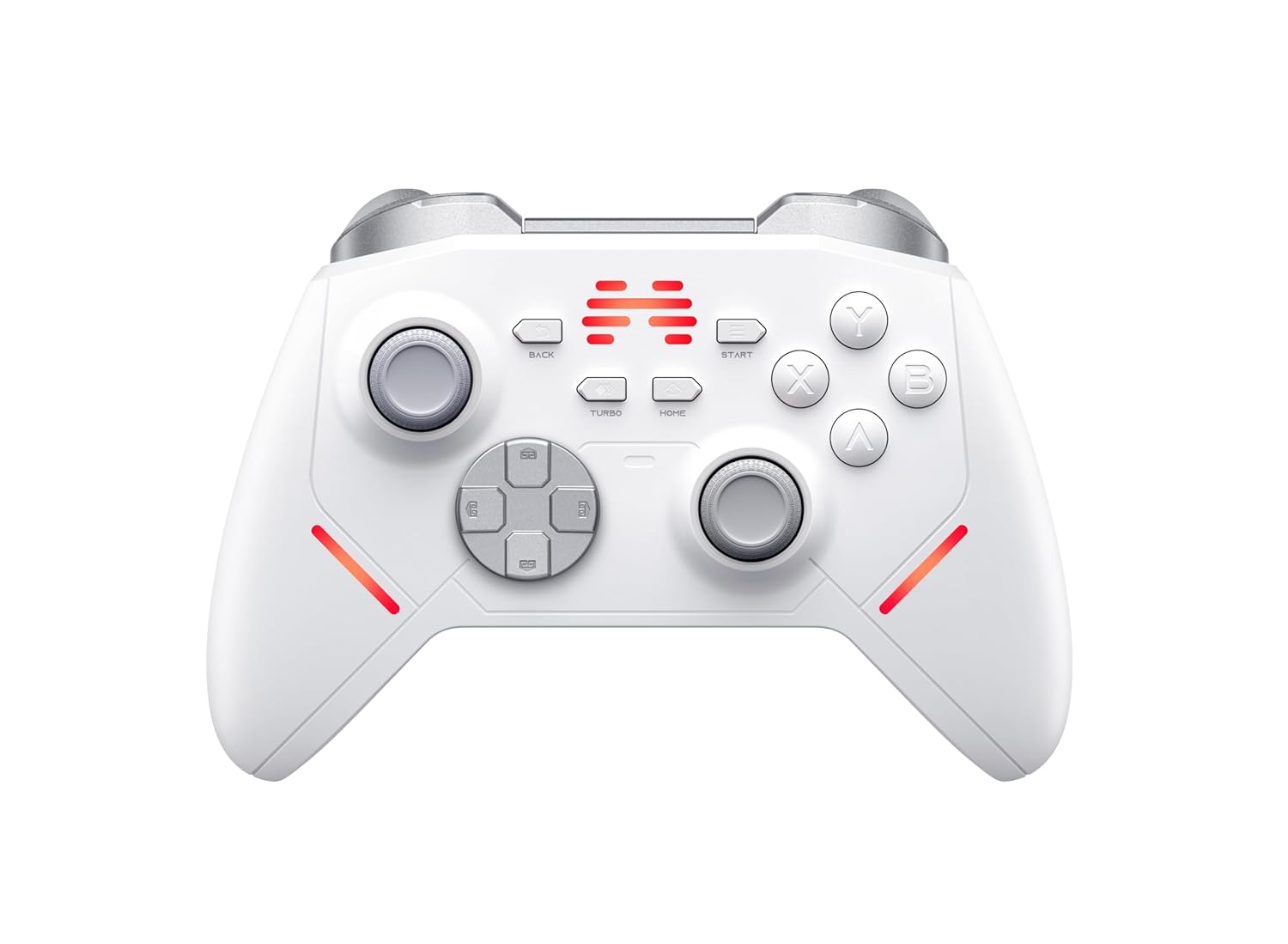
Figura 1: Frontal view of the BEITONG KP20 Wireless Controller, showcasinla seva disposició dels botons i el seu disseny ergonòmic.

Figura 2: Angle view of the BEITONG KP20 Wireless Controller, highlighting its contours and trigger buttons.
Característiques clau
- Palanques de joystick TMR: Experience less than 1% drift, 5400+ resolution, and a 1000Hz+ polling rate (wired/2.4G dongle) for precise control.

Figure 3: Illustration of Beitong TMR Electromagnetic Joysticks, detailing components like the 1000Hz+ polling rate, 12bit ADC sampling chip, and 5400+ sampresolució de ling.
- Hall Effect Linear Triggers: Provides smooth control with an accuracy of 0.1mm, reducing friction and preventing drift.

Figura 4: Primer pla view of the Hall Effect Linear Trigger mechanism, emphasizing its 0.1mm accuracy and touch-free linear sensing.
- Enhanced Mechanical Buttons & Hybrid D-Pad: Custom Hybrid D-Pad offers 8-direction precision, and mechanical buttons are designed for over 10 million presses with frictionless operation.
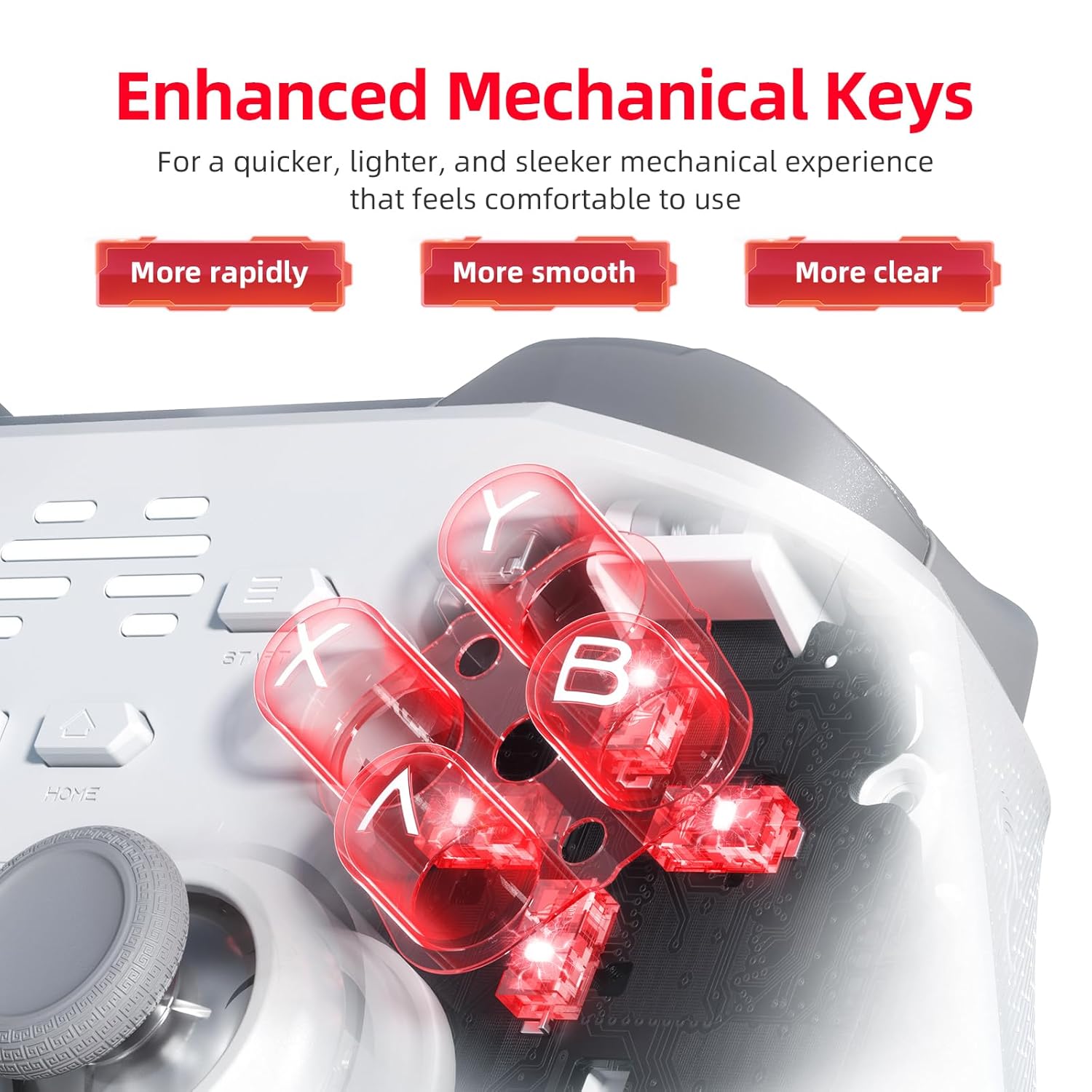
Figura 5: Detallada view of the enhanced mechanical keys, illustrating their internal structure for quicker, smoother, and clearer feedback.
- Multi-Connection Options: Supports wired, Bluetooth, and 2.4GHz wireless connections. Easily switch between modes using the dedicated back platform button.
- 6-Axis Gyro Motion Control & Turbo Mode: Built-in 6-axis gyroscope for motion control on PC, Switch, and Android. Features 3 Macro Keys (M1/M2/Turbo) that can be remapped.

Figure 6: Visual representation of 6-axis motion control being used for aiming in a game, with vibration feedback indicated.

Figura 7: posterior view of the controller, highlighting the M1, M2, and Turbo programmable keys and their mapping capabilities.
- Smart Wake-Up Charging Station: (Sold separately) Allows for convenient charging by simply placing the controller on the dock. The controller automatically reconnects upon pickup.

Figura 8: Detallada view of the charging dock, showing the USB-C connector, charging terminals, anti-slip pads, and 2.4G dongle storage.
Guia de configuració
1. Càrrega del controlador
Before initial use, fully charge the controller. Connect the provided USB-C cable to the controller and a power source (e.g., PC USB port, USB wall adapter 5V/1A). If using the optional charging dock, simply place the controller onto the dock.

Figure 9: The controller charging on its dock, illustrating that a full charge takes approximately 2.5 hours with a 5V/1A power supply.
A full charge typically takes 2.5 hours when using a 5V/1A power source. The charging indicator on the controller will show charging status.
2. Connexió del controlador
The KP20 controller supports three connection methods:
- 2.4GHz Wireless (via Dongle):
- Insert the 2.4GHz USB dongle into an available USB port on your PC or compatible device.
- Engegueu el controlador. S'hauria de connectar automàticament al dongle.
- Els indicadors lluminosos del controlador confirmaran una connexió correcta.
- Bluetooth sense fil:
- Ensure Bluetooth is enabled on your device (PC, mobile, Nintendo Switch).
- Put the controller into Bluetooth pairing mode (refer to the controller's specific button combination for pairing, usually holding a specific button like HOME or a dedicated pairing button).
- On your device, search for new Bluetooth devices and select "BEITONG KP20" to pair.
- Els indicadors lluminosos del controlador confirmaran una connexió correcta.
- Connexió per cable:
- Connect the controller to your PC or device using a USB-C cable.
- El controlador serà reconegut automàticament.
To switch between connection modes, use the dedicated back platform button on the controller.
Instruccions de funcionament
Disseny i funcions dels botons
The KP20 controller features standard gamepad buttons, including:
- Joysticks esquerre/dret: TMR Joysticks for precise movement and camera control.
- D-Pad: Hybrid D-Pad for directional input.
- Botons d'acció (A, B, X, Y): Mechanical buttons for in-game actions.
- Botons d'espatlla (LB, RB) i disparadors (LT, RT): Hall Effect Linear Triggers for analog input.
- BACK/SELECT, START, HOME Buttons: Standard system function buttons.
- Botó TURBO: Activates Turbo mode for rapid fire.
- M1, M2 Buttons: Programmable back paddle buttons.
Using Macro Keys (M1, M2, Turbo)
The M1, M2, and Turbo buttons can be remapped to other controller inputs. Refer to the "Beitong Gamepad Assistant" software for detailed customization options, including remapping, adjusting joystick dead zones, turbo speed, vibration strength, and RGB lighting.
Control de moviment
The built-in 6-axis gyroscope enables motion control functionality on compatible games and platforms (PC, Nintendo Switch, Android). This allows for intuitive aiming and control based on the physical movement of the controller.
Manteniment
- Neteja: Feu servir un drap suau i sec per netejar el controlador. Per a la brutícia persistent, fregueu lleugerament.ampRenta el drap amb aigua. Evita utilitzar productes químics agressius o materials abrasius.
- Emmagatzematge: Guardeu el controlador en un lloc fresc i sec, allunyat de la llum solar directa i de temperatures extremes.
- Cura de la bateria: Per allargar la durada de la bateria, eviteu descarregar completament el controlador amb freqüència. Carregueu-lo regularment, fins i tot si no l'utilitzeu constantment.
Resolució de problemes
| Problema | Causa possible | Solució |
|---|---|---|
| El controlador no s'encén. | Bateria baixa. | Charge the controller for at least 30 minutes. |
| El controlador no es connecta sense fil. | Incorrect pairing mode, out of range, interference, or dongle not properly inserted. |
|
| Retard d'entrada o connexió perduda. | Wireless interference, low battery, or distance. |
|
| Joysticks or triggers not responding correctly. | Calibration issue or software glitch. |
|
If you encounter issues not listed here, or if the suggested solutions do not resolve the problem, please contact customer support.
Especificacions
- Model: KP20
- Taxa de votació: 1000Hz+ (wired/2.4G wireless)
- Joystick Resolution: 5400+
- Trigger Accuracy: 0.1 mm
- Button Lifespan: Over 10 million presses
- Tipus de connexió: Wired (USB-C), Bluetooth, 2.4GHz Wireless
- Compatibilitat: PC, Nintendo Switch, Mobile (Android)
- Temps de càrrega: Approximately 2.5 hours (with 5V/1A power supply)
- Joystick Type: TMR Electromagnetic Joysticks
- Tipus d'activador: Hall Effect Linear Triggers
- Control de moviment: Giroscopi de 6 eixos
- Tecles programables: M1, M2, Turbo
Garantia i Suport
Garantia limitada
The BEITONG KP20 Wireless Controller comes with a limited warranty against defects in materials and workmanship under normal use. Please refer to the warranty card included with your product or visit the official BEITONG weblloc web per obtenir informació detallada sobre els termes i condicions de la garantia.
Atenció al client
For technical assistance, troubleshooting, or warranty inquiries, please contact BEITONG customer support through their official website or the contact information provided in your product packaging. When contacting support, please have your product model (KP20) and purchase details ready.


