1. Introducció
This manual provides detailed instructions for the installation, operation, and maintenance of your new Fortdows Car Radio. Please read this manual thoroughly before installation and use to ensure proper functionality and safety.
1.1. Producte acabatview
The Fortdows Car Radio is an advanced 7-inch HD touchscreen stereo designed to upgrade your Jeep Wrangler JK (2007-2017) with modern features. It includes wireless Apple CarPlay and Android Auto, Bluetooth 5.4, 5G WiFi, GPS navigation, a 32-band EQ, and supports a 1080P rear-view càmera.
1.2. Compatibilitat del vehicle
This head unit is specifically designed for the following vehicle models:
- Jeep Wrangler JK: 2007, 2008, 2009, 2010, 2011, 2012, 2013, 2014, 2015, 2016, 2017
The included CANBUS decoder ensures seamless integration with your vehicle's existing systems, displaying information such as reverse signals, door status, handbrake, air conditioning, vehicle settings, and amplifier information.

Figure 1: Fortdows Car Radio Main Unit
2. Contingut del paquet
Si us plau, verifiqueu que tots els elements que s'enumeren a continuació estiguin inclosos al vostre paquet:

Figure 2: All included accessories and wiring kits.
- Main Head Unit (7-inch Touch Screen)
- Cable d'alimentació
- Cable USB original
- Cable USB (x2)
- Cable RCA
- CANBUS Decoder
- Antena GPS
- Línia inversa
- Càmera de seguretat
- Micròfon extern
- Crowbar (for panel removal)
3. Configuració i instal·lació
The Fortdows Car Radio is designed for plug-and-play installation. No wire cutting is typically required. However, professional installation is recommended if you are unfamiliar with car audio systems.
3.1. Passos previs a la instal·lació
- Ensure the vehicle's ignition is off and the battery is disconnected to prevent electrical damage.
- Carefully remove the existing car radio and dashboard trim using the provided crowbar tool.
- Identify the vehicle's wiring harness and antenna connections.
3.2. Connexions de cablejat
Connect the provided wiring harnesses to the corresponding ports on the new head unit and the vehicle's wiring. Refer to the wiring diagram for detailed connections.
Video 1: Car Radio Installation Guide. This video demonstrates the physical installation process of the car radio, including panel removal and wiring connections.
Video 2: How to Upgrade Your Car with This Android Radio. This video provides a general overview of upgrading a car with an Android radio, which may include relevant installation steps.
Video 3: How to install Jeep Wrangler Radio? This video specifically details the installation process for a Jeep Wrangler radio.
3.3. Post-instal·lació
- Secure the new head unit into the dashboard opening.
- Reattach all dashboard trim pieces.
- Torneu a connectar la bateria del vehicle.
- Turn on the ignition and test all functions of the new car radio.
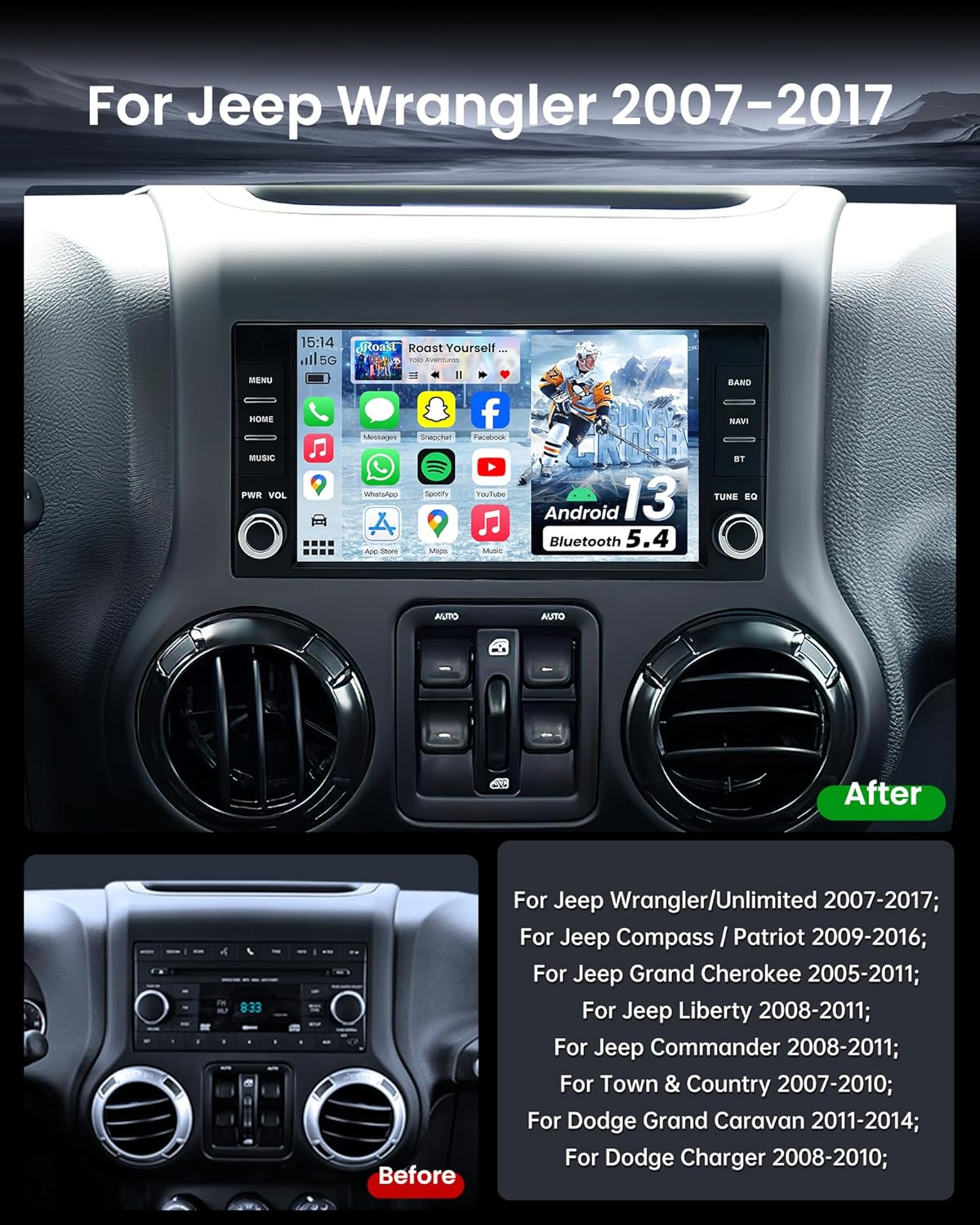
Figure 3: Comparison of the Jeep Wrangler JK dashboard before and after the car radio upgrade.
4. Instruccions de funcionament
This section covers the basic operation of your Fortdows Car Radio.
Video 4: Real Function Display. This video demonstrates various functions and the user interface of the car radio.
Video 5: Instructions for Use. This comprehensive video covers various operational aspects of the car radio.
4.1. Interfície d'usuari i navegació
The 7-inch high-definition IPS touchscreen provides a responsive and intuitive interface. Swipe left or right to access different application pages. Tap on icons to launch applications or settings.
4.2. Connexió Wi-Fi
To access online features, connect your car radio to a Wi-Fi network:
- Vés a Configuració > Xarxa > Wi-Fi.
- Toggle Wi-Fi to On.
- Seleccioneu la xarxa desitjada de la llista i introduïu la contrasenya si se us demana.

Figure 4: The unit supports 5G WiFi for faster and more stable connections.
4.3. Connectivitat Bluetooth 5.4
Pair your smartphone via Bluetooth 5.4 for hands-free calling and audio streaming:
- Aneu a la Telèfon aplicació o Configuració > Bluetooth.
- Ensure Bluetooth is On on both your car radio and smartphone.
- Cerca available devices on your smartphone and select the car radio's device name (e.g., "BCB-Android845").
- Confirma el codi d'emparellament en tots dos dispositius.
4.4. Apple CarPlay i Android Auto sense fil
Connect your smartphone for seamless integration of navigation, music, and voice commands:
- Assegureu-vos que el Bluetooth i la Wi-Fi estiguin activats al vostre telèfon intel·ligent.
- A la ràdio del cotxe, obriu el CarPlay or Android Auto aplicació.
- Follow the on-screen prompts to connect your device wirelessly.

Figure 5: Wireless Apple CarPlay and Android Auto interfaces.
Video 6: How to connect Android Auto? BT&Tlink. This video specifically guides on connecting Android Auto via Bluetooth and Tlink.
4.5. Navegació GPS
The built-in GPS supports both online and offline navigation. For offline maps, download them via a Wi-Fi connection. The high-sensitivity chip provides fast satellite acquisition and real-time traffic updates (with internet connection).
4.6. FM/RDS Tuner
Accedeix al Ràdio application to listen to FM stations. The QN8035 tuner provides stable FM signals and real-time RDS station information.
4.7. Audio Settings (EQ & Sound Field)
Customize your audio experience with the 32-band EQ and subwoofer output:
- Obriu el EQ aplicació.
- Adjust the frequency bands to fine-tune the sound.
- Utilitza el Camp de so settings to adjust audio balance and fader for optimal sound distribution within the vehicle.

Figure 6: Professional RDS Sound and detailed EQ settings for audio customization.
4.8. Comandaments al volant (SWC)
The unit supports your vehicle's original steering wheel controls. Configuration may be required:
- Vés a Configuració > Configuració del vehicle > SWC.
- Follow the on-screen instructions to program each button on your steering wheel.

Figure 7: The car radio supports original steering wheel controls for safe operation.
4.9. posterior-View Càmera
The included 1080P HD rear-view camera provides a 170° ultra-wide angle and enhanced night vision. The display automatically switches to the reversing image when the vehicle is in reverse gear, showing clear obstacle visibility.
4.10. Split-Screen Function
La funció de pantalla dividida permet executar dues aplicacions simultàniament, com ara la navegació i la reproducció de música.
5. Manteniment
5.1. Neteja de pantalles
Feu servir un drap suau i sense borrissol per netejar la pantalla tàctil. Per a taques difícils, fregueu lleugeramentampNetegeu el drap amb aigua o un netejador de pantalles. Eviteu productes químics agressius o materials abrasius.
5.2. Actualitzacions de programari
Comproveu periòdicament si hi ha actualitzacions de programari per garantir un rendiment òptim i l'accés a noves funcions. Normalment, les actualitzacions es poden trobar a la configuració del sistema o al fitxer del fabricant. weblloc.
6. Solució De Problemes
Si teniu algun problema, consulteu les solucions habituals següents:
- Sense energia: Check all power connections and ensure the vehicle battery is properly connected. Verify fuses.
- Sense so: Comproveu les connexions dels altaveus, els nivells de volum i la configuració de l'equalitzador. Assegureu-vos que s'ha seleccionat la font d'àudio correcta.
- Problemes de connexió Bluetooth/CarPlay/Android Auto: Ensure Bluetooth is enabled on both devices. Try unpairing and re-pairing the device. Restart both the car radio and your smartphone.
- Pèrdua de senyal GPS: Assegureu-vos que l'antena GPS estigui instal·lada correctament i que tingui una vista clara view del cel.
- Pantalla tàctil que no respon: Perform a system reset (refer to the device settings for the reset option).
For persistent issues, please contact Fortdows customer support.
7. Especificacions
| Característica | Especificació |
|---|---|
| Model | B0F5GD72MK |
| Sistema operatiu | Android 13 |
| RAM | 4 GB |
| ROM | 64 GB |
| Mida de la pantalla | 7 polzades |
| Resolució de visualització | IPS HD de 1280 x 800 |
| Connectivitat | Bluetooth 5.4, 5G Wi-Fi, USB |
| Característiques especials | CarPlay, Android Auto, GPS Navigation, Split-screen, 32-band EQ, RDS Tuner, 1080P Backup Camera Support |
| Sortida d'àudio | 4x45W estèreo |
| Pes de l'article | 2.94 lliures |
| Dimensions del paquet | 10.67 x 9.76 x 3.82 polzades |
8. Garantia i Suport
Fortdows provides lifetime after-sales technical support to assist you with any installation or operation problems. Please contact our customer service team for assistance.


