1. Introducció
Thank you for choosing the AINAVI 10-inch Car Radio Stereo. This advanced head unit is designed to enhance your driving experience with its Android 13 operating system, QLED touchscreen, and a wide array of features including wireless CarPlay, Android Auto, GPS navigation, Bluetooth 5.0, and 5G Wi-Fi connectivity. This manual provides detailed instructions for installation, operation, and maintenance to ensure optimal performance and longevity of your device.
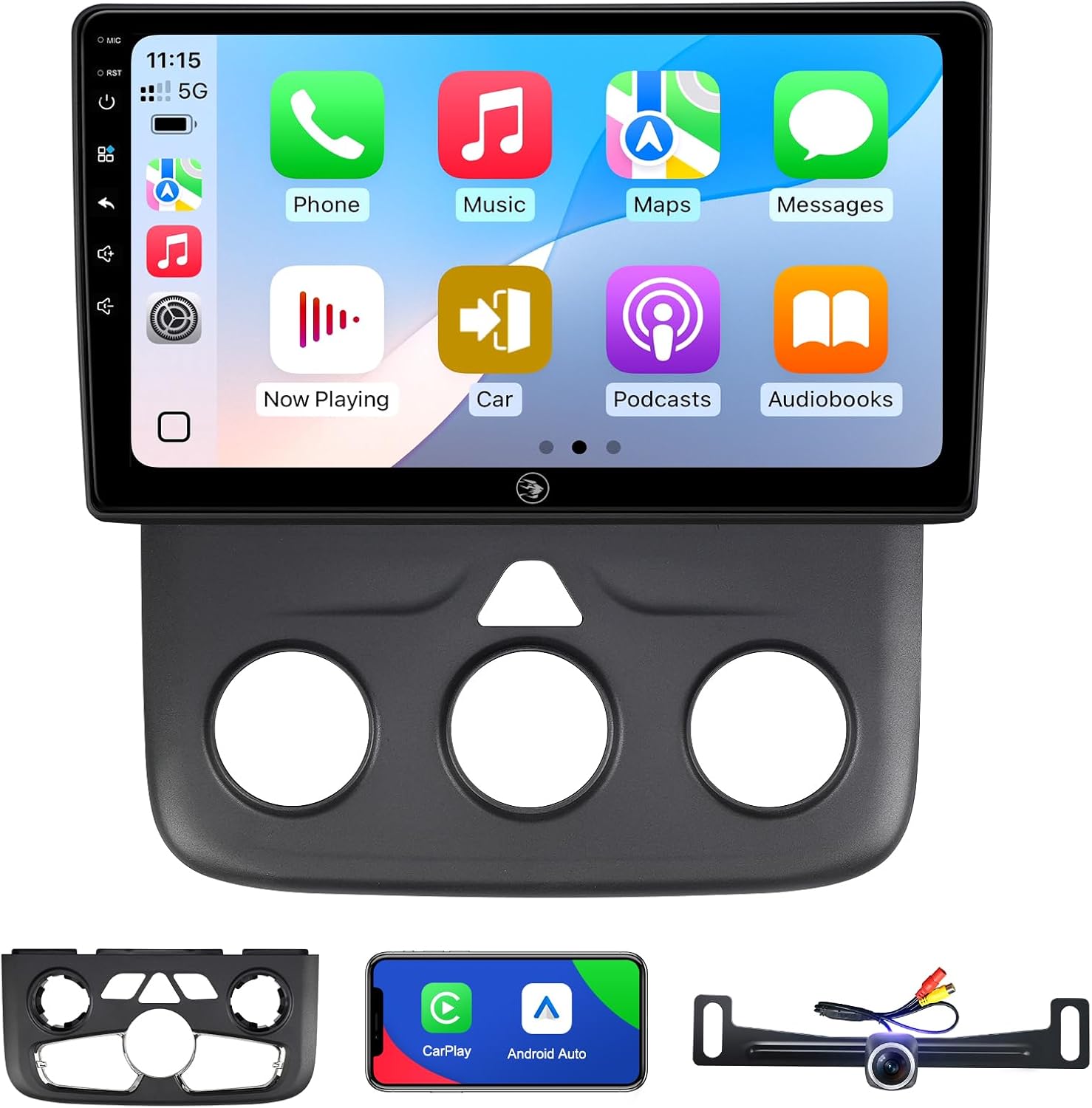
Image: The AINAVI 10-inch Car Radio Stereo unit with its display showing the CarPlay interface, alongside the included dash kit and rearview càmera.
2. Compatibilitat del vehicle
This AINAVI Android radio is specifically designed for the following vehicle models:
- Dodge Ram Pickup Truck 1500, 2500, 3500 (Model Years: 2013, 2014, 2015, 2016, 2017, 2018)
- Dodge Ram Classic (Model Years: 2019-2023)
It supports both manual AC and automatic AC versions of these vehicles. Please ensure your vehicle's model and year match the compatibility list for proper fitment and functionality.

Image: Comparison of Dodge Ram dashboards before and after installing the AINAVI stereo, illustrating compatibility with both manual and automatic climate control systems.
3. Configuració i instal·lació
3.1. Què s'inclou
Abans de començar la instal·lació, comproveu que hi hagi tots els components:
- 1x Android Car Stereo with Frame for Dodge Ram Pickup Truck 1500 2500 3500
- Wiring Harness Power Cable, CANbus Decoder
- 1x Radio Antenna Adaptor, 1 x Speaker
- 1 x RCA cable, 2 x USB cable, 1 x GPS Antenna
- 1 x posterior View Camera, 1 x Microphone, User Manual

Image: A visual representation of all items included in the product package, such as the head unit, wiring harnesses, GPS antenna, rearview càmera i eines d'instal·lació.
3.2. Pautes d'instal·lació
Installation of this car stereo requires basic knowledge of automotive electronics. If you are unfamiliar with car stereo installation, it is recommended to seek professional assistance.
- Preparació: Desconnecteu la bateria del vehicle abans de començar qualsevol treball elèctric.
- Eliminar la unitat existent: Carefully remove the factory radio and dashboard trim. Refer to your vehicle's service manual for specific instructions on trim removal.
- Connecteu l'arnès de cablejat: Connect the provided wiring harness and CANbus decoder to the vehicle's existing wiring. Ensure all connections are secure. Soldering connections for the backup camera wires is recommended for better reliability.
- Instal·lació de l'antena GPS: Munteu l'antena GPS en un lloc amb llum clara view del cel, normalment al tauler de control o sota el parabrisa.
- Instal·leu la part posteriorview Càmera: If included, install the rearview camera according to its separate instructions and route the video cable to the head unit.
- Muntar la nova unitat principal: Secure the AINAVI head unit into the dashboard opening using the provided frame and mounting brackets.
- Reconnect Battery & Test: Reconnect the vehicle's battery and power on the unit to test all functions (radio, audio, touchscreen, CarPlay/Android Auto, GPS, camera).
- Assemblea final: Torneu a instal·lar totes les peces de guarnició del tauler de control.
4. Instruccions de funcionament
4.1. Basic Functions & Interface
The unit features an Android 13 operating system with a responsive 10-inch QLED touchscreen (1280x720 resolution, 178° viewing angle). Navigate through menus by tapping and swiping. Volume control is typically available via physical buttons or on-screen controls.
4.2. CarPlay i Android Auto
Enjoy seamless smartphone integration with built-in wireless and wired CarPlay and USB connection Android Auto.
- Connexió: Connect your iPhone via USB or wirelessly for CarPlay. Connect your Android phone via USB for Android Auto.
- Característiques: Access GPS navigation, make calls, send/receive messages, and listen to music directly from your phone's interface on the stereo screen.
- Comandaments de veu: Activate voice assistants by saying “Hey Siri” or “Hey Google” for hands-free control.

Image: The car stereo displaying both Apple CarPlay and Android Auto interfaces, demonstrating smartphone integration.
4.3. Navegació GPS
The unit includes a built-in GPS module for navigation.
- Mapes en línia: Connect to a network via Wi-Fi to receive real-time traffic information and use online mapping services.
- Mapes fora de línia: Download offline maps to use GPS navigation without an internet connection.

Image: The car stereo screen showing a detailed GPS navigation map with route guidance.
4.4. Bluetooth 5.0 & Wi-Fi Connectivity
- Bluetooth: Connect your phone via Bluetooth 5.0 for hands-free calls, music streaming, and phonebook synchronization.
- Wi-Fi: Supports dual-band 2.4Ghz & 5Ghz Wi-Fi for high-speed internet access, allowing app downloads, online music, and navigation updates.

Image: The car stereo interface demonstrating Wi-Fi connection setup and Bluetooth music playback.
4.5. DSP & Sound Quality
The unit features a built-in Digital Sound Processor (DSP) with a max output of 4*45W.
- Ajust d'EQ: Customize your audio experience with various equalizer presets and graphic EQ options.
- Correcció del temps: Digitally adjust the sound timing for individual speakers to optimize the sound field position within your vehicle.
4.6. Split Screen Mode & Steering Wheel Control
- Pantalla dividida: Executeu dues aplicacions simultàniament a la pantalla, com ara la navegació i la reproducció de música.
- Control del volant: The unit supports your vehicle's original steering wheel controls for convenient operation of audio and other functions.

Image: The car stereo operating in split-screen mode, displaying two applications concurrently, and an illustration of steering wheel controls.
4.7. Darreraview Camera & RCA Output
- posteriorview Càmera: Supports 1080P AHD rearview cameras with a 170-degree wide angle and waterproof design to assist with safe parking.
- Full RCA Output: The unit provides full RCA output, allowing connection to external monitors (e.g., headrest screens) for passenger entertainment.

Image: The car stereo screen showing the clear 1080P rearview camera feed with parking assistance lines.
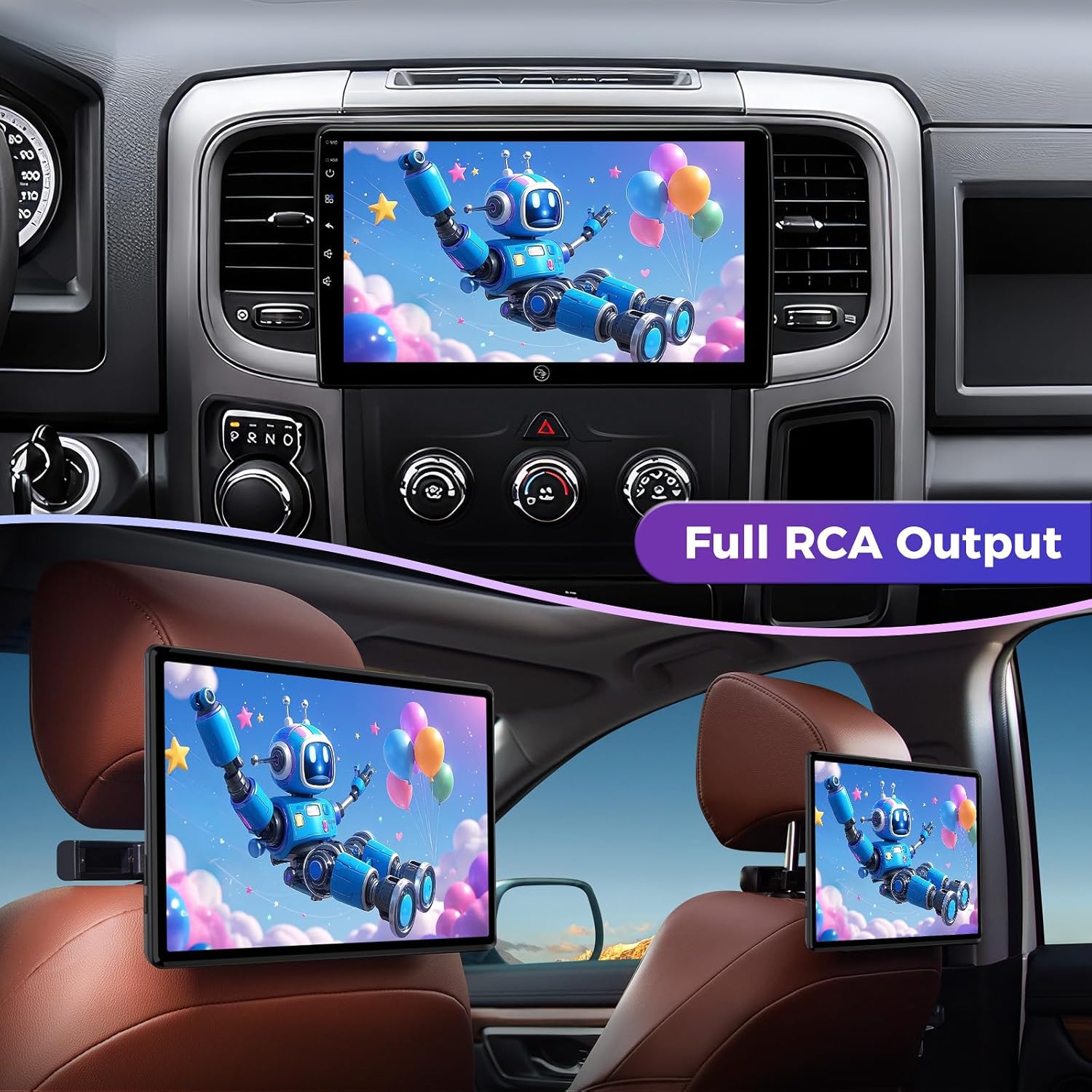
Image: The car stereo displaying video content, with an example of the full RCA output mirroring the display to rear headrest screens.
5. Manteniment
To ensure the longevity and optimal performance of your AINAVI car stereo, follow these maintenance guidelines:
- Neteja de pantalla: Utilitzeu un drap suau i sense pelusa lleugerament dampNetegeu-ho amb aigua o amb un netejador de pantalles dissenyat específicament per a pantalles electròniques. Eviteu productes químics agressius o materials abrasius.
- Eliminació de pols: Regularly wipe down the unit and surrounding dashboard area to prevent dust buildup, which can affect performance and appearance.
- Actualitzacions de programari: Periodically check for available software updates to ensure you have the latest features and bug fixes. Follow the on-screen prompts or instructions provided by AINAVI for updating.
- Eviteu temperatures extremes: While designed for automotive use, prolonged exposure to extreme heat or cold can affect electronic components.
6. Solució De Problemes
If you encounter issues with your AINAVI car stereo, refer to the following common problems and solutions:
| Problema | Causa possible | Solució |
|---|---|---|
| La unitat no s'encén | Connexió d'alimentació fluixa, fusible cremat, problema amb la bateria del vehicle | Check wiring harness connections. Inspect vehicle fuses. Ensure vehicle battery is charged. |
| Sense sortida de so | Speaker wires disconnected, incorrect audio settings, ampqüestió de lifier | Verify speaker wire connections. Check audio settings (volume, mute, balance/fade). |
| Senyal GPS perdut o inexacte | GPS antenna obstruction, faulty antenna, no network connection for online maps | Assegureu-vos que l'antena GPS tingui una visió clara view of the sky. Check antenna connection. Connect to Wi-Fi for online map data. |
| CarPlay/Android Auto no es connecta | Loose USB cable, phone settings, software incompatibility | Ensure USB cable is securely connected. Check phone's CarPlay/Android Auto settings. Try a different USB cable. Restart phone and head unit. |
| La pantalla tàctil no respon | Software glitch, screen calibration issue | Restart the head unit. If issue persists, perform a factory reset (refer to settings menu). |
| Slow startup or UI lag | Background apps, system overload | Close unnecessary background applications. Ensure sufficient storage space. Perform a system restart. |
If these solutions do not resolve the issue, please contact AINAVI customer support for further assistance.
7. Especificacions
| Característica | Detall |
|---|---|
| Sistema operatiu | Android 13 |
| RAM + ROM | 2 GB de RAM + 64 GB de ROM |
| Mida de la pantalla | 10 polzades |
| Tipus de pantalla | QLED Touchscreen |
| Resolució | 1280 x 720 |
| Viewangle ing | 178° completViewangle ing |
| CarPlay | Built-in Wireless & Wired |
| Android Auto | Built-in USB Connection |
| Bluetooth | Versió 5.0 |
| Wi-Fi | Dual-band 2.4Ghz & 5Ghz |
| Navegació GPS | Built-in (supports offline maps) |
| Sortida d'àudio | 4*45W Max. Output, Built-in DSP with Time Correction & EQ |
| posteriorview Càmera | Supports 1080P AHD (camera included) |
| Característiques especials | Split Screen Function, Steering Wheel Control, AM FM RDS Radio, Panel light and Four Themes, USB (4Pin+6Pin), Full RCA Output |
| Pes de l'article | 4.33 lliures |
| Dimensions del paquet | 13.86 x 9.65 x 5.12 polzades |
8. Garantia i assistència
8.1. Garantia del producte
The AINAVI 10-inch Car Radio Stereo comes with a 12 mesos de garantia des de la data de compra. Aquesta garantia cobreix els defectes de fabricació i garanteix que el producte compleix els estàndards de rendiment especificats. Conserveu el comprovant de compra per a reclamacions de garantia.
8.2. Suport tècnic
For any technical assistance, installation questions, or troubleshooting not covered in this manual, please contact AINAVI customer support:
- Correu electrònic d'Amazon: Contact us via the Amazon messaging system through your order details.
- Línia directa: +1 (833) 858-5016 (Horari laboral: de 01:00 a 00:00 PST)
- Correu electrònic: info@ainavi.com
Our professional technical support team is available to provide prompt assistance.

Image: Information on superior customer care, detailing how to seek help via order center or hotline.

Image: A customer service representative with contact information including phone number and email for support.


