Introducció
This manual provides comprehensive instructions for the Phezer 0.5-inch 42ml Black Quick Dry Ink Cartridge, designed for use with compatible handheld inkjet printers. It covers installation, operation, maintenance, and specifications to ensure optimal performance and longevity of your ink cartridge.
The Phezer 42ml ink cartridge features quick-drying, waterproof, and durable ink, suitable for various surfaces. It is engineered for smooth, bright, and stable printing results.
Producte acabatview

Image: The Phezer 0.5-inch 42ml Black Quick Dry Ink Cartridge, shown with its transparent protective cover. The label indicates "Model: PS100 (M)".
The Phezer 0.5-inch 42ml Black Quick Dry Ink Cartridge is an industrial-grade replacement cartridge. Key features include:
- Quick-Drying Ink: Achieves rapid drying on various printing surfaces.
- Alta capacitat: Each 42ml cartridge can print tens of thousands of characters.
- Durador i impermeable: Ensures long-lasting and smudge-resistant prints.
- Smooth and Stable Printing: Equipped with a high-quality nozzle for consistent output.
Configuració i instal·lació
Follow these steps to properly install the ink cartridge into your compatible handheld inkjet printer:
- Prepareu el cartutx: Before initial use, gently shape the cartridge up and down a few times with the protective cover still on. This helps ensure ink flow.
- Open Printer Cartridge Cover: Locate and open the cartridge compartment cover on your handheld inkjet printer.
- Inseriu el cartutx: Carefully insert the ink cartridge into the designated slot. Ensure the electrical contacts align correctly.
- Cartutx segur: Press the cartridge down firmly until it is securely fixed in place.
- Tancar la coberta: Close the printer cartridge cover. The printer is now ready for use.

Image: Visual guide demonstrating the four steps for easy installation of the ink cartridge into a handheld printer.
Instruccions de funcionament
The Phezer 0.5-inch 42ml Black Quick Dry Ink Cartridge is designed for versatile printing on a wide range of materials. Ensure your handheld inkjet printer is powered on and properly configured for your desired print job.

Image: A handheld inkjet printer in operation, demonstrating printing of text and a QR code onto a cardboard box.
This cartridge supports printing on both water-absorbing and non-absorbing materials, including:
- Fusta
- Acrylic materials
- Alumini
- Porcellana
- Tela
- Paper and Carton
- Plàstic
- Metall
- Pedra
- Tela
- Vidre
- Etiquetes
- Cuir
Drying time for prints typically ranges from 3 to 5 seconds, depending on the material and environmental conditions.
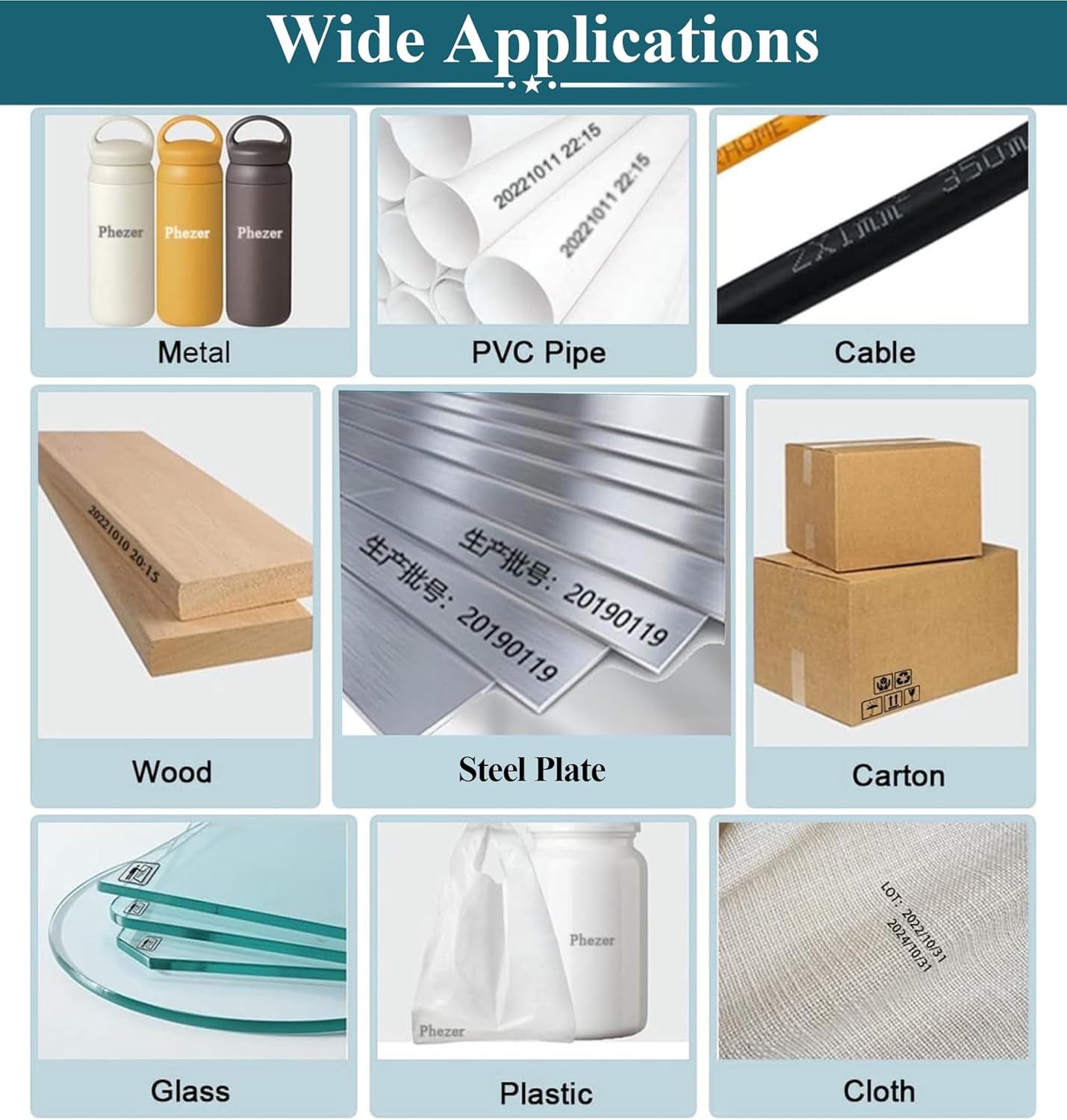
Image: A collage illustrating the wide range of applications for the ink cartridge, showing prints on diverse materials such as metal, PVC pipe, wood, and glass.
The cartridge is designed with a dual nozzle system for enhanced efficiency and lifespan. If one nozzle experiences issues, the system allows for switching to the other.

Image: A comparison graphic emphasizing the dual nozzle design of the Phezer cartridge, which contributes to higher efficiency and extended lifespan.
The cartridge offers significant print capacity, capable of producing a large number of characters, dates, logos, variable data, and QR codes.

Image: An illustration detailing the estimated print yield for different types of content, such as 800,000 2mmx2mm characters or 100,000 QR codes.
For more information, you may visit: http://qr61.cn/o8lrCM/qRCnntZ
Manteniment
Proper maintenance is crucial for extending the life of your ink cartridge and ensuring consistent print quality. Always handle the cartridge with care.
- Nozzle Protection: If printing is suspended for more than 20 minutes, cover the nozzle with its protective buckle immediately. This prevents the ink from air-drying and blocking the nozzle.
- Neteja regular: For clear printing, clean the nozzle with alcohol every time before use.
- Post-Use Cover: Always replace the protective cover on the cartridge after every use to prevent air exposure and drying.

Image: A visual guide detailing maintenance tips, such as spraying alcohol on a cloth, wiping the nozzle, and shaking the cartridge gently.
Resolució de problemes
If you encounter issues with print quality, such as unclear printing or nozzle blockage, follow these steps:
- Unclear Printing: If the ink cartridge is not printing clearly, spray a small amount of alcohol onto a soft, lint-free cloth.
- Neteja el broquet: Gently wipe the nozzle with the alcohol-dampened cloth. You may also gently shake the cartridge about 5 times.
- Remove Excess Ink: Wipe away any excess ink to ensure the nozzle is clean and dry before resuming printing.
These steps help to resolve minor blockages and restore optimal print clarity.
Especificacions
| Característica | Detall |
|---|---|
| Marca | Phezer |
| Número de model | 0.5 inch cartridge (PS100) |
| Capacitat de tinta | 42 ml |
| Color de tinta | Black (Other colors may be available separately) |
| Tipus de tinta | Quick Dry Solvent Ink |
| Temps d'assecat | 3-5 seconds (depending on material) |
| Característiques especials | High Viscosity, High Yield, Long-Lasting, Quick Dry, Smudge Resistant |
| Dimensions del producte | 4 x 1 x 3 polzades |
| Pes de l'article | 5.5 lliures (Note: This weight likely includes packaging or is a general product weight from the printer listing.) |

Image: A close-up of the ink cartridge, emphasizing its imported quality and key attributes such as quick-drying and waterproof ink.

Image: The Phezer ink cartridge displayed alongside swatches of available ink colors, including Black, Blue, White, Red, Green, Yellow, and Invisible.
Informació de la garantia
This Phezer ink cartridge comes with a Garantia limitada. For specific terms and conditions regarding your warranty, please refer to the documentation provided with your original printer purchase or contact Phezer customer support.
Atenció al client
For any questions, technical assistance, or support regarding your Phezer ink cartridge, please contact Phezer customer service through the platform where you purchased the product.
If purchased on Amazon, you can typically contact the seller by:
- Navigating to the product page.
- Clicking on the "Sold by [Seller Name]" link (e.g., "Phezer Coding and Marking Solution").
- Selecting the "Ask a question" option to send a message.

Image: A visual guide demonstrating how to locate and use the "Ask a question" feature on Amazon to contact Phezer customer support.


