1. Introducció
Thank you for choosing the TONGVEO 3-in-1 4K Webcam. This device integrates a high-resolution 4K camera, dual microphones, and a powerful speaker into a single, compact unit. Designed for professional conferences, live streaming, online teaching, and gaming, it offers advanced features like AI auto-tracking, voice tracking, and adjustable field of view to enhance your communication experience. This manual provides essential information for setting up, operating, and maintaining your weblleva.
2. Què hi ha a la caixa
- 1 x TONGVEO 3-in-1 4K Weblleva
- 1 x USB Cable (USB-C to USB-A)
- 1 x comandament a distància
- 1 x Type-C Adapter
- 1 x Manual d'usuari (aquest document)
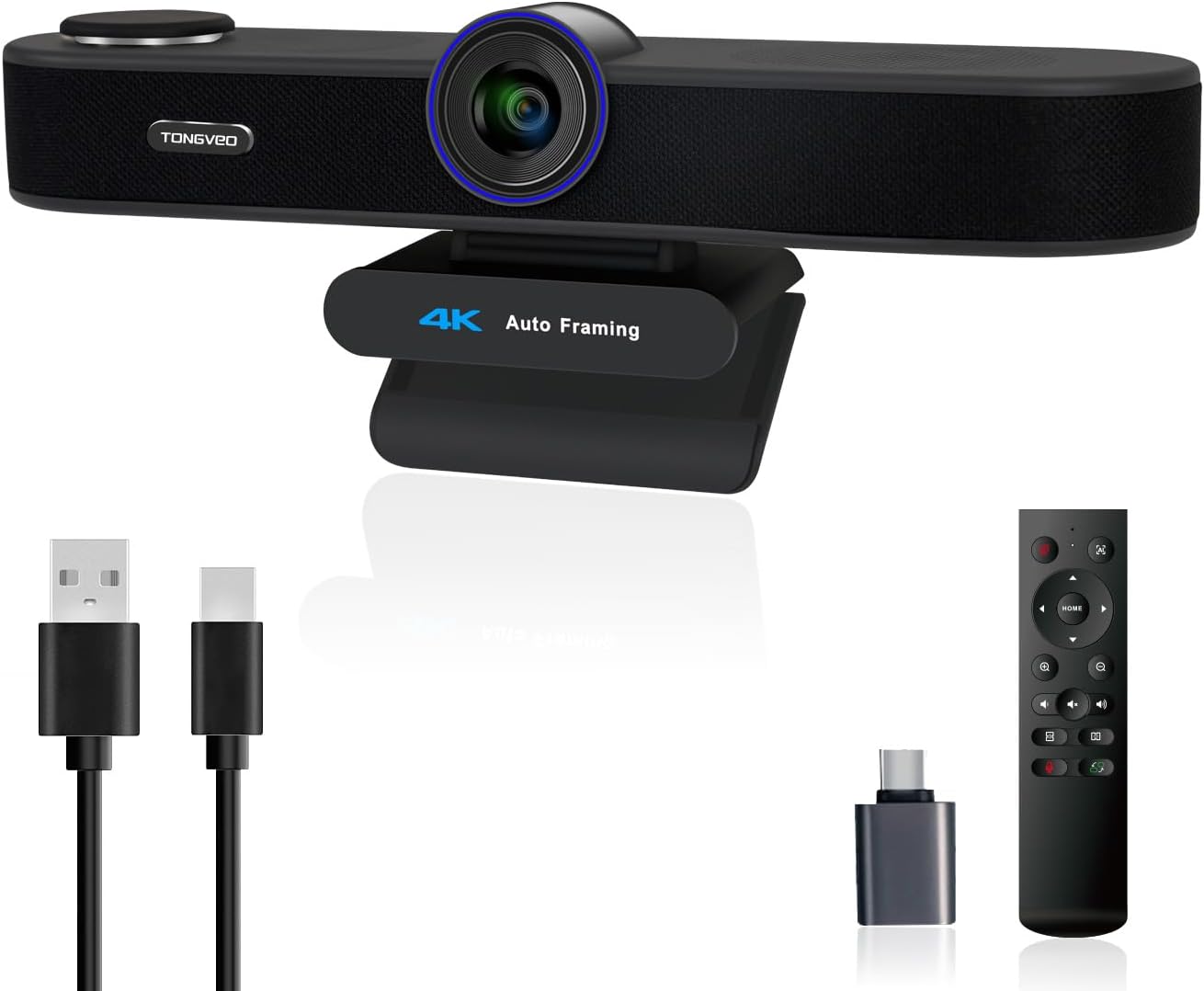
Figure 1: TONGVEO 3-in-1 4K Webcam and its accessories.
3. Producte acabatview
The TONGVEO 3-in-1 4K Webcam combines a high-definition camera, dual microphones, and a speaker into a sleek bar design. It features an integrated adjustable clip for easy mounting on monitors or laptops, and also includes a standard tripod thread for alternative placement.
3.1 Components clau
- 4K UHD Camera Lens: Captures video at up to 3840x2160 resolution.
- Micròfons estèreo duals: Omnidirectional with noise cancellation, effective up to 16.4ft.
- 3W Speaker: Proporciona una sortida d'àudio clara.
- Coberta de privacitat magnètica: Attaches to the lens for security and protection.
- Port USB-C: Per connectar-vos al vostre ordinador.
- Adjustable Mounting Clip: For secure placement on displays.
3.2 Guia visual

Figura 2: Mésview de la webcam's integrated features.

Figura 3: Comparació visual de diferents resolucions de vídeo.
4. Configuració
The TONGVEO 3-in-1 4K WebLa càmera està dissenyada per a la funcionalitat plug-and-play, sense necessitat de controladors addicionals per a la majoria de sistemes operatius.
4.1 Connexió del Weblleva
- Muntar el Weblleva: Col·loca el webcam securely on top of your monitor or laptop screen using the adjustable clip. Ensure the camera lens is facing you. Alternatively, use the tripod thread on the base to mount it on a tripod.
- Connexió a l'ordinador: Connect the provided USB-C to USB-A cable to the USB-C port on the back of the webcam and the USB-A end to an available USB 2.0 or USB 3.0 port on your computer. If your computer only has USB-C ports, use the included Type-C adapter.
- Reconeixement del sistema: Your computer's operating system (Windows or Mac OS) should automatically detect and install the necessary drivers. This process may take a few moments.
- Verifica la connexió: Open your preferred video conferencing or streaming software (e.g., Zoom, Microsoft Teams, WebEx, YouTube, TikTok) and select the TONGVEO webcam as your video and audio input device.

Figure 4: Plug-and-play setup with USB connection.
4.2 Guia de vídeo de configuració
Video 1: This video demonstrates the unboxing and basic setup process for a similar 3-in-1 weblleva.
5. Instruccions de funcionament
5.1 Funcions de control remot
The included remote control allows for convenient adjustment of various webcam settings without needing to interact with your computer's software interface.
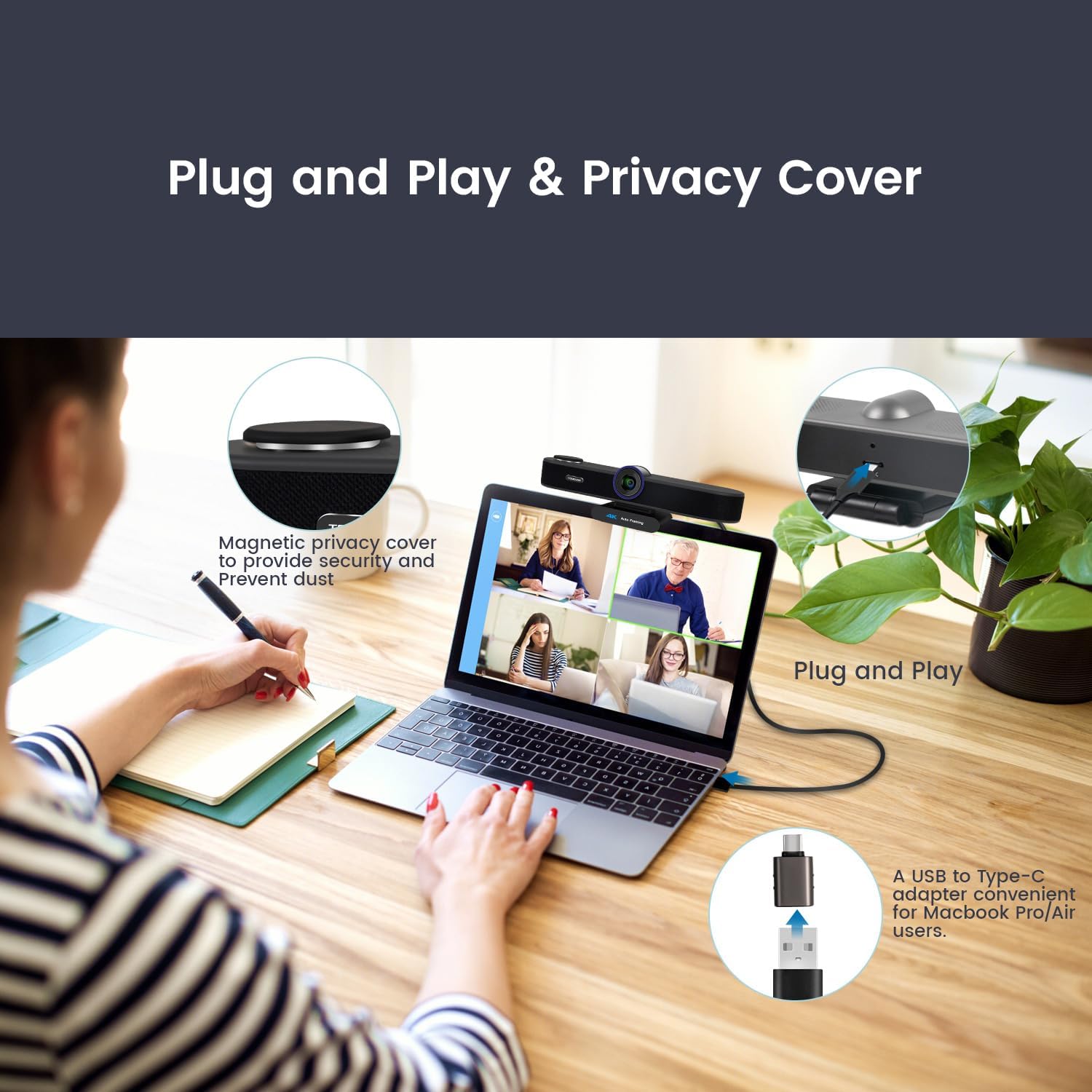
Figura 5: Disposició i funcions dels botons del comandament a distància.
- Botó d'encesa: Encén/apaga la càmera.
- AI On/Off Button: Activates/deactivates AI modes (Auto Framing, Voice Tracking). Press once for frame selection, press again for voice tracking, and a third time to exit AI mode.
- Botons de navegació (amunt/avall/esquerra/dreta): Adjusts camera pan/tilt when zoomed in.
- Apropar/reduir: Digitally zooms the image up to 5x.
- Pujar/baixar el volum: Ajusta el volum de l'altaveu.
- Silència del micròfon: Mutes/unmutes the built-in microphones.
- Image Flip (Left/Right): Flips the video horizontally.
- Canvia càmera Viewing Angle (FOV): Cycles through 118° (wide), 100° (medium), and 88° (narrow) fields of view.
5.2 AI Auto Framing & Voice Tracking
El webcam features intelligent AI capabilities to keep your subjects perfectly framed and focused.
- AI Auto Framing: Automatically detects attendees within its field of view and centers everyone into the frame, ensuring all participants are visible.
- Seguiment de veu: Locates and follows the active speaker within 3 seconds, dynamically focusing on their movements within the FOV.

Figure 6: AI Auto Framing in action.

Figure 7: Auto-framing and Voice Tracking modes.
5.3 Zoom digital
Utilize the remote control to digitally zoom in or out up to 5 times, allowing you to focus on specific details or individuals.

Figure 8: 5X Digital Zoom functionality.
5.4 Adjustable Field of View (FOV)
Easily switch between three preset FOV modes to suit your meeting environment:
- 118° (Wide): Ideal for group calls or showing more of the room.
- 100° (Medium): Un equilibrat view for small groups.
- 88° (Narrow): Best for solo presentations or focusing on a single speaker.
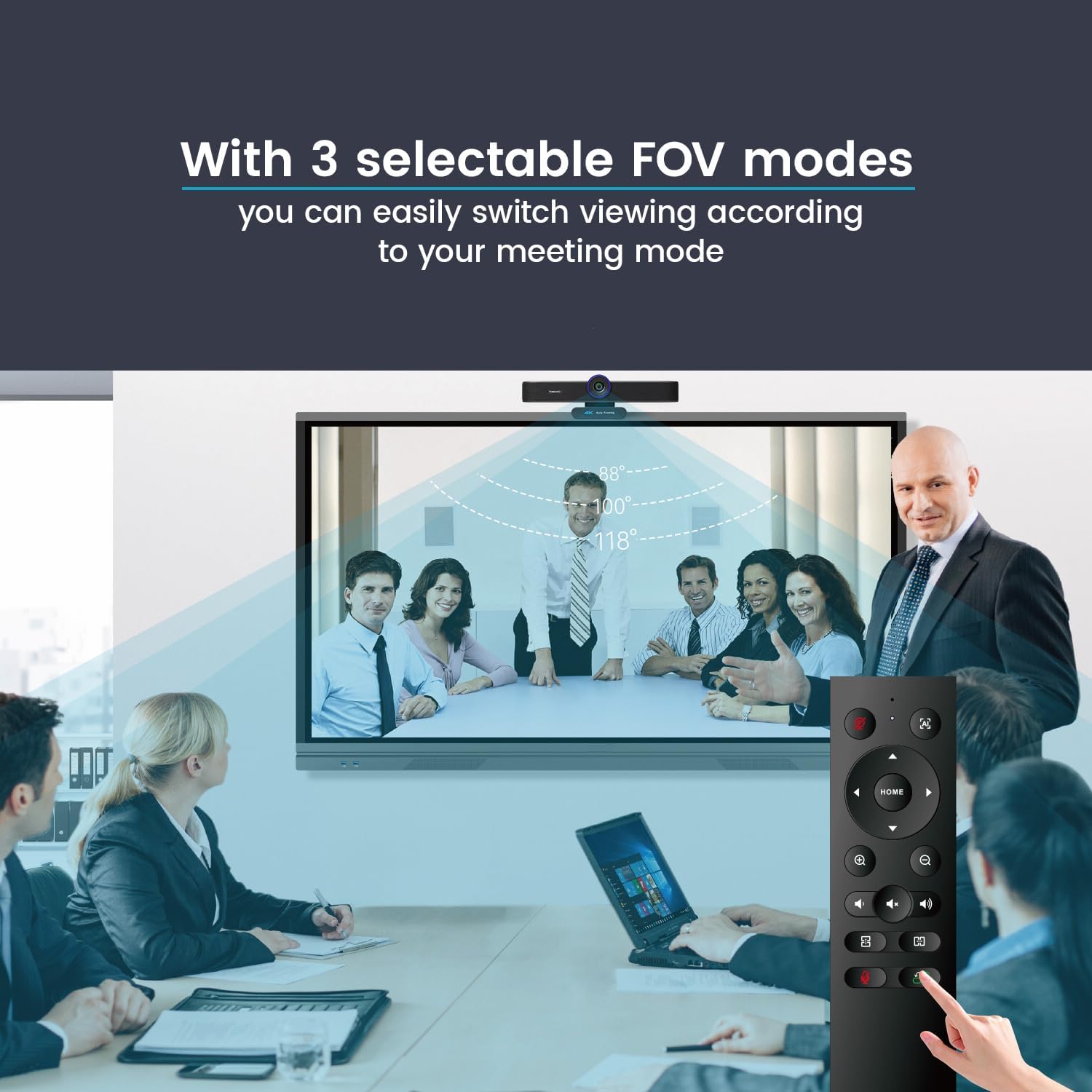
Figure 9: Adjustable FOV modes.
6. Manteniment
6.1 Neteja
- Utilitzeu un drap suau i sec per netejar-lo webcam's exterior.
- For the lens, use a microfiber cloth specifically designed for optics. Avoid harsh chemicals or abrasive materials.
6.2 Emmagatzematge
- When not in use, attach the magnetic privacy cover to protect the camera lens from dust and scratches.
- Emmagatzemar el webcàmera en un lloc fresc i sec, lluny de la llum solar directa i de temperatures extremes.
7. Solució De Problemes
7.1 Sense sortida de vídeo
- Assegureu-vos que el cable USB estigui connectat correctament a tots dos webla càmera i el teu ordinador.
- Intenta connectar el webcàmera a un port USB diferent de l'ordinador.
- Comproveu que el webcam is selected as the primary video device in your conferencing software settings.
- Check if the privacy cover is removed from the lens.
7.2 Sense sortida/entrada d'àudio
- Assegureu-vos el webcam's microphone and speaker are selected as the audio input/output devices in your computer's sound settings and conferencing software.
- Comproveu si el micròfon està silenciat amb el comandament a distància o el programari.
- Adjust the speaker volume using the remote control or your computer's volume settings.
7.3 AI Features Not Working
- Ensure the AI feature is activated using the AI button on the remote control.
- Comproveu si hi ha obstruccions al camp de la càmera view that might interfere with tracking.
7.4 El comandament a distància no respon
- Assegureu-vos que no hi hagi obstacles entre el comandament a distància i el webcam's IR receiver.
- Replace the batteries in the remote control if it becomes unresponsive.
8. Especificacions
| Característica | Especificació |
|---|---|
| Número de model | TV-AC3-C |
| Resolució de la càmera | 4K UHD (3840x2160) @ 30fps |
| Sensor d'imatge | CMOS d'1/2.8 de polzada de 8.29 megapíxels |
| Zoom digital | 5x |
| Camp de View (FOV) | Adjustable: 118° (Wide), 100° (Medium), 88° (Narrow) |
| Micròfons | Built-in Dual Omnidirectional with Noise Cancellation (up to 16.4ft pickup) |
| Altaveu | 3W |
| Característiques d'IA | Auto Framing, Voice Tracking |
| Connectivitat | USB 2.0/3.0 |
| Compatibilitat | Windows 7/8/10/11, Mac OS |
| Dimensions (aprox.) | 9.5 polzades (L) x 6 polzades (H) x 6 polzades (W) |
| Pes | 1.37 lliures |
9. Compatibilitat
The TONGVEO 3-in-1 4K Webcam is widely compatible with various operating systems and popular video conferencing platforms:
- Sistemes operatius: Windows 7/8/10/11, Mac OS
- Video/Meeting Software: Zoom, Microsoft Teams, WebEx, Facebook, YouTube, TikTok, etc.
Figure 10: Universal compatibility with major platforms.
10. Garantia i Suport
TONGVEO is committed to providing high-quality products and customer satisfaction. Technical support is available for the 4K webcam, and any questions will be answered within 24 hours. Please refer to the product packaging or official TONGVEO weblloc web per obtenir detalls específics de la garantia i informació de contacte.


