1. Producte acabatview
The ARENTI P10 Wireless Video Doorbell is an innovative security solution designed to provide comprehensive surveillance of your entryway. Featuring a dual-camera system, advanced motion detection, and two-way audio, it ensures you are always connected to your home's front door, whether you are present or away.
Its robust and elegant design, coupled with IP65 weather protection, ensures reliable operation in various environmental conditions. The P10 offers flexible power options, including a long-lasting battery or optional wired connection, and supports both local and cloud storage for video recordings.

Figure 1: ARENTI P10 Wireless Video Doorbell and Chime Unit. The doorbell features a sleek black design with two cameras and a large button, accompanied by a compact, patterned chime unit.
2. Guia de configuració
2.1 Contingut del paquet
Abans de començar la instal·lació, assegureu-vos que hi hagi tots els components:
- ARENTI P10 Video Doorbell
- Unitat de timbre
- Suport de muntatge
- Power Cables (for AC output, if wired installation is chosen)
- Adaptador d'alimentació
- Paquet de cargols
- Allibera el passador
- Double-sided Adhesive Tape (for chime and doorbell)
- Manual d'usuari
2.2 Càrrega del timbre
The ARENTI P10 Video Doorbell comes with a built-in 5200 mAh lithium-ion battery. For optimal performance, fully charge the doorbell before initial use. Connect the doorbell to the power adapter using the provided USB cable.
2.3 Instal·lació i emparellament de l'aplicació
- Descarrega't el Arenti App from the App Store (iOS 9 or higher) or Google Play Store (Android 5 or higher).
- Creeu un compte i inicieu sessió.
- Follow the in-app instructions to add your ARENTI P10 doorbell. This typically involves scanning a QR code on the device or manually selecting the device type and connecting to your Wi-Fi network (2.4 GHz IEEE802.11b/g/n).
- Pair the doorbell with the chime unit as instructed in the app.
2.4 Muntatge del timbre
The ARENTI P10 is designed for easy wireless installation, typically taking only a few minutes. It can also be permanently wired if preferred.
- Trieu un lloc adequat a prop de la porta principal, assegurant-vos que hi hagi claredat. view de la zona que voleu controlar.
- Attach the mounting bracket to the wall using the provided screws or double-sided adhesive tape.
- Secure the doorbell onto the mounting bracket. Ensure it clicks into place firmly.

Figure 2: ARENTI P10 Doorbell with Mounting Plate. The image shows the back of the doorbell detached from its mounting plate, illustrating how the device connects to its wall mount.
3. Instruccions de funcionament
Sistema de doble càmera 3.1
The ARENTI P10 features two high-resolution cameras for comprehensive coverage:
- Upper Camera: Provides 3-megapixel (2304 x 1296 pixels) recordings, ideal for reliable face and person detection.
- Lower Camera: Offers 2-megapixel (1920 x 1080 pixels) recordings, suitable for monitoring packages or objects directly in front of your door.
3.2 Detecció de moviment i notificacions
The integrated PIR sensor reliably detects human motion up to 5 meters away within a 100° detection angle. Upon detection, you will receive an instant notification on your smartphone via the Arenti app, allowing you to respond immediately.
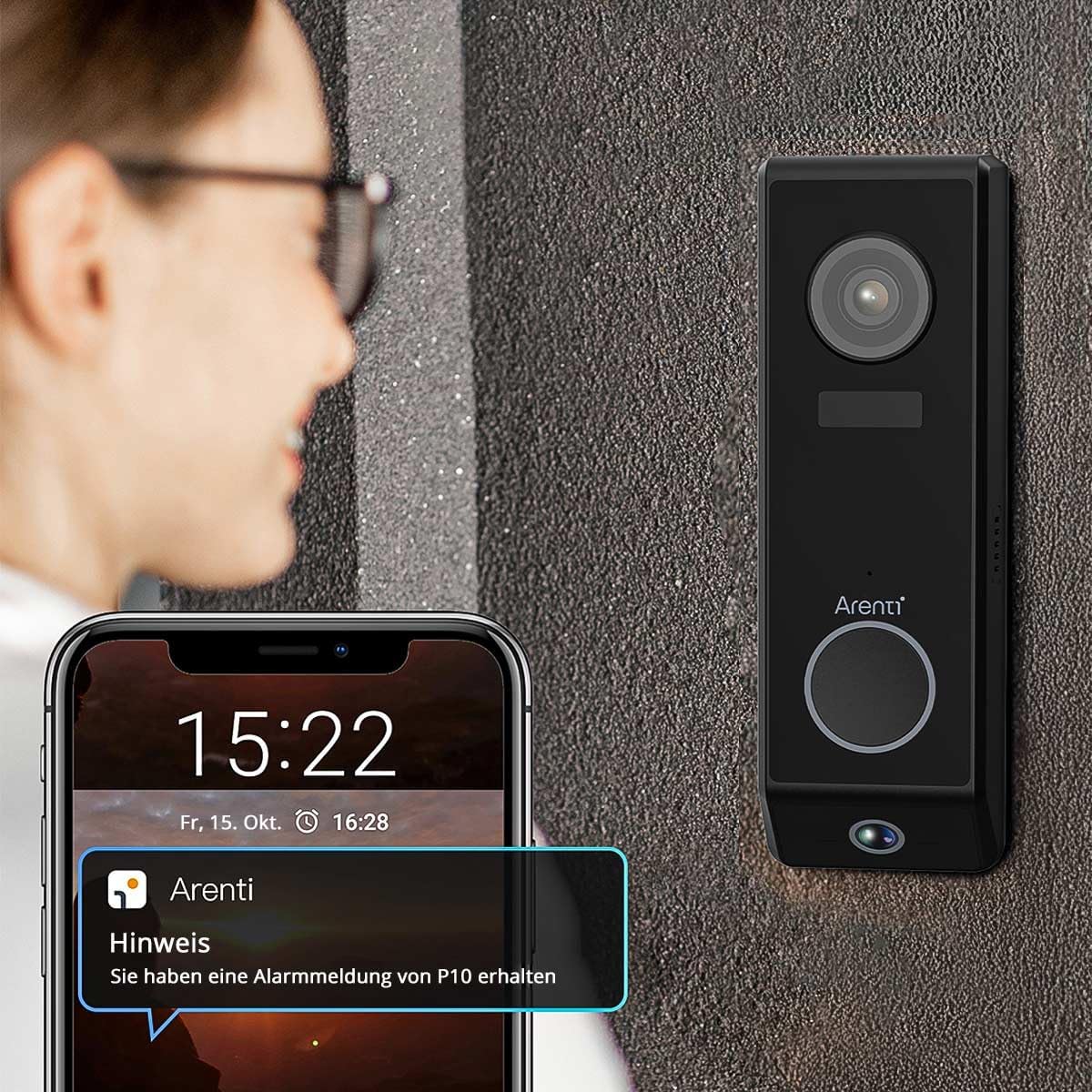
Figure 3: ARENTI P10 Doorbell with Phone Notification. A person is shown looking at their smartphone, which displays an alert from the Arenti app, indicating motion detection by the doorbell.
3.3 Comunicació d'àudio bidireccional
Utilize the full-duplex two-way audio function to communicate clearly with visitors at your door. High-quality microphones and speakers ensure excellent conversation quality, allowing you to speak to visitors, ask questions, or provide instructions from anywhere.
3.4 Visió nocturna
Modern integrated infrared LEDs provide clear and detailed video recordings even in complete darkness, with a night vision range of up to 10 meters. This ensures your entryway remains monitored and protected day and night.
3.5 Opcions d'emmagatzematge
Video recordings can be stored flexibly:
- Emmagatzematge local: Insert a microSD card (up to 256 GB) into the doorbell for local storage.
- Servei al núvol: Utilize the convenient cloud service for secure and accessible recordings.

Figure 4: ARENTI P10 Cloud and SD Card Storage Options. A diagram illustrating the two storage methods: cloud storage and local storage via an SD card, with an inset showing the SD card slot on the doorbell.
3.6 Integració de la llar intel·ligent
The ARENTI P10 doorbell seamlessly integrates with popular smart home systems such as Amazon Alexa and Google Home, allowing for convenient control and monitoring through voice commands or your existing smart home ecosystem.
4. Manteniment
4.1 Gestió de la bateria
The 5200 mAh battery provides up to 6 months of standby time. With regular use (approximately 10 detections per day), the battery typically lasts 2 to 3 months. Recharge the doorbell when the battery level is low, as indicated by the Arenti app.
4.2 Neteja
Per mantenir un rendiment i un aspecte òptims, netegeu periòdicament l'exterior del timbre. Feu servir un drap suau i sec.amp cloth to wipe away dust and dirt. Avoid using harsh chemicals or abrasive cleaners, as these can damage the device. Ensure the camera lenses are clean for clear video quality.
4.3 actualitzacions de microprogramari
Regularly check the Arenti app for available firmware updates. Updates often include performance improvements, new features, and security enhancements. Follow the in-app instructions to perform any necessary updates.
5. Solució De Problemes
5.1 No Power/Doorbell Not Turning On
- Ensure the battery is fully charged. Connect the doorbell to power and allow it to charge for several hours.
- If using wired power, verify the connection and power source.
5.2 Mala qualitat de vídeo
- Netegeu les lents de la càmera amb un drap suau i sense borrissol.
- Assegureu-vos que hi hagi una il·luminació adequada a la zona vigilada.
- Comproveu la intensitat del senyal Wi-Fi. Un senyal feble pot afectar la qualitat de la transmissió de vídeo.
5.3 Problemes de detecció de moviment
- Adjust the motion detection sensitivity settings in the Arenti app.
- Assegureu-vos que no hi hagi obstacles que bloquegin el sensor view.
- Verify the doorbell is positioned correctly to cover the desired area.
5.4 Problemes de connectivitat Wi-Fi
- Ensure your Wi-Fi network is 2.4 GHz. The doorbell does not support 5 GHz networks.
- Move the doorbell closer to your Wi-Fi router or consider a Wi-Fi extender.
- Reinicieu el router i el timbre.
- If issues persist, try resetting the doorbell to factory settings (refer to the app or quick start guide for reset instructions) and re-pairing it.
5.5 Two-Way Audio Not Working
- Check the volume settings on your smartphone and in the Arenti app.
- Ensure there are no obstructions covering the doorbell's microphone or speaker.
- Verifiqueu que la vostra connexió a Internet sigui estable.
6. Especificacions tècniques
| Característica | Especificació |
|---|---|
| Resolució de gravació de vídeo | Upper Camera: 2304 x 1296 pixels (3MP) Lower Camera: 1920 x 1080 pixels (2MP) |
| Capacitat de la bateria | 5200 mAh d'ions de liti |
| Durada de la bateria (mode d'espera) | Fins a 6 mesos |
| Interval de detecció de moviment | Up to 5 meters (PIR sensor) |
| Angle de detecció de moviment | 100° |
| Gamma de visió nocturna | Fins a 10 metres (LEDs infrarojos) |
| Comunicació sense fils | Wi-Fi 2.4 GHz (IEEE802.11b/g/n) |
| Opcions d'emmagatzematge | MicroSD card (max. 256 GB), Cloud service |
| Àudio | Two-way audio (Full Duplex) |
| Resistència a la intempèrie | IP65 (Waterproof, protected against dust, rain, and snow) |
| Dispositius compatibles | iOS 9 o superior, Android 5 o superior |
| Dimensions (L x A x A) | 3.4 x 5.4 x 16.5 cm (1.34 x 2.13 x 6.5 polzades) |
| Pes | 490 grams |
| Poder | 5 volts, 2 watts |
| Tipus d'instal·lació | Screw-in / Wall mount bracket |
7. Garantia i Suport
For detailed warranty information and customer support, please refer to the official ARENTI website or contact ARENTI customer service directly. Keep your purchase receipt for warranty claims.


