AULA WIN60 HE PRO 60% Mechanical Gaming Keyboard User Manual
Model: WIN60 HE PRO | Brand: AULA
1. Introducció
This manual provides detailed instructions for the AULA WIN60 HE PRO 60% Mechanical Gaming Keyboard. Designed for high-performance gaming, this keyboard features Hall Effect magnetic switches, rapid trigger mode, an 8000Hz polling rate, and customizable RGB lighting. Please read this manual thoroughly to ensure proper setup, operation, and maintenance of your keyboard.
Figure 1: AULA WIN60 HE PRO 60% Mechanical Gaming Keyboard with highlighted features.
2. Configuració
2.1 Unboxing
Traieu amb cura tots els components de l'embalatge. Assegureu-vos que hi hagi els elements següents:
AULA WIN60 HE PRO Keyboard
Cable USB-C
Extractor de tecles
Extra Switches (if included)
Video 1: Unboxing the AULA WIN60 HE Gaming Keyboard, showing the contents including the keyboard, USB-C cable, and switch puller.
2.2 Connexió del teclat
Localitza el port USB-C a la part posterior del teclat.
Connect the provided USB-C cable to the keyboard.
Connecteu l'altre extrem del cable USB-C a un port USB disponible de l'ordinador.
The keyboard will automatically be recognized by your operating system (Windows PC/Laptop compatible).
Note: This keyboard is not compatible with PlayStation 5/4 (PS5/PS4) and OBOX.
2.3 Driver Installation (Web-Based)
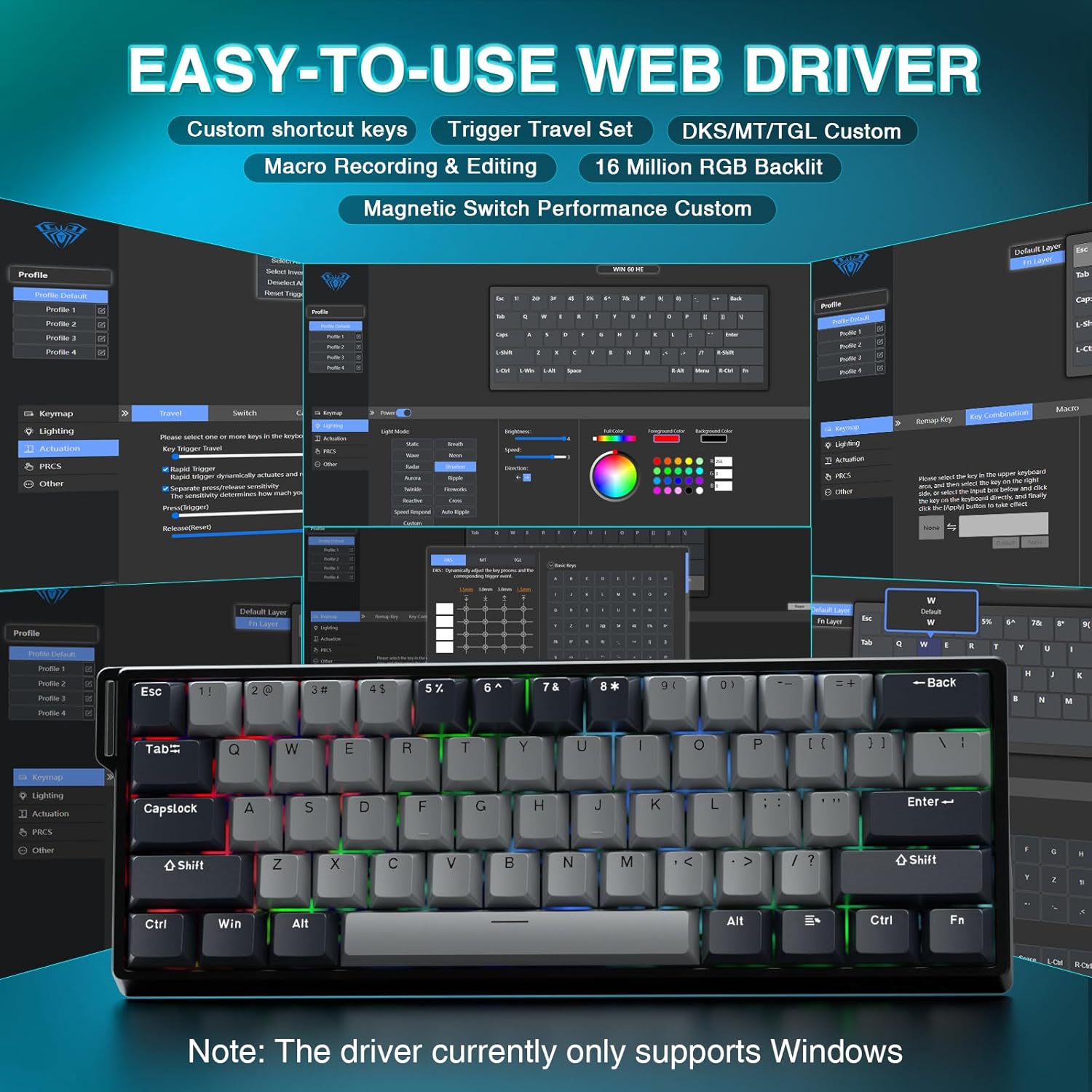
The AULA WIN60 HE PRO utilizes a web-based driver for customization, eliminating the need for software downloads.
Assegureu-vos que el vostre ordinador estigui connectat a Internet.
Obriu el vostre preferit web navegador.
Navigate to the official AULA web driver portal (refer to the product packaging or manufacturer's weblloc web per a l'exactitud URL).
El web interface will allow you to customize settings directly.
Figure 2: Easy-to-use web driver interface for customization.
Nota: El web driver currently only supports Windows operating systems.
3. Funcionament
3.1 Hall Effect Magnetic Switches & Rapid Trigger
The AULA WIN60 HE PRO features advanced Hall Effect magnetic switches, which detect key presses using magnetic fields rather than physical contact. This design provides:
Accionament ajustable: Customize the actuation point of each key to your preference for faster response or more deliberate presses.
Mode de disparador ràpid: Allows keys to activate and deactivate based on movement rather than a fixed actuation point, enabling ultra-fast repeated inputs and precise control, especially beneficial for FPS games. The ultra-low RT step distance is 0.02mm.
Durabilitat: Absence of physical contact reduces wear and tear.
Figure 3: Rapid Trigger technology for enhanced gaming performance.
Video 2: Demonstrating the hot-swappable magnetic switches, including Gray Wood Magnetic Switch and Wing Chun Magnetic Switch variants.
3.2 8000Hz Polling Rate
The keyboard features an 8000Hz polling rate, meaning it reports key presses to your computer 8000 times per second. This results in:
Ultra-Fast Response Times: Minimizes input lag for immediate in-game actions.
Control de precisió: Ensures every keystroke is registered accurately and without delay.
Figure 4: 8000Hz Hyper-Polling Technology for minimal latency.
3.3 Dynamic RGB Lighting
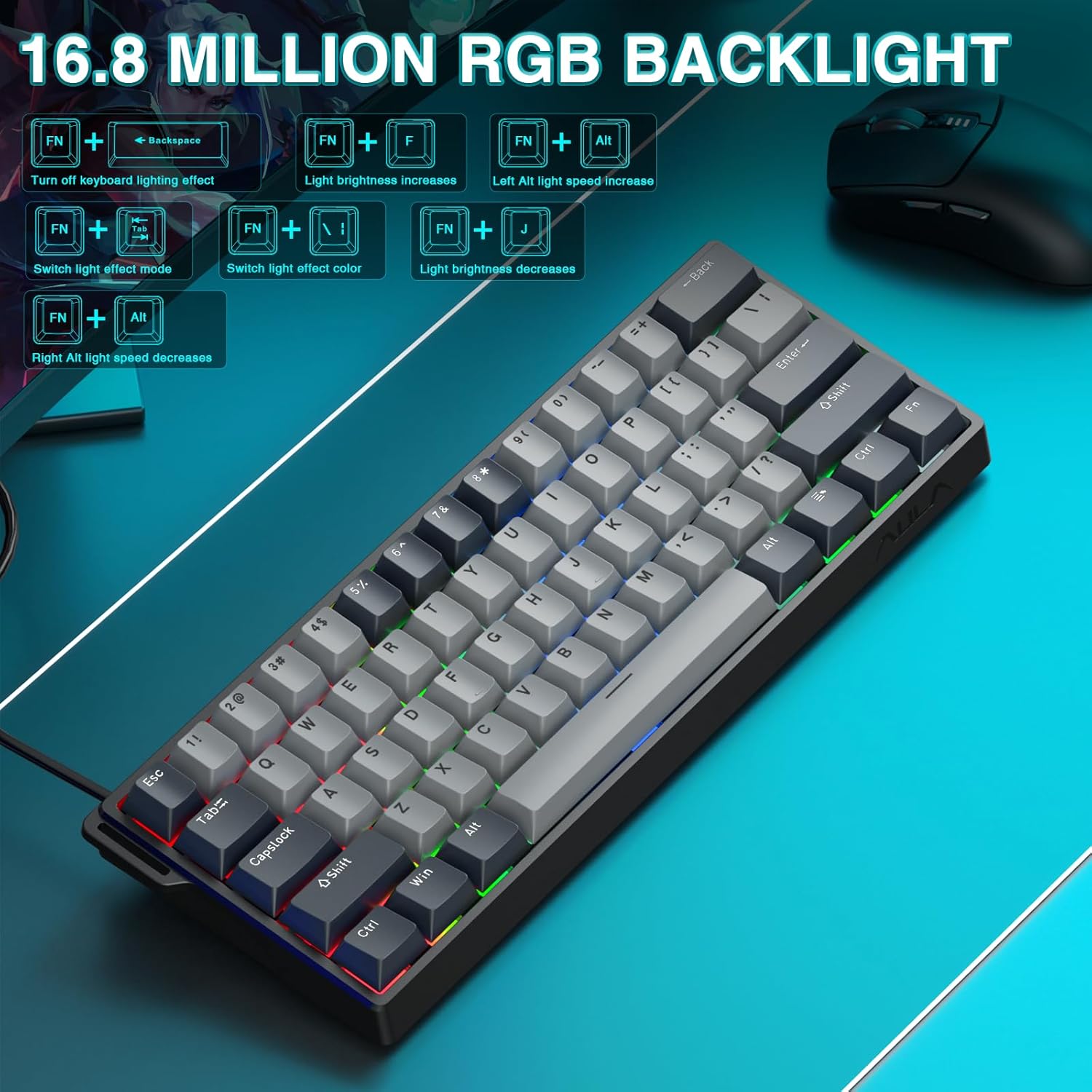
The keyboard offers 16.8 million customizable RGB color options and various lighting effects. Use the following key combinations for quick adjustments:
RGB Lighting Control Hotkeys
Combinació de tecles
Funció
FN + Retrocés
Turn off keyboard lighting effect
FN + [
La brillantor de la llum augmenta
FN + ]
La brillantor de la llum disminueix
FN + {
Left Alt light speed increase
FN + }
Right Alt light speed decrease
FN + \
Canvia el mode d'efecte de llum
FN + Alt
Canvia el color de l'efecte de llum
Figure 5: RGB Backlight controls and effects.
3.4 Customization with Web Conductor
El web-based driver provides extensive customization options:
Reassignació de tecles: Assign any function to any key.
Creació de macros: Enregistra i assigna seqüències complexes d'ordres a una sola tecla.
Personalització de la il·luminació RGB: Fine-tune lighting effects, colors, and patterns beyond the basic hotkeys.
Ajust del punt d'actuació: Precisely set the actuation distance for each magnetic switch.
Accedeix al web driver as described in Section 2.3.
4. Manteniment
4.1 Neteja del teclat
Per mantenir un rendiment i un aspecte òptims:
Desconnecteu el teclat de l'ordinador abans de netejar-lo.
Utilitzeu un drap suau i sense pelusa lleugerament dampRenteu-les amb aigua o una solució netejadora suau per netejar les tecles i el xassís.
Per a la pols i les restes entre les tecles, feu servir aire comprimit.
Eviteu productes químics o materials abrasius.
4.2 Commutadors intercanviables en calent
The AULA WIN60 HE PRO features hot-swappable magnetic switches, allowing for easy replacement or customization without soldering.
Use the provided keycap puller to gently remove the keycap.
Use a switch puller (not explicitly mentioned as included, but implied by "hot-swappable" and video) to carefully remove the switch.
Align the new switch with the socket and press firmly until it clicks into place.
Substitueix la tapa de les tecles.
Caution: Apply gentle force to avoid damaging the switch sockets.
5. Solució De Problemes
5.1 El teclat no respon
Assegureu-vos que el cable USB-C estigui connectat correctament tant al teclat com a l'ordinador.
Prova de connectar el teclat a un port USB diferent de l'ordinador.
Prova el teclat en un altre ordinador per descartar problemes específics del sistema.
Reinicieu l'ordinador.
5.2 RGB Lighting Not Working
Check if the lighting is turned off using the FN + Retrocés tecla d'accés ràpid.
Ajusta la brillantor amb FN + [ or FN + ].
Assegureu-vos el web driver settings haven't disabled lighting.
5.3 Keys Sticking or Not Registering
Netegeu al voltant de la tecla afectada per eliminar qualsevol residu.
If a specific switch is faulty, consider replacing it using the hot-swappable feature (refer to Section 4.2).
Check the actuation point settings in the web driver; it might be set too high or too low for your preference.
6. Especificacions
Característica
Detall
Model
WIN60 HE PRO
Tipus de teclat
60% Mechanical Gaming Keyboard
Tipus de canvi
Hall Effect Magnetic Switch, Hot-Swappable
Connectivitat
USB-C amb cable
Taxa de votació
8000 Hz
Característiques especials
Rapid Trigger Mode, Adjustable Actuation, RGB Backlit, Programmable Keys, Hotkeys and Media Keys, Portable
Dispositius compatibles
Laptop, PC Windows (Not compatible with PS5/PS4, OBOX)
Dimensions del producte
11 x 5 x 1.1 polzades (27.94 x 12.7 x 2.79 cm)
Pes de l'article
2.18 lliures (0.99 kg)
Fabricant
AULA
Figure 6: Detailed comparison of AULA WIN60 HE series magnetic switches.
7. Garantia i Suport
For warranty information, technical support, or service inquiries, please refer to the warranty card included with your product or visit the official AULA/CORBOBO weblloc web. També podeu contactar directament amb el venedor a través de la vostra plataforma de compra per obtenir ajuda.
Manual del producte del teclat amb interruptor magnètic amb cable AULA WIN60 Aquest manual proporciona una guia completa del teclat amb interruptor magnètic amb cable AULA WIN60, que cobreix les seves característiques, funcions i modes de funcionament tant per a les edicions PRO/Max com Standard. Aprèn sobre els ajustos de la retroil·luminació, el canvi de sistema, les descripcions de les tecles de drecera i els mètodes d'ajust de l'interruptor magnètic.
AULA WiN60/68HE Mechanical Keyboard: Hall Effect, Custom Wired, User Manual User manual for the AULA WiN60/68HE custom wired mechanical keyboard, featuring Hall Effect switches, adjustable actuation, 8000Hz polling rate, and web driver customization. Includes setup, maintenance, troubleshooting, and specifications.
Manual d'usuari del teclat mecànic AULA F99 Manual d'usuari del teclat mecànic AULA F99 3 en 1 amb junta RGB intercanviable en calent, que detalla les seves característiques, especificacions i instruccions de funcionament per als modes amb cable, 2.4G i Bluetooth.
Manual d'usuari del teclat mecànic AULA F75 Descobreix les característiques i les instruccions d'ús del teclat mecànic 3 en 1 amb junta RGB intercanviable en calent AULA F75. Aquest manual tracta la connectivitat, les funcions, les especificacions i la resolució de problemes.