Introducció
The KiiBoom Jade75 is a 75% layout mechanical keyboard featuring a unique resin molding and CNC+UV crafted case. It offers versatile connectivity options including Bluetooth 5.0, 2.4GHz wireless, and USB-C wired modes. Designed for customization, it supports QMK/VIA programming and hot-swappable switches, alongside dynamic RGB backlighting. This manual provides detailed instructions for setting up, operating, and maintaining your KiiBoom Jade75 keyboard.
Contingut del paquet
Upon unboxing your KiiBoom Jade75 keyboard, please verify that all the following items are included:
- KiiBoom Jade75 Mechanical Keyboard
- Cable USB-C
- Extractor de tecles
- Tirador de commutació
- Manual d'usuari
- Additional Switches (if included in specific package)
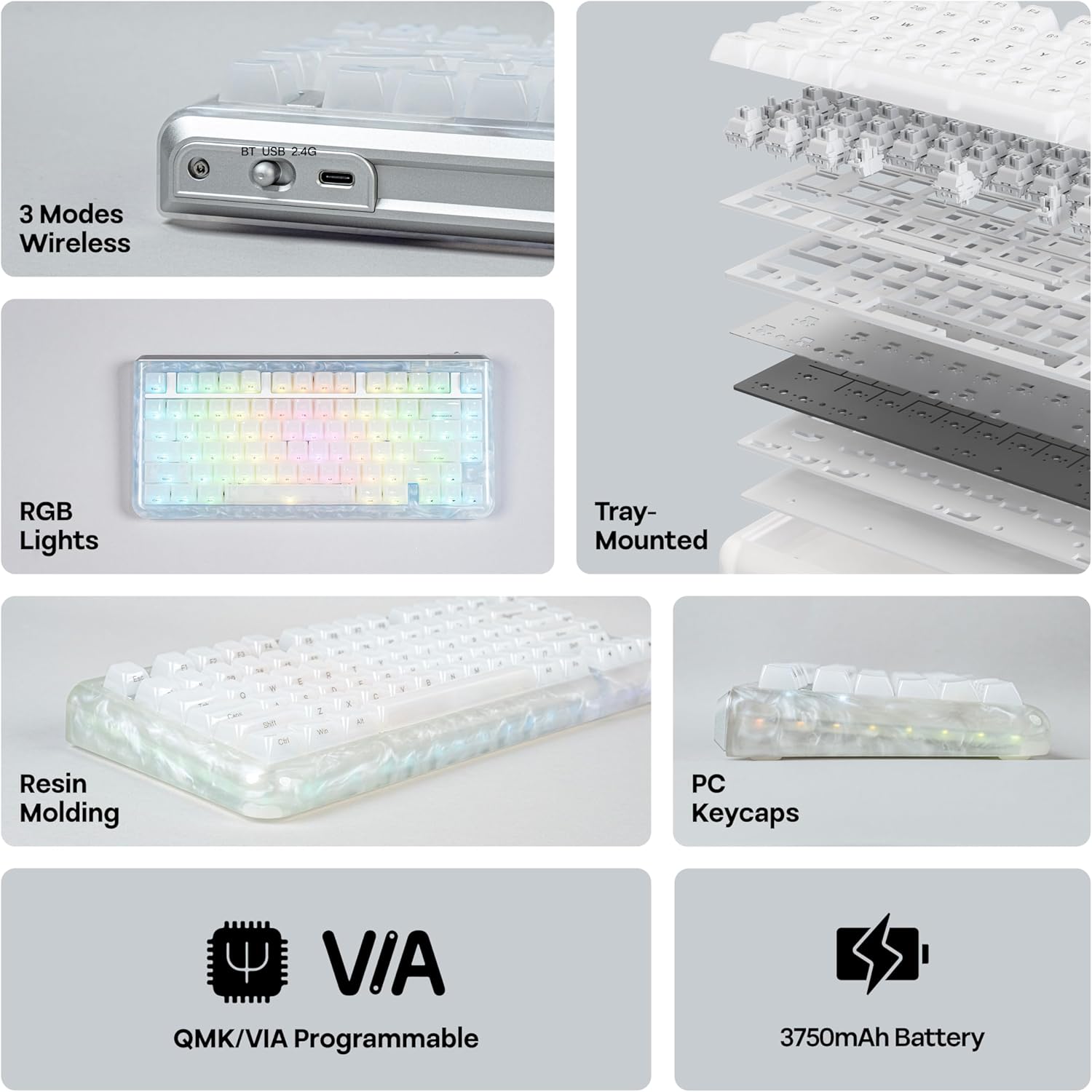
Image: KiiBoom Jade75 keyboard with its accessories, including a USB-C cable, keycap puller, and switch puller.
Video: An unboxing of the KiiBoom Jade75 keyboard, showcasing the packaging, included accessories, and a demonstration of the typing sound and RGB lighting.
Producte acabatview
The KiiBoom Jade75 features a compact 75% layout, combining essential keys with a space-saving design. Its resin molding provides a durable and aesthetically pleasing translucent case, complemented by a tray-mounted design for a stable typing experience. The keyboard is equipped with south-facing RGB backlighting for vibrant illumination.
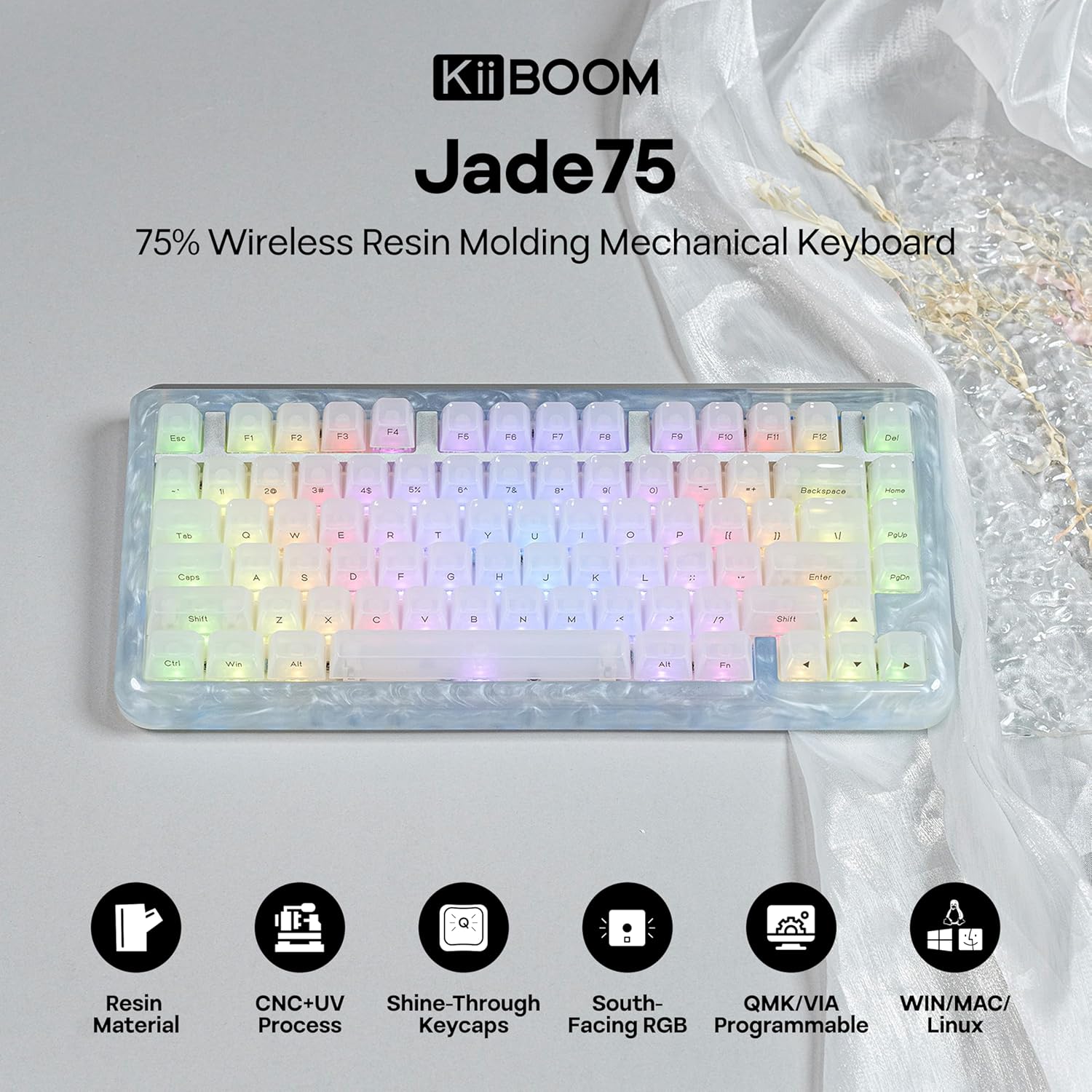
Imatge: Vista de dalt a baix view of the KiiBoom Jade75 keyboard, showcasing its 75% layout, translucent resin case, and keycap design.
Configuració i connectivitat
The KiiBoom Jade75 offers three connectivity modes: 2.4GHz wireless, Bluetooth 5.0, and USB-C wired. Choose the mode that best suits your device and usage.
1. USB-C Wired Mode
- Connecteu el cable USB-C proporcionat al port USB-C del teclat.
- Connecteu l'altre extrem del cable a un port USB disponible de l'ordinador.
- El teclat es reconeixerà automàticament i estarà llest per al seu ús.
2. Mode sense fil de 2.4 GHz
- Localitza el receptor USB de 2.4 GHz (normalment es guarda en un compartiment del teclat).
- Connecteu el receptor de 2.4 GHz a un port USB disponible de l'ordinador.
- On the keyboard, switch the mode selector to 2.4G.
- The keyboard should automatically connect to the receiver. If not, press Fn + R per iniciar l'aparellament.
3. Mode Bluetooth 5.0
El teclat admet fins a tres dispositius Bluetooth.
- On the keyboard, switch the mode selector to BT.
- Mantén premut Fn + Q, Fn + W, o Fn + E for 3-5 seconds until the corresponding key flashes, indicating pairing mode.
- On your device (computer, tablet, smartphone), enable Bluetooth and search for "KiiBoom Jade75".
- Seleccioneu el teclat per emparellar. La tecla deixarà de parpellejar un cop connectat.
- Per canviar entre dispositius Bluetooth emparellats, premeu Fn + Q, Fn + W, o Fn + E breument.

Image: Visual representation of the KiiBoom Jade75's three connectivity modes: Bluetooth, 2.4GHz wireless, and USB-C, showing compatibility with laptops, PCs, tablets, and gaming consoles.
Personalització de QMK/VIA
The KiiBoom Jade75 is QMK/VIA programmable, allowing for extensive customization of key assignments, macros, and lighting effects. This feature is ideal for users who require a personalized keyboard layout and functionality.
- Download the VIA software from the official KiiBoom website or the VIA GitHub repository.
- Connect your keyboard to your computer via USB-C cable.
- Launch the VIA software. The software should automatically detect your Jade75 keyboard.
- Use the VIA interface to remap keys, create custom macros, adjust lighting settings, and define different layers for various functions.
- Changes are applied in real-time to the keyboard.
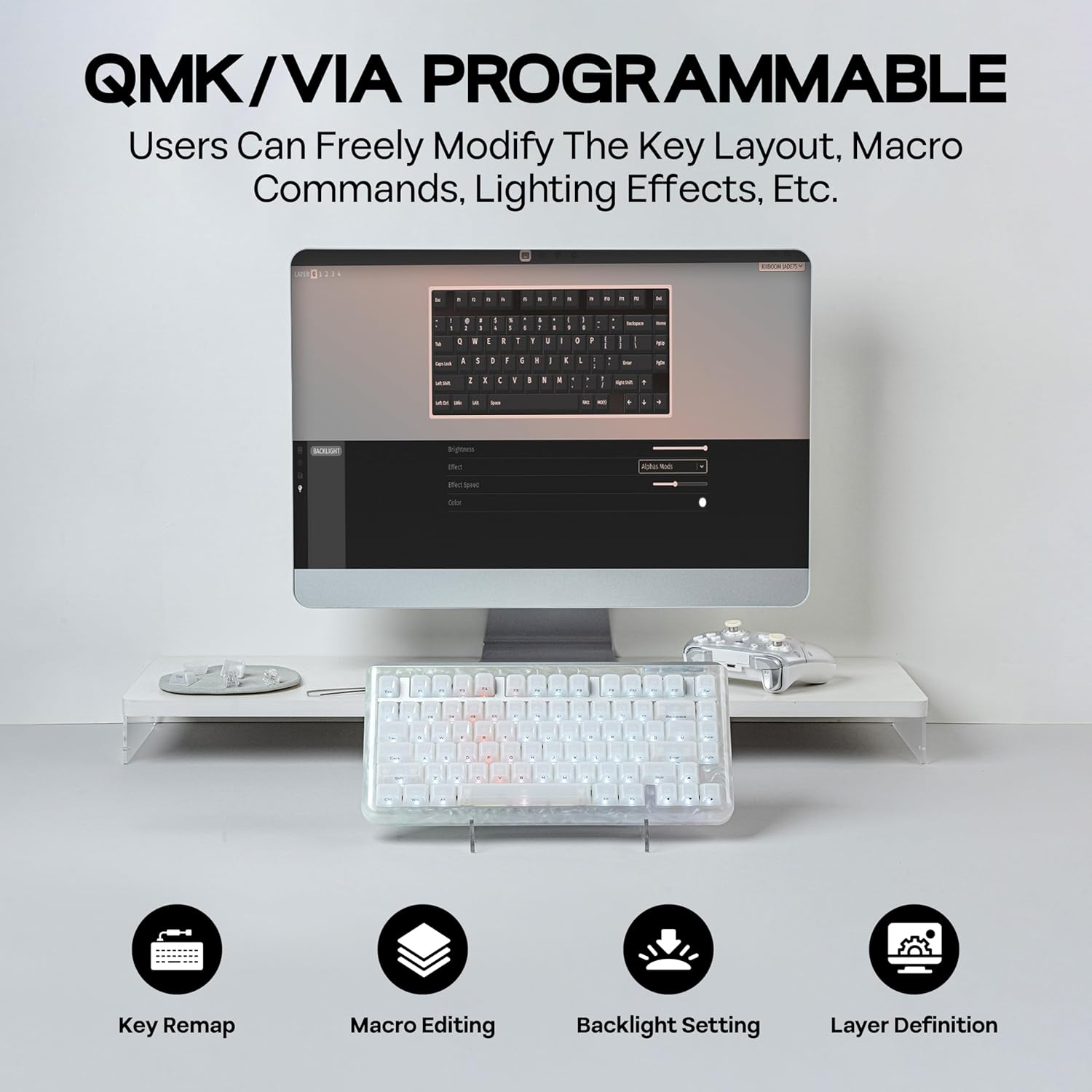
Image: A computer screen displaying the QMK/VIA software interface, illustrating options for key remapping, macro editing, backlight settings, and layer definition for the KiiBoom Jade75 keyboard.
Control d'il·luminació RGB
The KiiBoom Jade75 features dynamic RGB backlighting with 16.8 million color options and various customizable modes. The south-facing RGB LEDs enhance the visual appeal, especially with the translucent resin case.
- Toggle Backlight Effects: Premeu Fn + \| to cycle through different backlight modes.
- Toggle Sidelight Effects: Premeu Fn + Z to change the sidelight effects.
- Encendre/apagar els llums: Premeu Fn + Retrocés to toggle the keyboard lighting on or off.
- Ajusta la brillantor/la velocitat: Use the VIA software for fine-tuning brightness, speed, and specific color settings.

Image: The KiiBoom Jade75 keyboard illuminated with colorful RGB backlighting, demonstrating various lighting effects and key combinations for control.
Interruptors intercanviables en calent
The KiiBoom Jade75 features a hot-swappable PCB, allowing you to change mechanical switches without soldering. This enables easy customization of your typing feel and sound.
- Treure la tapa de les tecles: Feu servir l'extractor de tecles per treure suaument la tecla desitjada.
- Treure l'interruptor: Use the switch puller to carefully grip the top and bottom clips of the switch and pull it straight up.
- Insereix un nou interruptor: Align the pins of the new switch with the holes on the PCB. Gently push the switch down until it clicks into place. Ensure the pins are not bent.
- Substitueix la tapa de les tecles: Torneu a col·locar la tapa de les tecles al nou interruptor.
Nota: Ensure the keyboard is disconnected or powered off before changing switches to prevent accidental key presses or damage.

Imatge: Una imatge detallada view of the KiiBoom Jade75's hot-swappable PCB, demonstrating the process of removing and inserting switches, along with a close-up of a KiiBoom Linear Switch and plate-mount stabilizer.
Manteniment
Proper maintenance ensures the longevity and performance of your KiiBoom Jade75 keyboard.
- Neteja de les tecles: Use the keycap puller to remove keycaps. Clean them with mild soap and water, then dry thoroughly before reattaching.
- Neteja de la caixa: Wipe the resin case with a soft, damp tela. Eviteu productes químics durs que puguin danyar l'acabat.
- Eliminació de pols: Feu servir aire comprimit per eliminar la pols i les restes que hi ha entre les tecles i els interruptors.
- Cura de la bateria: For optimal battery life, avoid fully discharging the keyboard frequently. Charge it regularly using the provided USB-C cable.
Resolució de problemes
If you encounter issues with your KiiBoom Jade75, refer to the following common solutions:
- El teclat no respon:
- Assegureu-vos que el teclat estigui carregat o connectat mitjançant USB-C.
- Check the mode switch (2.4G, BT, USB-C) is set correctly.
- For wireless modes, ensure the receiver is plugged in (2.4G) or Bluetooth is enabled and paired (BT).
- Try restarting your computer or device.
- Claus que no es registren:
- Remove the keycap and switch for the affected key. Re-insert the switch firmly, ensuring pins are straight.
- Test with a different switch if available.
- La il·luminació RGB no funciona:
- Ensure lighting is turned on (Fn + Retrocés).
- Check lighting settings in the VIA software.
- Desconnexió Bluetooth:
- Assegureu-vos que el teclat estigui dins de l'abast del dispositiu.
- Torna a emparellar el teclat amb el dispositiu.
- Comproveu si hi ha interferències d'altres dispositius sense fil.
If issues persist, please contact KiiBoom customer support for further assistance.
Especificacions
| Característica | Detall |
|---|---|
| Marca | KiiBoom |
| Model | Jade75 |
| Disseny | 75% |
| Connectivitat | Sense fil de 2.4 GHz, Bluetooth 5.0, USB-C amb cable |
| Material de la caixa | Resin Molding & CNC+UV Crafted |
| Material de claus | PC (policarbonat) |
| Interruptors | Hot-Swappable (KiiBoom Linear Switch) |
| Il·luminació de fons | RGB (orientat al sud) |
| Programabilitat | Compatible amb QMK/VIA |
| Dispositius compatibles | Consola de jocs, ordinador portàtil, PC, telèfon intel·ligent, tauleta |
| Sistemes operatius | Windows, Mac, Linux |
| Dimensions del producte | 12.99 cm de llargada x 12.99 cm d'amplada x 1.77 cm d'alçada |
Garantia i Suport
KiiBoom products are designed for quality and durability. For warranty information, product support, or technical assistance, please visit the official KiiBoom weblloc web o contacteu directament amb el servei d'atenció al client. Conserveu el comprovant de compra per a reclamacions de garantia.
Official KiiBoom Store: KiiBoom Store on Amazon


