1. Introducció
Thank you for choosing the havit OWS915 Open Ear Headphones. These headphones are designed to provide a comfortable and secure listening experience while maintaining awareness of your surroundings. Featuring Bluetooth 5.4 connectivity, 64 hours of total playtime with the charging case, IPX5 water resistance, and Environmental Noise Cancellation (ENC) for clear calls, the OWS915 is suitable for various activities.
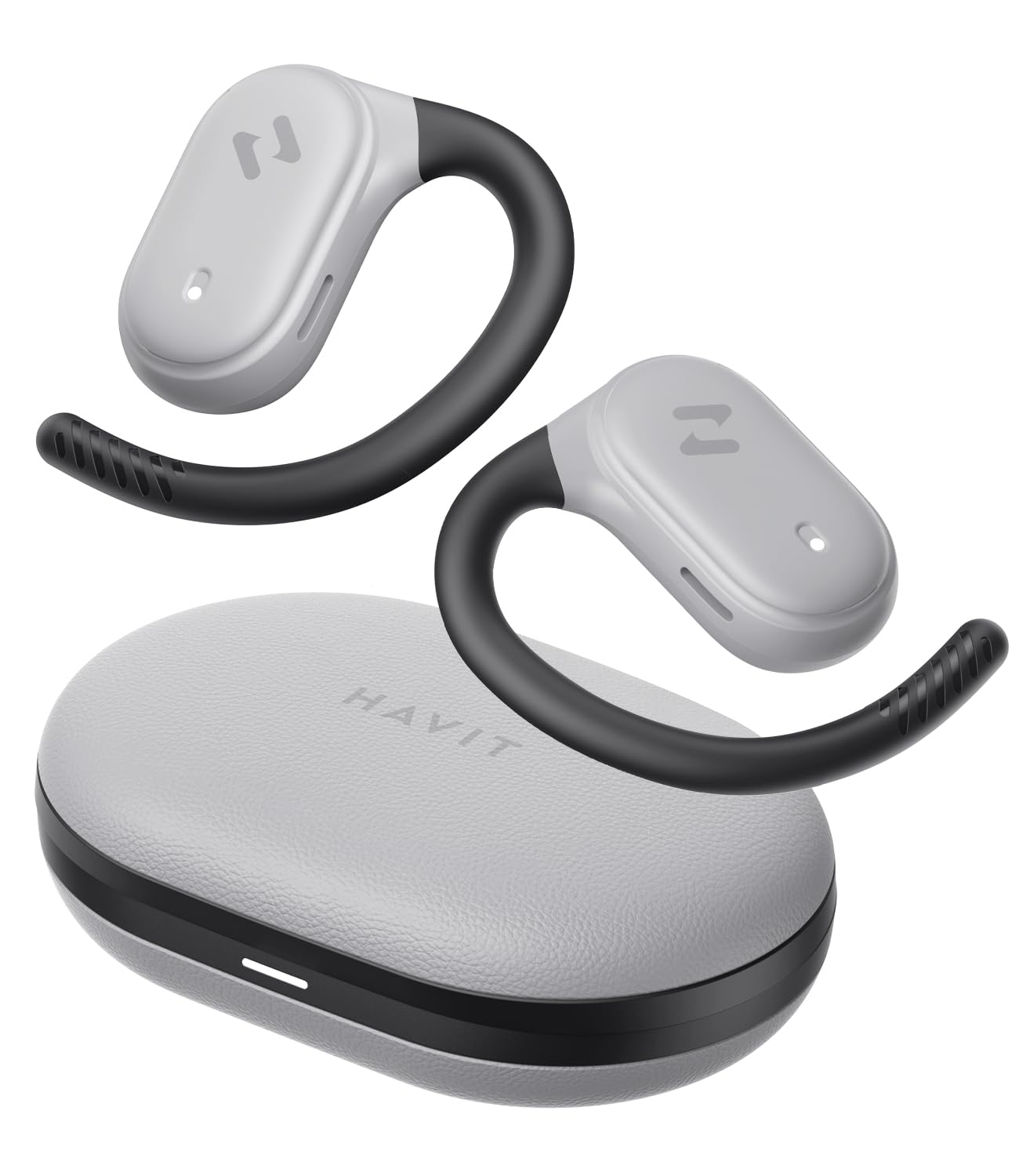
Image: havit OWS915 Open Ear Headphones and their charging case, showcasinel disseny del producte.
2. Què hi ha a la caixa
- havit OWS915 Open Ear Headphones (Left and Right)
- Estoig de càrrega
- Cable de càrrega USB-C
- Manual d'usuari

Image: A visual representation of all items included in the havit OWS915 product packaging.
3. Instruccions d'ús
Per a una comoditat i una qualitat de so òptimes, assegureu-vos de portar els auriculars correctament.
- Obriu la funda de càrrega i traieu els auriculars.
- Place the earhook over the top of your ear.
- Adjust the earbud so that the speaker rests comfortably outside your ear canal, directing sound towards your ear.

Image: A three-step visual guide demonstrating the proper way to position the open-ear headphones on the ear.
4. Configuració
4.1 Emparellament inicial
- Assegureu-vos que els auriculars estiguin carregats.
- Obre l'estoig de càrrega. Els auriculars entraran automàticament en mode d'emparellament, cosa que s'indicarà amb un llum LED intermitent.
- Al dispositiu (telèfon intel·ligent, tauleta, ordinador), activeu el Bluetooth i cerqueu els dispositius disponibles.
- Select "havit OWS915" from the list of devices.
- Un cop connectats, l'indicador LED dels auriculars deixarà de parpellejar.
4.2 Càrrega dels auriculars i l'estoig
The headphones provide up to 8.5 hours of playtime on a single charge, with the charging case extending this to a total of 64 hours.
- Auriculars de càrrega: Place the earbuds into the charging case. They will automatically begin charging. The indicator lights on the earbuds will show charging status.
- Estoig de càrrega: Connect the provided USB-C cable to the charging port on the case and to a power source. The indicator light on the case will show charging progress.

Image: The havit OWS915 headphones in their charging case, highlighting the 8.5 hours of playtime per charge and 64 hours total with the case.
5. Instruccions de funcionament
5.1 Controls tàctils
The havit OWS915 headphones feature intuitive touch controls on each earbud.
| Funció | Acció |
|---|---|
| Reproduir/Pausa | Toca qualsevol dels auriculars dues vegades |
| Cançó anterior | Touch and hold left earbud for 1 second |
| Següent Cançó | Touch and hold right earbud for 1 second |
| Respondre/Finalitzar la trucada | Toca qualsevol dels auriculars dues vegades |
| Rebutja la trucada | Touch and hold either earbud for 1 second |
| Assistent de veu | Toqueu l'auricular esquerre tres vegades |
| Mode de joc/Mode de música | Toqueu l'auricular dret tres vegades |

Image: A visual guide detailing the various touch control functions on the havit OWS915 earbuds.
5.2 HAVIT LIFE APP
Enhance your listening experience by downloading the HAVIT LIFE APP. The app allows you to:
- Customize EQ settings to match your audio preferences.
- Adjust touch control functions.
- Monitor headphone battery levels.
- Switch between game and music modes.

Image: Screenshots of the HAVIT LIFE APP, demonstrating options for equalizer settings and other customizations.
6. Característiques i tecnologia
6.1 Open-Ear Design and Comfort
The OWS915 headphones feature an open-ear design with lightweight (7.9 grams) and soft TPU materials, ensuring a comfortable and secure fit for extended wear without fatigue. This design allows you to remain aware of your surroundings.

Image: A person wearing the havit OWS915 headphones, illustrating the comfortable and secure open-ear design.
6.2 Powerful Sound Performance
Equipped with advanced 14.2mm dynamic drivers and bass enhancement technology, these headphones deliver rich bass and vibrant 3D surround sound for an immersive audio experience.

Image: An illustration of the 14.2mm dynamic drivers, highlighting their role in delivering powerful bass.
6.3 Crystal Clear Calls with 4-Microphone ENC
The integrated 4-microphone Environmental Noise Cancellation (ENC) technology ensures your voice is transmitted clearly during calls, even in noisy environments.
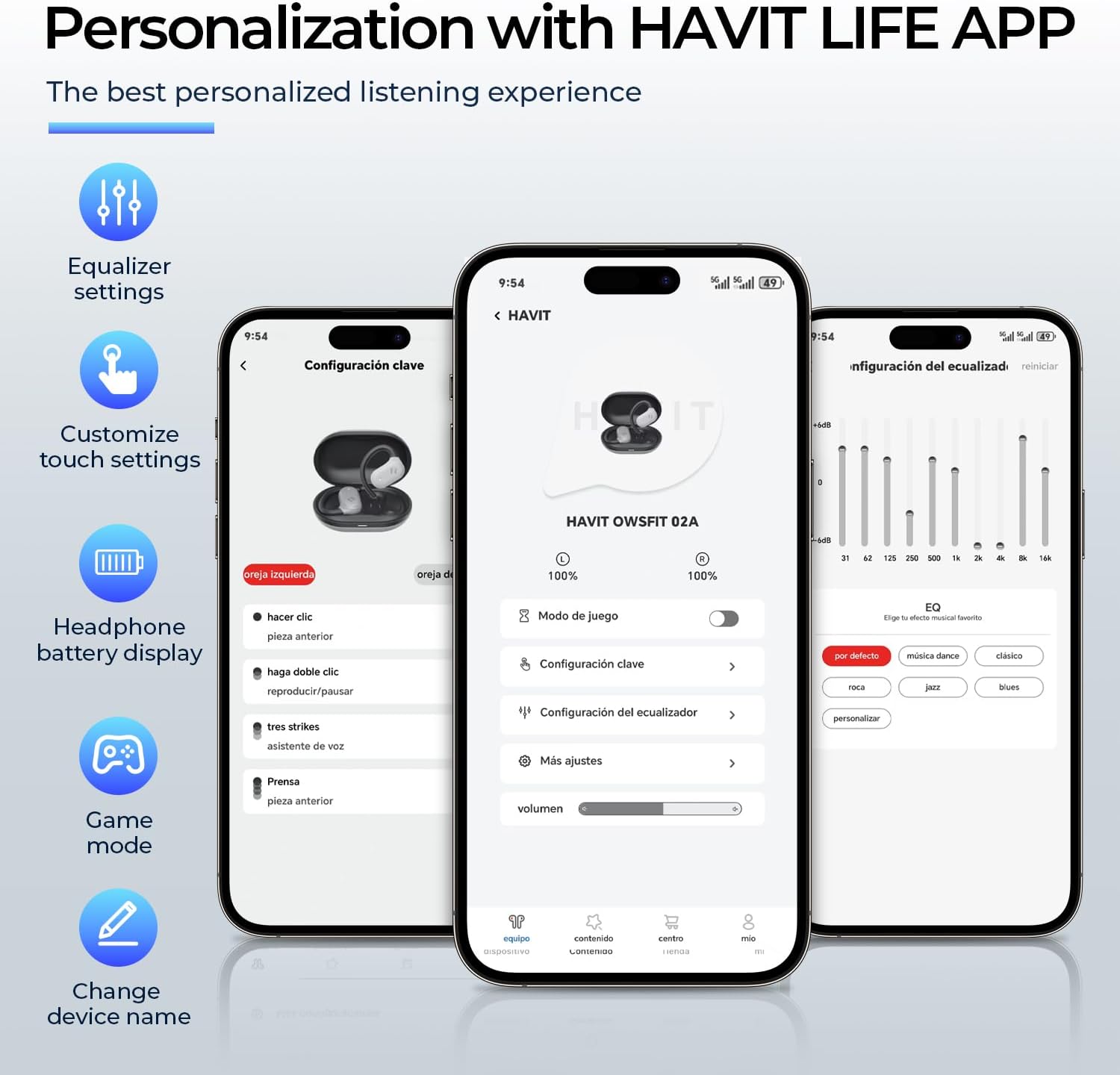
Image: A person using the havit OWS915 headphones for a call, illustrating the clear communication provided by 4-microphone ENC technology.
6.4 Cutting-Edge Directional Audio Technology
Innovative directional audio technology provides precise sound placement, minimizing sound leakage while improving bass quality. This allows you to enjoy your audio without disturbing others and without compromising your awareness.

Image: A visual representation of the directional audio technology, showing sound waves directed towards the ear with minimal leakage.
Resistència a l'aigua IPX5 6.5
With an IPX5 rating, the OWS915 headphones are resistant to sweat and splashes, making them suitable for workouts, outdoor activities, and light rain.
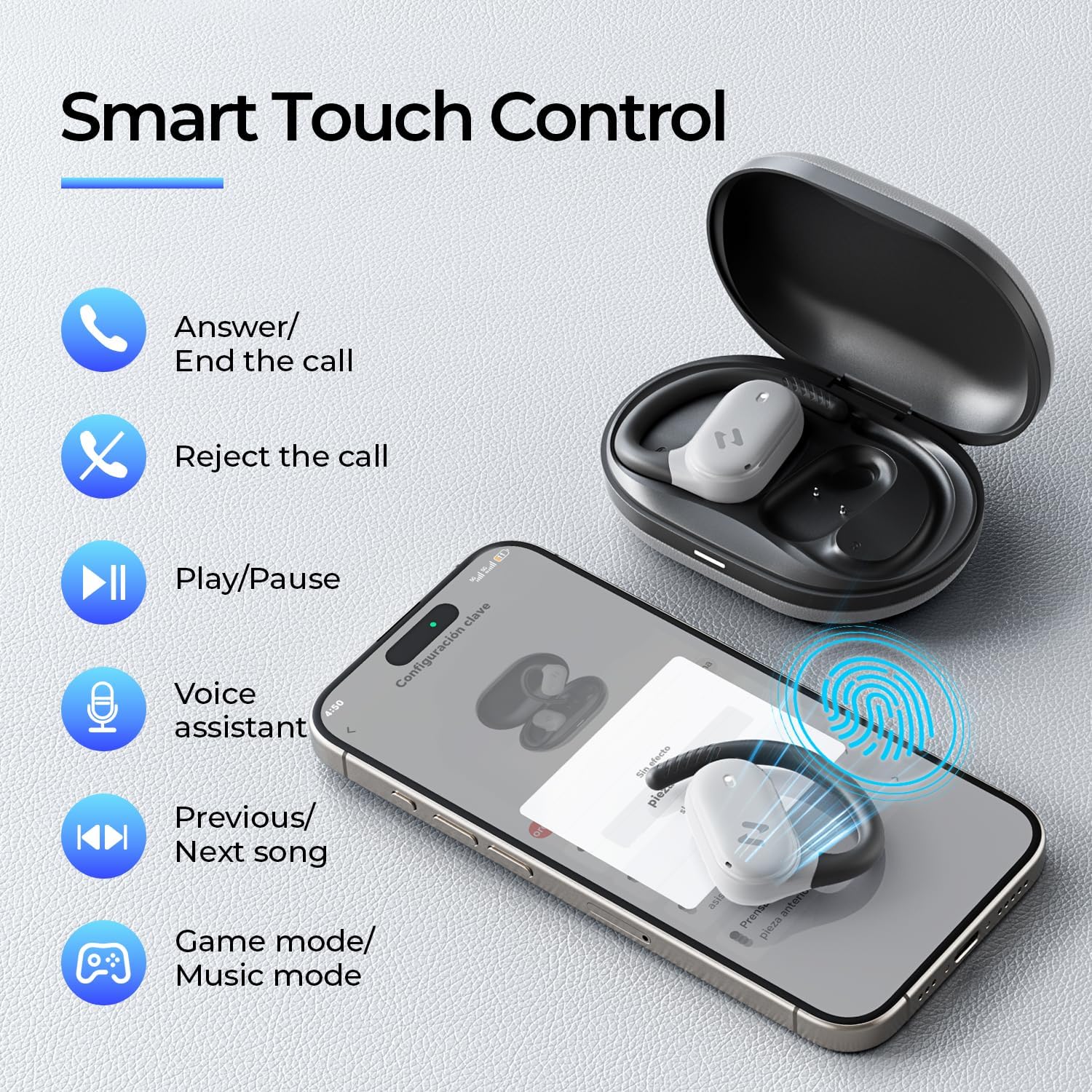
Image: The havit OWS915 headphones partially submerged in water, demonstrating their IPX5 water and sweat resistance.
7. Manteniment
- Neteja: Netegeu regularment els auriculars i l'estoig de càrrega amb un drap suau i sec. Eviteu utilitzar materials abrasius o productes químics agressius.
- Exposició a l'aigua: While IPX5 rated, avoid submerging the headphones in water. If exposed to sweat or splashes, wipe them dry before placing them back in the charging case.
- Emmagatzematge: Guarda els auriculars a la seva funda de càrrega quan no els facis servir per protegir-los i assegurar-te que es mantinguin carregats.
- Cura de la bateria: To prolong battery life, avoid fully discharging the headphones or charging case frequently. Charge them regularly.
8. Solució De Problemes
- Sense energia: Assegureu-vos que els auriculars i l'estoig de càrrega estiguin completament carregats.
- Error de vinculació:
- Assegureu-vos que el Bluetooth estigui habilitat al vostre dispositiu.
- Ensure the earbuds are in pairing mode (flashing LED).
- Desactiva el Bluetooth en altres dispositius propers que puguin estar intentant connectar-se.
- Try resetting the earbuds (refer to the full manual for specific reset instructions if needed).
- Sense so:
- Comproveu el nivell de volum tant del dispositiu com dels auriculars.
- Assegureu-vos que els auriculars estiguin connectats correctament al dispositiu.
- Prova de reproduir àudio des d'una altra aplicació o font.
- Qualitat de trucada baixa:
- Assegureu-vos que els micròfons no estiguin obstruïts.
- Mou-te a una zona amb menys soroll de fons.
- Comproveu la connexió de xarxa del vostre dispositiu.
9. Especificacions
| Característica | Especificació |
|---|---|
| Nom del model | OWS915 |
| Tecnologia de connectivitat | Sense fil (Bluetooth 5.4) |
| Interval Bluetooth | 10 metres |
| Durada de la bateria (auriculars) | 8.5 hores (una sola càrrega) |
| Temps de reproducció total (amb estoig) | 64 hores |
| Nivell de resistència a l'aigua | IPX5 (impermeable) |
| Mida del controlador d'àudio | 14.2 mil·límetres |
| Mètode de control | Aplicació, Toc |
| Components inclosos | Micròfon |
| Pes de l'article (auriculars) | 7.9 grams (cada una) |
| Pes de la maleta de transport | 77.8 grams |
| Material | PC + ABS + TPU |
| Resposta de freqüència | 20 kHz |
| Sensibilitat | 118 dB |
| Impedància | 32 ohms |
10. Guia de vídeo
Mireu aquest vídeo oficial per veure-ho totview of the havit OWS915 Open Ear Headphones.
Video: An official product video from HAVIT Direct showcasing the havit OWS915 Open Ear Headphones, including their design and features.
11. Garantia i Suport
havit products come with a standard warranty. For detailed warranty information, technical support, or customer service inquiries, please refer to the warranty card included in your product packaging or visit the official havit weblloc web. També podeu contactar directament amb el venedor per obtenir ajuda.
Assistència en línia: www.havit.com/support


