1. Introducció
This manual provides essential information for the safe and efficient use of your HOTWAV R9 Plus Rugged Tablet. Please read it thoroughly before operating the device to ensure optimal performance and longevity. This tablet is designed for durability and high performance in various environments.
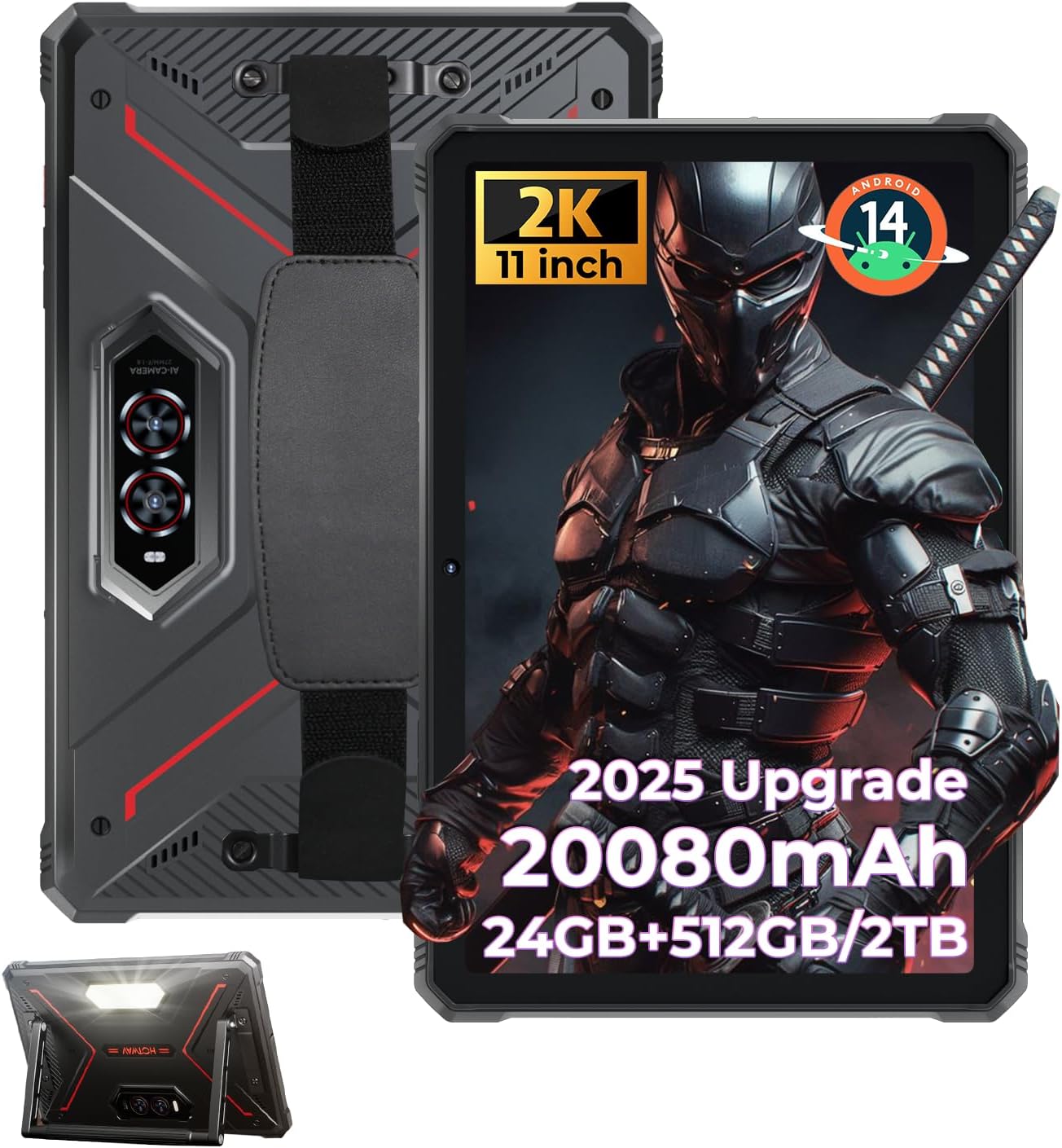
Figure 1: HOTWAV R9 Plus Rugged Tablet Overview
2. Característiques clau
- Durabilitat: IP68, IP69K, and MIL-STD-810H certified for water, dust, and drop resistance.
- Visualització: 11-inch 2K FHD+ IPS scratch-resistant display (1200x1920 resolution).
- Rendiment: Unisoc T7280 Octa-Core processor with 24GB RAM (8GB fixed + 16GB expandable) and 512GB ROM, expandable up to 2TB via TF card.
- Bateria: 20080mAh mega battery with 20W fast charging and OTG reverse charging support.
- Càmeres: 64MP rear camera, 16MP front camera, with underwater photography capability.
- Sistema operatiu: Android 14 with Gemini AI Smart Assistant.
- Connectivitat: Dual SIM 4G LTE, 2.4G/5G dual-band WiFi, Bluetooth 5.0, multi-satellite GPS (GPS/Beidou/GLONASS/Galileo), Face ID.
- Característiques addicionals: C ajustableampinglight, aluminum stand, and attachable hand strap.
3. Configuració
3.1 Encès inicial
- Press and hold the Power button located on the side of the tablet until the screen illuminates.
- Segueix les instruccions que apareixen a la pantalla per seleccionar el teu idioma i la teva regió.
3.2 Configuració del compte de Google
To access the Google Play Store and other Google services, you will need to sign in with your Google account. You can create a new account if you do not have one. This step can be skipped, but functionality will be limited.
3.3 Security Setup (PIN/Pattern/Password)
For enhanced security, set up a screen lock method. A PIN of at least 4 digits is required, with a 6-digit PIN recommended. Other options include pattern or password.
3.4 Connexió Wi-Fi
Connect your tablet to a Wi-Fi network for internet access. Go to Settings > Network & Internet > Wi-Fi, select your network, and enter the password.
3.5 Instal·lació de l'aplicació
Once connected to Wi-Fi and signed into your Google account, you can download and install applications from the Google Play Store.
Vídeo 1: Acabatview of the HOTWAV R9 Plus Rugged Tablet, demonstrating various features and usage scenarios.
4. Funcionament
4.1 Campinglight Function
The tablet features a powerful Campinglight on its rear. Access its controls through the quick settings panel or a dedicated app to adjust brightness (up to 350 lumens) and modes (Lighting, Sharp Light, SOS, High-Medium-Low, Dauer).

Figure 2: Rear Campinglight in operation.
4.2 Underwater Camera Mode
Utilize the tablet's waterproof design for underwater photography. Activate the underwater camera mode from the camera app settings to capture photos and videos while submerged.

Figure 3: Tablet used for underwater photography.
4.3 Mode guant
The R9 Plus supports Glove Mode, enhancing touchscreen sensitivity for use with gloves. This feature is beneficial in cold weather, construction sites, or outdoor activities.

Figure 4: Tablet touchscreen responsive with gloves.
4.4 OTG Reverse Charging
The tablet supports OTG (On-The-Go) reverse charging, allowing it to function as a power bank to charge other devices. Connect your device to the tablet using a compatible OTG cable.

Figure 5: OTG reverse charging in action.
5. Connectivitat
5.1 Dual SIM 4G LTE
The tablet supports dual SIM cards for 4G LTE connectivity, allowing for flexible network usage. Insert your SIM cards into the designated tray.
5.2 5G WiFi & Bluetooth 5.0
Enjoy fast and stable wireless connections with 2.4G/5G dual-band WiFi and Bluetooth 5.0 for connecting peripherals.
5.3 Multi-Satellite GPS
The tablet integrates GPS, Beidou, GLONASS, and Galileo for accurate and reliable positioning and navigation.

Figure 6: Multi-satellite GPS for precise navigation.
5.4 Identificació facial
Unlock your tablet quickly and securely using facial recognition technology.
6. Performance & Storage
Processador 6.1
The HOTWAV R9 Plus is powered by a Unisoc T7280 Octa-Core chip, providing efficient performance for multitasking and demanding applications.

Figure 7: Unisoc T7280 Octa-Core Processor.
6.2 RAM & ROM
The tablet features 24GB RAM (8GB fixed + 16GB expandable) and 512GB of internal storage (ROM), which can be expanded up to 2TB using a TF (microSD) card.

Figure 8: Memory and storage capacity.
6.3 Gemini AI Smart Assistant
The tablet is equipped with Gemini AI Smart Assistant for instant answers, multi-language support, and seamless device synchronization.
7. Display & Camera
7.1 Pantalla
Experience vibrant visuals on the 11-inch 2K FHD+ IPS scratch-resistant display with a resolution of 1200x1920 pixels and a 14.5:9 screen ratio.

Figure 9: 11-inch 2K FHD+ Display.
7.2 Càmeres
The tablet features a 64MP rear camera for high-resolution photos and videos, and a 16MP front camera for selfies and video calls.

Figure 10: Dual camera system (64MP Rear + 16MP Front).
8. Durabilitat
The HOTWAV R9 Plus is built to withstand harsh conditions, certified with IP68, IP69K, and MIL-STD-810H standards. It is drop-proof up to 1.2m and water/dust-resistant up to 2m depth for at least 30 minutes.

Figure 11: Durability features (Drop-proof, Waterproof, Dust-proof).
8.1 Corning Gorilla Glass 3
The display is protected by Corning Gorilla Glass 3, offering enhanced scratch resistance and durability.
9. Bateria i càrrega
The tablet is equipped with a massive 20080mAh battery, providing extended usage times:
- Up to 3000 hours of standby time.
- Fins a 100 hores de temps de conversa.
- Fins a 1000 hores de reproducció de música.
It supports 20W fast charging via a Type-C port for quick power replenishment.

Figure 12: 20080mAh Massive Battery.
10. Solució De Problemes
10.1 Compatibilitat de xarxa
Please note that HOTWAV rugged tablets are not compatible with AT&T, Cricket, or Verizon networks. They fully support T-Mobile, Mint, Boost, and Google Fi.
10.2 Problemes generals
- El dispositiu no respon: Premeu i manteniu premut el botó d'engegada durant 10-15 segons per forçar un reinici.
- Problemes de connexió Wi-Fi: Ensure your Wi-Fi router is working correctly and the password is entered accurately. Try restarting both the tablet and the router.
- Rendiment lent: Tanca les aplicacions que no fas servir, esborra la memòria cau o reinicia la tauleta. Considera alliberar espai d'emmagatzematge.
11. Manteniment
- Neteja: Utilitzeu un suau, damp cloth to clean the tablet's screen and body. Avoid harsh chemicals or abrasive materials.
- Emmagatzematge: Guardeu la tauleta en un lloc fresc i sec, allunyat de la llum solar directa i de temperatures extremes.
- Cura de la bateria: Avoid fully discharging the battery frequently. For long-term storage, charge the battery to around 50-60%.
- Protecció del port: Assegureu-vos que totes les cobertes dels ports estiguin ben tancades per mantenir la resistència a l'aigua i la pols.
12. Especificacions
| Característica | Especificació |
|---|---|
| Model | R9 Plus |
| Sistema operatiu | Android 14 |
| Mida de la pantalla | 11 polzades |
| Resolució de pantalla | 1920 x 1200 pixels (2K FHD+) |
| Processador | Unisoc T7280 Octa-Core |
| RAM | 24GB (8GB fixed + 16GB expandable) |
| Emmagatzematge intern (ROM) | 512 GB |
| Emmagatzematge ampliable | Fins a 2 TB mitjançant targeta TF |
| Càmera posterior | 64MP |
| Càmera frontal | 16MP |
| Capacitat de la bateria | 20080 mAh |
| Càrrega ràpida | 20W |
| Resistència a l'aigua/pols | IP68 i IP69K |
| Resistència a les caigudes | MIL-STD-810H (1.2m) |
| Tipus sense fil | 802.11ac, 802.11n (2.4G/5G WiFi) |
| Bluetooth | 5.0 |
| GPS | GPS/Beidou/GLONASS/Galileo |
| Pes de l'article | 4.02 lliures |
| Dimensions del producte | 26.5 x 16.8 x 1.2 polzades |
13. Garantia i assistència
The HOTWAV R9 Plus tablet comes with:
- A 30-day no-questions-asked return policy.
- A 2-year warranty.
- Suport tècnic de per vida.
- Servei d'atenció al client les 24 hores.
For any inquiries or support, please contact HOTWAV customer service.


