1. Introducció
The Raddy UV-6 Professional Weather Station is designed to provide comprehensive environmental data for your home and surroundings. It features a 6-inch VA display console and a multi-sensor outdoor unit, offering precise measurements of indoor and outdoor temperature, humidity, barometric pressure, wind speed and direction, rainfall, UV index, and light intensity. The system also includes an atomic clock for accurate timekeeping and supports monitoring of up to five areas with optional additional sensors.

Figure 1.1: Raddy UV-6 Professional Weather Station components.
2. Contingut del paquet
Verifiqueu que tots els elements siguin presents al paquet:
- Raddy UV-6 Display Console
- Outdoor Sensor Suite (integrated rain funnel, wind vane, anemometer, temperature & humidity sensor, UV/light sensors, solar panel)
- Mounting Pole and Hardware (U-bolts, nuts, washers, mounting brackets)
- Adaptador d'alimentació per a la consola de visualització
- Manual d'usuari (aquest document)
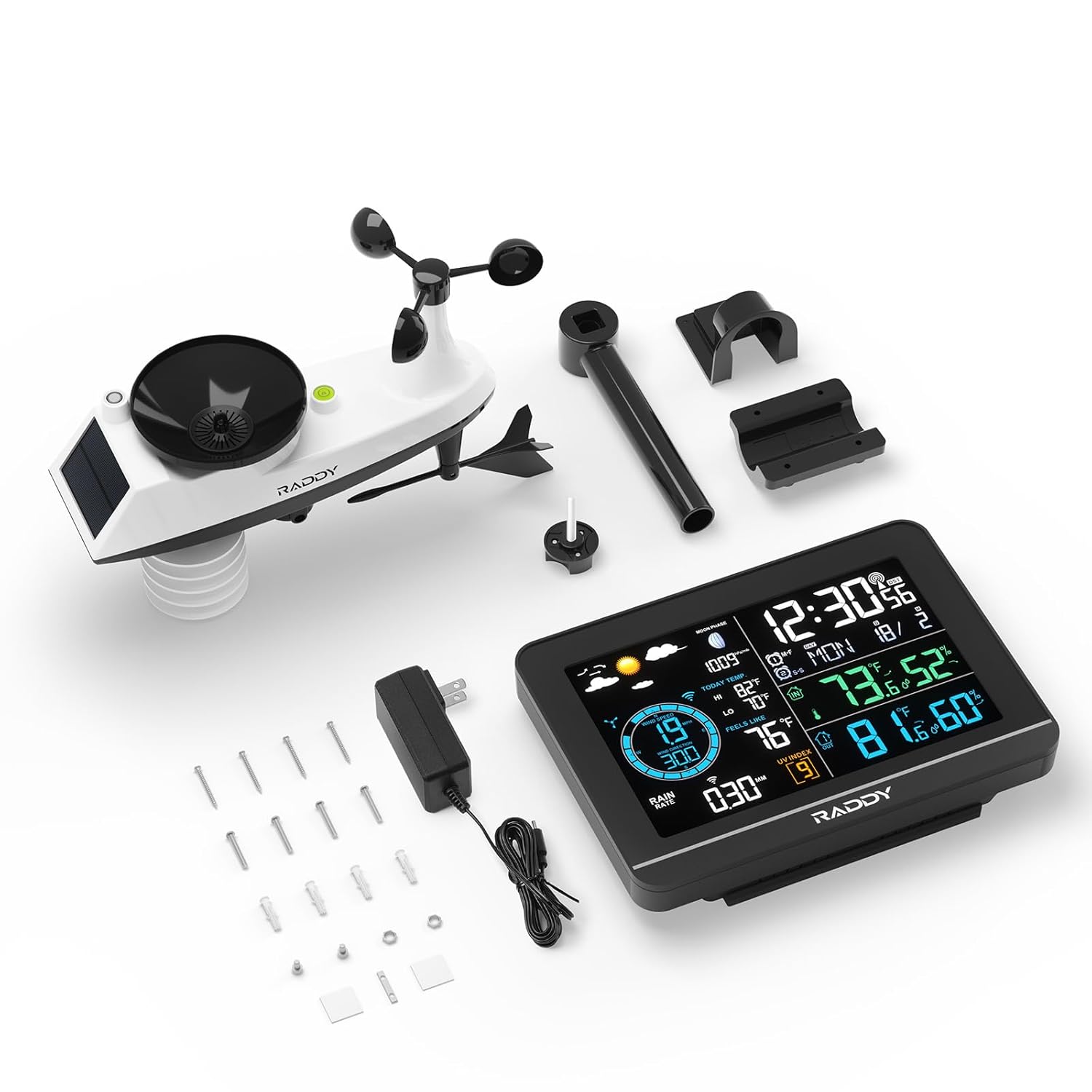
Figure 2.1: Contents of the Raddy UV-6 package.
3. Característiques del producte
- Clear 6" VA Display: High-contrast screen with wide viewing angles, displaying various weather parameters.
- Precision Outdoor Sensor Suite: Integrated sensor for accurate measurement of wind speed/direction, rainfall, temperature, humidity, UV, and light.
- Wireless Data Transmission: Outdoor sensor wirelessly transmits data up to 300 feet (91 meters) to the display console.
- Atomic Clock with Dual Alarms: Automatically syncs time via RCC signal and includes dual alarms with snooze function.
- Multi-Area Monitoring: Supports monitoring of up to 5 areas (indoor console, outdoor sensor, and three optional R5 sensors sold separately).
- Adjustable Brightness & Auto Night Mode: 5 brightness levels and a programmable night mode for display dimming.
- Weather Forecast & Moon Phases: Provides a weather forecast based on barometric pressure changes and displays 12 types of moon phases.
- UV & Light Index Monitoring: Displays current UV index and light intensity.

Figure 3.1: Multi-functional display overview.

Figure 3.2: UV Index monitoring.

Figure 3.3: Multi-area monitoring capability.

Figure 3.4: Weather forecast modes and moon phases.

Figure 3.5: Dual alarm clocks.
4. Configuració
4.1. Configuració de la consola de visualització
- Connecteu l'adaptador d'alimentació a la consola de la pantalla i connecteu-lo a una presa de corrent.
- Insert 3 x AAA batteries (not included) into the battery compartment for backup power.
- The console will power on and begin searching for the outdoor sensor and atomic clock signal.
4.2. Outdoor Sensor Suite Installation
Choose a location for the outdoor sensor that is open and unobstructed to ensure accurate readings for wind, rain, and sunlight. The sensor should be mounted securely.
- Assemble the wind cups and wind vane onto the sensor unit according to the instructions in the quick start guide.
- Insert 3 x AA batteries (not included) into the battery compartment of the outdoor sensor. Ensure the battery compartment is sealed tightly to prevent water ingress.
- Mount the outdoor sensor using the provided pole and hardware. Common mounting options include:
- On top of a pole (minimum diameter 2.4 cm)
- On the side of a pole
- On a flat surface (e.g., wooden post)
- Ensure the sensor is level for accurate rain gauge readings.
- Once powered, the outdoor sensor will automatically attempt to pair with the display console. Allow a few minutes for the connection to establish.

Figure 4.1: Outdoor sensor mounting options and details.
5. Instruccions de funcionament
5.1. Display Console Overview
The 6-inch VA display provides a clear overview of all measured data. Key areas on the display include:
- Weather Forecast & Moon Phase
- Direcció i velocitat del vent
- Today's Max/Min Temperature & Feels Like Temperature
- Dades de precipitacions
- Light & UV Index
- Time & Date (Atomic Clock)
- Temperatura i humitat interiors
- Temperatura i humitat exteriors
5.2. Ajust de la brillantor de la pantalla
The display offers 5 levels of brightness. Use the dedicated button on the console to cycle through the brightness levels. An auto night mode can be activated to automatically dim the display during specified hours (e.g., LV4 from 08:00-20:00, LV1 from 20:00-08:00).

Figure 5.1: Backlight and night mode settings.
5.3. Configuració d'alarmes
The weather station features dual alarms. Refer to the detailed instructions in the full user manual for setting specific alarm times and functions.
5.4. Monitoring Multiple Areas
If you have purchased additional R5 sensors, you can monitor up to three extra locations. The display console allows you to manually switch between zones or activate an auto-cycle mode to view data from all connected sensors sequentially.
6. Manteniment
- Neteja: Periodically clean the display console with a soft, dry cloth. For the outdoor sensor, gently clean the rain funnel, wind cups, and solar panel to ensure optimal performance. Avoid abrasive cleaners.
- Substitució de la bateria: Replace batteries in both the display console (AAA) and outdoor sensor (AA) when the low battery indicator appears on the display. For cold climates, consider using lithium batteries in the outdoor sensor for better performance.
- Col·locació del sensor: Regularly check the outdoor sensor's mounting to ensure it remains secure and unobstructed.
7. Solució De Problemes
| Problema | Causa possible | Solució |
|---|---|---|
| No outdoor data displayed | Outdoor sensor not paired or out of range; low batteries. | Ensure sensor batteries are fresh. Move sensor closer to console. Press the reset button on the outdoor sensor and re-pair. |
| Temperatura/humitat inexactes | Sensor exposed to direct sunlight/heat source; blocked ventilation. | Relocate sensor to a shaded, well-ventilated area. Ensure radiation shield is clear. |
| Wind speed/direction incorrect | Anemometer/wind vane obstructed or not spinning freely. | Check for debris (leaves, spiderwebs) on the wind cups and vane. Ensure they rotate freely. |
| Rainfall data inaccurate | Rain funnel blocked; sensor not level. | Clear any debris from the rain funnel. Ensure the outdoor sensor is mounted perfectly level. |
| Atomic clock not syncing | Interference; console too far from signal source. | Place console near a window, away from electronic devices that may cause interference. Allow up to 24 hours for initial sync. |
8. Especificacions
| Característica | Detall |
|---|---|
| Número de model | UV6 |
| Tipus de visualització | 6-inch VA Display |
| Font d'alimentació (consola) | AC Adapter (included), 3 x AAA Batteries (backup, not included) |
| Font d'alimentació (sensor exterior) | 3 x AA Batteries (not included), Solar Panel for long-term use |
| Interval de transmissió sense fil | Fins a 91 metres (300 peus) a l'aire lliure |
| Característiques especials | Adjustable Brightness, Dual Alarms, Large Display, Wireless Connectivity, Atomic Clock, UV Index, Light Index |
| Dimensions (consola) | Approx. 6.2" (W) x 4.5" (H) |
| Data de primera disponibilitat | 28 d'abril de 2025 |
9. Garantia i Suport
Specific warranty details for the Raddy UV-6 Professional Weather Station are not provided in this manual. For warranty information, technical support, or service inquiries, please refer to the product packaging or contact Raddy customer service directly through their official weblloc web o el venedor on es va comprar el producte.


