1. Configuració
The OSCOO CU002 Dual USB Flash Drive is designed for plug-and-play convenience across various devices. No special drivers or software installation is required for basic functionality.
1.1 Dispositiu acabatview

Image: The OSCOO CU002 flash drive featuring both USB-A and USB-C connectors, highlighting its dual interface capability.
The flash drive features a dual interface with both USB-A and USB-C connectors, allowing compatibility with a wide range of devices including smartphones, tablets, laptops, and desktops. The swivel design protects the unused connector.
1.2 Connexió inicial
Simply insert the appropriate connector (USB-A or USB-C) into your device's port. The device should automatically recognize the flash drive as external storage.
Video: Demonstrates how to connect the OSCOO SU001 (similar model) to an iOS device and transfer files. This process is applicable to the CU002 model.
2. Funcionament
Once connected, you can manage files on the OSCOO CU002 flash drive using your device's native file sistema de gestió.
2.1 File Transferència
Per transferir files, navigate to the flash drive's directory through your device's file explorer. You can then copy, paste, or move files between your device's internal storage and the flash drive.

Image: Visual representation of the OSCOO CU002 flash drive's fast data transfer capabilities, indicating speeds up to 150MB/s.
The drive supports fast data transfer speeds, with read speeds up to 100MB/s and write speeds up to 30MB/s, enabling quick transfer of large files, fotos i vídeos.
2.2 Swivel Design
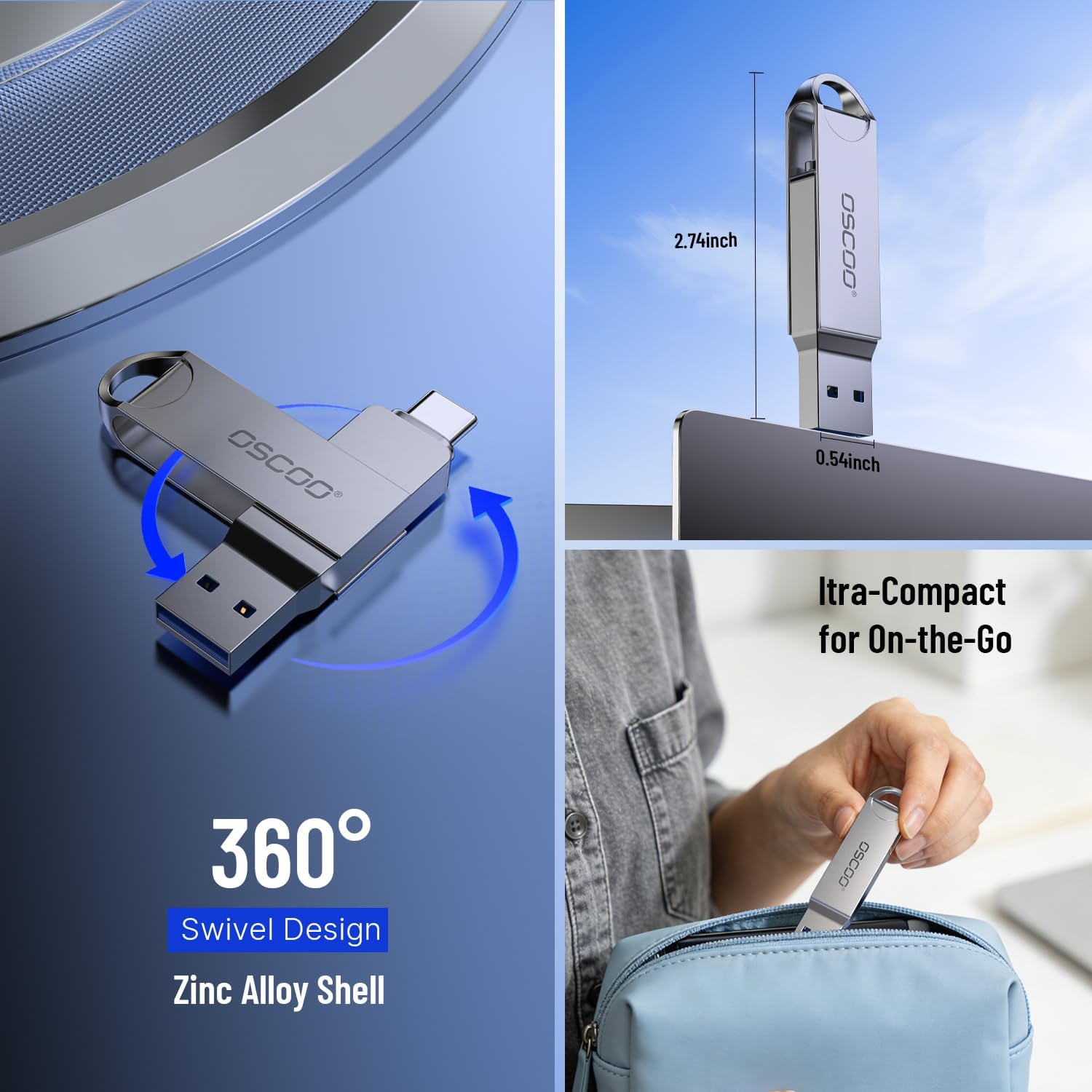
Image: The 360-degree swivel design of the OSCOO CU002 flash drive, illustrating how the protective zinc alloy shell rotates to cover either the USB-A or USB-C connector.
The 360-degree swivel design allows you to easily switch between the USB-A and USB-C connectors while protecting the unused port. The durable zinc alloy shell provides robust protection.
2.3 Compatibilitat àmplia

Image: The OSCOO CU002 flash drive demonstrating wide compatibility with devices such as smartphones, tablets, and laptops.
The dual USB-A and USB-C ports ensure broad compatibility with devices running Windows, macOS, Linux, and Android operating systems.
3. Manteniment
- Mantenir net: Regularly wipe the exterior of the flash drive with a soft, dry cloth to remove dust and debris.
- Protegir els connectors: Utilize the swivel design to cover the unused connector to prevent dust and physical damage.
- Eviteu condicions extremes: While durable, avoid exposing the flash drive to extreme temperatures, direct sunlight, or excessive moisture.
- Expulsió segura: Always safely eject the flash drive from your device before physically removing it to prevent data corruption.
4. Solució De Problemes
| Problema | Causa possible | Solució |
|---|---|---|
| Drive not recognized by device. | Incorrect insertion, incompatible port, or device driver issue. | Ensure the drive is fully inserted into the correct USB-A or USB-C port. Try a different port or device. Restart your device. |
| Velocitats de transferència de dades lentes. | Older USB port (e.g., USB 2.0), large file sizes, or background processes. | Ensure you are using a USB 3.0/3.1 compatible port for optimal speeds. Close unnecessary applications. |
| Files not copying/moving. | Insufficient space, file system limitations, or corrupted drive. | Check available storage space on the drive and your device. Ensure the file size does not exceed file system limits (e.g., 4GB for FAT32). Format the drive if necessary (Nota: això esborrarà totes les dades). |
| Drive gets warm during use. | Normal operation during data transfer. | This is normal, especially during prolonged data transfers. If it becomes excessively hot or causes device issues, discontinue use and contact support. |
5. Especificacions
- Model: CU002-128GB-CA
- Capacitat: 128 GB
- Interfície: USB 3.1 Gen 1 (USB-A & USB-C Dual Interface)
- Velocitat de lectura: Fins a 100 MB/s
- Velocitat d'escriptura: Fins a 30 MB/s
- Material: Aliatge de zinc
- Dimensions (LxWxH): 2.74 x 0.54 x 0.36 polzades (69.6 x 13.7 x 9.1 mm)
- Pes: 0.67 unces (19 grams)
- Compatibilitat: Windows, macOS, Linux, Android
- Característiques especials: Lightweight, Portable, Shockproof, Temperature Proof, Water Proof
6. Garantia i assistència
6.1 Informació de la garantia
The OSCOO CU002 Flash Drive comes with a Garantia limitada d'3 any from the date of purchase. This warranty covers manufacturing defects and material faults under normal use. It does not cover damage caused by misuse, accident, unauthorized modification, or external causes.
Conserveu el vostre comprovant de compra per a reclamacions de garantia.
6.2 Atenció al client
For technical assistance, warranty claims, or general inquiries, please contact OSCOO customer support through the following channels:
- Correu electrònic: Refer to your product packaging or the official OSCOO weblloc web per al correu electrònic de contacte més actual.
- Weblloc: Visita el OSCOO Store on Amazon or the official OSCOO weblloc web per a preguntes freqüents i recursos de suport.
When contacting support, please provide your product model number (CU002-128GB-CA) and a detailed description of the issue.


