1. Introducció
Thank you for choosing the Ajazz AF84 Wireless Membrane Silent Typewriter Keyboard. This keyboard combines a unique retro aesthetic with modern dual-mode connectivity, offering a comfortable and versatile typing experience. This manual provides detailed instructions for setup, operation, maintenance, and troubleshooting to ensure optimal performance of your device.

Figura 1.1: Ajazz AF84 Keyboard Overview
2. Característiques del producte
- Wireless Bluetooth & 2.4G Dual-Mode: Seamless connectivity with Bluetooth 5.0 and a 2.4G USB receiver for versatile use across multiple devices.
- Vintage Typewriter Style: Features two-tone, spherical keycaps and a classic typewriter aesthetic for a unique look.
- Built-In Tablet & Phone Stand: An extended front ledge with a sturdy card slot supports iPads, Kindles, or smartphones up to 12.9 inches for hands-free viewing.
- Disseny ergonòmic: 84-key layout with adjustable feet for customizable typing angles, promoting comfort during extended use.
- Portable & Battery-Powered: Operates on 2 AAA batteries (6+ months lifespan), offering a wireless and minimalist setup ideal for travel.
3. Guia de configuració
3.1 Instal·lació de la bateria
The Ajazz AF84 keyboard requires 2 AAA batteries for operation. The battery compartment is located on the underside of the keyboard.
- Locate the battery compartment cover on the bottom of the keyboard.
- Feu lliscar o aixequeu la tapa per obrir el compartiment.
- Introduïu 2 piles AAA, assegurant-vos de la polaritat correcta (+/-) tal com s'indica a l'interior del compartiment.
- Col·loqueu la coberta del compartiment de la bateria amb seguretat.
3.2 Modes de connectivitat
The keyboard supports two connection modes: 2.4G Wireless via USB receiver and Bluetooth 5.0.
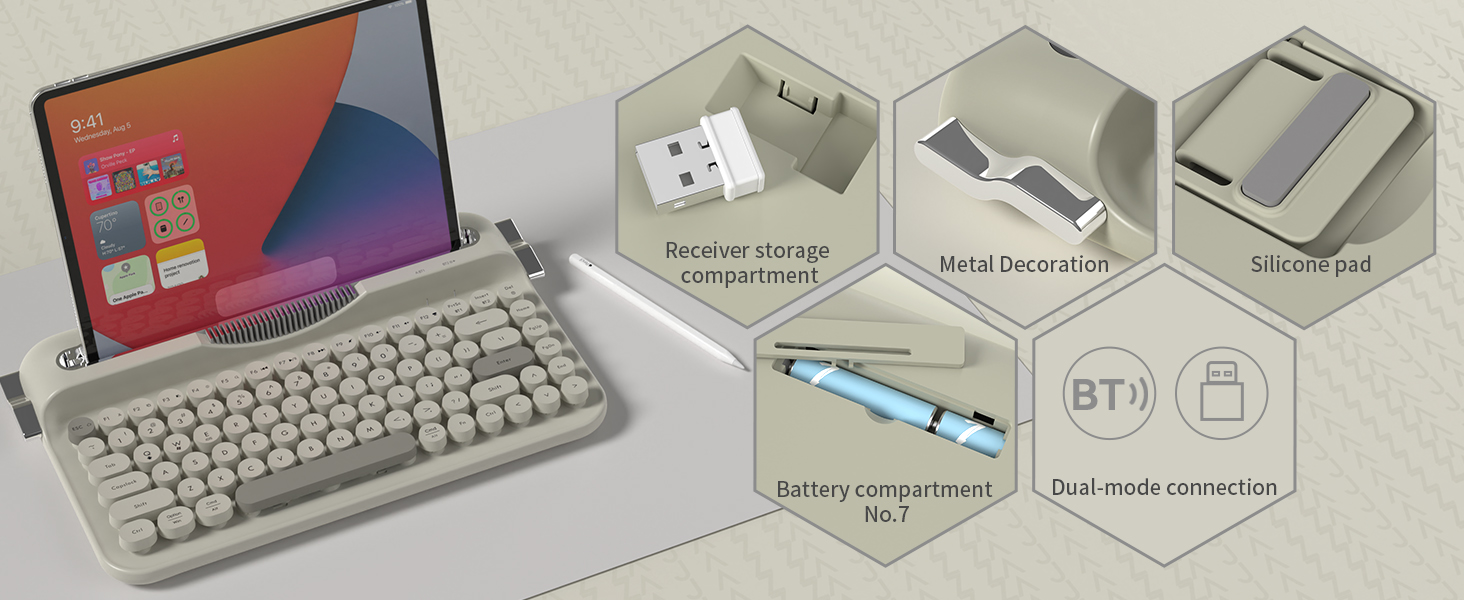
Figura 3.1: Keyboard Components and Connectivity Options
3.2.1 Connexió sense fil 2.4G
This mode provides a stable and fast connection using the included USB receiver.
- Locate the 2.4G USB receiver, typically stored in a dedicated slot on the keyboard.
- Connecteu el receptor USB a un port USB disponible de l'ordinador o dispositiu.
- The keyboard should automatically connect. If not, ensure the keyboard is powered on and in 2.4G mode (refer to Section 4.2 for mode switching).

Figura 3.2: Connexió del receptor USB 2.4G
3.2.2 Connexió Bluetooth
Connect your keyboard to Bluetooth-enabled devices like tablets, smartphones, or computers.
- Assegureu-vos que el teclat estigui encès.
- Switch the keyboard to Bluetooth mode (refer to Section 4.2).
- Al dispositiu, vés a la configuració de Bluetooth i activa el Bluetooth.
- Cerca available devices. The keyboard should appear as "Ajazz AF84" or similar.
- Select the keyboard to pair. If prompted, enter the displayed code on the keyboard and press Enter.
3.3 Compatibilitat de dispositius
The Ajazz AF84 keyboard is compatible with a wide range of operating systems and devices:
- Sistemes operatius: Windows (8.0 and above), macOS (10.10 and above), Android, iOS.
- Dispositius: Laptops, PCs, Smartphones, Tablets, Smart TVs.

Figura 3.3: Suport multidispositiu
4. Instruccions de funcionament
4.1 Llums indicadors
The keyboard features several indicator lights to provide status information:
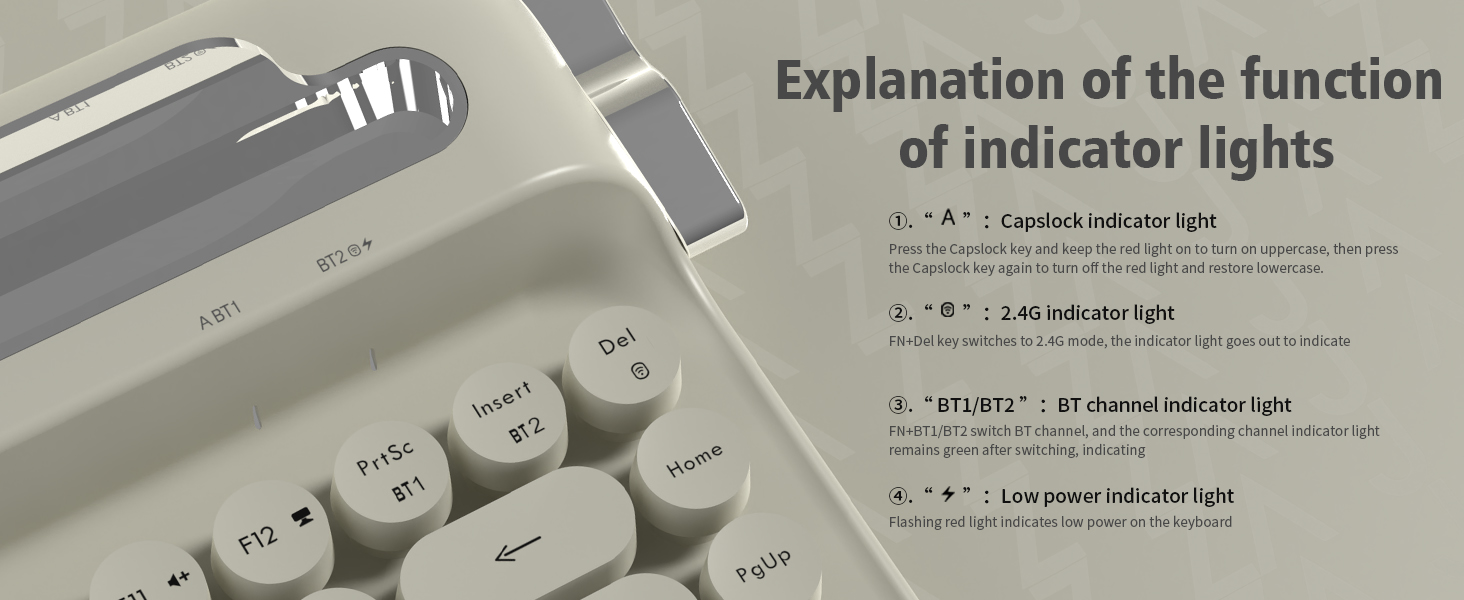
Figura 4.1: Funcions de la llum indicadora
- "A" (Capslock) Indicator Light: Press the Capslock key to turn on (red light) for uppercase. Press again to turn off (light off) for lowercase.
- "2.4G" Indicator Light: When in 2.4G mode, this light will go out to indicate connection.
- "BT1/BT2" (Bluetooth Channel) Indicator Light: The corresponding channel indicator light remains green after switching to indicate active Bluetooth connection.
- "Low Power" Indicator Light: A flashing red light indicates low battery power on the keyboard.
4.2 Canvi entre modes
To switch between 2.4G and Bluetooth modes, use the designated function keys:
- Premeu FN + Del per canviar al mode 2.4G.
- Premeu FN + BT1 or FN + BT2 per canviar entre canals Bluetooth.
4.3 Ergonomic Features
The AF84 keyboard is designed for comfort during long typing sessions.
4.3.1 peus ajustables
El teclat té duestage adjustable tilt legs on its underside, allowing you to set the angle for maximum comfort based on your personal habits.

Figura 4.2: Ergonomic Comfort with Adjustable Feet
Suport integrat per a tauleta/telèfon 4.3.2
The extended front ledge of the keyboard includes a sturdy card slot designed to securely prop up your iPad, Kindle, or smartphone (up to 12.9 inches), streamlining your workflow with hands-free viewmentre escriu.

Figura 4.3: Integrated Card Slot Bracket
5. Manteniment
Proper maintenance ensures the longevity and performance of your Ajazz AF84 keyboard.
- Neteja: Feu servir un drap suau i sec per netejar la superfície del teclat. Per a la brutícia persistent, netegeu lleugerament.amp cloth can be used, but ensure no liquid enters the keyboard. Do not use harsh chemicals or abrasive cleaners.
- Tecles de tecles: The round keycaps can be carefully removed for deeper cleaning if necessary. Use a keycap puller or gently pry them off from the edges. Realign and press firmly to reattach.
- Emmagatzematge: When not in use for extended periods, store the keyboard in a cool, dry place. Remove batteries if storing for several months to prevent leakage.
- Eviteu els vessaments: Mantingueu els líquids allunyats del teclat per evitar danys als components interns.
6. Solució De Problemes
If you encounter issues with your Ajazz AF84 keyboard, refer to the following common troubleshooting steps:
- El teclat no respon:
- Check battery level. Replace batteries if the low power indicator is flashing.
- Assegureu-vos que el teclat estigui encès.
- Verify the correct connection mode (2.4G or Bluetooth) is selected.
- Problemes de connexió 2.4G:
- Assegureu-vos que el receptor USB estigui ben connectat a un port USB que funcioni.
- Prova de connectar el receptor a un port USB diferent.
- Acosteu el teclat al receptor per descartar problemes de rang.
- Problemes de vinculació de Bluetooth:
- Ensure Bluetooth is enabled on your device and the keyboard is in pairing mode.
- Forget the keyboard from your device's Bluetooth list and attempt to re-pair.
- Assegureu-vos que cap altre dispositiu interfereixi amb el senyal Bluetooth.
- Try pairing with a different device to confirm keyboard functionality.
- Les tecles no funcionen correctament:
- Check for any debris or foreign objects under the keycaps.
- Ensure keycaps are properly seated.
- If specific keys are not working, it may indicate a hardware issue.
If these steps do not resolve the issue, please contact Ajazz customer support for further assistance.
7. Especificacions
Detailed technical specifications for the Ajazz AF84 keyboard:

Figura 7.1: Dimensions del producte
| Atribut | Valor |
|---|---|
| Marca | Ajazz |
| Nom del model | AJAZZ AF84 |
| Tecnologia de connectivitat | 2.4Ghz/BT (Bluetooth 5.0) |
| Descripció del teclat | Retro typewriter |
| Nombre de claus | 84 |
| Color | Gris |
| Característica especial | Round Key, Integrated Tablet/Phone Stand, Adjustable Feet |
| Dispositius compatibles | Ordinador portàtil, PC, telèfon intel·ligent, tauleta |
| Pes de l'article | 1.87 lliures (aprox. 850 g) |
| Dimensions del paquet | 14.41 x 8.39 x 2.68 polzades |
| Fabricant | AJAZZ |
| Font d'alimentació | 2 x piles AAA |
8. Garantia i Suport
For warranty information and customer support, please refer to the official Ajazz weblloc web o poseu-vos en contacte amb el vostre distribuïdor. Conserveu el rebut de compra com a comprovant de compra per a qualsevol reclamació de garantia.
For technical assistance or inquiries, please visit the Ajazz Store: Ajazz Official Store


