1. Introducció
The FUNSNAP CM8 SE is a 3-axis gimbal stabilizer designed for smartphones, compatible with both iPhone and Android devices. It provides stable and shake-free footage for video recording, vlogging, and content creation. Key features include a remote control, long battery life, horizontal and vertical screen switching, AI tracking, and gesture control.
2. Contingut del paquet
Verifiqueu que tots els elements que s'enumeren a continuació s'inclouen al vostre paquet:
- CM8 Gimbal x 1
- Control remot x 1
- Mini trípode x 1
- Cable de càrrega tipus C x 1
- Manual d'usuari x 1

Image: The package contents of the FUNSNAP CM8 SE gimbal stabilizer, showing the gimbal, remote controller, mini tripod, USB-C charging cable, and user manual.
3. Producte acabatview
Familiarize yourself with the main components of your FUNSNAP CM8 SE gimbal stabilizer.
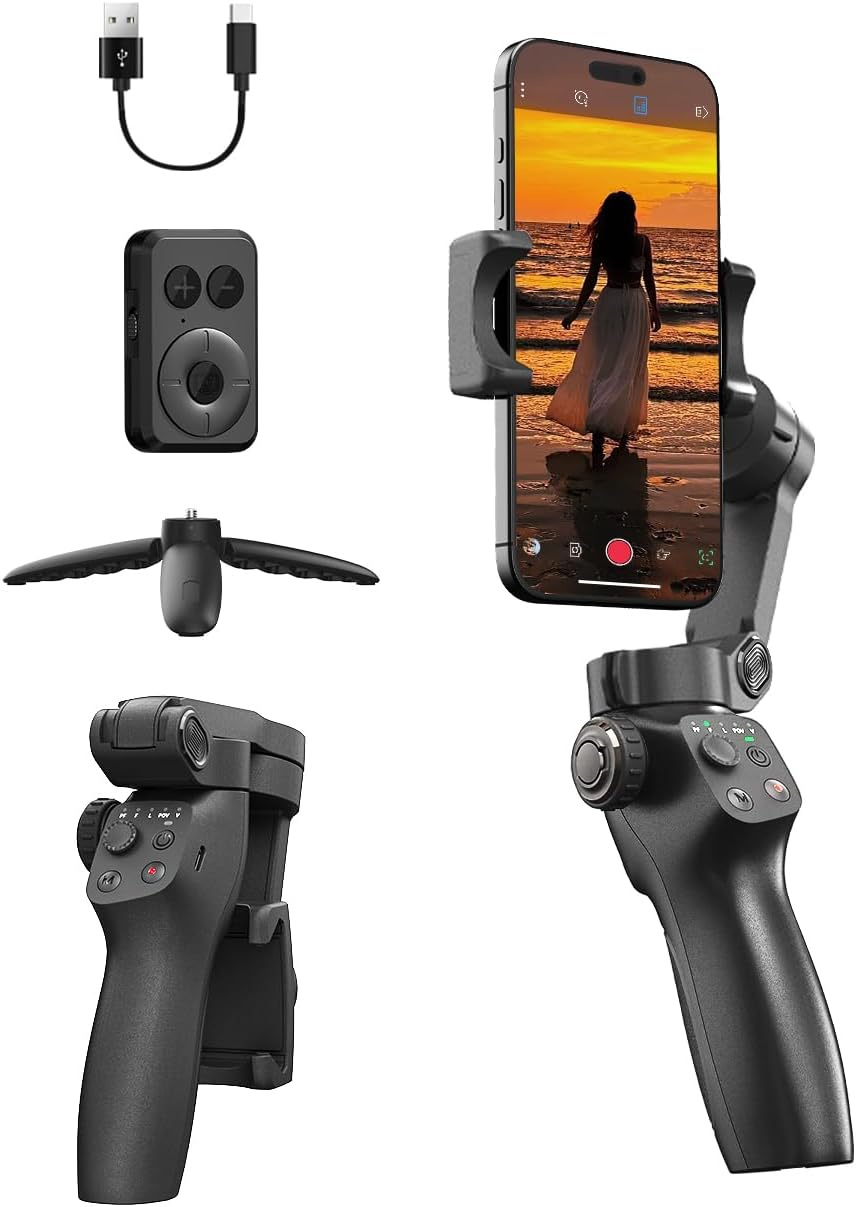
Imatge: Un cop mésview of the FUNSNAP CM8 SE gimbal stabilizer, displaying the main unit with a smartphone mounted, the detachable remote control, a mini tripod, and a USB charging cable.
4. Configuració
4.1 Càrrega del cardan
Before first use, fully charge the gimbal. A full charge takes approximately 2 hours and provides up to 12 hours of operation.
- Connect the provided Type-C charging cable to the gimbal's charging port and a USB power adapter (not included).
- L'indicador lluminós mostrarà l'estat de càrrega i s'apagarà quan estigui completament carregat.

Image: Visual representation of the gimbal's charging time (3.5 hours for fast charge) and extended battery life (12 hours), shown with the gimbal set up outdoors.
4.2 Muntatge del telèfon intel·ligent
- Allargar la clavilla del telèfonamp braços.
- Col·loca amb cura el teu telèfon intel·ligent a la tapa.amp, ensuring it is centered and secure.
- Ensure the phone's camera is not obstructed.
4.3 Equilibri del cardan
Proper balancing is crucial for optimal performance and battery life.
- With the phone mounted, adjust the phone clamp position until the phone remains level when the gimbal is powered off.
- Slight adjustments may be needed to achieve perfect balance.
4.4 Instal·lació de l'aplicació i connexió Bluetooth
For full functionality, download the Captura 2 aplicació des de la botiga d'aplicacions del teu telèfon intel·ligent.
- Download and install the "Capture2" app.
- Activa el Bluetooth al teu telèfon intel·ligent.
- Power on the CM8 SE gimbal.
- Open the Capture2 app and follow the on-screen instructions to connect to the gimbal via Bluetooth.
- Pair the remote control with the gimbal if it is not automatically connected.
5. Instruccions de funcionament
5.1 Encès/Apagat
- Encès: Manteniu premut el botó d'encesa durant 3 segons.
- Apagar: Manteniu premut el botó d'encesa durant 3 segons.
5.2 Modes del cardan
The CM8 SE offers various stabilization modes to suit different shooting scenarios:
- Seguiment panoràmic (PF): The camera pans left/right following your movement, while tilt and roll axes are locked.
- Follow (F): The camera follows your pan and tilt movements, with the roll axis locked.
- Punt de vista: All three axes (pan, tilt, roll) follow your movement, providing a first-person perspective.
- Lock (L): All three axes are locked, keeping the camera pointing in a fixed direction.
- Mode inicial: Creates a spinning camera effect.

Image: An illustration of various gimbal modes including Pan Follow (PF), Follow (F), POV, and Lock (L), demonstrating how each mode contributes to steady and controlled video visuals.

Image: The 180-degree Inception Mode in action, showing a smartphone capturing a spiraling effect on a staircase, indicating the gimbal's ability to create dynamic, rotating shots.
5.3 Horizontal and Vertical Switching
Easily switch between horizontal (landscape) and vertical (portrait) orientations with a single button press, ideal for different social media platforms.

Image: A visual demonstrating the quick switch functionality between landscape and portrait modes on the gimbal, allowing for flexible content creation.
5.4 Funcions de control remot
The included remote control allows for convenient operation from a distance of up to 32.81 feet (10 meters).
- Botó de gravació/obturador: Start/stop video recording or take photos.
- Botó de mode: Cycle through gimbal modes.
- Palanca de control: Controla els moviments de panoràmica i inclinació del gimbal.
5.5 Seguiment AI
The gimbal features AI-powered tracking for both faces and objects, ensuring your subject remains in focus and centered within the frame.
- Activate AI tracking through the Capture2 app.
- Select the face or object you wish to track.

Image: A snowboarder being tracked by the gimbal's AI, demonstrating both AI Face Tracking and AI Object Tracking capabilities to keep the subject in focus.
5.6 Gesture Control
Control recording and photo capture using simple hand gestures, enhancing convenience for solo content creators.
- Stop Gesture: A flat open palm.
- Start Gesture: An 'OK' sign.
- These gestures can also be used to trigger phone photo/video and customize composition.

Image: A person demonstrating hand gestures for Smart AI Gesture Control, including 'Stop' (open palm) and 'Start' (OK sign) for initiating recording or taking photos.
5.7 Creative Features (via Capture2 App)
The Capture2 app unlocks additional creative shooting modes:
- panorama: Capture wide, sweeping panoramic shots with ease.
- Hitchcock (Dolly Zoom): Create a dramatic effect by zooming in or out on a target while simultaneously moving the camera, maintaining the subject's size in the frame.

Image: A screenshot of the Capture2 app interface showing the Panorama mode, designed to capture wide, consistent shots of cityscapes.

Image: A screenshot of the Capture2 app interface demonstrating the Hitchcock mode, which allows zooming in and out on a target to create a cinematic effect.
6. Manteniment
6.1 Neteja
- Wipe the gimbal body with a soft, dry cloth.
- No utilitzeu netejadors líquids ni dissolvents.
6.2 Emmagatzematge
- Store the gimbal in a cool, dry place, away from direct sunlight.
- Ensure the gimbal is powered off before storage.
- Per a l'emmagatzematge a llarg termini, carregueu la bateria aproximadament al 50% cada tres mesos per mantenir-la en bon estat.

Image: The FUNSNAP CM8 SE gimbal stabilizer shown folded and stored in a small bag, highlighting its compact and portable design for easy transport.
7. Solució De Problemes
If you encounter issues with your FUNSNAP CM8 SE gimbal, refer to the following common problems and solutions:
| Problema | Causa possible | Solució |
|---|---|---|
| Gimbal does not power on | Bateria baixa; no s'ha premut prou estona el botó d'engegada | Charge the gimbal fully; Press and hold the power button for 3 seconds |
| Footage is shaky/unstable | Improper phone balancing; Gimbal not calibrated | Ensure phone is perfectly balanced; Perform gimbal calibration via the Capture2 app |
| Cannot connect to smartphone via Bluetooth | Bluetooth off; App not open; Gimbal not in pairing mode | Ensure Bluetooth is on; Open Capture2 app; Restart gimbal and try pairing again |
| El comandament a distància no funciona | Remote battery low; Not paired with gimbal | Replace remote battery (if applicable); Re-pair remote with gimbal |
| AI Tracking not functioning | Poor lighting; Subject too far/close; App issue | Ensure adequate lighting; Maintain optimal distance from subject; Restart Capture2 app |

Image: A visual comparison showing the difference between stabilized footage captured with the FUNSNAP CM8 SE and unstable footage from handheld recording, highlighting the gimbal's effectiveness.
8. Especificacions
| Característica | Especificació |
|---|---|
| Dimensions del producte | 2.5 x 3.5 x 8 inches (Folded: 8.0 x 3.5 x 2.5 inches) |
| Pes de l'article | 12.8 unces (0.8 lliures) |
| Durada de la bateria | Fins a 12 hores |
| Temps de càrrega | Approx. 2 hours (3.5 hours for fast charge) |
| Capacitat de càrrega útil | 0.66 lliures |
| Dispositius compatibles | Android, iPhone |
| Interval de control remot | Fins a 32.81 peus (10 metres) |
| Color | Negre |
9. Garantia i Suport
FUNSNAP products are manufactured to high-quality standards. For warranty information, technical support, or customer service inquiries, please refer to the official FUNSNAP weblloc web o contacteu directament amb el seu servei d'atenció al client.
You can visit the official FUNSNAP store for more information: FUNSNAP Store


