1. Introducció
The IRRADIO IR-203 Sound+ is a compact and portable wireless speaker designed for high-quality audio playback. Featuring Bluetooth 5.0 connectivity and a USB port for external media, it offers versatile listening options. Its robust design and long-lasting battery make it ideal for both home use and on-the-go entertainment.

Figura 1.1: IRRADIO IR-203 Sound+ Wireless Speaker. This image shows the speaker from an angled perspective, highlighting its compact size and fabric grille.
2. Informació de seguretat
Si us plau, llegiu atentament totes les instruccions de seguretat abans d'utilitzar el dispositiu. Conserveu aquest manual per a futures consultes.
- No exposeu l'altaveu a l'aigua ni a una humitat excessiva. Aquest producte no és impermeable.
- Avoid extreme temperatures. Do not place near heat sources or in direct sunlight.
- Do not disassemble, repair, or modify the device. This will void the warranty and may cause damage or injury.
- Utilitzeu només el volum de càrrega especificattage (DC 5V/2A).
- Mantenir fora de l'abast dels nens.
3. Contingut del paquet
Assegureu-vos que tots els elements siguin presents al paquet:
- IRRADIO IR-203 Sound+ Wireless Speaker
- Cable de càrrega USB
- Manual d'usuari (aquest document)
4. Producte acabatview
4.1. Controls i ports

Figura 4.1: lateral view of the speaker showing control buttons. From left to right: Mode button (M), Volume Down (-), Volume Up (+), Play/Pause/Next Track button (▶).

Figura 4.2: Enrere view of the speaker showing connectivity ports. From left to right: TF (MicroSD) card slot, USB-A port, ON/OFF switch, DC 5V charging port.
The speaker features intuitive controls on its top edge and essential connectivity ports on its rear panel.
- Botó de mode (M): Premeu per canviar entre els modes de reproducció Bluetooth i USB.
- Baixar el volum (-): Premeu per reduir el volum.
- Puja el volum (+): Premeu per augmentar el volum.
- Play/Pause/Next Track (▶): Press to play or pause audio. Long press to skip to the next track.
- Ranura per a targetes TF: Inseriu una targeta MicroSD per reproduir àudio directament.
- Port USB-A: Insert a USB flash drive for direct audio playback.
- Interruptor ON / OFF: Slide to power the speaker on or off.
- Port DC 5V: Connect the USB charging cable here to charge the speaker.
5. Configuració
5.1. Carregant l’altaveu
Before first use, fully charge the speaker. The battery capacity is 400 mAh.
- Connecteu el cable de càrrega USB proporcionat al port de 5 V CC de l'altaveu.
- Connect the other end of the USB cable to a compatible USB power adapter (DC 5V/2A recommended) or a computer USB port.
- El llum indicador de càrrega s'il·luminarà (el color pot variar) per indicar que l'altaveu s'està carregant.
- La càrrega completa sol trigar aproximadament 2 hores. L'indicador lluminós canviarà o s'apagarà un cop finalitzada la càrrega.
A full charge provides approximately 2 hours and 40 minutes of continuous playback at 50% volume.
5.2. Encès / apagat
To power on the speaker, slide the ON/OFF switch to the 'ON' position. You will hear an audible prompt. To power off, slide the switch to the 'OFF' position.
6. Instruccions de funcionament
6.1. Emparellament Bluetooth
The speaker uses Bluetooth 5.0 for stable wireless connection up to 10 meters.
- Ensure the speaker is powered on and in Bluetooth mode. If not, press the 'M' (Mode) button to switch to Bluetooth mode. The speaker will enter pairing mode, indicated by a flashing LED light and an audible prompt.
- Al dispositiu (telèfon intel·ligent, tauleta, ordinador portàtil), activeu el Bluetooth i cerqueu els dispositius disponibles.
- Select "IRRADIO IR-203 Sound+" from the list of found devices.
- Un cop emparellat, l'altaveu emetrà una confirmació audible i el llum LED deixarà de parpellejar.
- Ara pots reproduir àudio des del teu dispositiu a través de l'altaveu.
Nota: L'altaveu intentarà tornar a connectar-se automàticament amb l'últim dispositiu emparellat quan s'encengui.
6.2. Reproducció de targetes USB/TF
The speaker supports direct audio playback from a USB flash drive or a MicroSD (TF) card.
- Insert a USB flash drive into the USB-A port or a MicroSD card into the TF card slot.
- The speaker will automatically switch to USB/TF card mode and begin playing audio files (MP3, WAV, etc.) from the inserted storage device. If it does not switch automatically, press the 'M' (Mode) button to select the correct mode.
- Use the Play/Pause/Next Track button (▶) to control playback.
6.3. Control de volum
Use the '+' and '-' buttons on the speaker to adjust the volume. You can also control the volume from your connected device.
7. Manteniment
Per garantir la longevitat i el rendiment òptim del vostre altaveu, seguiu aquestes pautes de manteniment:
- Neteja: Feu servir un drap suau i sec per netejar la superfície de l'altaveu. No utilitzeu productes de neteja abrasius, alcohol ni dissolvents químics.
- Emmagatzematge: Quan no l'utilitzeu durant períodes prolongats, guardeu l'altaveu en un lloc fresc i sec, allunyat de la llum solar directa i de temperatures extremes.
- Cura de la bateria: To preserve battery life, avoid fully discharging the battery frequently. Charge the speaker regularly, even if not in use.
8. Solució De Problemes
If you encounter issues with your IRRADIO IR-203 Sound+ speaker, refer to the following common problems and solutions:
| Problema | Causa possible | Solució |
|---|---|---|
| L'altaveu no s'encén. | La bateria està esgotada. | Carregueu l'altaveu durant almenys 30 minuts. |
| Sense so. | El volum és massa baix o silenciat. S'ha seleccionat un mode incorrecte. | Increase volume on both speaker and connected device. Press 'M' button to switch modes. |
| No es pot emparellar per Bluetooth. | L'altaveu no està en mode d'emparellament. El dispositiu és massa lluny. Interferències. | Ensure speaker is in Bluetooth pairing mode (flashing LED). Move device closer to speaker (within 10m). Turn off other Bluetooth devices. |
| La targeta USB/TF no funciona. | Incorrecte file format. La targeta/unitat no s'ha inserit correctament. | Assegureu-vos l'àudio files are in supported format (e.g., MP3). Reinsert the USB drive or TF card firmly. Press 'M' button to select USB/TF mode. |
Si el problema persisteix després de provar aquestes solucions, poseu-vos en contacte amb l'atenció al client.
9. Especificacions
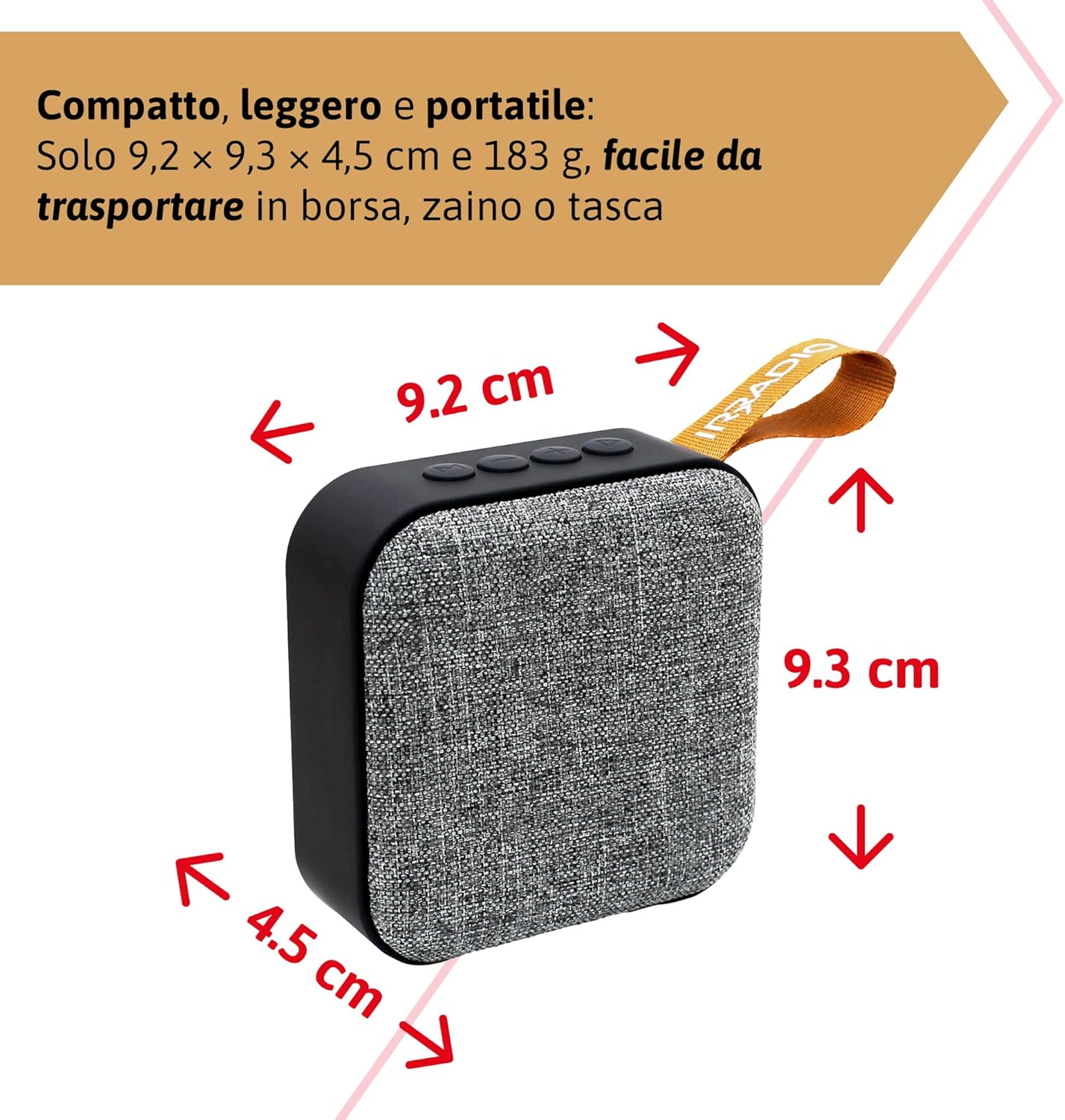
Figura 9.1: Dimensions of the IRRADIO IR-203 Sound+ speaker: 9.2 cm (width) x 9.3 cm (height) x 4.5 cm (depth).
| Característica | Detall |
|---|---|
| Nom del model | IR-203 Sound+ |
| Número de model de l'article | 550922126 |
| Marca | IRRADIO |
| Dimensions del producte | 9.2 x 9.3 x 4.5 cm |
| Pes | 183 grams |
| Tipus d'altaveu | Woofer (Full Range 50mm Driver + Passive Radiator) |
| Potència màxima de sortida de l'altaveu | RMS de 3.5 Watts |
| Tecnologia de connectivitat | Bluetooth 5.0, USB |
| Distància de transmissió sense fils | Fins a 10 metres (sense obstacles) |
| Mode de sortida d'àudio | estèreo |
| Capacitat de la bateria | 400 mAh (3.7 V, 1.48 Wh) |
| Durada de la bateria | Approx. 2 hours 40 minutes (at 50% volume) |
| Temps de càrrega | Aprox. 2 hores |
| Entrada de càrrega | DC 5V/2A |
| Dispositius compatibles | Smartphones, Tablets, Laptops, Desktop Computers, MP3 Players, USB Flash Drives |
| Color | Gris |
| Impermeable | No |
10. Garantia i Suport
10.1. Informació de la garantia
For information regarding warranty and returns, please refer to the purchase platform's policies. Typically, products purchased on Amazon.it can be returned within 30 days of receipt if you change your mind. For defective or damaged products, specific return policies apply.
For specific information on purchases made through the Marketplace, please consult the relevant help page on the platform.
10.2. Atenció al client
For further assistance, technical support, or inquiries about your IRRADIO IR-203 Sound+ speaker, please visit the official IRRADIO store page:


