1. Introducció
Thank you for choosing the AIWA FPH-S100/4G Simple Mobile Phone. This device is designed for ease of use, featuring large keys, a clear display, and essential functions like 4G connectivity, an SOS emergency button, FM radio, and a flashlight. This manual provides detailed instructions to help you set up, operate, and maintain your new phone.
2. Producte acabatview
The AIWA FPH-S100/4G is a user-friendly mobile phone with a focus on simplicity and accessibility. It supports 4G LTE for reliable calls and features a 1.8-inch color screen.

Figura 2.1: Davant view of the AIWA FPH-S100/4G mobile phone, displaying the screen and large, clearly labeled keypad.

Figura 2.2: Enrere view of the AIWA FPH-S100/4G mobile phone, highlighting the prominent orange SOS button and the integrated camera.

Figura 2.3: lateral view of the AIWA FPH-S100/4G mobile phone, illustrating its ergonomic design.

Figura 2.4: A dalt view of the AIWA FPH-S100/4G mobile phone, featuring the built-in LED flashlight.
Característiques principals:
- Tecles grans: Easy to see and press for comfortable dialing and texting.
- Botó SOS: Dedicated button for quick access to emergency contacts.
- 1.8" LCD Display: Clear color screen for easy viewing of numbers and text.
- Connectivitat 4G LTE: Ensures clear and stable call quality.
- Ràdio FM: Listen to your favorite radio stations on the go.
- Llanterna LED: Convenient for low-light situations.
- Càrrega USB-C: Modern and reversible connector for easy charging.
- Suport Dual SIM: Use two SIM cards simultaneously.
- Ranura per a targetes TF: Expandable storage for contacts, photos, and more.
3. Configuració
3.1. Contingut del paquet
Assegureu-vos que tots els elements siguin presents a la caixa:
- AIWA FPH-S100/4G Mobile Phone
- Cable USB
- Manual d'usuari (aquest document)
3.2. Instal·lació de la bateria
- Traieu la tapa posterior del telèfon fent palanca suaument per obrir-la des de l'osca.
- Alineeu els contactes de la bateria amb els terminals de l'interior del telèfon.
- Premeu la bateria cap avall fins que quedi ben fixada.
- Torneu a col·locar la coberta posterior, assegurant-vos que encaixi en el seu lloc amb un clic.
3.3. Inserting SIM Cards and TF Card
The phone supports two SIM cards and one TF (microSD) card for expandable storage.
- With the back cover and battery removed, locate the SIM card slots and the TF card slot.
- Carefully insert your SIM card(s) into the designated slots with the gold contacts facing down, following the orientation indicated on the phone.
- Insert the TF card into its slot, ensuring it is properly seated.
- Torneu a instal·lar la bateria i la coberta posterior.
3.4. Càrrega inicial
Abans del primer ús, carregueu completament la bateria del telèfon.
- Connect the USB-C cable to the charging port on the phone.
- Connecteu l'altre extrem del cable USB a un adaptador de corrent USB compatible (no inclòs) o al port USB d'un ordinador.
- L'indicador de bateria a la pantalla mostrarà l'estat de càrrega.
- Un cop estigui completament carregat, desconnecteu el carregador.


Figura 3.1: Icons representing USB-C charging and the flash card slot.
4. Instruccions de funcionament
4.1. Encendre/apagar
- Per encendre: Manteniu premut el botó Red Call End/Power botó fins que la pantalla s'il·lumini.
- Per apagar: Manteniu premut el botó Red Call End/Power button until the power off options appear, then select 'Power Off'.
4.2. Fer i rebre trucades
- Per fer una trucada: Enter the phone number using the large keypad. Press the Trucada verda botó per iniciar la trucada.
- Per respondre una trucada: Quan soni el telèfon, premeu la tecla Trucada verda botó.
- Per finalitzar una trucada: Premeu el botó Red Call End/Power botó.

Figura 4.1: The phone's simplified interface, showing the large numeric keypad for easy dialing.
4.3. Botó d'emergència SOS
The dedicated SOS button provides a quick way to contact pre-set emergency numbers.
- Setting Up Emergency Contacts: Navigate to the 'SOS Settings' in the phone's menu. Add up to 5 emergency contact numbers. These contacts will be called in sequence when the SOS button is activated.
- Activació de SOS: Manteniu premuda la taronja SOS button on the back of the phone for a few seconds. The phone will automatically dial the emergency contacts one by one until a connection is made. It will also send a pre-set emergency SMS message to these contacts.
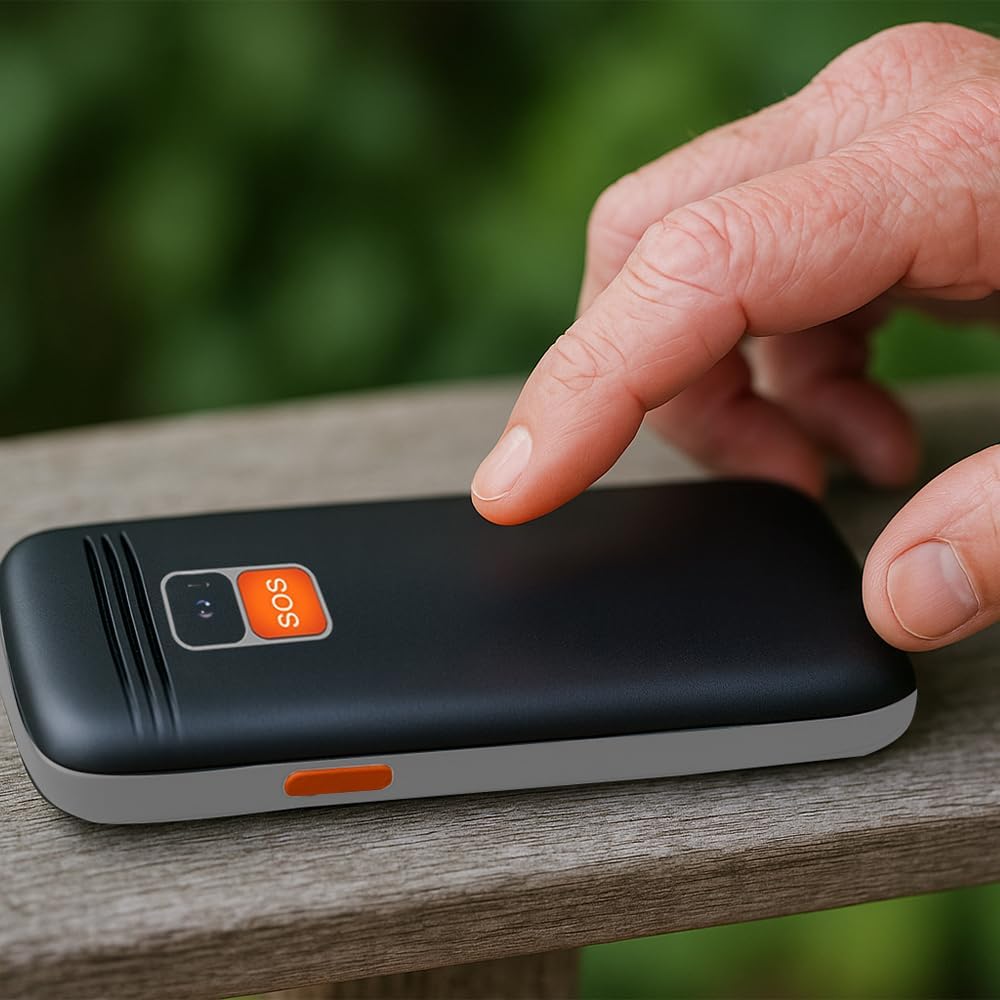
Figura 4.2: A user activating the SOS emergency function by pressing the dedicated button on the phone's rear.
4.4. Ús de la llanterna
To turn the LED flashlight on or off, locate the dedicated flashlight button on the side of the phone (or refer to the manual for specific key combination if not a dedicated button). Press and hold or toggle the button as instructed.

Figura 4.3: Icon indicating the flashlight function.
4.5. Ràdio FM
To use the FM radio, connect a wired headset (not included) to the 3.5mm audio jack, as it acts as an antenna. Navigate to the 'FM Radio' application in the phone's menu to scan for stations and adjust volume.

Figura 4.4: Icon representing the earphone output port.
4.6. Connectivitat Bluetooth
Per sincronitzar amb un dispositiu Bluetooth:
- Aneu a "Configuració" > "Bluetooth".
- Activa el Bluetooth.
- Selecciona 'Cerca devices' to find available Bluetooth accessories.
- Select your desired device from the list and follow the on-screen prompts to pair.
5. Manteniment
5.1. Neteja del dispositiu
Use a soft, dry, lint-free cloth to clean the phone's screen and body. Avoid using harsh chemicals, cleaning solvents, or abrasive materials, as these can damage the phone's surface.
5.2. Cura de la bateria
- Eviteu exposar la bateria a temperatures extremes (calor o fred).
- No perforeu, desmunteu ni modifiqueu la bateria.
- Si no feu servir el telèfon durant un període prolongat, carregueu-lo al 50% aproximadament abans de guardar-lo.
5.3. Emmagatzematge
Guardeu el telèfon en un lloc fresc i sec, allunyat de la llum solar directa i de la humitat quan no l'utilitzeu.
6. Solució De Problemes
This section addresses common issues you might encounter with your AIWA FPH-S100/4G.
| Problema | Causa possible | Solució |
|---|---|---|
| El telèfon no s'encén. | Low battery or battery not installed correctly. | Carregueu la bateria durant almenys 30 minuts. Assegureu-vos que la bateria estigui inserida correctament. |
| Sense senyal de xarxa. | SIM card not inserted, out of network coverage, or SIM card issue. | Check SIM card installation. Move to an area with better network coverage. Contact your service provider if the issue persists. |
| No es poden fer ni rebre trucades. | No network signal, incorrect call settings, or insufficient balance (prepaid). | Verify network signal. Check call barring settings. Ensure sufficient credit if using a prepaid SIM. |
| El botó SOS no funciona. | Emergency contacts not set up or incorrect numbers. | Go to 'SOS Settings' and ensure emergency contacts are correctly saved. Test the function in a non-emergency situation. |
| La ràdio FM no funciona. | Headset not connected or faulty. | Ensure a wired headset is properly connected, as it functions as the antenna. Try a different headset if available. |
7. Especificacions
Detailed technical specifications for the AIWA FPH-S100/4G mobile phone.
| Característica | Especificació |
|---|---|
| Nom del model | FPH-S100/4G |
| Marca | No |
| Sistema operatiu | Symbian 9.1 |
| Tecnologia mòbil | 4G |
| Wireless Service Provider | Tots els transportistes |
| Color | Negre |
| Tipus de connector | USB tipus C |
| Factor de forma | Bar |
| Tipus de visualització | LCD |
| Mida de la pantalla | 1.8 polzades |
| Capacitat de la bateria | 800 mAh (extraïble) |
| Dimensions (paquet) | 15 x 15 x 10 cm |
| Pes | 58 g |
| Components inclosos | Cable USB |


Figura 7.1: Icons highlighting the 1.8" LCD display and the phone's light weight of 58g.
8. Garantia i Suport
8.1. Garantia del producte
The AIWA FPH-S100/4G mobile phone comes with a 2 anys de garantia del producte des de la data de compra. Aquesta garantia cobreix defectes de fabricació i avaries en condicions d'ús normal. Conserveu el comprovant de compra per a reclamacions de garantia.
8.2. Atenció al client
For technical assistance, troubleshooting beyond this manual, or warranty inquiries, please contact your retailer or the official Aiwa customer support. Refer to the contact information provided with your purchase or visit the official Aiwa weblloc per obtenir detalls de suport.


