1. Introducció
This manual provides detailed instructions for the setup, operation, maintenance, and troubleshooting of your Zmodo 2-Camera Security System. This system includes two Zmodo Indoor Mini Pro cameras and two Zmodo Wireless Outdoor/Indoor Battery Cameras, designed to provide comprehensive surveillance for your home or property. Please read this manual thoroughly before using your cameras to ensure proper installation and functionality.
2. Què hi ha a la caixa
Verifiqueu que tots els components siguin presents al vostre paquet:
- Zmodo Indoor Mini Pro Cameras (2 units)
- Zmodo Wireless Outdoor/Indoor Battery Cameras (2 units)
- Power Adapters (for Indoor Mini Pro cameras)
- Cargols de muntatge
- Stands (for Indoor Mini Pro cameras)
- USB Charging Cables (for Battery Cameras)
3. Guia de configuració
Follow these steps to set up your Zmodo security cameras:
- Charge Battery Cameras: Before initial use, fully charge the Wireless Outdoor/Indoor Battery Cameras using the provided USB charging cables. A full charge ensures optimal performance and battery life.
- Descarrega l'aplicació: Download the free "Smartz Eaze" app from your smartphone's app store (iOS or Android).
- Crea un compte: Open the Smartz Eaze app and follow the on-screen instructions to create a new user account or log in if you already have one.
- Afegir càmeres:
- Toca la icona "+" a l'aplicació per afegir un dispositiu nou.
- Select the appropriate camera model (Indoor Mini Pro or Wireless Outdoor/Indoor Battery Cam).
- Follow the app's prompts to connect each camera to your Wi-Fi network. This typically involves scanning a QR code displayed on your phone with the camera's lens or entering Wi-Fi credentials.
- Col·locació i muntatge:
- Indoor Mini Pro: Place on a flat surface using the stand or mount to a wall/ceiling using the included screws. Ensure it is within Wi-Fi range and near a power outlet.
- Wireless Outdoor/Indoor Battery Cam: Its wire-free design allows flexible placement. Mount it to a wall or ceiling using the included bracket and screws. Ensure the location provides a clear view and good Wi-Fi signal. The camera is IP65 weatherproof for outdoor use.

Image: The Zmodo 2-Camera Security System, featuring both the Indoor Mini Pro and Wireless Outdoor/Indoor Battery Cameras.

Imatge: Examples of flexible camera placement, including indoor on a shelf, outdoor under an eave, and indoor monitoring a child.
4. Instruccions de funcionament
Once your cameras are set up, you can utilize their features through the Smartz Eaze app:
- Viu View: Open the Smartz Eaze app to view live 1080P HD video streams from your cameras. You can view up to four cameras simultaneously. The cameras offer a 130-degree wide-angle view.

Imatge: Gran angular view of a living room, demonstrating the 1080P HD and 130-degree viewing capability of the camera.
- Visió nocturna: Both cameras feature night vision. The Wireless Outdoor/Indoor Battery Cam offers color night vision, allowing you to see clear, full-color images even in low-light conditions.

Image: An outdoor scene at night, illuminated by the camera's color night vision, showing clear details in the dark.
- Detecció de moviment i alertes: Receive instant push notifications with image previews on your smartphone when motion is detected. Through a cloud plan, AI-powered alerts can identify specific objects like people, pets, vehicles, and packages.
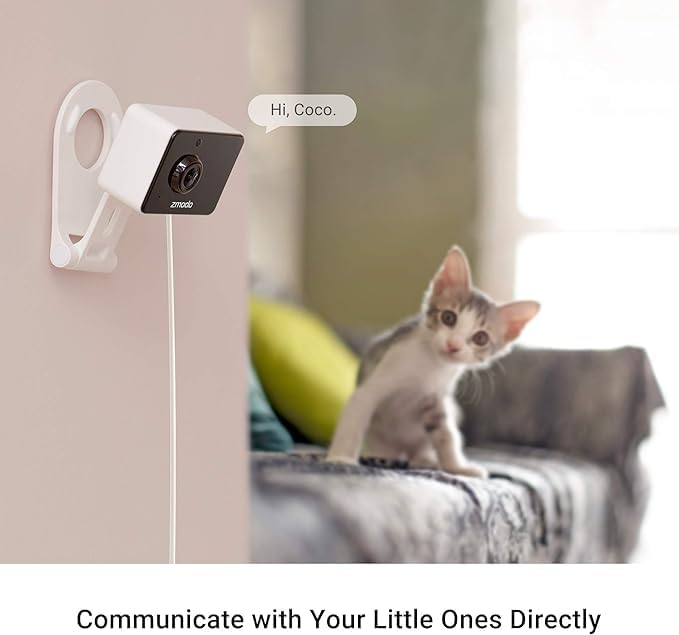
Image: A smartphone screen displaying a Zmodo app notification for "Motion Detected" with a preview image of children and a dog.
- Àudio bidireccional: Use the built-in microphone and speaker to communicate with family members, visitors, or even pets directly through the camera from your app.

Image: An Indoor Mini Pro camera mounted on a wall, with a cat in the foreground and a speech bubble saying "Hi, Coco." illustrating two-way audio.

Image: A Wireless Outdoor/Indoor Battery Cam on a table, with a dog looking at it and a speech bubble saying "Hi Donut!" demonstrating two-way audio.
- Opcions d'emmagatzematge: Your cameras support flexible storage options, including cloud storage (subscription required) and local storage via a microSD card (up to 128GB, not included).

Image: A Wireless Outdoor/Indoor Battery Cam with icons for "Cloud Storage" and "SD Card Storage" indicating available recording options.
- Control per veu amb Alexa: Both camera models are compatible with Amazon Alexa. You can control your cameras hands-free by pairing them with Alexa-enabled devices. For example, say "Alexa, show me the backyard" to view the camera feed on a compatible display.

Image: An Alexa smart display showing a live camera feed of a backyard, with a speech bubble indicating the voice command "Alexa, show me the backyard."
5. Manteniment
To ensure the longevity and optimal performance of your Zmodo cameras:
- Neteja: Gently wipe the camera lens and body with a soft, dry cloth. Avoid using harsh chemicals or abrasive materials that could scratch the lens or damage the casing.
- Battery Management (Battery Cam): Monitor the battery level of your Wireless Outdoor/Indoor Battery Cameras via the Smartz Eaze app. Recharge the cameras promptly when the battery is low to avoid interruptions in surveillance.
- Actualitzacions de firmware: Regularly check the Smartz Eaze app for available firmware updates. Keeping your camera's firmware updated ensures you have the latest features, security patches, and performance improvements.
- Condicions ambientals: While the Outdoor/Indoor Battery Cam is weatherproof (IP65), avoid submerging it in water or exposing it to extreme temperatures outside its operating range.
6. Solució De Problemes
If you encounter issues with your Zmodo cameras, refer to the following common solutions:
- Càmera fora de línia:
- Check your Wi-Fi connection and ensure the router is working correctly.
- Assegureu-vos que la càmera estigui dins de l'abast del vostre encaminador Wi-Fi.
- For Indoor Mini Pro, verify the power adapter is securely connected.
- For Battery Cam, check battery level and recharge if necessary.
- Restart the camera by unplugging it (Indoor Mini Pro) or holding the power button (Battery Cam) and then reconnecting.
- Poca qualitat de vídeo:
- Ensure your Wi-Fi signal strength is adequate at the camera's location.
- Netegeu la lent de la càmera amb un drap suau.
- Check your internet speed. A stable and fast internet connection is crucial for HD streaming.
- Alertes de moviment no rebudes:
- Verify that motion detection is enabled in the Smartz Eaze app settings for the specific camera.
- Check your phone's notification settings to ensure the Smartz Eaze app is allowed to send notifications.
- Ajusta la sensibilitat de la detecció de moviment a l'aplicació.
- Problemes d'àudio bidireccional:
- Ensure your phone's microphone is enabled for the Smartz Eaze app.
- Comprova la configuració del volum al telèfon i a l'aplicació.
- Assegureu-vos que no hi hagi cap obstacle que bloquegi el micròfon o l'altaveu de la càmera.
- Cannot Connect to Alexa:
- Ensure your Zmodo account is correctly linked in the Alexa app.
- Discover devices in the Alexa app after linking the skill.
- Ensure both your Alexa device and Zmodo cameras are on the same Wi-Fi network.
For further assistance, please refer to the support section on the Zmodo weblloc o contacteu amb el servei d'atenció al client.
7. Especificacions
| Característica | Especificació |
|---|---|
| Nom del model | ZG013C-2 |
| Ús interior/exterior | Exterior, Interior |
| Font d'alimentació | Battery Powered (Outdoor/Indoor), Power Adapter (Indoor Mini Pro) |
| Tecnologia de connectivitat | Sense fil (Wi-Fi, Bluetooth) |
| Resolució de captura de vídeo | 1080p |
| Viewangle ing | 130 graus |
| Característiques especials | Local Recording, 2-Way Audio, Night Vision (Color for Outdoor/Indoor), Weather Proof (Outdoor/Indoor), Motion Sensor |
| Dispositius compatibles | Smartphone, Alexa |
| Dimensions (L x A x A) | 3.12 x 2.67 x 3.46 polzades (aproximadament) |
| Fabricant | Zmodo |
| País d'origen | Xina |
8. Garantia i Suport
Zmodo products are designed for reliability and performance. For information regarding product warranty, technical support, or frequently asked questions, please visit the official Zmodo weblloc o poseu-vos en contacte amb el seu departament d'atenció al client.
Zmodo Official Store: Visit the Zmodo Store on Amazon
Conserveu el vostre comprovant de compra per a reclamacions de garantia.


