1. Introducció
Welcome to the user manual for your Dragon Touch 10.1-inch Digital Calendar, Model TM10. This device is designed to streamline family organization through an interactive touchscreen display, offering features such as calendar management, task tracking, and digital photo display. This manual provides detailed instructions to help you set up, operate, and maintain your digital calendar effectively.
2. Producte acabatview
The Dragon Touch TM10 is a versatile 10.1-inch digital calendar featuring a Full HD display and an interactive touchscreen. It supports both wall and tabletop mounting, making it adaptable to various home environments. With 32GB of internal memory and cloud backup capabilities, it securely stores family plans, chores, and events.
Característiques principals:
- Pantalla FHD de 10.1 polzades: Clear and vibrant display for schedules and photos.
- Pantalla tàctil interactiva: Direct interaction for adding and managing events.
- Family Planner: Assign and track tasks for multiple family members with color-coding.
- Calendar Compatibility: Seamlessly integrates with Google Calendar, iCloud Calendar, Outlook Calendar, Cozi, and Yahoo.
- Wi-Fi de doble banda: Connects to 2.4G/5G networks for reliable synchronization.
- 32GB Internal Storage & Cloud Backup: Secure storage for long-term data integrity.
- Digital Photo Frame Functionality: Displays family photos uploaded from anywhere.
- Funcions intel·ligents: Automatic brightness adjustment, sleep mode, and automatic screen rotation.

Figure 2.1: Dragon Touch 10.1-inch Digital Calendar with accompanying mobile application view.
3. Configuració
3.1 Desembalatge i col·locació inicial
- Carefully remove the digital calendar and all accessories from the packaging.
- Place the device on a stable, flat surface or mount it on a wall using appropriate hardware (not included). The device supports both tabletop and wall mounting.
- Connecteu l'adaptador de corrent al dispositiu i endolleu-lo a una presa de corrent. El dispositiu s'encendrà automàticament.
3.2 Connexió de xarxa
- Upon first boot, follow the on-screen prompts to select your language and region.
- Select your Wi-Fi network (supports 2.4G and 5G) from the list and enter the password. Ensure a stable internet connection for optimal performance.
3.3 Account Setup and Synchronization
The Dragon Touch Digital Calendar is compatible with various online calendar services. You can link your existing accounts to synchronize events.
- On the device, navigate to the 'Settings' menu and locate the 'Calendar Sync' or 'Accounts' option.
- Select your preferred calendar service (e.g., Google Calendar, iCloud Calendar, Outlook Calendar, Cozi, Yahoo).
- Follow the on-screen instructions to log in and grant necessary permissions for synchronization.
- To manage and update your calendar on the go, download the dedicated mobile application for your Dragon Touch Digital Calendar from your device's app store.
- Log in to the app using the same account credentials to ensure seamless synchronization between your phone and the digital calendar.

Figure 3.1: The digital calendar's ability to effortlessly auto-sync with various online calendar services.
4. Instruccions de funcionament
4.1 Calendar Management
The interactive touchscreen allows for direct management of your schedule.
- Adding Events: Tap on a specific date or time slot to create a new event. Enter event details such as title, time, and participants.
- Editing Events: Tap on an existing event to modify its details.
- ViewModes de funcionament: Switch between day, week, and month views to see your schedule in different formats.
- Color-Coding: Assign different colors to family members or event types for quick identification.
4.2 Task Management and Rewards
Organize household chores and personal tasks efficiently.
- Creating Tasks: Access the 'Tasks' section to add new tasks. Assign tasks to specific family members.
- Tracking Progress: Mark tasks as complete directly on the screen or via the mobile app.
- Sistema de recompensa: Utilize the integrated reward system to motivate family members. Create and redeem rewards for completed tasks.

Figure 4.1: Managing family tasks on the digital calendar.

Figure 4.2: Completing tasks and earning rewards on the digital calendar.
4.3 Family Profiles and Customization
Crear un professional individualfiles for each family member to personalize their experience and view their specific schedules and tasks.
- Creant Profiles: In the 'Settings' or 'Profiles' section, add new family members.
- Personalització: Assign unique colors and settings to each profile.
- Multi-Views: The device supports various views, including customized lists and different calendar layouts (Day, Week, Month).

Figure 4.3: Customization options and multi-views for family profiles.
4.4 Marc de fotos digital
Transform your digital calendar into a dynamic photo display.
- Carregant fotos: Use the mobile application to upload photos from your phone or other devices to the calendar's internal storage or cloud.
- Configuració de la pantalla: Configure slideshow intervals, transition effects, and display order in the 'Photo' or 'Screensaver' settings.
4.5 Meal Planning
Plan and display your family's meals directly on the calendar.
- Adding Meals: Navigate to the 'Meals' section to input daily or weekly meal plans.
- Visibilitat: Once entered, meal plans are clearly visible on the calendar for all family members.

Figure 4.4: Planning and displaying meals on the digital calendar.
4.6 Configuració del dispositiu
Adjust various device settings for optimal user experience.
- Brillantor automàtic: The device features an ambient light sensor that adjusts screen brightness automatically based on room lighting conditions. This can be enabled or disabled in settings.
- Mode de repòs: Configure sleep mode settings to save energy when the device is not in active use.
- Rotació de pantalla: The display automatically rotates to portrait or landscape mode depending on the device's orientation.
- Pronòstic del temps: View local weather information directly on the display.
- Wake Alarm: Set alarms for reminders or daily routines.
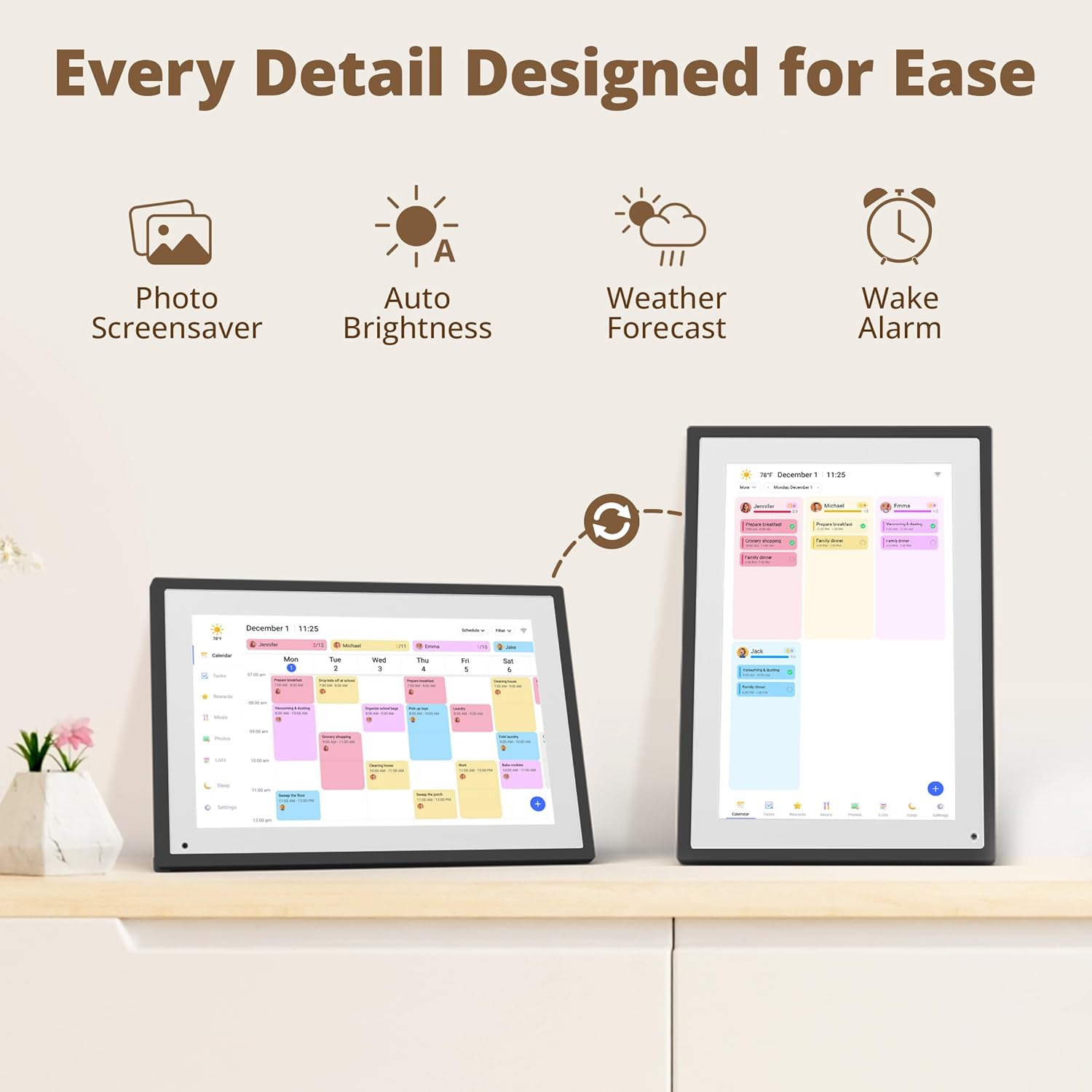
Figura 4.5: Mésview of smart features and settings for ease of use.
4.7 App Cloud Access
The dedicated mobile application provides remote access and management capabilities.
- Remote Updates: Update your calendar, tasks, and photos from anywhere using the app.
- Notificacions: Receive notifications for upcoming events or completed tasks.
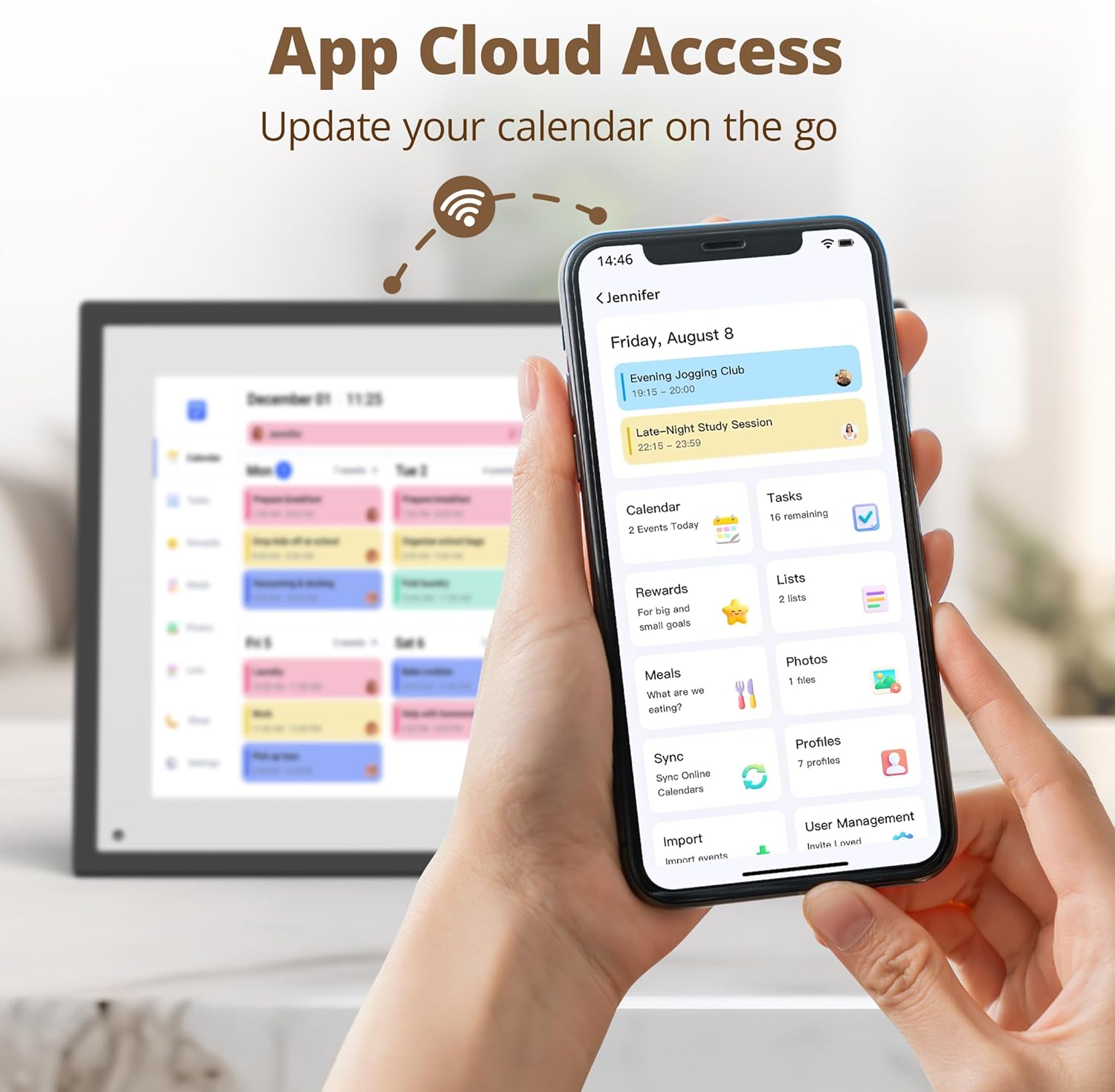
Figure 4.6: Managing the digital calendar via the mobile application.
5. Manteniment
5.1 Neteja
- Per netejar la pantalla, netegeu-la suaument amb un drap suau i sense borrissol. Per a taques difícils, fregueu-la lleugerament.ampNetegeu el drap amb aigua o una solució de neteja segura per a pantalles.
- Avoid using harsh chemicals, abrasive materials, or excessive moisture, as these can damage the screen or internal components.
- Clean the device's exterior with a dry, soft cloth.
5.2 Actualitzacions de programari
Periodically check for software updates in the device's settings menu. Updates often include performance improvements, new features, and security enhancements. Ensure the device is connected to Wi-Fi and has sufficient battery or is plugged in during updates.
5.3 Còpia de seguretat de dades
The device features 32GB of internal storage and supports cloud backup. Regularly ensure your data is backed up to prevent loss of important schedules and photos.
6. Solució De Problemes
If you encounter issues with your Dragon Touch Digital Calendar, refer to the following common problems and solutions:
- El dispositiu no s'encén:
- Assegureu-vos que l'adaptador de corrent estigui connectat correctament tant al dispositiu com a una presa de corrent que funcioni.
- Proveu una presa de corrent diferent.
- Problemes de connexió Wi-Fi:
- Verifiqueu que la contrasenya del Wi-Fi sigui correcta.
- Restart your router and the digital calendar.
- Assegureu-vos que el dispositiu estigui dins de l'abast de la vostra xarxa Wi-Fi.
- Calendar events not syncing:
- Comproveu la vostra connexió a Internet.
- Verify that your online calendar accounts are correctly linked in the device settings and the mobile app.
- Manually initiate a sync from the device or app.
- La pantalla no respon:
- Restart the device by holding down the power button until it reboots.
- Assegureu-vos que la pantalla estigui neta i lliure de residus.
- Fotos que no es mostren:
- Confirm photos have been successfully uploaded via the mobile app.
- Check the photo display settings on the device.
If the problem persists, please contact Dragon Touch customer support for further assistance.
7. Especificacions
| Característica | Detall |
|---|---|
| Marca | Toc de Drac |
| Número de model | TM10 |
| Mida de la pantalla | 10.1 polzades |
| Color | Negre |
| Material | ABS IPS |
| Memòria interna | 32 GB |
| Connectivitat | Wi-Fi 2.4G / 5G |
| Dimensions del producte | 18.1 d'amplada x 26.7 d'alçada cm |
| Tipus de muntatge | Muntatge de paret, sobretaula |
| UPC | 850074502180 |
8. Garantia i Suport
Dragon Touch products are designed for reliability and performance. For information regarding warranty coverage, please refer to the warranty card included with your product or visit the official Dragon Touch weblloc.
For technical support, troubleshooting assistance, or any inquiries not covered in this manual, please contact Dragon Touch customer service. Contact details can typically be found on the official product weblloc web o dins de l'embalatge del producte.


