1. Introducció
The INGCO DM310002 is a True RMS 6000-count digital multimeter designed for precise electrical measurements. It offers a wide range of functions including AC/DC voltage, AC/DC current, resistance, diode test, continuity, non-contact voltage (NCV) detection, data hold, and features a built-in flashlight and backlight for enhanced visibility. This manual provides essential information for safe and effective operation of your multimeter.
2. Informació de seguretat
Sempre seguiu les precaucions de seguretat quan utilitzeu qualsevol equip de prova elèctrica. Si no ho feu, podeu patir descàrregues elèctriques, lesions o danys al mesurador o a l'equip que s'està provant.
- Do not exceed the maximum input limits for any function.
- Inspeccioneu els cables de prova for damaged insulation or exposed metal before use.
- Do not use the meter if it appears damaged or if the case is open.
- Extremeu la precaució quan es treballa amb el voltagper sobre de 30 V CA RMS, 42 V pic o 60 V CC. Aquests voltagsuposen un risc de xoc.
- Remove test leads from the circuit before changing functions.
- Substituïu la bateria immediately when the low battery indicator appears.
- Do not operate the meter in explosive gas, vapor, or dust.
3. Producte acabatview
The INGCO DM310002 Digital Multimeter features a clear display and intuitive controls for various electrical measurements.
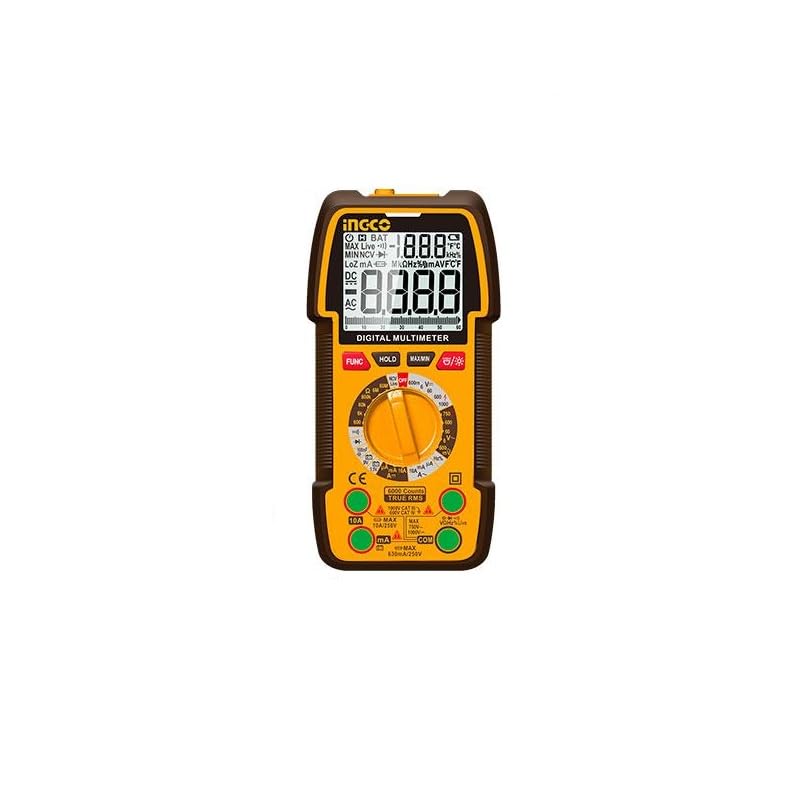
Figura 1: INGCO DM310002 Digital Multimeter showing its front panel, display, rotary switch, input jacks, and approximate dimensions (188mm height, 90mm width, 58mm depth).
3.1 Característiques de visualització
- True RMS 6000 Counts: Proporciona lectures precises per a formes d'ona no sinusoïdals.
- Il·luminació de fons: Millora la visibilitat en condicions de poca llum.
- Conservació de dades: Congela la lectura actual a la pantalla.
- Indicador NCV: Vol. Sense contactetage detecció.
- Indicador de bateria baixa: Alertes quan cal substituir la bateria.
3.2 Controls and Input Jacks
- Interruptor rotatiu: Selecciona la funció de mesura desitjada.
- Botó FUNC: Toggles between different measurement modes within a single rotary switch position (e.g., AC/DC, Diode/Continuity).
- Botó HOLD: Activates/deactivates data hold.
- Botó MAX/MIN: Records maximum and minimum values during a measurement.
- Botó de retroiluminació/llanterna: Activates the display backlight and the built-in flashlight.
- VΩmA Input Jack: Entrada positiva per al volumtage, resistència i miliampmesures actuals.
- Presa d'entrada COM: Entrada comuna (negativa) per a totes les mesures.
- Entrada de 10A: Positive input for high current (up to 10A) measurements.
4. Configuració
4.1 Instal·lació de la bateria
The DM310002 requires batteries for operation. To install or replace batteries:
- Assegureu-vos que el multímetre estigui apagat i que els cables de prova estiguin desconnectats.
- Localitzeu la tapa del compartiment de la bateria a la part posterior del mesurador.
- Descargoleu el(s) cargol(s) de subjecció i traieu la coberta.
- Insert new batteries, observing correct polarity (+ and -).
- Torneu a col·locar la tapa del compartiment de la bateria i fixeu-la amb el(s) cargol(s).
4.2 Connexió dels cables de prova
Connecteu sempre el cable de prova negre al COM Connecteu el cable de prova vermell al connector d'entrada adequat segons el tipus de mesura:
- Per al voltage, resistance, diode, continuity, and milliampere current: Connect the red lead to the VΩmA jack.
- For 10A current: Connect the red lead to the 10A jack.
5. Instruccions de funcionament
Before taking any measurement, ensure the test leads are correctly connected and the rotary switch is set to the desired function.
5.1 Mesura de vol DC/ACtage
- Connecteu el cable de prova vermell al VΩmA jack and the black test lead to the COM jack.
- Poseu el commutador rotatiu a la V~ (Volum AC)tage) o V- (DC Voltage) position. If the symbol is combined, press the EMPLEAT button to select AC or DC.
- Connecteu els cables de prova en paral·lel a través del circuit o component que s'ha de mesurar.
- Llegeix el voltage valor a la pantalla.
5.2 Measuring DC/AC Current (up to 10A)
Precaució: Never connect the meter in parallel to a voltage source when measuring current. This can blow the fuse or damage the meter.
- For currents up to 600mA: Connecteu el cable de prova vermell al VΩmA jack.
- For currents up to 10A: Connecteu el cable de prova vermell al 10A jack.
- Connecteu el cable de prova negre al COM jack.
- Set the rotary switch to the appropriate A~ (corrent altern) o A- (DC Current) position. Press EMPLEAT si cal.
- Open the circuit where current is to be measured and connect the meter in series with the load.
- Llegiu el valor actual a la pantalla.
5.3 Mesura de la resistència
- Connecteu el cable de prova vermell al VΩmA jack and the black test lead to the COM jack.
- Poseu el commutador rotatiu a la Ω Posició (de resistència).
- Assegureu-vos que el circuit que s'està provant estigui desenergitzat.
- Connecteu els cables de prova al component que s'ha de mesurar.
- Llegiu el valor de resistència a la pantalla.
5.4 Prova de díodes i continuïtat
- Connecteu el cable de prova vermell al VΩmA jack and the black test lead to the COM jack.
- Poseu el commutador rotatiu a la Díode/Continuitat posició. Premeu EMPLEAT to toggle between diode test and continuity.
- For Diode Test: Connecteu el cable vermell a l'ànode i el cable negre al càtode del díode. La pantalla mostrarà el volum directe.tagcaiguda de corrent. Invertiu els cables; la pantalla hauria de mostrar OL (bucle obert) per a un díode en bon estat.
- Per a la prova de continuïtat: Connect the test leads across the circuit or component. If continuity exists (resistance below a certain threshold), the buzzer will sound.
5.5 NCV (Volum sense contacte)tage) Detecció
- Poseu el commutador rotatiu a la NCV posició.
- Move the top part of the meter near a live AC voltage font.
- The meter will beep and the NCV indicator will light up, indicating the presence of AC voltage.
5.6 Data Hold, MAX/MIN, Backlight/Flashlight
- MANTENIR: Premeu el botó MANTENIM per congelar la lectura actual a la pantalla. Premeu-la de nou per alliberar-la.
- MÀXIM / MÍN: Premeu el botó MAX/MIN button to enter MAX/MIN recording mode. The meter will display the maximum or minimum value detected. Press again to cycle through MAX, MIN, and exit.
- Retroiluminació/Llanterna: Premeu el botó Il·luminació de fons/Llanterna button to turn on the display backlight. Press and hold to activate the built-in flashlight. Press again to turn off.
6. Manteniment
6.1 Neteja
Netegeu el comptador amb anuncisamp drap i detergent suau. No utilitzeu abrasius ni dissolvents. Assegureu-vos que el mesurador estigui completament sec abans d'utilitzar-lo.
6.2 Substitució de la bateria
When the low battery indicator appears on the display, replace the batteries as described in Section 4.1. Use the specified battery type.
6.3 Emmagatzematge
If the meter is not used for an extended period, remove the batteries to prevent leakage and damage. Store the meter in a cool, dry place.
7. Solució De Problemes
- Sense pantalla o pantalla tènue: Comproveu la instal·lació de la bateria i el nivell de càrrega. Canvieu les bateries si cal.
- Es mostra "OL": Indicates an overload or open circuit. Check connections and ensure the measurement range is appropriate.
- Lectures incorrectes: Verify the correct function is selected, test leads are properly connected, and the circuit is within the meter's specified range.
- No hi ha bip de continuïtat: Ensure the function is set to continuity and the resistance is below the threshold for continuity.
8. Especificacions
| Característica | Especificació |
|---|---|
| Mostra | True RMS 6000 Counts Digital Display |
| DC Voltage Rang | 600mV / 6V / 60V / 600V / 1000V |
| Vol. ACtage Rang | 600mV / 6V / 60V / 600V / 750V |
| Interval de corrent DC | 6000µA / 60mA / 600mA / 10A |
| Interval de corrent de CA | 6000µA / 60mA / 600mA / 10A |
| Interval de resistència | Yes (Specific ranges not detailed in source, typical for 6000 counts) |
| Prova de díode | Sí |
| Prova de continuïtat | Sí |
| NCV (vol sense contacte).tage) | Sí |
| Retenció de dades | Sí |
| Llanterna | Integrat |
| Llum de fons | Sí |
| Font d'alimentació | Battery Powered (Batteries Required) |
| Dimensions | 10 x 20 x 37 cm (aproximadament) |
| Pes | 209 g (0.21 kg) |
| Classificació de seguretat | CAT III 1000V (implied by 1000V DC max) |
9. Garantia i Suport
For warranty information and technical support, please refer to the documentation provided with your purchase or contact your local INGCO distributor. Keep your purchase receipt as proof of purchase for warranty claims.


