1. Introducció
The Thermaltake AX700 TG Super Tower chassis is engineered to support high-performance computing needs, including AI computing, content creation, and data storage. This chassis offers flexible hardware configurations, extensive cooling capabilities, and ample storage options. It is designed to accommodate various motherboard sizes and provides significant room for components and expansion.
2. Informació de seguretat
- Always disconnect the power supply from the wall outlet before performing any installation or maintenance.
- Avoid exposing the chassis to water or excessive humidity.
- Manipuleu els panells de vidre temperat amb cura per evitar que es trenquin.
- Assegureu-vos una correcta connexió a terra per evitar riscos elèctrics.
- Keep small components and screws away from children.
3. Contingut del paquet
Verifiqueu que tots els components que s'enumeren a continuació siguin presents al vostre paquet:
- Thermaltake AX700 TG Super Tower Chassis
- Caixa d'accessoris (que conté cargols, brides i altres peces petites)
- Manual d'usuari (aquest document)
- Additional fan/radiator brackets (if applicable)
4. Producte acabatview i Característiques

Figura 1: Frontal esquerre view of the Thermaltake AX700 TG Super Tower Chassis.
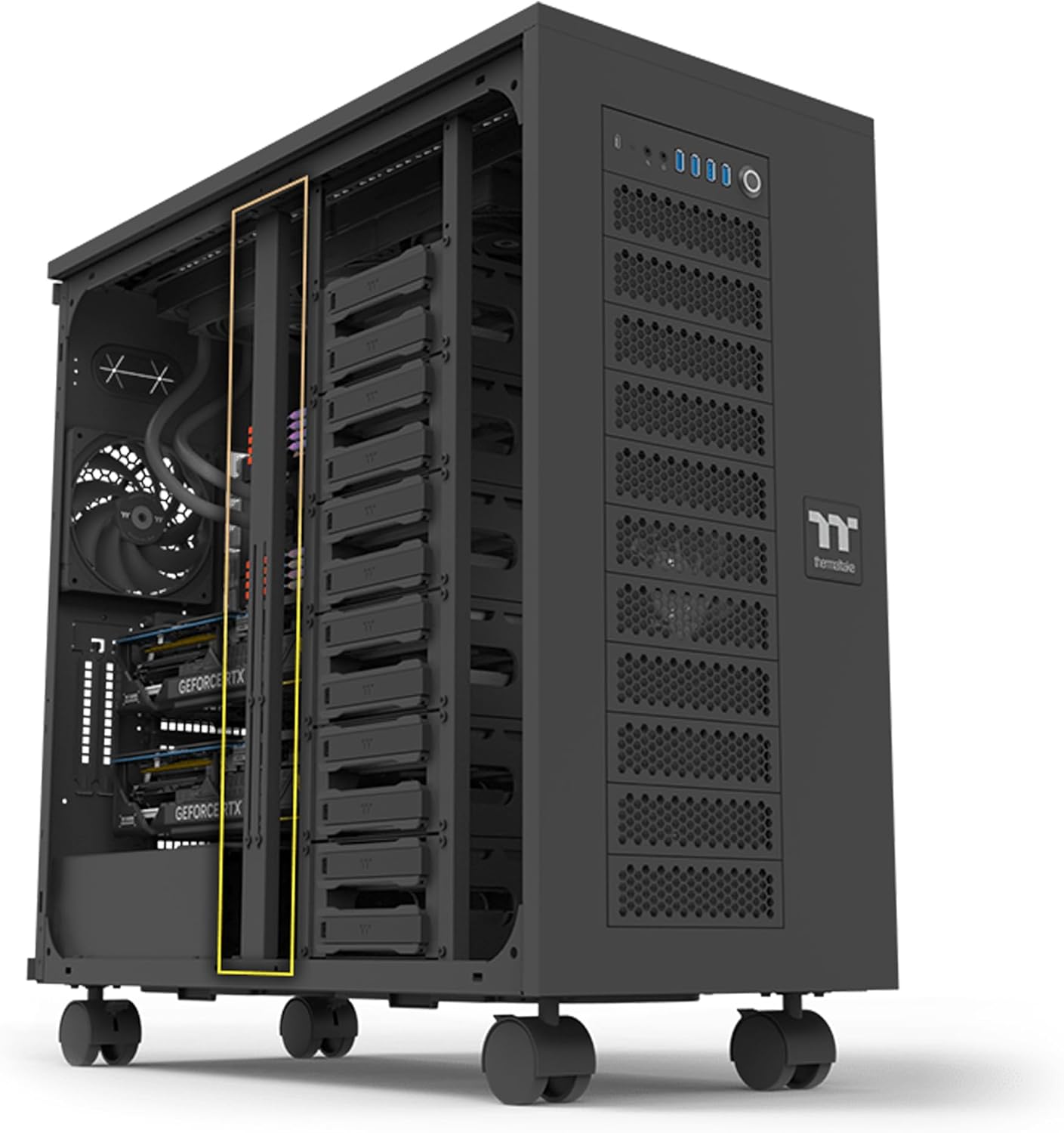
Figura 2: Interior view espectacleasing drive bays and component layout.

Figura 3: Frontal view highlighting the mesh panel design and I/O ports.

Figura 4: Interior view with drive cages removed, showing extensive space.

Figura 5: superior view of the chassis, showing ventilation and I/O panel.
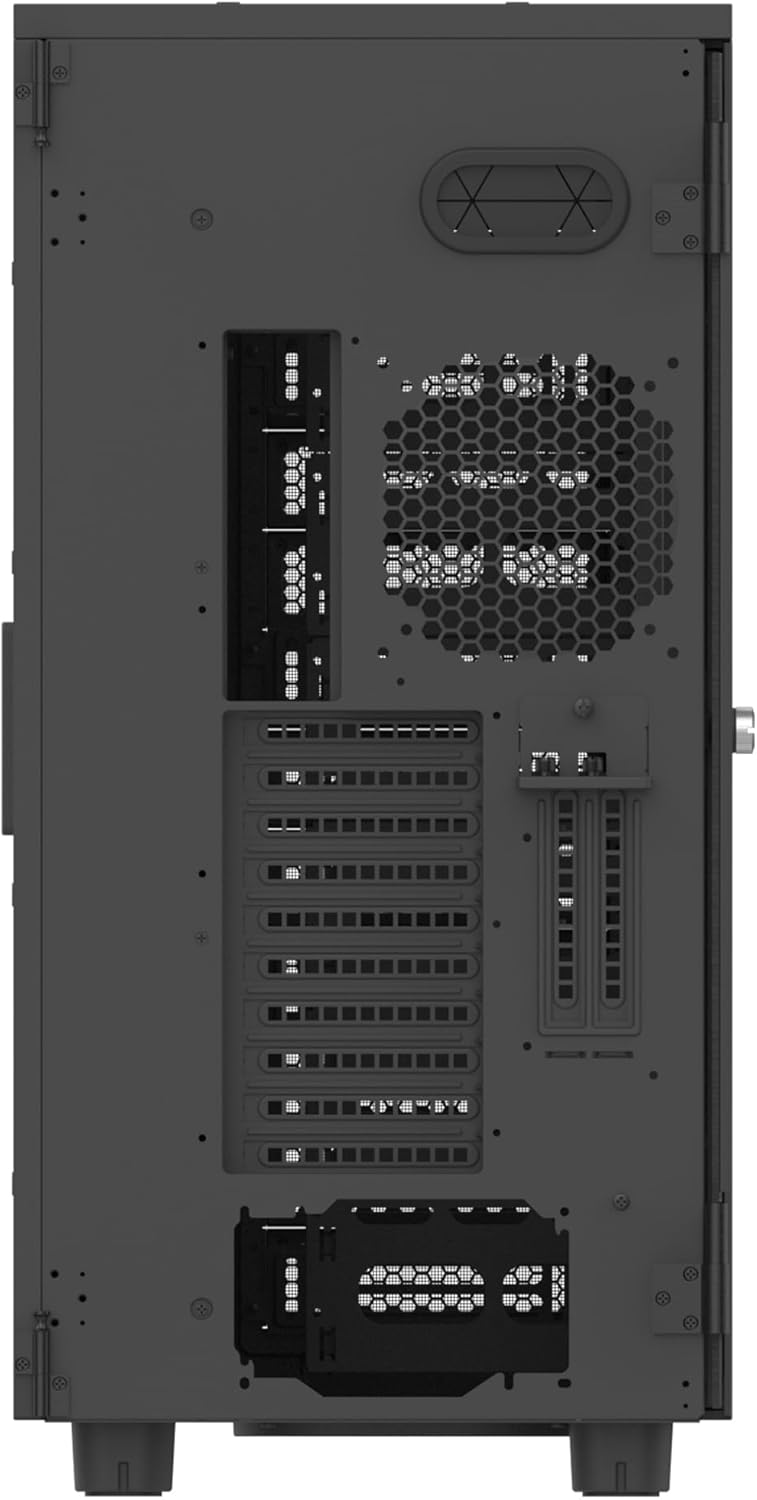
Figura 6: posterior view of the chassis, showing expansion slots and fan mount.
4.1. Característiques principals:
- Compatibilitat de la placa base: Supports SSI-CEB/SSI-EEB server boards, as well as XL-ATX/E-ATX/ATX/mATX/mITX consumer motherboards.
- Suport de refrigeració ampli: Accommodates up to 18x 140mm/120mm fans. Radiator support includes AIOs up to 420mm and DIY solutions up to 560mm. Air coolers up to 190mm.
- Multi-GPU Expandability: Features 8+2 PCIe expansion slots for multiple GPUs. Supports GPUs up to 360mm with HDD racks installed, or up to 630mm without HDD racks. Includes a GPU brace with 4 adjustable supports.
- AmpEmmagatzematge: Up to 18 HDD trays for 3.5" or 2.5" drives. Twelve trays are located in the main chamber cages, with an additional 6 trays behind the motherboard tray.
- Stackable Expansion: Compatible with the optional AX100 Pedestal (sold separately) for increased storage, cooling, and power options, mountable on the bottom and/or top of the chassis.
- Panells laterals: One tempered glass left side panel for component visibility and one perforated right side panel for enhanced airflow. Both feature a hinged design for easy access.
- Protecció contra la pols: Features dust filters on the front, top, bottom, and motherboard sides to protect internal components.
- Ports d'E/S frontals: Includes a power button with integrated power LED, HDD LED, 4x USB 3.0, 1x USB 3.2 Gen 2 Type-C, and HD Audio ports.
- Dismantlable Modular Design (DMD): Facilitates easy installation and maintenance by allowing various components to be removed.

Figura 7: Detallada view of the front I/O ports.

Figura 8: Explotat view illustrating the Dismantlable Modular Design.
5. Configuració
5.1. Instal·lació del disc dur
The AX700 TG chassis offers extensive storage options with multiple HDD trays. Follow these steps to install your 3.5" or 2.5" drives:
- Locate the HDD cages within the main chamber or behind the motherboard tray.
- Slide your 3.5" or 2.5" drive into an available tray. Secure the drive to the tray using the provided screws from the accessory box.
- Slide the filled tray back into the HDD cage until it clicks into place.
- Connect SATA power and data cables to each installed drive. Ensure cables are routed neatly to maintain airflow.
Video 1: Hard Drive Cage Installation Guide. This video demonstrates the process of installing hard drives into a PC case, including securing drives in trays and connecting SATA cables. While the specific case may differ, the general installation principles apply.
5.2. Instal·lació de la placa base
The AX700 TG supports a wide range of motherboard form factors. Ensure you have the correct standoffs installed for your motherboard size.
- Install the I/O shield that came with your motherboard into the rear I/O cutout of the chassis.
- Align your motherboard with the standoffs and gently place it into the chassis.
- Fixeu la placa base amb els cargols adequats de la caixa d'accessoris.
5.3. Instal·lació de la font d'alimentació (PSU)
The chassis supports standard ATX PSUs. The PSU is typically mounted at the bottom rear of the case.
- Position the PSU into its designated bay at the bottom rear of the chassis.
- Secure the PSU to the chassis using the screws provided with your PSU or from the accessory box.
- Route the necessary power cables (24-pin ATX, CPU, PCIe, SATA) through the cable management cutouts to their respective components.
5.4. Instal·lació de la targeta gràfica (GPU)
The AX700 TG offers generous GPU clearance and includes a GPU brace for stability.
- Traieu les cobertes de les ranures PCIe necessàries de la part posterior del xassís.
- Align your GPU with the PCIe slot on the motherboard and firmly press it into place until it clicks.
- Secure the GPU to the chassis using the provided screws or tool-less mechanism.
- Connect any required PCIe power cables from the PSU to the GPU.
- Utilize the included adjustable GPU brace to provide additional support and prevent sag.
5.5. Gestió de cables
Effective cable management is crucial for optimal airflow and aesthetics. The AX700 TG provides various tie-down points and ampespai darrere de la safata de la placa base.
- Route cables through the rubber grommets and cutouts to the backside of the motherboard tray.
- Use the provided cable ties or Velcro straps to bundle and secure cables neatly.
- Ensure no cables obstruct fan blades or airflow paths.
6. Funcionament
6.1. Encès / apagat
Connect your PC to a power outlet and press the power button on the front I/O panel to turn on your system. To power off, use the operating system's shutdown function or press and hold the power button.
6.2. Front I/O Port Usage
The front I/O panel provides convenient access to various ports:
- Ports USB: Use the USB 3.0 and USB 3.2 Gen 2 Type-C ports for connecting peripherals and external storage devices.
- Àudio HD: Connect your headphones or microphone to the dedicated audio jacks.
- LED HDD: Indica l'activitat del disc dur.
7. Manteniment
7.1. Neteja dels filtres de pols
Regular cleaning of the dust filters is essential to maintain optimal airflow and prevent dust buildup inside the chassis.
- Locate the dust filters on the front, top, and bottom of the chassis.
- Gently remove the filters. They are designed for easy removal.
- Clean the filters using compressed air, a soft brush, or by rinsing with water (ensure they are completely dry before reinstallation).
- Reinstall the clean filters back into their respective positions.
8. Solució De Problemes
- El sistema no s'encén: Check all power connections, including the 24-pin ATX, CPU, and GPU power cables. Ensure the PSU switch is in the 'On' position.
- Sense sortida de pantalla: Verify that the monitor cable is connected to the graphics card (not the motherboard I/O unless using integrated graphics) and that the GPU is properly seated and powered.
- Sobreescalfament: Ensure all fans are spinning correctly and dust filters are clean. Check CPU and GPU temperatures using monitoring software.
- Sorolls inusuals: Identify the source of the noise (e.g., fan, HDD). Check for loose components or cables.
9. Especificacions
| Característica | Especificació |
|---|---|
| Marca | Thermaltake |
| Sèrie | AX700 TG Black |
| Número de model | CA-11B-00F1WN-00 |
| Tipus de cas | Super Torre |
| Compatibilitat amb la placa base | SSI-CEB, SSI-EEB, XL-ATX, E-ATX, ATX, Micro ATX, Mini ITX |
| Dimensions (L x A x A) | 645 x 324.6 x 685 mm (aprox. 25.4 x 12.8 x 26.9 polzades) |
| Pes de l'article | 57.4 lliures |
| Material | Stainless Steel, Tempered Glass, Plastic |
| Liquidació del refrigerador de la CPU | Fins a 190 mm |
| Liquidació de la GPU | Up to 360 mm (with HDD rack), 630 mm (without HDD rack) |
| Longitud de la font d'alimentació | Fins a 220 mm |
| Ranures d'expansió | 8 + 2 (Vertical) |
| Drive Bays | 18x 3.5" or 2.5" (12 in cages, 6 behind M/B tray) |
| Ports d'E/S | 1x USB Type-C, 4x USB 3.0, 1x HD Audio |
| Mètode de refrigeració | Ventilador |
10. Garantia i Suport
For detailed warranty information and technical support, please refer to the official Thermaltake weblloc web o poseu-vos en contacte amb el servei d'atenció al client. Conserveu el comprovant de compra per a reclamacions de garantia.
Recursos en línia:
- Oficial de Thermaltake Weblloc: www.thermaltake.com
- Pàgina d'assistència del producte: www.thermaltake.com/support


