1. Introducció
This manual provides instructions for the setup, operation, maintenance, and troubleshooting of your CRUA 27-inch 240Hz QHD IPS Gaming Monitor. This monitor features a 2560x1440 QHD resolution, a 240Hz refresh rate, an IPS panel for wide viewing angles, AMD FreeSync support, a blue light filter for eye protection, and built-in speakers. Please read this manual thoroughly before using the product.
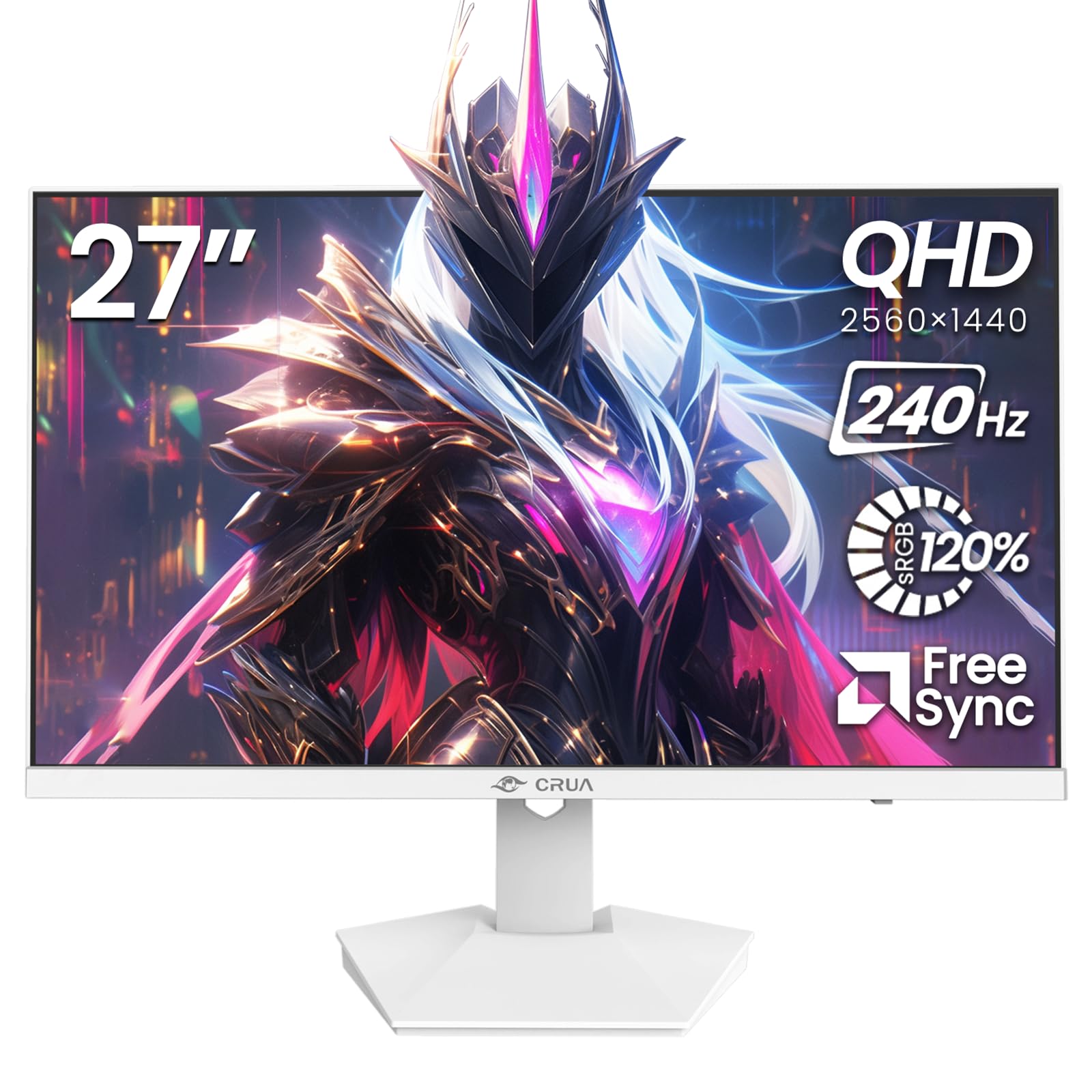
Imatge: Frontal view of the CRUA 27-inch 240Hz QHD IPS Gaming Monitor.
2. Contingut del paquet
Verifiqueu que tots els elements siguin presents al paquet:
- CRUA 27-inch 240Hz QHD IPS Gaming Monitor
- Suport de monitor (base i coll)
- Adaptador d'alimentació i cable
- Cable HDMI
- Cable DisplayPort (DP)
- Manual d'usuari (aquest document)
3. Configuració
3.1 Muntatge del suport
- Traieu amb cura el monitor del seu embalatge, col·locant-lo cara avall sobre una superfície suau i neta per evitar ratllades.
- Fixeu el coll del suport al panell del monitor. Assegureu-vos que encaixi correctament al seu lloc amb un clic.
- Attach the stand base to the stand neck. Tighten any screws if provided.
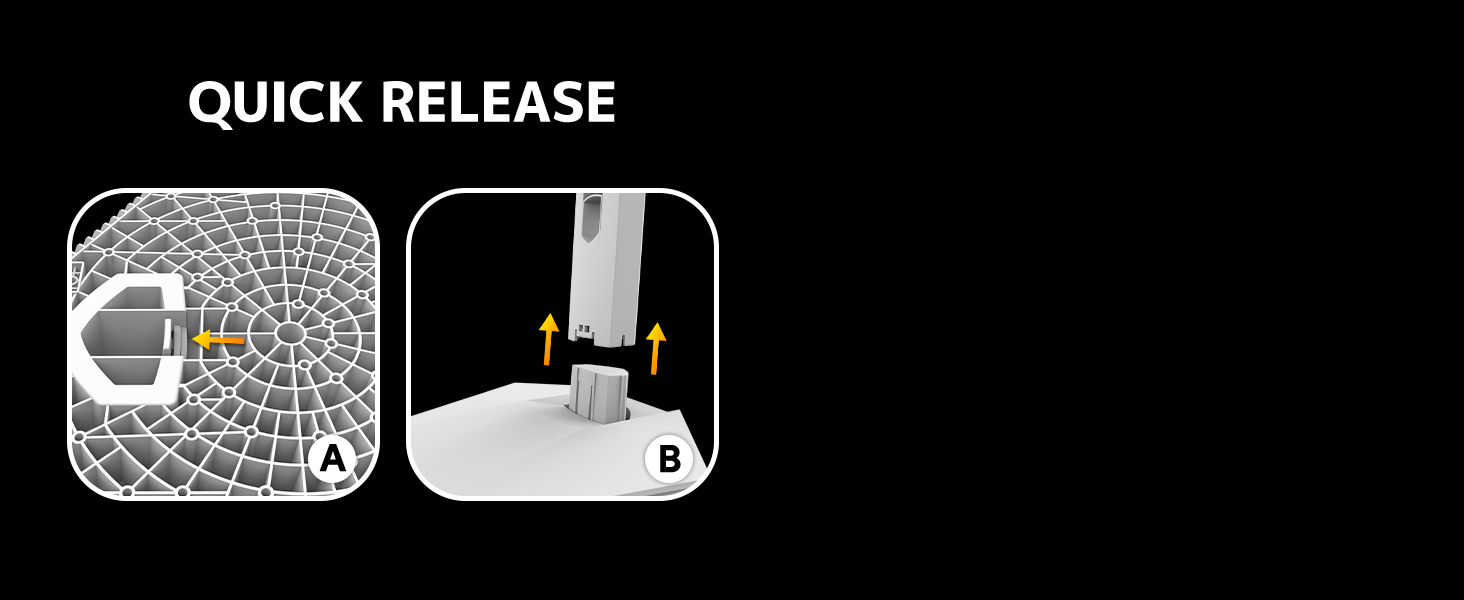
Image: Diagram illustrating the quick release stand assembly.
3.2 Muntatge a la paret (opcional)
The monitor supports VESA wall mounting (75mm x 75mm). To wall mount:
- Traieu el suport del monitor si ja hi està connectat.
- Attach a VESA-compatible wall mount bracket (not included) to the monitor using appropriate screws.
- Seguiu les instruccions que s'inclouen amb el suport de paret per a una instal·lació segura.

Imatge: Part posterior view of the monitor showing VESA mount points (75x75mm) and built-in speakers.
3.3 Connexió a un ordinador
Connect the monitor to your computer using one of the following methods:
- DisplayPort (DP 1.4): For optimal performance, especially at 240Hz QHD resolution, use the included DisplayPort cable.
- HDMI (HDMI 2.0): Use an HDMI cable for QHD resolution at up to 144Hz.
Connecteu l'adaptador de corrent a l'entrada d'alimentació del monitor i després endolleu-lo a una presa de corrent.

Imatge: Part posterior view of the monitor displaying the input ports, including HDMI and DisplayPort.
4. Instruccions de funcionament
4.1 Encès/Apagat
Press the power button located on the back of the monitor to turn it on or off. The power button may resemble a joystick for OSD navigation.
4.2 Menú de visualització en pantalla (OSD)
The OSD menu allows you to adjust various monitor settings. Use the joystick-like button on the back of the monitor to navigate the menu:
- Prem el botó: Obre el menú OSD.
- Moure amunt/avall: Navega per les opcions del menú.
- Mou a l'esquerra/dreta: Adjusts selected settings or enters sub-menus.
- Torneu a prémer: Confirma la selecció o surt d'un submenú.
4.3 Configuració de la pantalla
Within the OSD menu, you can adjust:
- Brillantor/Contrast: Ajusta la luminància general i la relació de contrast.
- Configuració de color: Fine-tune color temperature, hue, and saturation. The monitor offers 120% sRGB color coverage for accurate and vibrant visuals.
- Font d'entrada: Manually select between HDMI and DisplayPort inputs.

Image: Details on true color accuracy, including 120% sRGB, 8-bit color depth, and 16.7 million colors.
4.4 Característiques del joc
- Freqüència d'actualització: The monitor supports up to 240Hz refresh rate for smooth motion. Ensure your graphics card and cable support this rate.
- AMD FreeSync: Enable FreeSync in the OSD menu and on your AMD graphics card settings to eliminate screen tearing and stuttering.

Imatge: Comparació visual que demostra la suavitat d'una freqüència d'actualització de 240 Hz enfront de 60 Hz.

Image: Illustrates the effect of Adaptive Sync (FreeSync) on reducing screen tearing and stuttering.
4.5 Protecció ocular
The monitor includes a built-in blue light filter to reduce eye strain during extended use. This feature can be enabled or adjusted through the OSD menu.
5. Manteniment
Per mantenir el rendiment i l'aspecte del monitor:
- Neteja de la pantalla: Netegeu suaument la pantalla amb un drap suau i sense borrissol. Per a les marques difícils, utilitzeu una solució de neteja específica per al monitor aplicada al drap, no directament a la pantalla.
- Neteja de la Casing: Feu servir un drap suau i sec per netejar el monitor casing. Eviteu netejadors o dissolvents abrasius.
- Apagar: Apagueu sempre el monitor i desendolleu-lo de la presa de corrent abans de netejar-lo.
6. Solució De Problemes
| Problema | Causa possible | Solució |
|---|---|---|
| No hi ha imatge a la pantalla | El monitor està apagat o no rep senyal. | Ensure power cable is connected and monitor is on. Check video cable connection (HDMI/DP) to both monitor and computer. Select correct input source via OSD. |
| Image flickering or tearing | FreeSync not enabled or incompatible settings. | Enable FreeSync in the monitor OSD and your graphics card control panel. Ensure your graphics card drivers are up to date. |
| Poor picture quality (blurry, incorrect colors) | Incorrect resolution, color settings, or faulty cable. | Set display resolution to 2560x1440. Adjust brightness, contrast, and color settings in the OSD. Try a different video cable. |
| No hi ha so dels altaveus integrats | Volume too low, incorrect audio output selected. | Increase monitor volume via OSD. Ensure the monitor is selected as the audio output device in your computer's sound settings. |
| Píxels morts | Defecte de fabricació. | Refer to warranty information for pixel policy. Contact customer support if within warranty. |
7. Especificacions
| Característica | Especificació |
|---|---|
| Número de model | CR270I |
| Mida de la pantalla | 27 polzades |
| Tipus de panell | IPS |
| Resolució | 2560 x 1440 (QHD) |
| Freqüència d'actualització | 240 Hz |
| Relació d'aspecte | 16:9 |
| Gamma de colors | 120% sRGB |
| Brillantor | 300 cd/m² |
| Relació de contrast | 1000:1 |
| Viewangle ing | 178° (Horitzontal/Vertical) |
| Entrades de vídeo | HDMI 2.0, DisplayPort 1.4 |
| Àudio | Altaveus incorporats |
| Muntatge VESA | 75 mm x 75 mm |
| Dimensions del producte | 1.78 x 24 x 14 polzades |
| Pes de l'article | 12.62 lliures |
8. Garantia i Suport
CRUA provides high-quality computer monitors and premium services. If you have any questions or require assistance, please contact CRUA customer support. Refer to your purchase documentation for specific warranty terms and contact information.


