1. Introducció
This manual provides essential information for the safe and efficient operation, setup, and maintenance of your Sunseeker X3 Plus Robot Lawn Mower. Please read this manual thoroughly before using the product to ensure optimal performance and longevity.
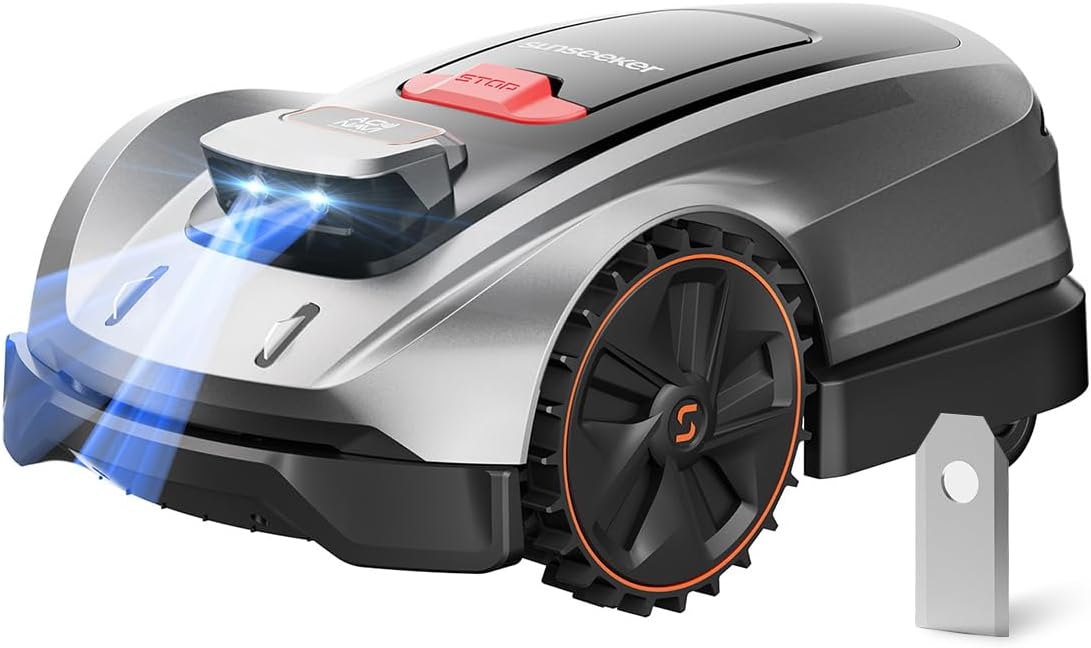
Figura 1.1: Sunseeker X3 Plus Robot Lawn Mower. This image shows the sleek, grey and black robotic lawn mower with orange accents on its wheels, featuring a red stop button on top and blue lights emanating from its front sensors.
2. Informació de seguretat
Always adhere to the following safety guidelines to prevent injury or damage to the product and property.
- Mantingueu les mans i els peus allunyats de les fulles.
- Do not operate the mower in wet conditions or during rain. The X3 Plus features rain detection and will return to its charging station.
- Ensure children and pets are clear of the mowing area during operation.
- Remove any obstacles such as toys, stones, or wires from the lawn before mowing. The Vision AI system helps detect objects, but pre-clearing is recommended.
- Only use original Sunseeker replacement parts and accessories.
- Do not attempt to repair or modify the mower yourself. Contact authorized service personnel.
- Always turn off the mower and remove the safety key (if applicable) before performing any maintenance or cleaning.
3. Contingut del paquet
Verifiqueu que tots els elements siguin presents al paquet:
- Sunseeker X3 Plus Robot Lawn Mower
- Estació de càrrega
- Adaptador d'alimentació
- Manual d'usuari (aquest document)
- Replacement Blades (15 count)
- Screws for Blades (15 count)

Figura 3.1: Included replacement blades and screws. This image displays fifteen silver replacement blades and fifteen small screws, neatly arranged in rows, indicating the spare parts provided for maintenance.
4. Configuració i instal·lació
4.1 Col·locació de l'estació de càrrega
Select a flat, level area with access to a power outlet. Ensure the charging station is placed in a location that allows the mower clear access for docking and undocking.
4.2 Càrrega inicial
Before first use, fully charge the robot mower. Place the mower onto the charging station. The indicator lights on the mower will show charging status.
4.3 Instal·lació i connexió de l'aplicació
Download the official Sunseeker app from your device's app store. Follow the in-app instructions to connect your X3 Plus mower to your Wi-Fi network and pair it with your smartphone.
4.4 Yard Mapping and Zone Setup
The X3 Plus utilizes the AONavi Positioning System (RTK-GNSS and VSLAM) for precise navigation. Use the app to guide the mower for its initial mapping run. This process allows the mower to learn your yard's layout and create a digital map. You can then define multiple mowing zones (up to 6) and no-go zones within the app.

Figura 4.1: The Sunseeker X3 Plus operating in a backyard, demonstrating its AONavi Positioning System. The image shows the robot mower on a green lawn with a house and patio furniture in the background, illustrating its ability to navigate complex outdoor environments.
5. Instruccions de funcionament
5.1 Inici i aturada de la sega
To start mowing, press the 'Start' button on the mower or initiate a mowing task through the Sunseeker app. To stop, press the large red 'STOP' button on the mower or use the 'Pause'/'Stop' function in the app.
5.2 Scheduling Mowing Tasks
Use the Sunseeker app to set up a mowing schedule. You can define specific days, times, and zones for the mower to operate. The X3 Plus will automatically return to its charging station when its battery is low or when a task is complete.
5.3 Funcions avançades
- Vision AI Obstacle Avoidance: The X3 Plus uses dual-camera 3D recognition to identify over 200 object types (e.g., pets, garden tools), allowing it to navigate safely around them.

Figura 5.1: The Sunseeker X3 Plus demonstrating its Vision AI technology by detecting a large teddy bear on the lawn. Blue light beams emanate from the mower's front, illustrating its object recognition capabilities.
- Floating Cut Technology: This patented system adjusts the blade height to match uneven terrain, preventing scalping and promoting a healthier lawn. It can handle slopes up to 30% and adapts to potholes or rough ground.

Figura 5.2: An illustration of the Sunseeker X3 Plus's Floating Cut System, showing the internal mechanism that allows the cutting deck to adjust to varying ground levels, ensuring an even cut on uneven terrain.
- Rain Detection: The mower is equipped with sensors that detect rain. Upon detecting rain, it will automatically return to its charging station to protect itself from adverse weather conditions.
- Funcionament silenciós: The X3 Plus operates at approximately 60dB, allowing for peaceful enjoyment of your yard while it mows.

Figura 5.3: A woman relaxing in a chair on a lawn while the Sunseeker X3 Plus operates nearby, illustrating its quiet operation at 60dB, allowing for undisturbed outdoor activities.
6. Manteniment
6.1 Recanvi de fulla
For optimal cutting performance, inspect and replace the blades regularly (approximately every 1-3 months, depending on usage and grass type). Always wear protective gloves when handling blades.
- Turn off the mower and remove the safety key.
- Gireu la tallagespa amb cura per accedir a la plataforma de tall.
- Using a screwdriver, remove the screws holding the old blades in place.
- Attach new blades and screws (15 blades + 15 screws are included in the package). Ensure the blades are securely fastened but can still pivot freely.
- Desfeu-vos de les fulles velles de manera responsable.
Note: The Sunseeker X3 Plus uses 3 blades at a time.

Figura 6.1: A single replacement blade for the Sunseeker X3 Plus. The image shows a rectangular silver blade with a circular hole for attachment, indicating its sharp cutting edge.
6.2 Neteja
Regularly clean the mower's chassis, wheels, and cutting deck to remove grass clippings and dirt. Use a soft brush or cloth. Do not use a high-pressure washer or immerse the mower in water.
6.3 Emmagatzematge
During off-season or extended periods of non-use, clean the mower thoroughly, fully charge the battery, and store it in a dry, frost-free environment. Store the charging station indoors as well.
7. Solució De Problemes
| Problema | Causa possible | Solució |
|---|---|---|
| La segadora no arrenca | Low battery; Safety key not inserted; Mower not on charging station. | Charge the battery; Insert safety key; Place mower on charging station. |
| Mal rendiment de tall | Dull or damaged blades; Grass too long; Debris on cutting deck. | Replace blades; Mow more frequently or adjust cutting height; Clean cutting deck. |
| La segadora s'encalla sovint | Obstacles in mowing area; Uneven terrain beyond capability. | Clear obstacles; Adjust no-go zones; Ensure terrain is within 30% slope limit. |
| Problemes de connexió de l'aplicació | Weak Wi-Fi signal; Mower out of range; App not updated. | Ensure strong Wi-Fi; Move mower closer to router; Update app to latest version. |
8. Especificacions
- Model: X3 Plus
- Àrea de cobertura: Up to 0.3 Acre / 13,000 Sq. Ft.
- Sistema de navegació: AONavi Positioning System (RTK-GNSS & VSLAM)
- Evitació d'obstacles: Vision AI (Dual-camera 3D recognition, identifies 200+ object types)
- Sistema de tall: Patented Floating Cut Technology
- Pendent màxim: Fins al 30%
- Nivell de soroll: Aproximadament 60 dB
- Control: Control intel·ligent d'APP
- Àrees: Supports up to 6 multi-zones
- Característiques: Path Planning, Automatic Charging, Rain Detection
9. Garantia i Suport
For warranty information, technical support, or service inquiries, please refer to the warranty card included with your product or visit the official SUNSEEKER website. You can also contact SUNSEEKER customer service directly for assistance.
Official SUNSEEKER Store: Visit the SUNSEEKER Store on Amazon


