1. Introducció
The OTTOCAST MINI is a compact wireless adapter designed to convert your vehicle's existing wired Apple CarPlay or Android Auto system into a wireless connection. This device allows for seamless integration of your smartphone's navigation, music, and communication features directly onto your car's display without the need for physical cables.

Image: The OTTOCAST MINI adapter and its packaging, highlighting its compact size.
2. Compatibilitat
Requisits del vehicle
- Requires a vehicle equipped with factory-wired Apple CarPlay or Android Auto.
- Important: Before purchase, verify your vehicle's compatibility using the dedicated compatibility check weblloc: https://check.adaptermanual.com/AMZ/
- Incompatibilitats conegudes: BMW, Lexus, Rakuten Hand 5G, Toyota Sienta, Land Cruiser 250GX.
Requisits del telèfon intel·ligent
- For Wireless CarPlay: iPhone with iOS 10.0 or later.
- For Wireless Android Auto: Android smartphone with Android 11.0 or later.
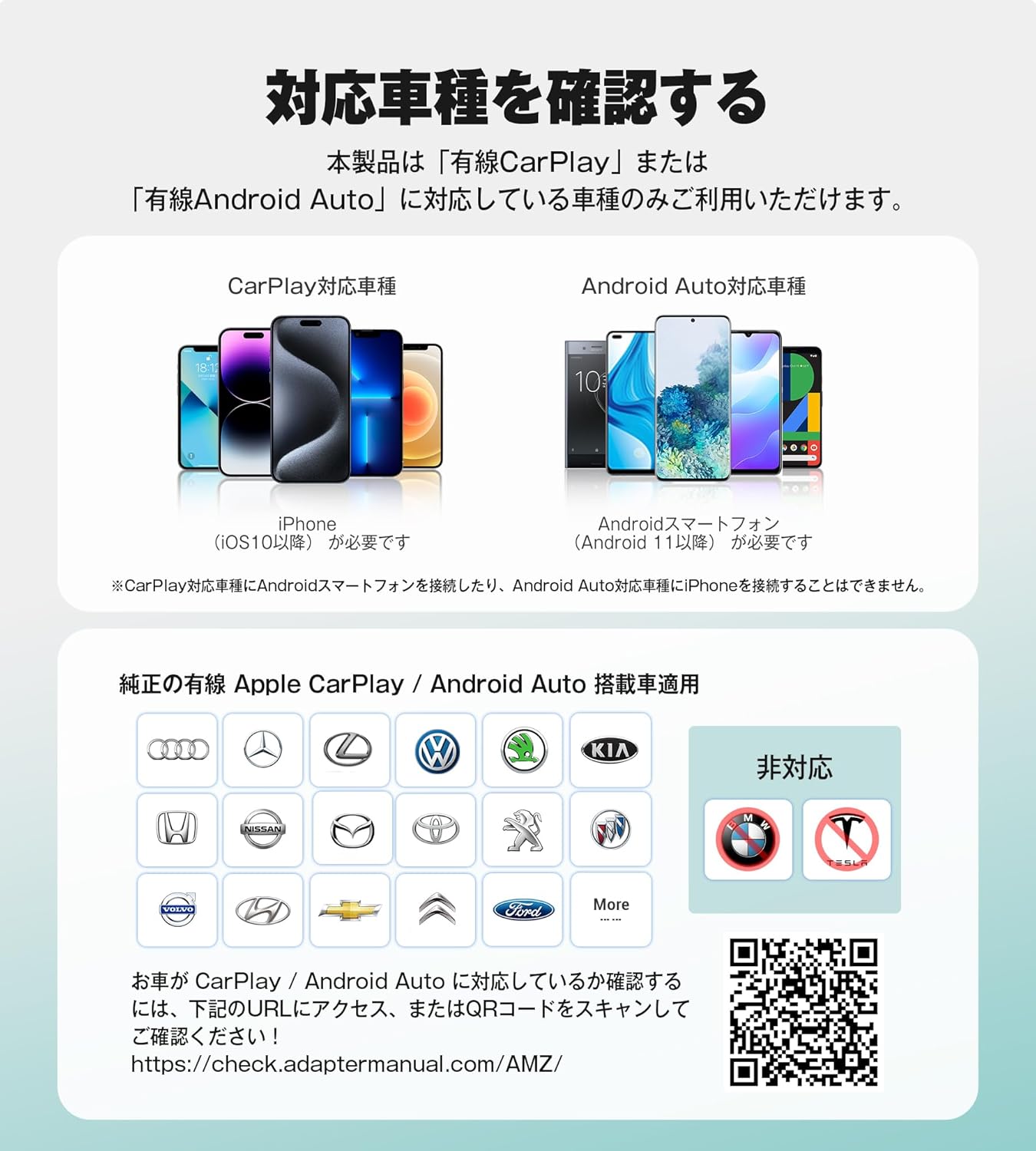
Image: A visual guide showing compatible car brands and smartphone operating systems (iOS 10+, Android 11+), along with a QR code and URL for compatibility check.

Image: A summary of device compatibility, showing iPhone (iOS 10.0+) for Wireless CarPlay and Android (Android 11.0+) for Wireless Android Auto, alongside a list of compatible car brands.

Image: Visual representation of compatibility requirements: iOS 10+ or Android 11+, mobile data enabled, and existing wired Apple CarPlay or Android Auto in the vehicle.

Image: Instructions on how to confirm if your car has wired CarPlay or Android Auto by checking for their icons in the car's UI. It also suggests consulting a car dealer.
3. Característiques del producte
- Wireless Conversion: Converts existing wired Apple CarPlay and Android Auto to wireless.
- Connexió estable: Equipped with the latest smart IC and a high-speed processor for reliable performance, even in areas with weak signals.
- Funcionalitat completa: Supports navigation, music playback, phone calls, messages, and voice control (Siri, Google Assistant).
- Disseny compacte: Lightweight, ultra-thin (approx. 1.0cm), and plug-and-play for minimal space usage.
- Connexió automàtica: After initial pairing, the device automatically connects to your smartphone when the car engine starts.
- Compatibilitat USB universal: Includes USB Type-A to C and 90° USB Type-A to A adapters for broad vehicle compatibility.
- Technical Compliance: Certified with technical compliance (R220-JP7656) for safe use.
- GPS Passthrough: Features unique technology for stable route guidance without interruption.

Image: The OTTOCAST MINI adapter showcasing its ability to convert wired CarPlay and Android Auto to wireless.

Image: Diagram illustrating the dedicated design for stable connection, featuring single Wi-Fi and dual Wi-Fi support (2.4GHz and 5GHz).

Image: Comparison showing the clutter of wired connections versus the clean, wireless setup provided by the OTTOCAST MINI.

Imatge: Una explosió view of the OTTOCAST MINI, highlighting its ultra-thin design (approximately 1.0cm) achieved through ultrasonic welding technology.

Image: A car display showing navigation with the OTTOCAST MINI, illustrating stable route guidance even in tunnels or mountainous areas due to GPS passthrough technology.

Image: Displays the included USB conversion adapters: a USB Type-A to Type-C adapter and a 90-degree USB Type-A to Type-A adapter, ensuring broad compatibility with various car USB ports.
4. Instruccions de configuració
- Connecteu l'adaptador: Plug the OTTOCAST MINI into your car's USB port. Use the appropriate adapter (Type-A to C or 90° Type-A to A) if needed.
- Enable Smartphone Connectivity: Turn on Wi-Fi and Bluetooth on your smartphone.
- Parella el dispositiu: On your car's display, navigate to the Bluetooth settings and pair your smartphone with the OTTOCAST MINI. The device name will typically appear as 'CARPLAY-XXXX' or similar.
- Connexió automàtica: After the initial pairing, the device will automatically connect to your smartphone and launch CarPlay or Android Auto within 10-15 seconds when the car engine is turned on. No further smartphone operation is required for subsequent connections.

Image: A four-step visual guide demonstrating how to connect the OTTOCAST MINI: plug into USB, turn on Wi-Fi and Bluetooth on phone, pair via Bluetooth, and enjoy wireless CarPlay.

Image: Illustration showing that the OTTOCAST MINI automatically reconnects to your smartphone within 10-15 seconds after the car engine starts, eliminating the need for manual connection each time.
5. Instruccions de funcionament
Once connected, your car's display will show the Apple CarPlay or Android Auto interface. You can interact with the system using your car's existing controls.
- Navegació: Use map applications like Google Maps for real-time navigation.
- Música i àudio: Play music from apps like Spotify.
- Comunicació: Make and receive phone calls, and send/receive messages.
- Control de veu: Utilize Siri or Google Assistant for hands-free operation.
- Controls del cotxe: The system supports control via touchscreen, rotary knob, and steering wheel buttons, maintaining your car's original control methods.
Image: A user happily driving while using wireless CarPlay on their car's display, powered by the OTTOCAST MINI.

Image: A user driving and interacting with wireless Android Auto on their car's display, enabled by the OTTOCAST MINI.

Image: Icons representing Siri and Google Assistant, indicating support for voice control functionality.

Image: A hand interacting with a car's touchscreen display, demonstrating touch control for CarPlay.

Image: A hand operating a car's rotary control knob, indicating support for this input method.

Image: A finger pressing a button on a car's steering wheel, showing compatibility with steering wheel controls.

Image: A display of various compatible applications for both Android Auto and CarPlay, including messaging, navigation, and music streaming services.
6. Limitacions
- No Video Streaming: The OTTOCAST MINI provides CarPlay and Android Auto functionality only. It does not support video playback from apps such as YouTube, Netflix, AirPlay, Apple TV+, Prime Video, or Hulu.
- Audio/Video Synchronization: Due to the nature of wireless CarPlay, there may be instances where audio and video synchronization is not perfect.
- Ús Wi-Fi: This product connects via Bluetooth for initial pairing, and data transmission occurs over Wi-Fi. It occupies your smartphone's Wi-Fi connection, so simultaneous use of in-car Wi-Fi or other Wi-Fi functions on your smartphone is not possible.

Image: A visual indicating that video streaming apps like YouTube, AirPlay, Netflix, Prime Video, Apple TV+, and Hulu are not supported for video playback through the device.

Image: Reiterates that Apple CarPlay and Android Auto do not support video playback, showing crossed-out logos of popular streaming services.
7. Manteniment
- Mantingueu el dispositiu net i lliure de pols.
- Eviteu exposar el dispositiu a temperatures o humitat extremes.
- For optimal performance, ensure your smartphone's operating system and the OTTOCAST MINI's firmware are up to date.
8. Solució De Problemes
Connection Instability or Interruption
If the connection is unstable or frequently interrupted, insufficient power supply may be the cause.
- First, try reconnecting or restarting the OTTOCAST MINI.
- If the issue persists, use a Y-split power cable (not included) for auxiliary power to the device.
No Bluetooth Display for Android Auto
When using wireless Android Auto, the Bluetooth screen will not be displayed. This is normal operation and does not indicate a fault.
9. Especificacions
| Color | Negre |
| Ús de la bateria | No |
| Marca | OTTOCAST |
| Fabricant | OTTOCAST |
| Components inclosos | Wireless CarPlay Adapter main unit, USB Plug Adapter (Type-A to C), 90° USB Plug Adapter (Type-A to A), User Manual |
| Altres característiques | Android Auto, Apple CarPlay, Hands-free calling, Voice control |
| Connectivitat | USB |
| Mida del paquet | 9.5 x 7.5 x 2.4 cm |
| Pes | 40 g |
| ASIN | B0F7L8WN1B |
| Primera data disponible | 2025/5/6 |
| UPC | 725414684720 |
| Supported OS Family | Android (for Android Auto compatibility) |
| Technical Compliance Certification | R220-JP7656 |
10. Garantia i assistència
Informació de la garantia
This product comes with a 2-year warranty from the date of purchase. Free replacement is offered within this period. Proof of purchase is required for warranty claims.

Image: A visual representation of the 2-year warranty provided with the product, indicating free replacement upon proof of purchase.
Actualitzacions de programari
The OTTOCAST MINI supports online software updates to ensure optimal performance and compatibility.
- Per a iPhones: If connected via wireless CarPlay, you can easily update the software by entering '192.168.1.101' into your browser.
- Per a dispositius Android: For detailed instructions on updating Android devices, please refer to the comprehensive user manual provided with the product.
Image: A smartphone screen showing the OttoPilot app interface for online updates, with the OTTOCAST MINI device in the background.
Atenció al client
The product includes a Japanese instruction manual and support is available via the OttoPilot app. For direct inquiries, you may contact customer support at 080-8117-5519 (Weekdays 9:00-17:00 JST).


