NBCP Wireless Pro Controller User Manual
Model: 775 | Brand: NBCP
1. Producte acabatview
The NBCP Wireless Pro Controller is a versatile gaming controller designed for enhanced performance across multiple platforms. It features an interactive LED display, Hall Effect joysticks and triggers, customizable macro buttons, Turbo function, and a 6-axis gyroscope. This manual provides detailed instructions for setup, operation, and maintenance.

Figure 1: NBCP Wireless Pro Controller with its interactive LED display.
2. Configuració i connexió
2.1 Càrrega inicial
Before first use, fully charge the controller using the provided USB-C cable. Connect the USB-C end to the controller's port and the USB-A end to a compatible power source (e.g., computer USB port, USB wall adapter). The LED display will indicate charging status.

Figure 2: USB-C charging port for convenient power delivery.
2.2 Modes de connexió
The controller supports three connection modes: Bluetooth, 2.4G Wireless (via dongle), and USB Wired.
2.2.1 Connexió de la Nintendo Switch
- Engega la teva consola Nintendo Switch.
- On the Switch HOME Menu, select Controladors > Canvia d'adherència/ordre.
- Manteniu premut el botó Botó d'inici on the NBCP controller for 3 seconds until the LED display shows 'Switch' and the connection indicator flashes.
- Once connected, the indicator will become solid, and the controller will be ready for use.
2.2.2 PC (Windows) Connection
The controller supports Xinput and Dinput modes for PC.
- Mode per cable USB: Connect the controller directly to your PC using the USB-C cable. The controller will be automatically recognized.
- Mode sense fil 2.4G: Insert the 2.4G USB dongle into an available USB port on your PC. Press and hold the Botó d'inici on the controller until the LED display shows 'PC' and the connection indicator flashes. It will automatically pair with the dongle.
- Mode Bluetooth: On your PC, go to Bluetooth settings and search for new devices. Press and hold the Botó d'inici on the controller until the LED display shows 'PC' and the connection indicator flashes. Select 'NBCP Controller' from the list to pair.
2.2.3 Android/iOS Connection
For Android and iOS devices, use Bluetooth connection.
- Activeu el Bluetooth al vostre dispositiu Android o iOS.
- Manteniu premut el botó Botó d'inici on the controller until the LED display shows 'Android' or 'iOS' and the connection indicator flashes.
- Cerca 'NBCP Controller' in your device's Bluetooth settings and select it to pair.
2.2.4 PlayStation 3 (PS3) Connection
Connect the controller to your PS3 console using the USB-C cable. The controller will be automatically recognized and function in wired mode.

Figure 3: Multi-platform compatibility of the NBCP Wireless Pro Controller.
3. Instruccions de funcionament
Pantalla LED intel·ligent 3.1
The integrated LED display provides real-time information and allows for on-the-fly customization without needing an external app. It shows:
- Connection Status (Bluetooth, 2.4G, Wired)
- Nivell de bateria
- Configuració de la sensibilitat
- Intensitat de vibració
- Modes d'il·luminació
Navigate the display menu using the directional pad and action buttons to adjust settings.
3.2 Joysticks i disparadors d'efecte Hall
The controller features Hall Effect joysticks and linear triggers, designed for precision and durability, minimizing drift over time. The triggers offer adjustable stroke settings for different game types.

Figure 4: Hall Effect Triggers provide precise and durable input.
3.2.1 Bloquejos del gallet
The controller includes physical trigger locks on the back, allowing you to switch between short-press (for quick shots in FPS games) and long-press (for racing games or other applications requiring full trigger travel) modes.
3.2.2 Joystick Sensitivity Curves
Adjust joystick sensitivity curves directly from the LED display to optimize control for various game genres (e.g., default, action fighting, role-playing, shooting/racing games).
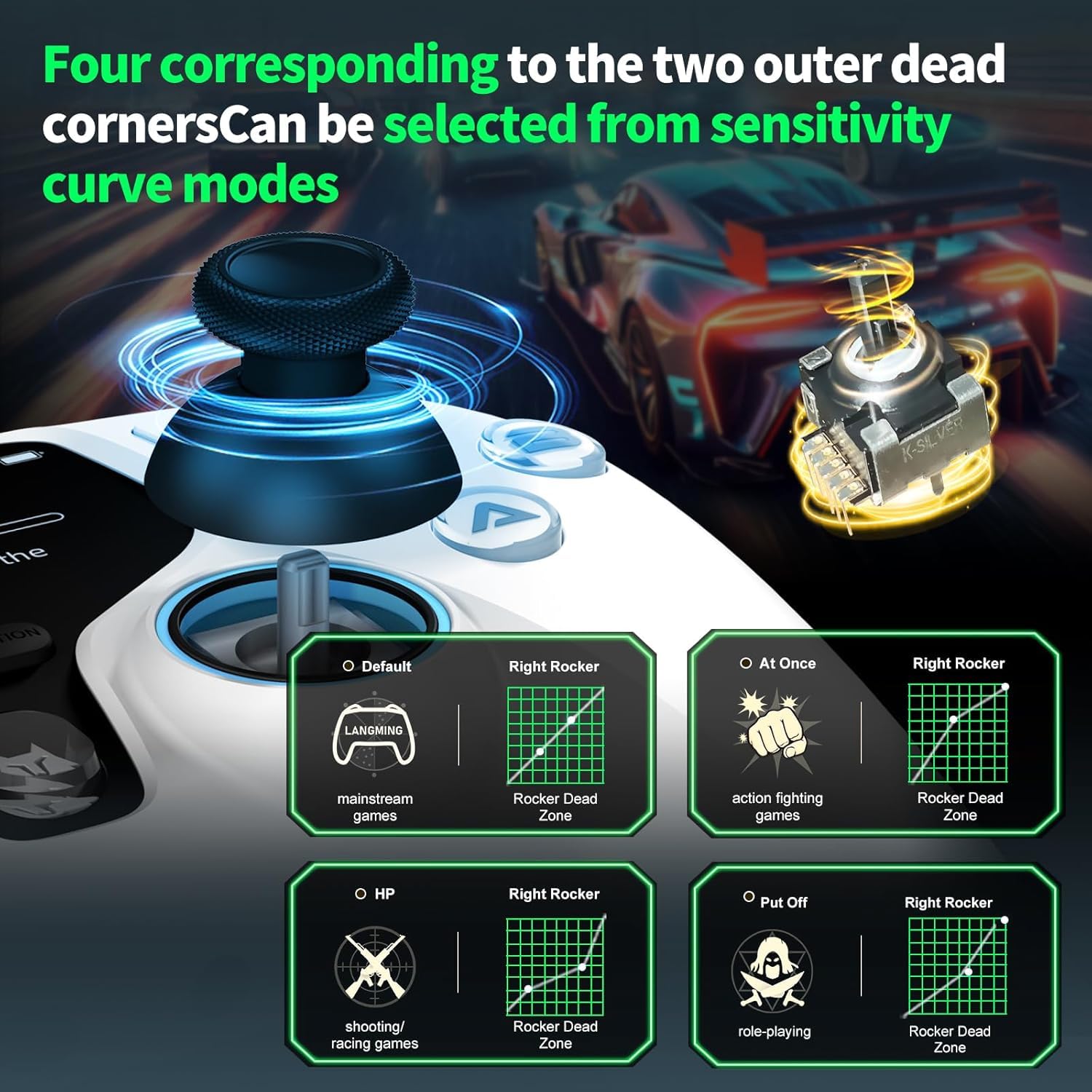
Figure 5: Customize joystick sensitivity curves for optimal gameplay.
3.3 Macro Back Buttons (MR/ML)
The controller features two programmable back buttons (MR and ML) that can be assigned complex command sequences or single button remappings. This allows for one-touch execution of intricate moves.
- To program a macro, enter the macro editing mode via the LED display.
- Record your desired button sequence.
- Assign the recorded macro to either the MR or ML button.

Figure 6: Dual macro back buttons for custom command sequences.
3.4 Funció Turbo
The Turbo function allows for rapid, continuous input of any of the 10 function keys. It supports both auto and manual modes, and the frequency can be adjusted.
- Select the desired button for Turbo function via the LED display.
- Choose between auto or manual Turbo mode.
- Adjust the Turbo frequency (e.g., 8Hz/s, 15Hz/s, 20Hz/s).

Figure 7: Configure Turbo function for rapid button presses.
3.5 6-Axis Gyroscope
The built-in 6-axis gyroscope provides motion-sensing capabilities, enhancing gameplay for titles that support motion controls, particularly in FPS or action games.

Figure 8: The 6-axis gyroscope offers precise motion control.
3.6 Headset Support
A 3.5mm audio jack is included for connecting a headset, enabling in-game audio and voice chat, primarily supported in PC wired mode.

Figure 9: Connect your headset via the 3.5mm audio jack.
3.7 Demostració en vídeo
Watch this official video for a visual guide on the NBCP Wireless Pro Controller's features and functionalities.
Vídeo 1: Final oficialview of the NBCP Wireless Pro Controller with LED Display.
4. Manteniment
4.1 Neteja
To maintain the controller's condition, wipe it regularly with a soft, dry cloth. For stubborn dirt, slightly dampRenta el drap amb aigua. Evita utilitzar productes químics agressius o materials abrasius.
4.2 Cura de la bateria
The controller is equipped with a rechargeable battery. For optimal battery life, avoid fully discharging the controller frequently. It can be used while charging, ensuring uninterrupted gameplay.
5. Solució De Problemes
If you encounter issues with your NBCP Wireless Pro Controller, please refer to the following common solutions:
- Problemes de connexió: Ensure the controller is fully charged. Verify that the correct connection mode (Bluetooth, 2.4G, Wired) is selected for your device. Try re-pairing the controller.
- Botons/joysticks que no responen: Check the LED display for any error indicators. If the controller is unresponsive, locate the small Botó RESET on the back of the controller (often a pinhole) and press it with a thin object (e.g., paperclip) to reset the controller.
- Deriva: While Hall Effect joysticks are designed to minimize drift, if you experience any, try recalibrating the joysticks through the controller's LED display settings.
- Audio Issues (PC Wired Mode): Ensure your headset is properly plugged into the 3.5mm jack. Check your PC's audio settings to confirm the controller's audio output is selected.
- Macro/Turbo Not Working: Review the programming steps for macros and Turbo functions on the LED display to ensure they were set correctly.
For further assistance, please contact NBCP customer support.
6. Especificacions
| Característica | Detall |
|---|---|
| Número de model | 775 |
| Connectivitat | Bluetooth, 2.4G sense fil, USB per cable |
| Taxa de votació | Up to 1000Hz (Wired & Wireless) |
| Joysticks | Efecte Hall |
| Disparadors | Hall Effect, Linear with Trigger Locks |
| Característiques especials | LED Display, Dual Macro Back Buttons, Turbo, 6-Axis Gyroscope |
| Jack d'àudio | 3.5mm (PC wired mode) |
| Bateria | 1 bateria P76 (inclosa) |
| Pes de l'article | 13.4 unces |
| Dimensions del paquet | 6.69 x 4.65 x 3.23 polzades |
7. Garantia i Suport
NBCP is committed to providing high-quality products and excellent customer service. We offer 24/7 service and step-by-step troubleshooting assistance for any issues you may encounter with your controller.
For warranty information or to receive support, please visit the official NBCP website or contact our customer service team directly through the contact details provided with your product packaging.


