1. Introducció
This manual provides essential instructions for setting up, operating, and maintaining your CONSUMER CELLULAR Iris Connect smartphone. The Iris Connect is designed for reliable performance, featuring a 6.5-inch display, 32GB of storage, and running on Android 13. Please read this manual thoroughly to ensure proper use and to maximize your device's capabilities.
2. Què hi ha a la caixa
Upon unboxing your CONSUMER CELLULAR Iris Connect, verify that all the following items are included:
- CONSUMER CELLULAR Iris Connect Smartphone
- Cable USB
- Guia d'inici ràpid
3. Dispositiu acabatview
Familiarize yourself with the physical components of your Iris Connect smartphone.

Figura 3.1: Davant i darrere view of the Iris Connect smartphone, highlighting its sleek design and camera placement.

Figura 3.2: Davant view of the Iris Connect, showcasing the 6.5-inch display and front-facing camera.
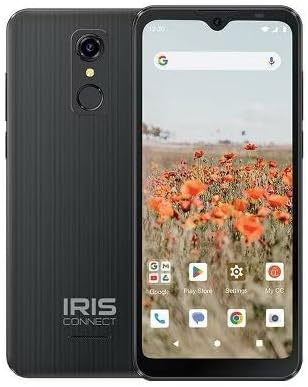
Figura 3.3: Enrere view of the Iris Connect, showing the main camera, flash, and fingerprint sensor.
Components clau:
- Pantalla de 6.5 polzades: High Definition+ screen for clear visuals.
- Càmera frontal (8MP): Situat a la part superior de la pantalla per a selfies i videotrucades.
- Càmera principal (13MP): Located on the rear, for high-resolution photos and videos.
- Escàner d’empremtes digitals: Integrated on the rear for secure unlocking.
- Botó d'encesa: Typically on the right side, used to turn the device on/off or wake/sleep the screen.
- Botons de volum: Adjacent al botó d'engegada, per ajustar els nivells d'àudio.
- Port USB-C: A la part inferior, per a la càrrega i la transferència de dades.
- Conector d'àudio de 3.5 mm: Per connectar auriculars.
4. Configuració
4.1. Inserció de la targeta SIM i la targeta MicroSD
- Localitza la safata de la targeta SIM al lateral del dispositiu.
- Insert the SIM ejector tool (not included, use a thin paperclip) into the small hole next to the tray and press gently until the tray pops out.
- Col·loqueu la targeta o targetes nano-SIM a les ranures designades amb els contactes daurats cap avall.
- If desired, insert a microSD card (up to 256GB) into its dedicated slot for expanded storage.
- Torneu a inserir la safata al dispositiu amb cura fins que encaixi al seu lloc.
4.2. Assistent d'encesa inicial i configuració
- Manteniu premut el botó Botó d'engegada fins que la pantalla s'il·lumini.
- Segueix les instruccions que apareixen a la pantalla per seleccionar l'idioma, connectar-te a una xarxa Wi-Fi i configurar el teu compte de Google.
- You may be prompted to transfer data from an old device or set up security features like the fingerprint scanner.
4.3. Càrrega del dispositiu
Before first use, it is recommended to fully charge your device. The Iris Connect features a 3500 mAh battery with an approximate charging time of 2.5 hours.
- Connecteu el cable USB al port USB-C de la part inferior del telèfon.
- Connect the other end of the USB cable to a compatible power adapter (not included) and plug it into a wall outlet.
- L'indicador de càrrega apareixerà a la pantalla.
5. Instruccions de funcionament
5.1. Navegació bàsica
- Toca: Toca una icona per obrir una aplicació o seleccionar un element.
- Llisca: Arrossegueu el dit per la pantalla per desplaçar-vos o navegar entre pantalles.
- Pessigar: Feu servir dos dits per ampliar o reduir les fotos i web pàgines.
- Pantalla d'inici: El centre neuràlgic de les teves aplicacions i widgets.
- Calaix d'aplicacions: Llisca cap amunt des de la pantalla d'inici per accedir a totes les aplicacions instal·lades.
5.2. Realització de trucades
- Toqueu Telèfon icon on your home screen or app drawer.
- Introduïu el número de telèfon amb el teclat numèric o seleccioneu un contacte de la llibreta d'adreces.
- Toqueu Truca botó per iniciar la trucada.
5.3. Enviament de missatges
- Obriu el Missatges aplicació.
- Toqueu Inicia el xat or Nou missatge icona.
- Introdueix el número del destinatari o selecciona'l dels contactes i, a continuació, escriu el missatge.
- Toqueu Enviar botó.
5.4. Connexió a Wi-Fi
- Vés a Configuració > Xarxa i Internet > Internet.
- Activa/desactiva el Wi-Fi On.
- Seleccioneu la xarxa Wi-Fi desitjada de la llista i introduïu la contrasenya si se us demana.
5.5. Emparellament Bluetooth
- Vés a Configuració > Dispositius connectats > Preferències de connexió > Bluetooth.
- Commuta el Bluetooth On.
- Seleccioneu Vincula un dispositiu nou and choose your desired device from the list. Follow any on-screen prompts to complete pairing.
5.6. Ús de la càmera
The Iris Connect features a 13MP main camera and an 8MP front-facing camera.
- Obriu el Càmera aplicació.
- Toqueu Obturador botó per fer una foto.
- Switch between photo and video modes, or front and rear cameras, using the on-screen icons.
5.7. Escàner d'empremtes digitals
To set up the fingerprint scanner for secure unlocking:
- Vés a Configuració > Seguretat i privadesa > Desbloqueig del dispositiu > empremta digital.
- Segueix les instruccions que apareixen a la pantalla per registrar la teva empremta digital.
6. Manteniment
6.1. Neteja del dispositiu
To keep your device clean and functional:
- Feu servir un drap suau i sense borrissol per netejar la pantalla i la carcassa.
- Eviteu utilitzar productes químics agressius, netejadors abrasius o aerosols.
- Assegureu-vos que els ports estiguin lliures de pols i deixalles.
6.2. Cura de la bateria
To optimize your battery life (up to 26 hours of use):
- Eviteu temperatures extremes.
- No deixeu el dispositiu carregant-se durant períodes prolongats després que estigui ple.
- Adjust screen brightness and close unused apps to conserve power.
6.3. Actualitzacions de programari
Comproveu regularment si hi ha actualitzacions de programari per assegurar-vos que el dispositiu tingui les funcions i els pegats de seguretat més recents:
- Vés a Configuració > Sistema > Actualització del sistema.
- Seguiu les instruccions que apareixen a la pantalla per descarregar i instal·lar les actualitzacions disponibles.
7. Solució De Problemes
This section addresses common issues you might encounter with your Iris Connect smartphone.
- El dispositiu no s'encén: Assegureu-vos que la bateria estigui carregada. Connecteu el carregador i espereu uns minuts abans d'intentar tornar-lo a engegar.
- Sense senyal de xarxa: Check if your SIM card is correctly inserted. Verify that Airplane Mode is off (swipe down from the top of the screen to check quick settings). Contact your service provider if the issue persists.
- Les aplicacions es bloquegen o es bloquegen: Try restarting the app. If the issue continues, restart the phone. You may also clear the app's cache or data via Configuració > Aplicacions > [Nom de l'aplicació] > Emmagatzematge i memòria cau.
- Rendiment lent: Close unused apps, clear cache, or consider uninstalling rarely used applications to free up storage.
- Unable to connect to Wi-Fi/Bluetooth: Ensure Wi-Fi/Bluetooth is enabled in settings. Try forgetting the network/device and reconnecting. Restart your phone and the router/Bluetooth device.
- Forgot screen lock password/pattern: Si teniu un compte de Google vinculat, és possible que pugueu restablir-lo. En cas contrari, pot ser necessari restablir les dades de fàbrica (això esborrarà totes les dades).
For more complex issues, please refer to the official CONSUMER CELLULAR support resources or contact their customer service.
8. Especificacions
Detailed technical specifications for the CONSUMER CELLULAR Iris Connect smartphone (Model: SH4650).
| Característica | Especificació |
|---|---|
| Nom del model | Iris Connect |
| Número de model | SH4650 |
| Sistema operatiu | Android 13.0 |
| Mida de la pantalla | 6.5 polzades |
| Resolució de visualització | 1440 x 810 |
| Model de CPU | Snapdragon 710 |
| Velocitat de la CPU | 2 GHz |
| Mida instal·lada de la memòria RAM | 3 GB |
| Emmagatzematge intern | 32 GB |
| Emmagatzematge ampliable | Fins a 256 GB mitjançant microSD |
| Càmera principal | 13 MP |
| Càmera frontal | 8 MP |
| Capacitat de la bateria | 3500 milionsamp Hores |
| Potència nominal de la bateria | 3600 (likely Wh or similar unit, as mAh is 3500) |
| Temps de càrrega | 2.5 hores |
| Connectivitat | 4G LTE, Bluetooth, Wi-Fi |
| Característiques especials | Dual Camera, Expandable Storage, Fingerprint Scanner, Long Battery Life |
| Jack d'àudio | 3.5 mil·límetre |
| Dimensions | 8 x 6 x 3 polzades |
| Pes de l'article | 6.5 unces |
9. Garantia i Suport
For information regarding your product's warranty, please refer to the warranty card included with your purchase or visit the official CONSUMER CELLULAR website. For technical assistance, troubleshooting beyond this manual, or customer service inquiries, please contact CONSUMER CELLULAR support directly.
CONSUMER CELLULAR Official Weblloc: www.consumercellular.com


