1. Introducció
Gràcies per la compraasing the G Keni Elegant CD Player Alarm Clock Radio. This device combines a top-loading CD player, FM radio, Bluetooth speaker, MP3/USB music player, and an alarm clock with a wireless charging station. It is designed to provide versatile audio entertainment and convenience for your home. Please read this manual thoroughly before use to ensure proper operation and to maximize your experience with the product.
2. Què hi ha a la caixa
- 1x G Keni Elegant CD Player Alarm Clock Radio (Model LC-10W)
- 1x Owner's Manual
- 1x cable d'alimentació de CA
- 1x Remote Control (2*AAA dry batteries NOT INCLUDED)
3. Producte acabatview
Familiarize yourself with the main components and controls of your G Keni device.

Figura 3.1: Frontal view of the G Keni CD Player Alarm Clock with a smartphone charging wirelessly on top and the remote control.
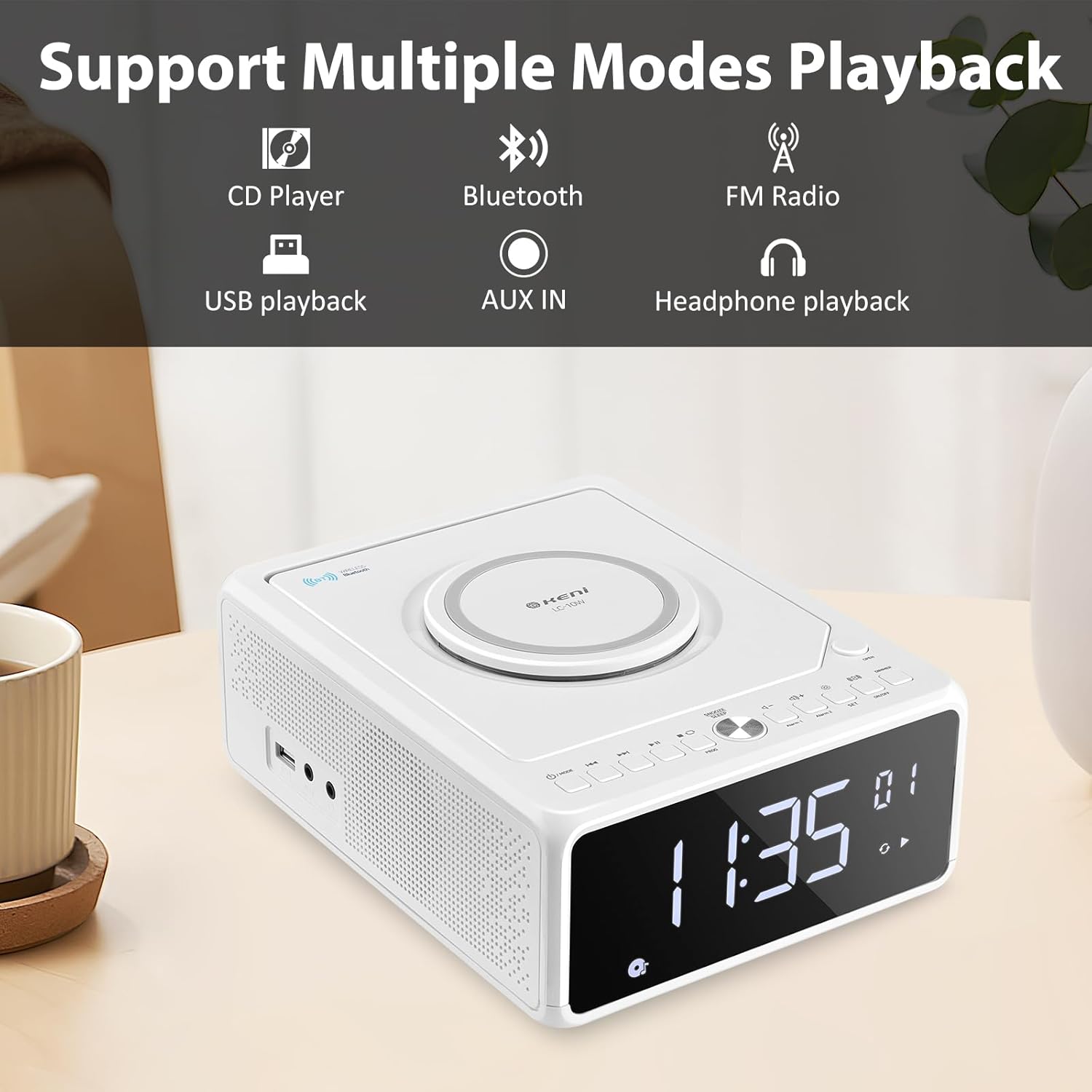
Figura 3.2: Mésview of supported playback modes: CD Player, Bluetooth, FM Radio, USB playback, AUX IN, and Headphone playback.
3.1 Front Panel & Display
- Pantalla LED gran: Shows time, FM frequency, mode, and alarm status.
- Botons de control: Power, Mode, Set, Volume, Skip/Tune, Alarm 1/2, Snooze/Dimmer.
3.2 Tauler superior
- Compartiment de CD: Top-loading mechanism for CDs.
- Coixinet de càrrega sense fil: Per a telèfons intel·ligents compatibles.
3.3 Rear/Side Panels
- Entrada d'alimentació de CA: Es connecta a l'adaptador de corrent.
- Antena FM: Extendable wire antenna for radio reception.
- Port USB: For MP3/WMA playback from USB drives.
- Entrada AUX: Presa de 3.5 mm per a dispositius d'àudio externs.
- Sortida d'auriculars: Jack de 3.5 mm per a escolta privada.
- Compartiment de la bateria: For backup batteries (2*AAA, not included) to retain time settings during power outages.
4. Configuració
4.1 Connexió d'alimentació
- Insert 2 AAA batteries (not included) into the battery compartment on the bottom of the unit. These batteries serve as a backup for time settings during power interruptions.
- Connect the AC power cord to the AC input on the back of the unit, then plug the other end into a standard wall outlet (100V-240V).
- La unitat s'engegarà i la pantalla s'il·luminarà.
4.2 Configuració de l'hora
- Manteniu premut el botó SET button until the hour digits begin to blink.
- Premeu el botó Forward (▶▶I) or Rewind (I◀◀) button to adjust the hour. Ensure the correct AM/PM indicator is selected if using 12-hour format.
- Premeu el botó SET button again. The minute digits will begin to blink.
- Premeu el botó Forward (▶▶I) or Rewind (I◀◀) per ajustar els minuts.
- Premeu el botó SET premeu el botó una vegada més per confirmar i estalviar temps.
- Per canviar entre el format de 12 hores i el de 24 hores, premeu la tecla Forward (▶▶I) button while the hour digits are blinking during time setting.
4.3 Antena FM
For optimal FM radio reception, fully extend the wire antenna located on the back of the unit. Adjust its position for the best signal.
5. Instruccions de funcionament
5.1 Reproducció de CD

Figure 5.1: Inserting a CD into the top-loading compartment.
- Obriu la tapa del compartiment de CD a la part superior de la unitat.
- Place a CD (CD, CD-R/RW, MP3, audio-book) onto the spindle with the label side facing up.
- Tanqueu la coberta del compartiment del CD.
- Premeu el botó MODE button until 'CD' mode is selected. The unit will begin playing automatically.
- Utilitza el Play/Pause (▶II) botó per aturar o reprendre la reproducció.
- Utilitza el Forward (▶▶I) or Rewind (I◀◀) buttons to skip tracks. Press and hold to fast forward or rewind within a track.
- Ajusteu el volum amb el botó VOL+ or VOL- botons.
5.2 Vinculació Bluetooth
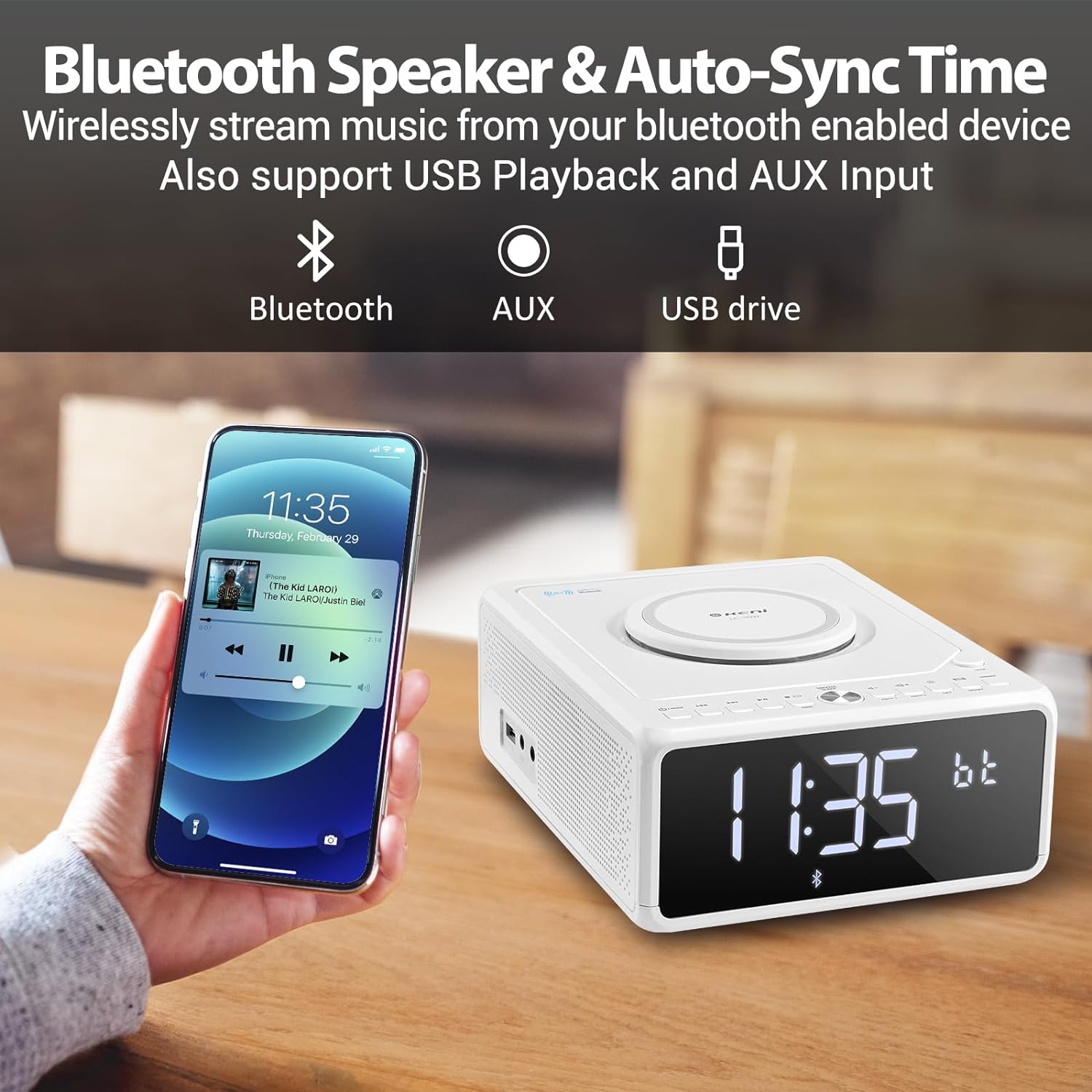
Figure 5.2: Streaming music from a smartphone via Bluetooth.
- Premeu el botó MODE button until 'BT' (Bluetooth) mode is selected. The display will show 'BT' and blink, indicating it's in pairing mode.
- Al telèfon intel·ligent o a un altre dispositiu amb Bluetooth, activeu el Bluetooth i cerqueu els dispositius disponibles.
- Select 'G Keni' from the list of devices.
- Once paired, the 'BT' indicator on the display will stop blinking and remain solid. You can now stream audio from your device.
5.3 Funcionament de la ràdio FM

Figure 5.3: Enjoying FM radio with the G Keni unit.
- Premeu el botó MODE button until 'FM' mode is selected.
- Escaneig automàtic: Manteniu premut el botó Play/Pause (▶II) per escanejar i desar automàticament les emissores de FM disponibles.
- Sintonització manual: Premeu el botó Forward (▶▶I) or Rewind (I◀◀) botons per sintonitzar manualment una freqüència específica.
- Estacions preseleccionades: Utilitza el CH+ or CH- buttons on the remote control to navigate through saved preset stations.
Reproducció USB 5.4
- Insert a USB flash drive containing MP3/WMA audio files al port USB.
- Premeu el botó MODE button until 'USB' mode is selected. The unit will automatically detect and begin playing audio files.
- Utilitza el Play/Pause (▶II), Forward (▶▶I), i Rewind (I◀◀) botons per controlar la reproducció.
5.5 Entrada AUX
- Connect an external audio device (e.g., MP3 player, smartphone) to the AUX IN port using a 3.5mm audio cable (not included).
- Premeu el botó MODE button until 'AUX' mode is selected.
- Controla la reproducció des del dispositiu extern connectat.
5.6 Funcions del despertador

Figure 5.4: The alarm clock on a bedside table, also showing wireless charging.
The unit features dual alarms (Alarm 1 and Alarm 2).
- Configuració de l'hora de l'alarma:
a. Manteniu premut el botó ALARMA 1 or ALARMA 2 botó fins que parpellegen els dígits de l'hora.
b. Utilitzar el Forward (▶▶I) or Rewind (I◀◀) buttons to set the desired hour.
c. Premeu el botó ALARMA 1 or ALARMA 2 button again. The minute digits will blink.
d. Utilitzar el Forward (▶▶I) or Rewind (I◀◀) buttons to set the desired minutes.
e. Premeu el botó ALARMA 1 or ALARMA 2 de nou per confirmar l'hora de l'alarma. - Selecting Alarm Source:
a. After setting the alarm time, the display will show options for the alarm sound (e.g., BB for Buzzer, TUNE for Radio, CD, USB, BT for Bluetooth).
b. Utilitzar el Forward (▶▶I) or Rewind (I◀◀) botons per seleccionar la font d'alarma preferida.
c. Premeu el botó ALARMA 1 or ALARMA 2 button to confirm the alarm source. - Setting Alarm Volume:
a. After selecting the alarm source, 'V' will blink on the display.
b. Utilitzar el Forward (▶▶I) or Rewind (I◀◀) botons per ajustar el volum de l'alarma.
c. Premeu el botó ALARMA 1 or ALARMA 2 button to confirm the alarm volume. - Activació/desactivació d'alarmes: Premeu breument ALARMA 1 or ALARMA 2 botó per activar o desactivar l'alarma. Apareixerà una icona d'alarma a la pantalla quan estigui activa.
5.7 Snooze and Sleep Timer
- Dormitar: Quan soni una alarma, premeu el botó SNOOZE / DIMMER button to temporarily silence the alarm for 9 minutes. The alarm will sound again after 9 minutes. This can be repeated within an hour.
- Temporitzador de son: While playing audio (Radio, CD, USB, Bluetooth), press the DORMIR button on the remote control repeatedly to cycle through sleep timer options (e.g., 10, 20, 30, 60, 90 minutes, or OFF). The unit will automatically turn off after the selected duration.
5.8 Brillantor de la pantalla
Premeu el botó SNOOZE / DIMMER botó (o DIMMER button on the remote) repeatedly to adjust the brightness of the LED display. There are 5 levels of dimmable settings, including an option to turn the display off completely.
5.9 Càrrega sense fil

Figure 5.5: A smartphone being charged wirelessly on the unit's charging pad.
Place your Qi-enabled smartphone directly onto the wireless charging pad located on the top of the unit. Ensure the phone is centered for optimal charging. The unit supports fast wireless charging (Max 7.5W for iOS, 10W for Android).
5.10 Ús del control remot
The included remote control provides convenient access to all functions. Insert 2 AAA batteries (not included) into the remote before use. Buttons on the remote mirror most functions available on the unit's front panel, including Power, Mode, Volume, Skip/Tune, Alarm settings, Snooze, Sleep, and Dimmer.
6. Manteniment
- Neteja: Netegeu la unitat amb un drap suau i sec. No utilitzeu productes de neteja abrasius ni dissolvents.
- Cura de CD: Handle CDs by their edges. Keep them clean and free of scratches.
- Col·locació: Place the unit on a stable, flat surface away from direct sunlight, heat sources, and moisture. Ensure adequate ventilation.
7. Solució De Problemes
If you encounter issues with your G Keni device, please refer to the following common problems and solutions:
| Problema | Causa possible | Solució |
|---|---|---|
| La unitat no s'encén. | El cable d'alimentació no està connectat correctament. | Ensure the AC power cord is securely plugged into both the unit and a working wall outlet. |
| El CD salta o no es reprodueix. | El CD està brut, ratllat o inserit incorrectament. | Clean the CD with a soft, lint-free cloth. Ensure the CD is placed correctly in the compartment. Try a different CD. |
| Mala recepció de ràdio FM. | Antenna not extended or positioned poorly. | Fully extend the FM wire antenna and adjust its position for better signal. |
| El dispositiu Bluetooth no s'està emparellant. | Unit not in BT mode or device too far. | Ensure the unit is in 'BT' mode and blinking. Keep your Bluetooth device within 10 meters (33 feet) of the unit. Restart both devices. |
| La càrrega sense fil no funciona. | Phone not Qi-enabled, misaligned, or case too thick. | Ensure your phone supports Qi wireless charging. Realign the phone on the charging pad. Remove thick phone cases. |
| Alarm did not sound. | L'alarma no està activada o està configurada incorrectament. | Verify that the alarm is set and activated (alarm icon visible on display). Check alarm time and volume settings. |
8. Especificacions
- Número de model: LC-10W
- Dimensions del producte: 8.46 x 6.69 x 3.15 polzades
- Pes de l'article: 2.6 lliures
- Tecnologia de connectivitat: Auxiliar, Bluetooth, USB
- Tipus d'altaveu: Doble altaveu
- Entrada d'alimentació: AC 100V-240V
- Sortida de càrrega sense fils: Max 7.5W (iOS), Max 10W (Android)
- Rang de freqüència de FM: 87.5-108 MHz
9. Garantia i Suport
G Keni provides a one-year warranty for this product from the date of purchase. This warranty covers manufacturing defects and workmanship. It does not cover damage caused by misuse, accidents, unauthorized modifications, or normal wear and tear.
For technical assistance, warranty claims, or customer service inquiries, please contact G Keni customer support. Refer to the contact information provided on the product packaging or the official G Keni weblloc web per obtenir els detalls d'assistència més actualitzats.


