Introducció
Thank you for choosing the Monster S290 Portable Bluetooth Speaker. This manual provides essential information for setting up, operating, and maintaining your speaker to ensure optimal performance and longevity. Please read this manual thoroughly before using the product.
Image: The Monster S290 speaker is designed for portability, allowing users to enjoy music in various outdoor settings.
Què hi ha a la caixa
Verifiqueu que tots els elements siguin presents al paquet:
- Monster S290 Speaker x1
- AUX IN Cable x1
- Cable de càrrega USB-C x1
- Quick Start Guide & Warning Card x1
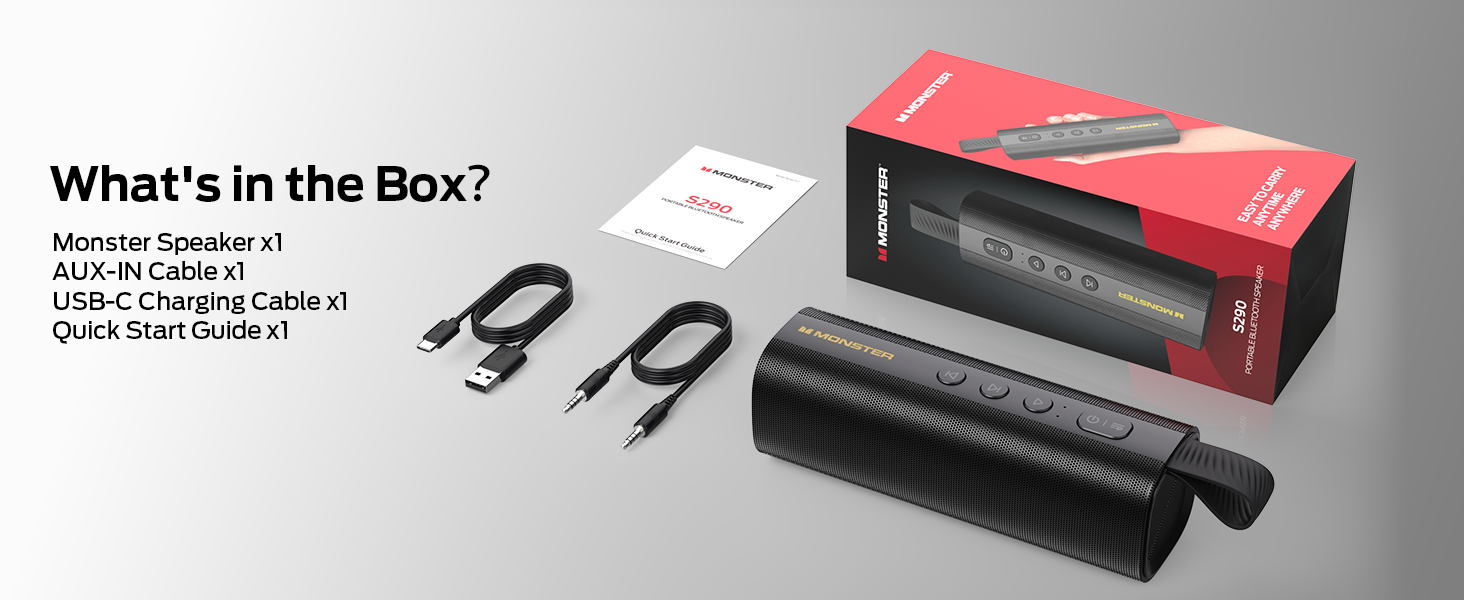
Image: All components included with the Monster S290 speaker are shown, ensuring users can confirm their package contents.
Producte acabatview i Controls
Familiarize yourself with the speaker's physical features and control buttons.
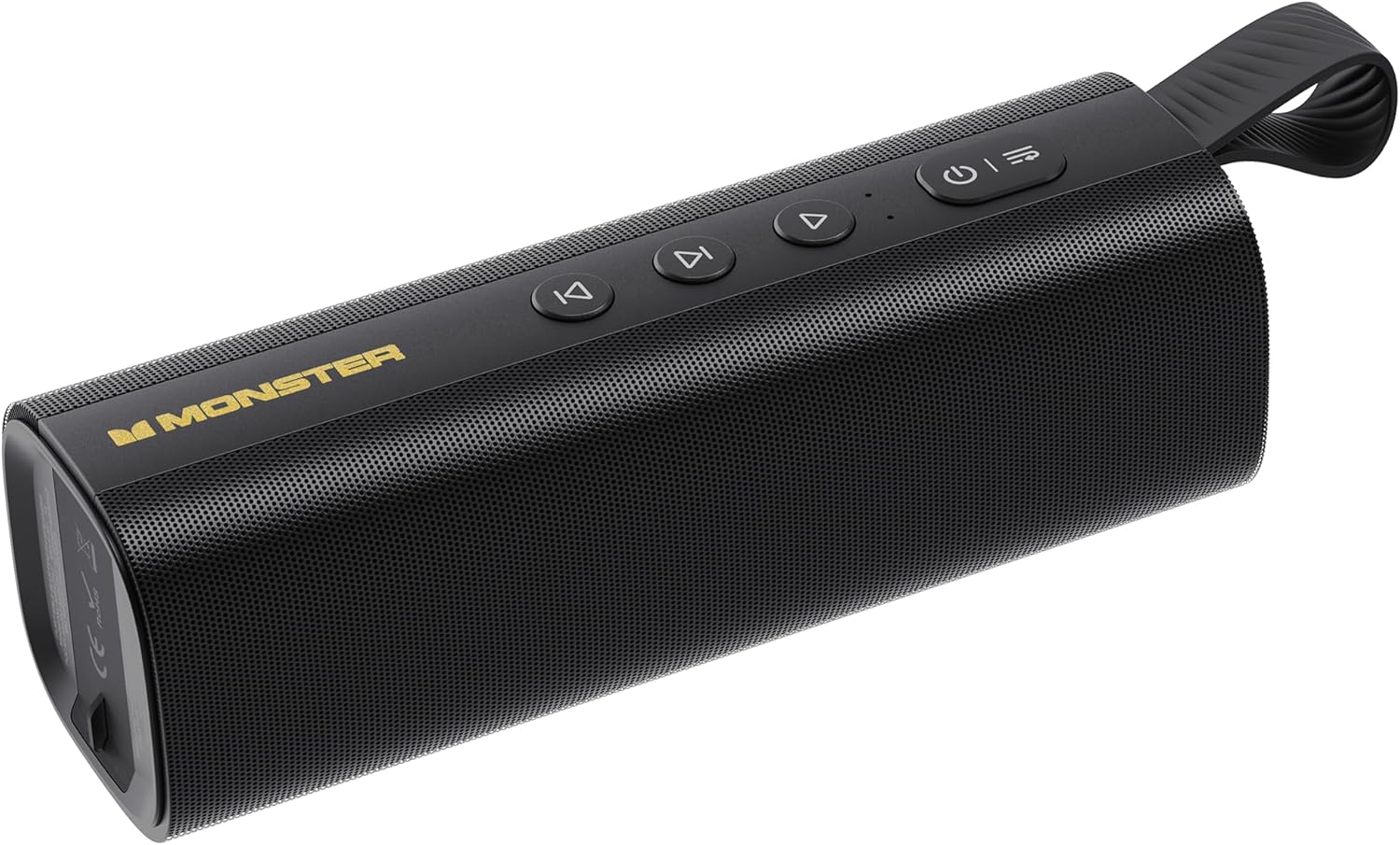
Imatge: Una imatge detallada view of the Monster S290 speaker, highlighting its compact design and accessible controls.
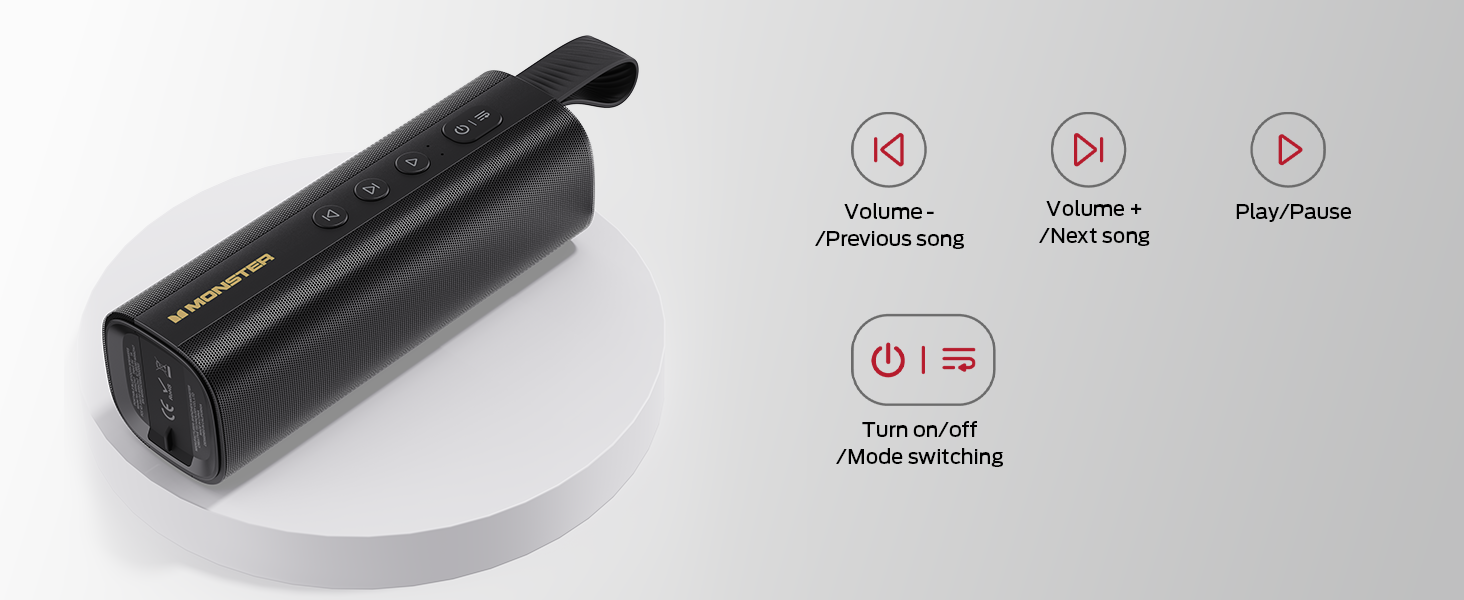
Image: A visual guide to the speaker's control panel, detailing the function of each button for easy operation.
Funcions de control:
- Botó d'engegada (⑂): Press and hold to turn the speaker on or off. Short press to switch between input modes (Bluetooth, AUX, TF Card).
- Play/Pause Button (▶): Press to play or pause audio. During a call, press to answer or end a call. Press and hold to reject an incoming call.
- Volume Down / Previous Track Button (◀◀): Short press to decrease volume. Press and hold to go to the previous track.
- Volume Up / Next Track Button (▶▶): Short press to increase volume. Press and hold to go to the next track.
Ports d'entrada:
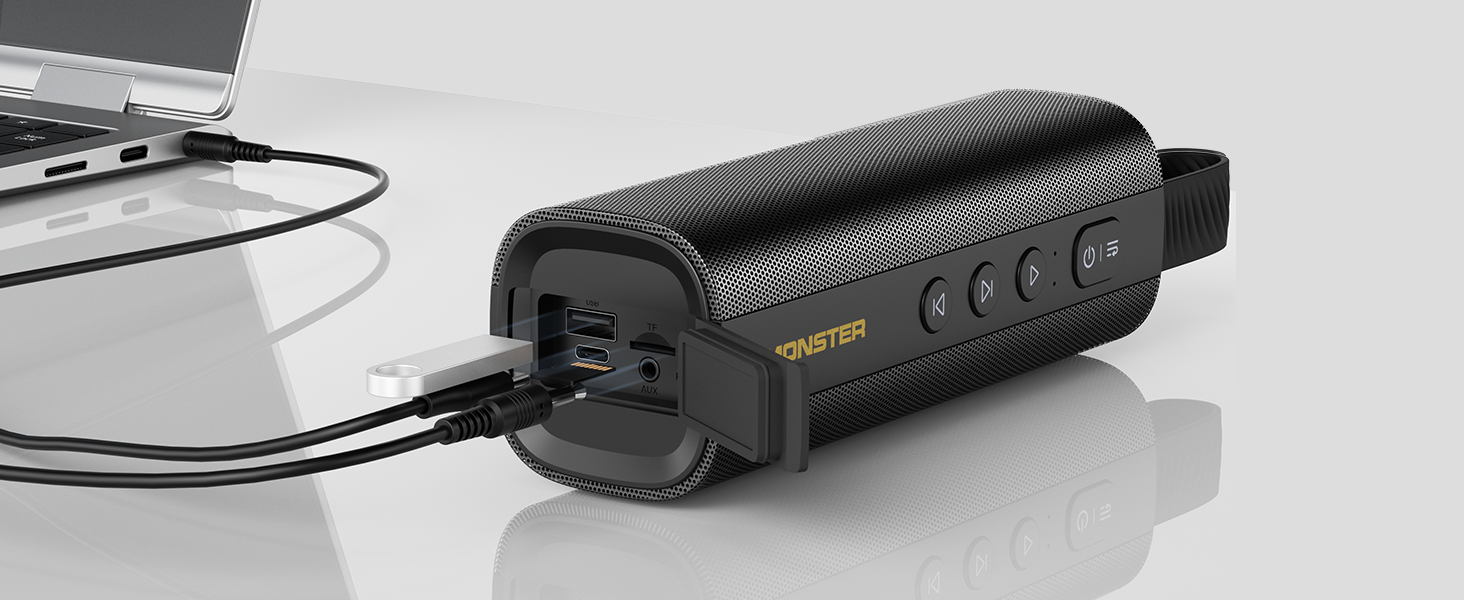
Image: The various input ports on the Monster S290 speaker, demonstrating connectivity options.
- Port USB-C: Per carregar l'altaveu.
- Port AUX-IN: For wired audio connection using the provided 3.5mm AUX cable.
- Ranura per a targetes TF: For playing audio directly from a MicroSD/TF card.
Configuració
1. Carregant l’altaveu
Before first use, fully charge the speaker. Connect the provided USB-C charging cable to the speaker's USB-C port and the other end to a USB power adapter (not included) or a computer's USB port. The charging indicator light will show the charging status.
2. Encès / apagat
Press and hold the Power button (⑂) for approximately 3 seconds to turn the speaker on or off. A sound prompt will indicate the power status.
3. Emparellament Bluetooth
The Monster S290 speaker features Bluetooth 6.0 for stable and efficient wireless connection.

Image: The advanced Bluetooth 6.0 chip within the Monster S290 speaker, highlighting its connectivity advantages.
- Engegueu l'altaveu. Entrarà automàticament en mode d'emparellament Bluetooth, cosa que s'indicarà amb un llum LED intermitent.
- Activa el Bluetooth al teu dispositiu (telèfon intel·ligent, tauleta, ordinador portàtil).
- Cerca "Monster S290" in the list of available Bluetooth devices.
- Select "Monster S290" to connect. Once connected, the LED light will become solid, and a sound prompt will confirm the connection.
4. Emparellatge TWS (True Wireless Stereo)
For an enhanced stereo experience, you can pair two Monster S290 speakers together.

Image: Two Monster S290 speakers wirelessly paired for True Wireless Stereo sound, enhancing the audio experience.
- Ensure both Monster S290 speakers are powered on and not connected to any other Bluetooth device.
- En un altaveu (aquest serà l'altaveu principal), premeu i manteniu premut el botó Reproduir/Pausa durant 3 segons fins que sentiu un missatge que indica el mode d'emparellament TWS.
- Els dos altaveus es cercaran i es connectaran automàticament. Un cop connectats, sentireu un so de confirmació.
- Ara, connecta el dispositiu a l'altaveu principal mitjançant Bluetooth tal com es descriu al pas 3. L'àudio es reproduirà a través dels dos altaveus en estèreo.
5. Connecting via AUX/TF Card
The speaker supports multiple input options for versatility.
- AUX IN: Connect one end of the 3.5mm AUX cable to your audio device's headphone jack and the other end to the speaker's AUX-IN port. The speaker will automatically switch to AUX mode, or you can manually switch using the Power button.
- Targeta TF: Insert a MicroSD/TF card (up to 32GB, FAT32 format) with audio files into the TF card slot. The speaker will automatically switch to TF card mode and begin playback, or you can manually switch using the Power button.
En funcionament
Reproducció d'àudio bàsica
- Reproduir/pausa: Premeu el botó Reproduir/Pausa.
- Ajust de volum: Short press the Volume Up (▶▶) or Volume Down (◀◀) buttons.
- Seguiment anterior / següent: Press and hold the Volume Up (▶▶) for next track or Volume Down (◀◀) for previous track.
Trucades mans lliures
Quan es connecta mitjançant Bluetooth a un telèfon intel·ligent, l'altaveu es pot utilitzar per a trucades de mans lliures.
- Respon a la trucada: Premeu el botó Reproduir/Pausa una vegada.
- Finalitzar la trucada: Premeu el botó Reprodueix/Pausa una vegada durant una trucada.
- Rebutja la trucada: Manteniu premut el botó Reproduir/Pausa durant 2 segons.
Canvi de mode
Short press the Power button (⑂) to cycle through available input modes: Bluetooth, AUX, and TF Card.
Manteniment
Classificació impermeable IPX6
The Monster S290 speaker is IPX6 waterproof, meaning it is protected against high-pressure water jets from any direction. This makes it suitable for outdoor use and resistant to splashes, rain, and spills. No submergiu l'altaveu a l'aigua. Assegureu-vos que la tapa del port de càrrega estigui ben tancada abans d'exposar l'altaveu a l'aigua.

Image: The Monster S290 speaker positioned by a pool, illustrating its resistance to water splashes.
Neteja
Netegeu l'altaveu amb un suau, damp drap. No utilitzeu productes de neteja abrasius, alcohol ni dissolvents químics, ja que poden danyar la superfície o els components interns.
Emmagatzematge
Guardeu l'altaveu en un lloc fresc i sec, allunyat de la llum solar directa i de temperatures extremes. Si l'emmagatzemeu durant un període prolongat, carregueu la bateria aproximadament al 50% cada pocs mesos per mantenir-la en bon estat.
Resolució de problemes
| Problema | Causa possible | Solució |
|---|---|---|
| L'altaveu no s'encén | Bateria baixa | Carregueu l'altaveu amb el cable USB-C. |
| No es pot emparellar per Bluetooth | L'altaveu no està en mode d'emparellament; el Bluetooth del dispositiu està desactivat; l'altaveu ja està connectat a un altre dispositiu | Ensure speaker is in pairing mode (flashing LED). Turn on Bluetooth on your device. Disconnect from other devices. Try restarting both speaker and device. |
| Sense so | Volume too low; Incorrect input mode; Device not playing audio | Increase speaker and device volume. Press Power button to cycle through modes (Bluetooth, AUX, TF Card). Ensure audio is playing on your connected device. |
| Mala qualitat de so/distorsió | Speaker too far from device; Obstructions; Low battery | Move speaker closer to the device. Remove obstructions. Charge the speaker. |
| L'aparellament de TWS falla | Speakers too far apart; One speaker already connected to a device | Ensure both speakers are close to each other. Disconnect both speakers from any other Bluetooth devices before initiating TWS pairing. |
Especificacions
- Nom del model: Monstre S290
- Tipus d'altaveu: Altaveu exterior portàtil
- Sortida d'àudio: 30W Loud Stereo Sound
- Versió Bluetooth: 6.0
- Temps de joc: Fins a 15 hores (amb un 50% de volum)
- Port de càrrega: USB-C
- Classificació impermeable: IPX6
- Connectivitat: Bluetooth, AUX-IN, TF Card
- Característiques especials: True Wireless Stereo (TWS) Pairing, Built-in Mic for Hands-Free Calling
- Mètode de control: Toqueu els botons
- Dimensions del producte: 6P x 18.2A x 6H centímetres
- Pes: Aproximadament 490 g
- Material: Plàstic
- Bateria: 1 AAA battery required (included) - Note: This likely refers to an internal rechargeable battery, not a replaceable AAA.

Image: The Monster S290 speaker highlighting its extended 15-hour battery life for prolonged use.
Garantia i Suport
Informació de la garantia
The Monster S290 Portable Bluetooth Speaker comes with a limited warranty. Please refer to the included 'Quick Start Guide & Warning Card' for specific warranty terms and conditions. Retain your proof of purchase for warranty claims.
Atenció al client
For technical assistance, troubleshooting beyond this manual, or warranty inquiries, please contact Monster customer support. Contact details can typically be found on the official Monster weblloc web o a l'embalatge del producte.


