1. Introducció
The Thermal Master Thor 002 is a high-performance handheld thermal camera designed for precise temperature measurement and thermal imaging. Featuring advanced X³IR Resolution technology, a 2MP visual camera, and a 3.5-inch IPS display, this device is suitable for various professional applications including electrical, HVAC, mechanical, and building inspections. This manual provides essential information for the safe and effective operation of your Thor 002 thermal camera.
2. Contingut del paquet
Verifiqueu que tots els elements siguin presents al paquet:
- Thor 002 Thermal Camera × 1
- Explosion-Proof Case × 1
- 100cm USB Data Cable × 1
- Targeta de memòria de 32 GB (preinstal·lada o inclosa per separat)

Image: The Thor 002 thermal camera, its protective case, a USB data cable, and a 32GB memory card.
3. Producte acabatview
The Thor 002 features a robust design with intuitive controls and advanced imaging capabilities.

Image: The Thor 002 thermal camera shown alongside its protective carrying case.
Components clau:
- Thermal Camera Lens: Captures infrared radiation for thermal imaging.
- Visible Light Camera (2MP): Captures standard visual images.
- 3.5-inch 640x480 IPS Display: Proporciona clar viewing of thermal and visual images.
- Laser Targeting System: Assists in precise aiming for measurements.
- Llum LED: Illuminates dark areas for the visible light camera.
- Botons de control: For navigation, settings, and capturing images/videos.
- Micròfon reductor de soroll: For adding voice notes to recordings.
- Port USB-C: Per a càrrega i transferència de dades.
- Alloy Base & Reinforced ABS Body: Ensures durability and ergonomic handling.
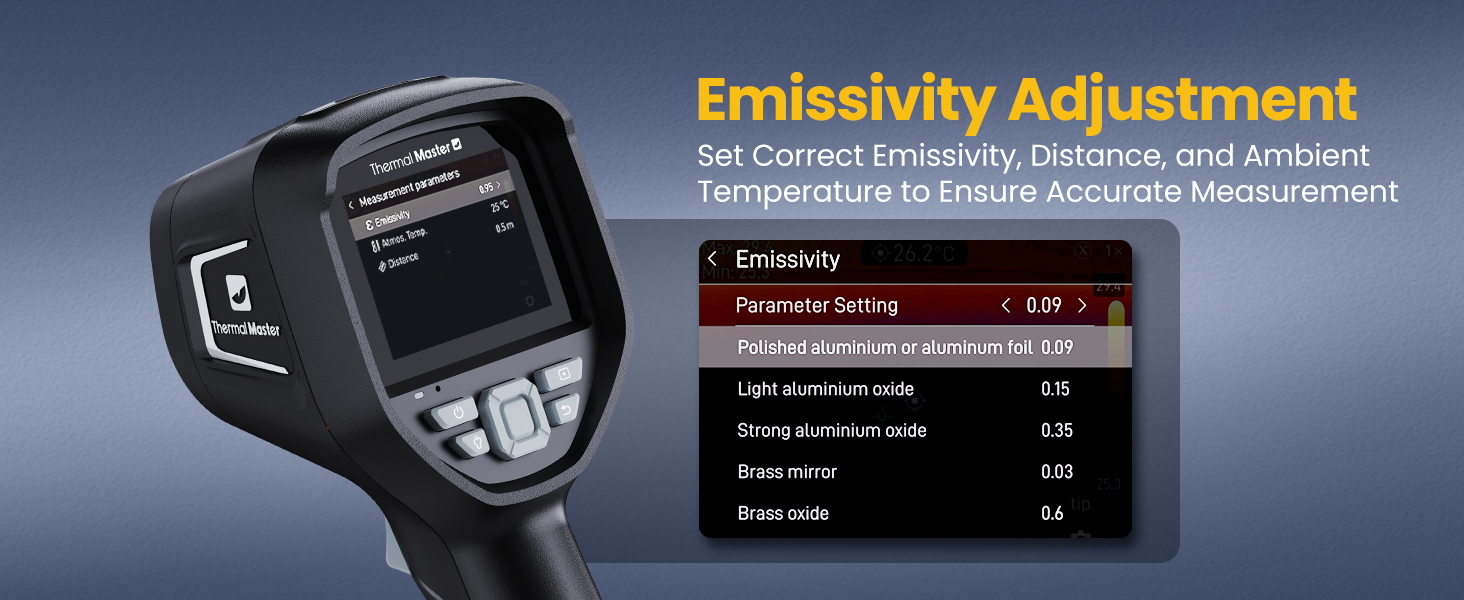
Image: Labeled diagram of the Thor 002 highlighting its key external features and components.
4. Configuració
4.1 Càrrega del dispositiu
The Thor 002 is powered by a 5000mAh lithium battery. Before first use, fully charge the device.
- Connect the provided USB data cable to the camera's USB-C port.
- Connect the other end of the USB cable to a compatible 18W fast charger (not included) or a computer's USB port.
- The charging indicator will show the charging status. A full charge provides up to 10.5 hours of operation.
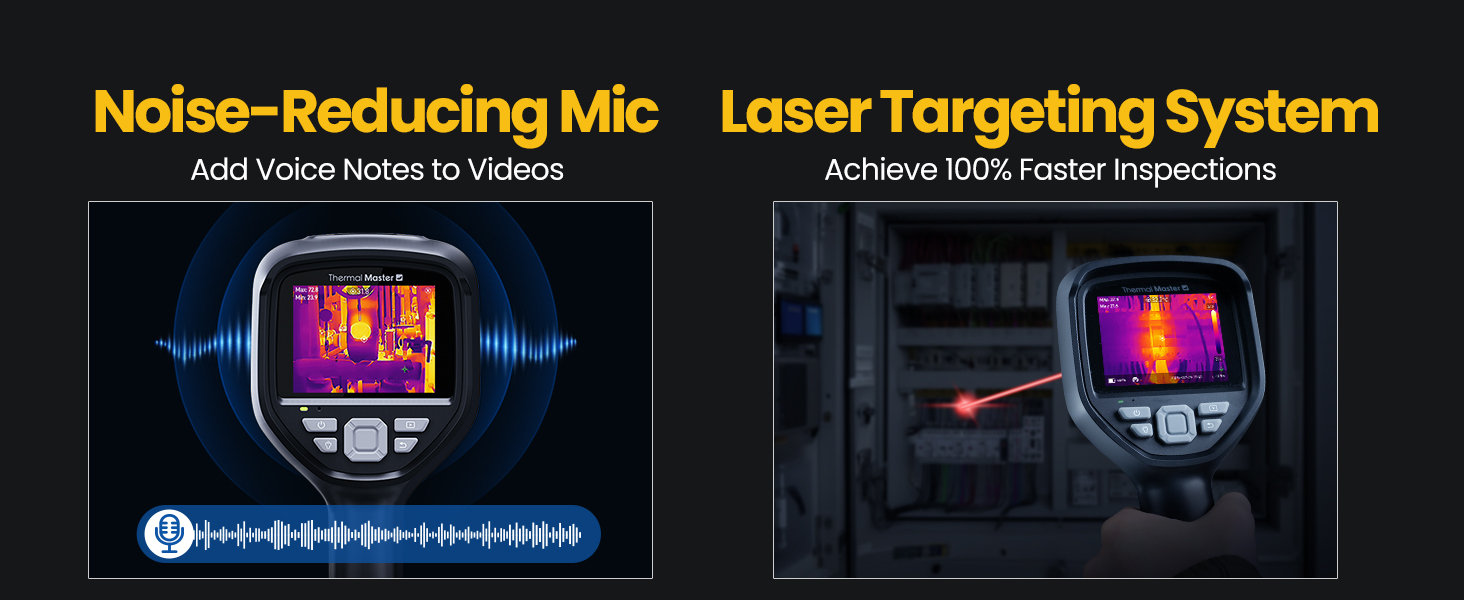
Image: Visual representation of the Thor 002's battery capacity, fast charging capability, and operational runtime.
4.2 Engegada/apagada
- Per encendre: Premeu i manteniu premut el botó d'engegada fins que la pantalla s'il·lumini.
- Per apagar: Press and hold the power button until the shutdown prompt appears, then confirm.
5. Instruccions de funcionament
5.1 Thermal Imaging and Display
The Thor 002 utilizes X³IR Resolution technology to enhance thermal image clarity, effectively boosting resolution from 256x192 to 512x384. The 60Hz refresh rate ensures smooth, real-time thermal video, and the 40mK sensitivity detects subtle temperature differences.

Image: A side-by-side comparison demonstrating the improved clarity of thermal images when X³IR Resolution is activated, showing a higher effective resolution of 512x384.
5.2 Mesura de la temperatura
The camera offers a wide measurement range from -4℉ to 1022℉ (-20℃ to 550℃) with an accuracy of ±3.6℉ (±2℃) or ±2% of reading.
- Multiple Measurement Points: Measure up to six points simultaneously, including center, hottest, coldest, and three user-defined spots.
- Ajust d'emissivitat: Customize emissivity settings for various surfaces to ensure accurate temperature readings. Access this setting in the camera's menu.

Image: The Thor 002 display indicating its temperature measurement capabilities, including range and accuracy.

Image: The emissivity adjustment interface on the Thor 002, allowing users to select appropriate emissivity values for various materials to improve measurement accuracy.

Image: The Thor 002 display demonstrating its 9-point temperature scanning feature, including center, maximum, minimum, and six customizable measurement points, alongside alarm indicators.
5.3 Zoom digital
The device supports 4X digital zoom for detailed inspection of distant objects.
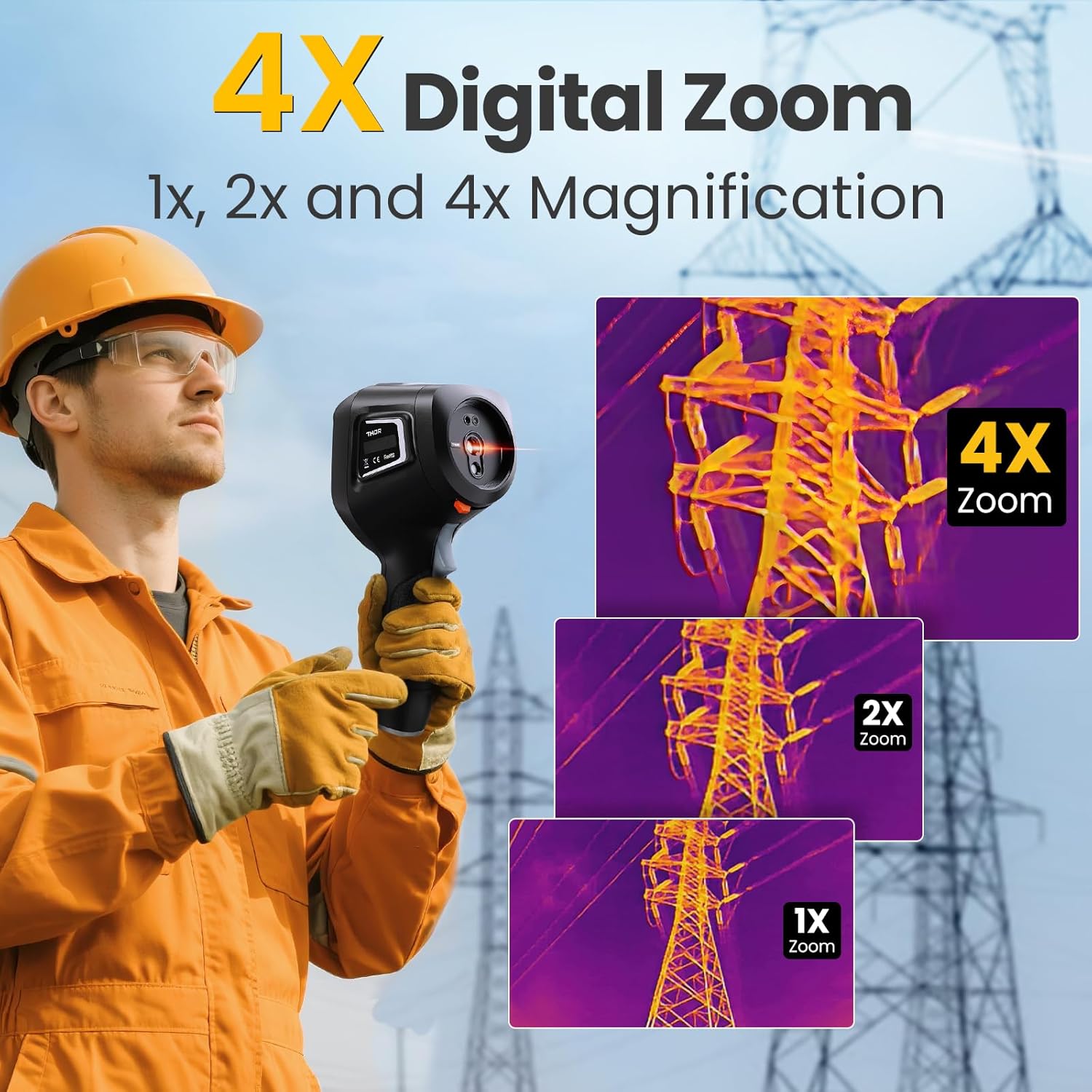
Image: A series of thermal images demonstrating the 1x, 2x, and 4x digital zoom capabilities of the Thor 002, focusing on an electrical tower.
5.4 Smart Temperature Alarms
Configure high and low temperature alarms to receive visual flash alerts and automatically capture images when thresholds are exceeded.

Image: The Thor 002 interface showing temperature alarm settings, including options for maximum, minimum, and center spot alarms, with visual flash alerts and auto-capture functionality.
5.5 IR-Fuse Dual-Light Fusion Technology
This technology combines thermal and visible light images to provide a clearer understanding of the scene, allowing for easier identification of problem areas.

Image: A comparison showing the benefits of IR-Fuse Dual-Light Fusion Technology, presenting both fusion imaging and picture-in-picture views for enhanced scene interpretation.
5.6 Recording and Documentation
- Captura de fotos i vídeos: The camera supports both photo and video recording.
- Voice Notes: Utilize the noise-reducing microphone to add voice notes to your recordings for detailed documentation.
- Codi QR File Gestió: Simplifies on-site documentation and post-inspection reporting.

Image: The Thor 002 demonstrating its noise-reducing microphone for voice notes and the laser targeting system for efficient inspections.
6. Connectivitat
The Thor 002 offers both wired and wireless connectivity options for data transfer and analysis.
6.1 Wired Connection (USB)
Connect the camera to a PC via the USB cable for real-time thermal analysis and data review on a larger screen.
6.2 Connexió sense fil (Wi-Fi)
The device supports Wi-Fi pairing with smartphones and iPads for flexible operation and post-capture thermal analytics using the 'Thermal Smart' application.

Image: The Thor 002 demonstrating both wireless connectivity to a smartphone and wired connection to a laptop for thermal data analysis and reporting.

Image: The 'Thermal Smart' application interface on a smartphone, displaying thermal images and analysis tools.
7. Especificacions
Detailed technical specifications for the Thermal Master Thor 002.
| Característica | Especificació |
|---|---|
| Resolució tèrmica | 512×384 (X³IR enhanced from 256×192) |
| Càmera de llum visible | 2MP |
| Mostra | 3.5" 640×480 IPS Screen |
| Freqüència d'actualització | 60 Hz |
| Sensibilitat tèrmica (NETD) | 40 mK |
| Interval de temperatura | -4 ℉ a 1022 ℉ (-20 ℃ a 550 ℃) |
| Precisió | ±3.6℉ (±2℃) or ±2% |
| Zoom digital | 4X |
| Bateria | Ió de liti de 5000 mAh (inclosa) |
| Durada de la bateria | Fins a 10.5 hores |
| Carregant | Càrrega ràpida de 18 W |
| Emmagatzematge | 8GB RAM, 32GB internal storage (supports video/photo) |
| Connectivitat | USB, Wi-Fi |
| Classificació de protecció | IP54 |
| Resistència a les caigudes | Fins a 2 metres |
| Dimensions del producte | 10.24 x 4.33 x 4.13 polzades |
| Pes | 4.32 lliures |
8. Manteniment
Proper maintenance ensures the longevity and optimal performance of your thermal camera.
- Neteja: Use a soft, dry cloth to clean the camera body. For lenses, use a specialized lens cleaning cloth and solution. Avoid abrasive materials or harsh chemicals.
- Emmagatzematge: Store the camera in its explosion-proof case when not in use to protect it from dust, moisture, and physical damage. Store in a cool, dry place.
- Cura de la bateria: For long-term storage, ensure the battery is charged to approximately 50%. Recharge periodically if stored for extended periods to prevent deep discharge.
9. Solució De Problemes
This section addresses common issues you might encounter with your Thor 002 thermal camera.
| Problema | Causa possible | Solució |
|---|---|---|
| El dispositiu no s'encén | Bateria baixa; el botó d'engegada no s'ha premut correctament | Carrega el dispositiu completament. Prem i mantén premut el botó d'engegada durant uns segons. |
| Els botons no responen | Software glitch; Device frozen | Perform a soft reset by holding the power button for an extended period (e.g., 10-15 seconds) until it restarts. If issue persists, contact support. |
| Lectures de temperatura inexactes | Incorrect emissivity setting; Distance too far; Lens obstruction | Adjust emissivity for the target material. Ensure measurement distance is within optimal range. Clean the thermal lens. |
| No es pot connectar a la Wi-Fi/aplicació | Wi-Fi disabled; Incorrect password; App not installed | Ensure Wi-Fi is enabled on the camera and smartphone. Verify Wi-Fi password. Download and install the 'Thermal Smart' app. |
10. Garantia i Suport
Thermal Master is committed to providing reliable products and excellent customer service.
- Garantia: The Thor 002 thermal camera comes with a 2-year warranty from the date of purchase, covering manufacturing defects.
- Suport tècnic: Thermal Master offers lifetime technical support for the Thor 002. For assistance, please contact our support team via email.

Image: A visual representation of Thermal Master's commitment to customer support, highlighting lifetime technical support, 24/7 email assistance, and a 2-year warranty.


