1. Introducció
The Yahboom K230 AI Development Board is a high-performance visual recognition module designed for AI and robotics applications. Equipped with a 1.6GHz main frequency chip, it offers significantly enhanced computing power compared to previous generations, enabling real-time operation of complex AI models. This module is ideal for developers, makers, and educational institutions looking to explore and implement AI visual recognition, voice processing, and various intelligent projects.

Figure 1.1: The Yahboom K230 AI Development Board, showcasing its compact design and user interface for AI applications.
2. Què hi ha a la caixa
Upon unboxing your Yahboom K230 AI Development Board, please verify that all the following components are included:
- K230 module
- Tornavís
- Cable de connexió
- Targeta TF

Figure 2.1: An illustration of the standard components included with the K230 visual recognition module, including the module itself, cables, screwdriver, and TF card.
3. Característiques
The K230 AI Development Board boasts a range of features designed to facilitate advanced AI development:
- Flagship Performance: Equipped with a 1.6GHz main frequency chip, offering 13.7 times the KPU computing power and 8.5 times the CPU computing power of the K210 visual module.
- Expansió flexible: Features a new 12Pin GPIO interface for compatibility with various sensors and modules.
- Pre-installed GUI Program: Comes with a pre-installed GUI based on the RTSmart system, offering over 30 functional gameplay options without requiring programming.
- Multi-controller Compatibility: Seamlessly connects to PC computers, MSPM0, STM32, ESP32, PICO, Raspberry Pi, UNO, Microbit, Jetson, RDK, and other mainstream controllers via serial communication.
- Multi-function AI Visual Camera: Integrates a 2.4-inch LCD capacitive touch screen and a 2MP camera, supporting various recognition functions like color, road sign, face, QR code, and more.
- Built-in AI Large Language Model Integration: Supports interaction with large language models like ChatGPT, DeepSeek V5, Gemini 2.0 Flash, Claude 3.7, and Llama 4 (API key and potential payment required for some models).
- Comprehensive Development Tools: Provides original model training tutorials and self-developed upper computer toolkits compatible with ESP32 ecology.
- Entrada/sortida d'àudio: Includes a microphone for audio input and recording, with support for external speakers.
- AIoT Network Application: Supports Wi-Fi/AP hotspot mode and various network communication protocols for real-time image transmission and intelligent voice/text interaction.

Figure 3.1: A visual summary of the K230's core features, including its high-performance chip, memory, and compatibility.

Figure 3.2: An in-depth look at the K230's technical specifications and capabilities, such as its high-performance CPU and KPU, HD camera, and various interfaces.
4. Configuració
4.1 Connexió inicial
To begin using your K230 AI Development Board, follow these steps for initial setup:
- Inseriu la targeta TF: Locate the TF card slot on the side of the K230 module and gently insert the provided TF card. Ensure it clicks into place.
- Connexió d'alimentació: Connect the K230 module to a power source using the provided Type-C USB cable. The module will power on automatically.
- Perifèrics opcionals: If using external sensors or controllers, connect them to the appropriate GPIO or serial communication interfaces as required by your project.

Figure 4.1: The K230 module connected to a power source via its Type-C USB port.
4.2 Mounting Options (Optional)
The K230 module supports various mounting brackets for different applications. Choose the bracket that best suits your needs:
- Suport fix: Suitable for static installations or when a fixed viewing angle is desired.
- Angle Adjustable Bracket: Allows for flexible adjustment of the pitch angle.
- Heightened Angle Adjustable Bracket: Provides additional height adjustment (1.2-9.5cm) for elevated viewangles d'ajust.
- 2DOF Electric PTZ: Enables flexible tracking of dynamic objects with two degrees of freedom.
All optional brackets are equipped with cooling fans to ensure stable operation.
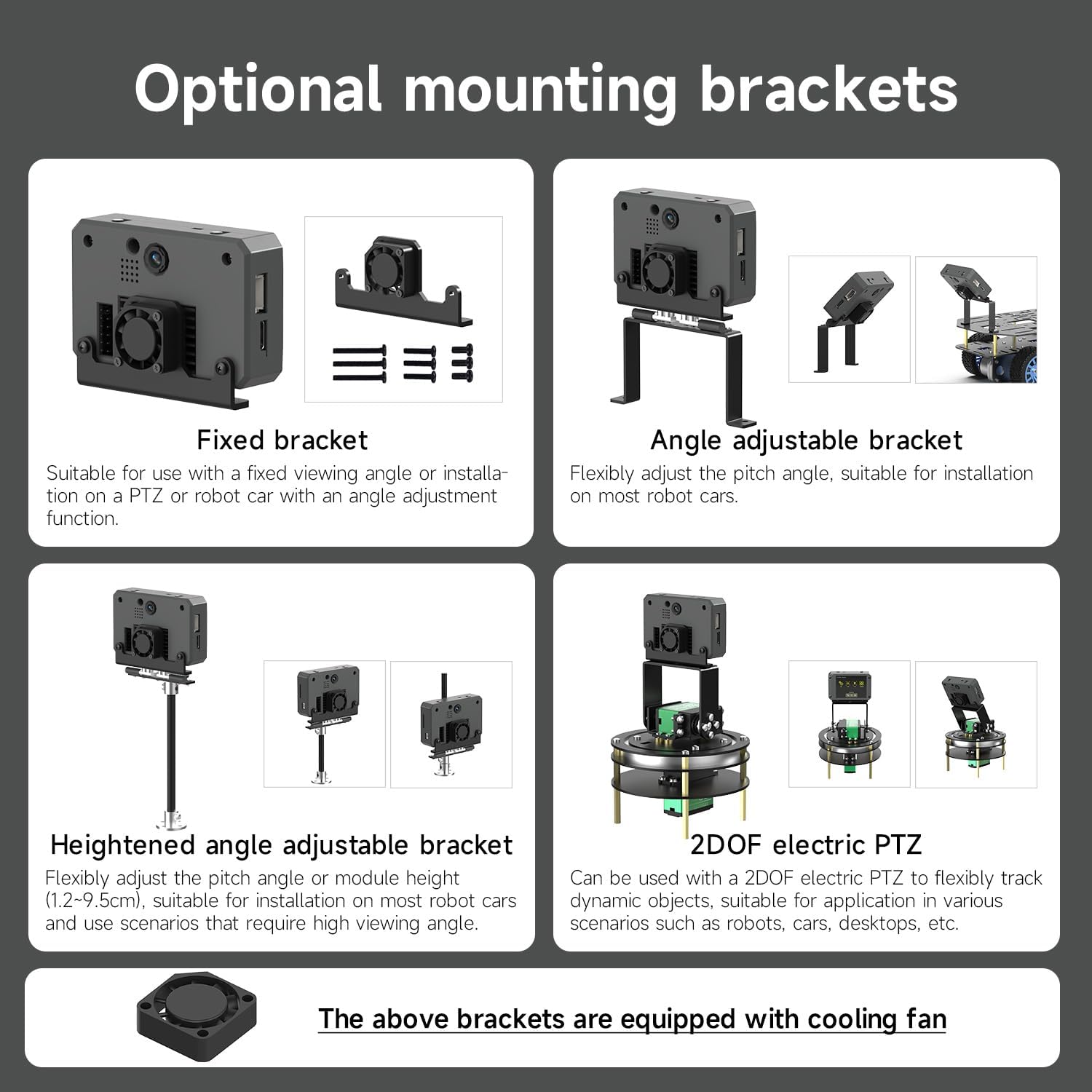
Figure 4.2: Different mounting solutions available for the K230 module, including fixed, adjustable, heightened, and 2DOF PTZ options.
5. Funcionament
5.1 Pre-installed GUI Program
The K230 module comes with a pre-installed graphical user interface (GUI) program, offering a wide range of functionalities without the need for immediate coding. Navigate the GUI using the 2.4-inch LCD capacitive touch screen.
- Accessing Functions: The main screen displays icons for various applications such as Settings, AI Face, AI Body, AI Scene Applications, LLM Large Model, Camera, Code Recognition, Color Recognition, File Manager, Gallery, Graphics Detection, Hardware Interface Test, and Drawing. Tap an icon to launch the corresponding function.
- Navegació bàsica: Use the touch screen to select options, input data, and control the module.

Figure 5.1: The K230's pre-installed GUI, displaying icons for various AI and utility applications.
5.2 AI Visual Recognition Applications
The K230 supports numerous AI visual recognition tasks. Examples inclouen:
- Rectangle detection, Object counting, QR code recognition
- Face key point recognition, Face 3D network, Human key point detection
- Fall detection, License plate recognition, YOLOv8n target detection
- Multi-color recognition, Barcode recognition, AprilTag tag recognition, DM code recognition
- Face detection, Face orientation detection, Gaze detection, Registered face recognition
- Human detection, Palm detection, Palm key point classification, Gesture recognition
- Dynamic gesture recognition, Rock-paper-scissors game, OCR character recognition
- YOLOv8n segmentation, Target tracking, Autonomous classification, Garbage classification, Road sign recognition

Figure 5.2: Visual demonstrations of various AI recognition capabilities, such as object detection, face recognition, and license plate recognition.
5.3 Programació i desenvolupament
For advanced users, the K230 supports programming with MicroPython and development within the CanMV IDE.
- MicroPython: A streamlined Python 3 implementation for microcontrollers, enabling interactive prompts, arbitrary precision integers, and more.
- CanMV IDE: A simple and convenient development environment for the K230, allowing code modification, debugging, and direct download to the module.
- Model Training: Yahboom provides tutorials and tools for custom model training and local deployment, allowing users to train their own AI models.

Figura 5.3: Un excésview of the MicroPython programming environment and the CanMV IDE, demonstrating their interfaces for K230 development.
5.4 Host Computer Learning Tools
Yahboom offers self-developed host computer learning tools for Windows, integrating K230 development and learning resources. These tools support RTSP real-time video stream monitoring, video/image processing, data generators, and more.

Figure 5.4: The interface of the Yahboom host computer learning tools, showing options for documentation, video tools, and image tools.
6. Manteniment
To ensure the longevity and optimal performance of your Yahboom K230 AI Development Board, adhere to the following maintenance guidelines:
- Neteja: Use a soft, dry cloth to clean the exterior of the module. Avoid using liquid cleaners or solvents, which can damage the electronic components.
- Emmagatzematge: Store the module in a cool, dry environment away from direct sunlight, extreme temperatures, and high humidity.
- Manipulació: Handle the board with care to prevent physical damage. Avoid dropping or subjecting it to strong impacts.
- Refrigeració: Ensure proper ventilation, especially during extended operation. The optional cooling fan helps maintain optimal operating temperature.
- Actualitzacions de firmware: Regularly check the official Yahboom website for firmware updates to improve performance and add new features.

Figure 6.1: The rear of the K230 module, showing the integrated cooling fan which aids in maintaining stable operating temperatures.
7. Solució De Problemes
This section provides solutions to common issues you might encounter with your K230 AI Development Board.
| Problema | Causa possible | Solució |
|---|---|---|
| Module does not power on. | No power, faulty cable, or incorrect connection. | Ensure the Type-C USB cable is securely connected to a working power source. Try a different cable or power adapter. |
| La pantalla està en blanc o no respon. | Software issue, loose display connection, or power problem. | Perform a hard reset by disconnecting and reconnecting power. Ensure the TF card is properly inserted with the pre-installed GUI. |
| AI recognition functions are not working. | Incorrect model loaded, camera obstruction, or software error. | Verify the correct AI model is selected in the GUI. Ensure the camera lens is clean and unobstructed. Restart the module. |
| Cannot connect to external controller. | Incorrect wiring, wrong serial port settings, or incompatible controller. | Double-check wiring according to the hardware distribution diagram. Confirm serial port baud rates and settings match. Refer to the specific controller's documentation for compatibility. |
| Module overheats during operation. | Poor ventilation or heavy workload. | Ensure the cooling fan is unobstructed and functioning. Reduce the complexity of the running AI tasks if possible. Operate in a well-ventilated area. |
8. Especificacions
Detailed technical specifications for the Yahboom K230 AI Development Board:
| Característica | Detall |
|---|---|
| Nom del producte | K230 visual recognition module |
| CPU | CPU 0: RISC-V Processor, 0.8GHz, 32KB I-cache, 32KB D-cache; CPU 1: RISC-V Processor, 1.6GHz, 32KB I-cache, 32KB D-cache, 256KB L2 Cache, 128bit RVV 1.0 extend |
| KPU | 6TOPS equivalent computing power; Support INT8 and INT6; Typical network performance: Resnet 50 > 85fps @INT8; Mobilenet_v2 > 670fps @INT8; Yolov5s > 36fps @INT8 |
| DPU | 3D structured light depth engine, supporting a maximum resolution of 1920*1080 |
| VPU | H.264 and H.265 encoders and decoders support a maximum resolution of 4096*4096; Encoder performance: 3840*2160@20fps; Decoder performance: 3840*2160@40fps; JPEG codec: supports a maximum resolution of 8K (8192*8192) |
| Entorn de desenvolupament | MicroPython Programming CanMV IDE |
| On Board Functions | Microphone, buzzer, RGB light, WiFi network card |
| Mostra | 2.4 inch LCD capacitive touch screen, Resolution 640*480 |
| Botons | Reset button + custom function button |
| Poder de Treball | 4W |
| Dimensions | 72 * 46 * 18.7 mm |
| On Board Interfaces | Speaker interface, fan interface, Type-C interface, serial communication interface, GPIO expansion interface, TF card slot |
| Mode d'alimentació | Type-C communication interface 5V input/GPIO 5V input |
| Entrada d'imatge | On board 2MP HD camera (GC2093) |
| RAM | 1 GB LPDDR4 |
| Corrent de treball | 0.8A |
| Pes | 64.9 g |

Figure 8.1: A comprehensive table detailing the technical specifications of the K230 visual recognition module.
8.1 Hardware Distribution Diagram
Understanding the layout of the K230 module's hardware components and GPIO pins is crucial for advanced development and integration.

Figure 8.2: A diagram illustrating the function layout of the K230 module and a detailed introduction to its 12Pin GPIO interface, including pin numbers and multiplexing functions.
9. Garantia i Suport
Yahboom provides comprehensive technical support and lifetime firmware updates for the K230 AI Development Board.
- Technical Q&A: For any technical inquiries or assistance, please contact Yahboom customer support.
- Actualitzacions de firmware: Benefit from lifetime firmware updates to ensure your module is always running the latest software with improved features and performance.
- Recursos en línia: Access original model training tutorials and video tutorials with English subtitles on the official Yahboom website for in-depth learning and development.

Figure 9.1: A visual representation of the extensive video tutorial library provided by Yahboom, complete with English subtitles, covering principle explanations, code examples, and practical demonstrations.


