1. Introducció
The Raddy WF-50V is a versatile indoor and outdoor thermometer and hygrometer designed to provide precise real-time environmental data. Featuring a clear 5-inch VA display, it offers instant data overview including indoor and outdoor temperature and humidity, pressure trends, time, weather forecast, and daily MAX/MIN records. Its stable wireless transmission ensures easy installation and reliable data transfer. The device supports flexible power options via USB-C or AAA batteries, with adjustable brightness levels for optimal viewing.
2. Contingut del paquet
- 1 x Raddy WF-50V Main Display Unit
- 1 x Sensor remot sense fil
- 1 x cable d'alimentació USB-C
- 1 x Manual d'usuari
3. Producte acabatview

Figura 3.1: The Raddy WF-50V main display unit (left) and its accompanying wireless remote sensor (right).
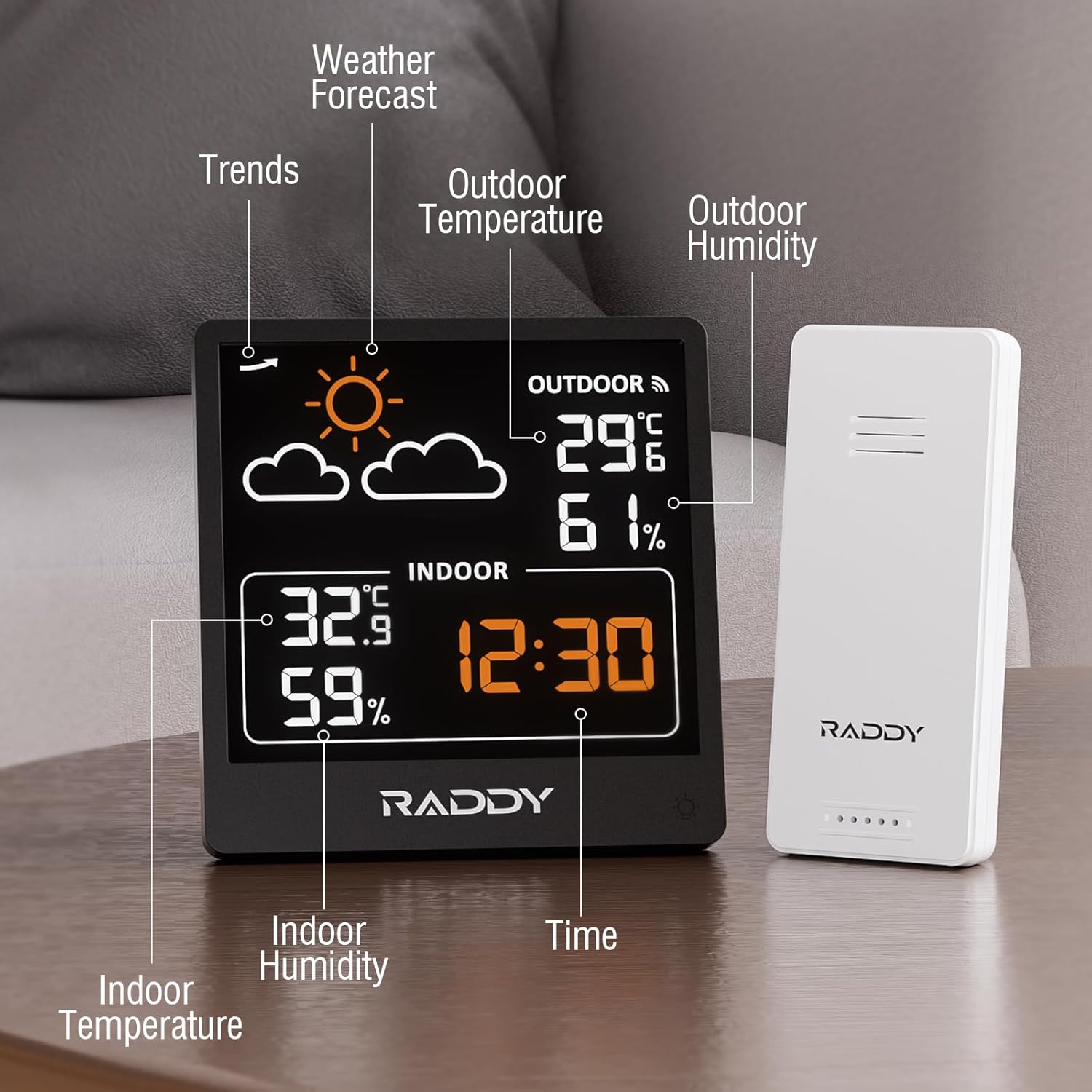
Figura 3.2: Detallada view of the WF-50V display, highlighting key information areas such as weather forecast, indoor/outdoor temperature and humidity, and current time.

Figura 3.3: posterior view of the main display unit, showing the control buttons (SET, MEM, +, -) and the USB-C power input.

Figura 3.4: Physical dimensions of both the main display unit and the wireless remote sensor for placement planning.
4. Configuració
4.1 Instal·lació de la bateria
The Raddy WF-50V main unit can be powered by USB-C or 2 x AAA batteries (not included). The remote sensor requires 2 x AAA batteries (not included).
- Unitat de visualització principal: Open the battery compartment on the back of the main unit. Insert 2 x AAA batteries, ensuring correct polarity (+/-). Close the compartment. For continuous backlight, connect the USB-C cable to a power adapter (not included).
- Sensor remot sense fil: Open the battery compartment on the back of the remote sensor. Insert 2 x AAA batteries, ensuring correct polarity (+/-). Close the compartment.
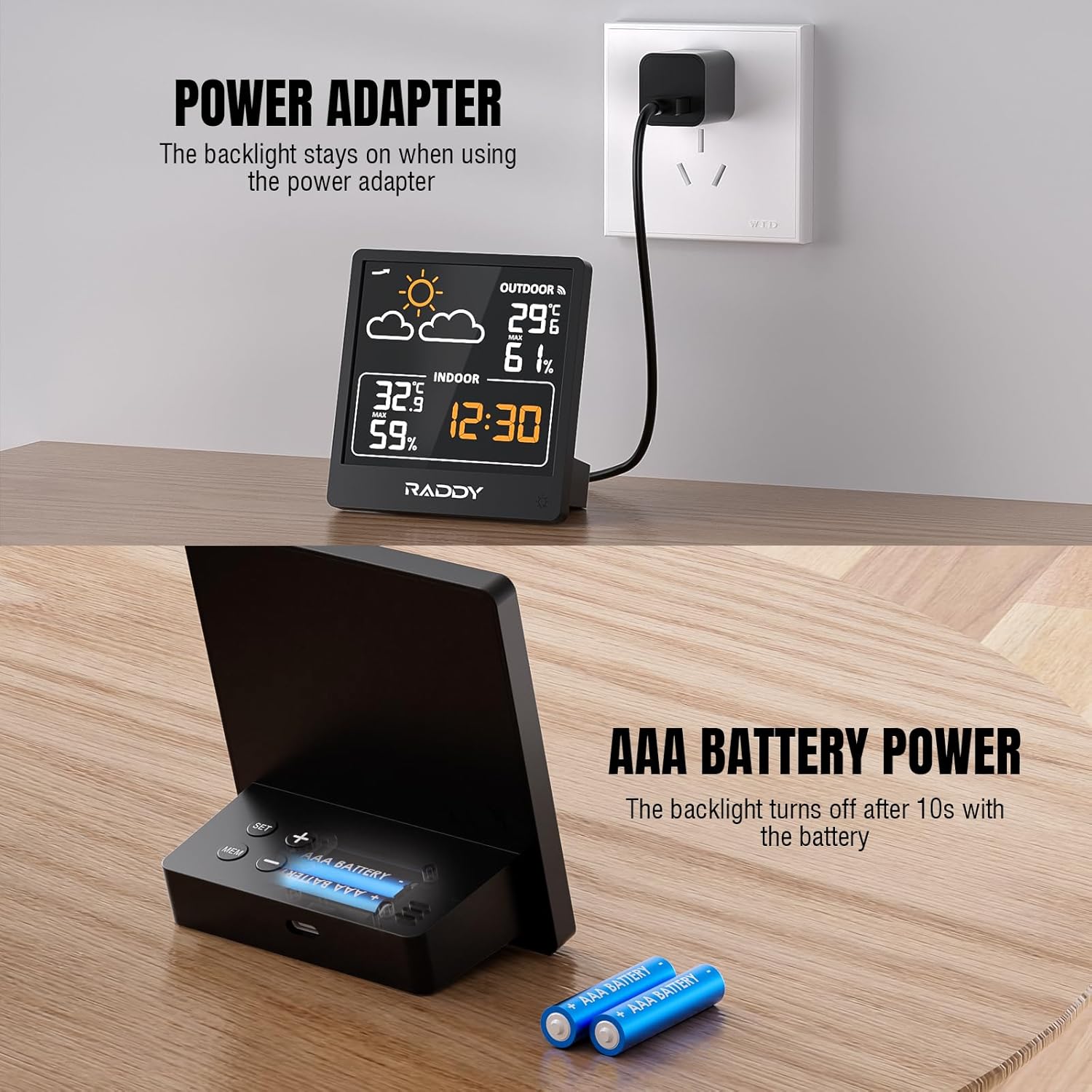
Figura 4.1: Illustration of the flexible power options for the main unit, including USB-C adapter and AAA battery power.
4.2 Emparellament de sensors
The main unit and remote sensor should pair automatically upon battery installation. If pairing does not occur, follow these steps:
- Ensure both the main unit and remote sensor have fresh batteries installed.
- Place the main unit and sensor close to each other.
- On the main unit, press and hold the 'MEM' button for 3 seconds to initiate a search for the remote sensor. The outdoor temperature and humidity display will flash.
- On the remote sensor, press the 'TX' button (usually located inside the battery compartment or on the back) to send a signal.
- Once connected, the outdoor readings will appear steadily on the main unit's display.
4.3 Col·locació
Proper placement is crucial for accurate readings and optimal wireless transmission.
- Unitat de visualització principal: Place the main unit indoors, away from direct sunlight, heat sources, or vents that could affect indoor temperature readings. It can be placed on a tabletop or mounted on a wall.
- Sensor remot sense fil: Place the remote sensor outdoors in a shaded, dry location, protected from direct rain and sunlight. Ensure it is within the 330-foot (100m) transmission range of the main unit. Avoid placing it near large metal objects or strong electromagnetic interference sources.

Figura 4.2: The Raddy WF-50V system demonstrating its 328ft (100m) wireless transmission range, allowing flexible placement of the remote sensor.
5. Instruccions de funcionament
5.1 Mostra finalview
The 5-inch VA display provides a comprehensive overview of environmental data:
- Pronòstic del temps: Icons indicating predicted weather conditions (sunny, cloudy, rainy, etc.).
- Temperatura i humitat exteriors: Lectures actuals del sensor remot.
- Temperatura i humitat interiors: Current readings from the main unit's built-in sensors.
- Hora: Current time in 12/24 hour format.
- Pressure Trend: An arrow indicating rising, falling, or stable barometric pressure.
5.2 Setting Time and Units
To adjust settings on the main unit:
- Entra al mode de configuració: Press and hold the 'SET' button for 3 seconds. The hour digit will flash.
- Ajusta els valors: Use the '+' or '-' buttons to change the flashing value.
- Navega per la configuració: Press the 'SET' button repeatedly to cycle through settings: Hour → Minute → 12/24 Hour Format → Temperature Unit (°C/°F).
- Desa la configuració: After adjusting all desired settings, press the 'SET' button one last time to exit setting mode, or wait 15 seconds for it to automatically exit.
5.3 Previsió meteorològica
The built-in pressure sensor predicts 12-24 hour weather trends. The display will show one of the following icons:
- Assolellat
- Poc ennuvolat
- Ennuvolat
- Pluviós
- Pluja intensa
- Nevat

Figura 5.1: The different weather icons displayed by the WF-50V to indicate future weather conditions.
5.4 Registres MÀX/MÍN
The unit automatically tracks and stores the maximum and minimum temperature and humidity readings from the past 24 hours.
- View MAX Records: Press the 'MEM' button once to display the maximum recorded indoor and outdoor temperature and humidity.
- View MIN Records: Press the 'MEM' button again to display the minimum recorded indoor and outdoor temperature and humidity.
- Esborra els registres: Press and hold the 'MEM' button for 3 seconds while viewing MAX or MIN records to clear them.

Figura 5.2: The display showing the maximum and minimum temperature and humidity records over a 24-hour period.
Control de retroiluminació 5.5
The main unit features three adjustable backlight levels when powered by batteries, and a continuous backlight when powered via USB-C.
- Ajusta la brillantor: Briefly press the light bulb icon button on the front of the unit to cycle through backlight levels (Off → Low → High).
- When powered by USB-C, the backlight remains continuously on.

Figura 5.3: Visual representation of the three adjustable backlight levels for the main display unit.
6. Manteniment
- Neteja: Netegeu les superfícies de la pantalla i la unitat amb un drap suau iamp tela. No utilitzeu netejadors abrasius ni dissolvents.
- Substitució de la bateria: Replace batteries in both the main unit and remote sensor when the low battery indicator appears on the display. Ensure to use fresh AAA batteries.
- Emmagatzematge: Si guardeu el dispositiu durant un període prolongat, traieu totes les piles per evitar fuites.
7. Solució De Problemes
| Problema | Causa possible | Solució |
|---|---|---|
| No outdoor reading | Sensor not paired or out of range; low sensor battery. | Re-pair sensor (Section 4.2); move sensor closer to main unit; replace sensor batteries. |
| Lectures inexactes | Unit/sensor exposed to direct sunlight, heat, or moisture. | Relocate unit/sensor to a shaded, protected area (Section 4.3). |
| La pantalla està tènue o apagada | Low main unit battery; USB-C cable disconnected. | Replace main unit batteries; ensure USB-C cable is securely connected. |
| Previsió meteorològica incorrecta | Unit needs time to calibrate pressure changes. | Allow 24-48 hours for the unit to learn local atmospheric pressure patterns. |
8. Especificacions
- Model: WF-50V
- Interval de temperatura interior: +14.2°F to +122°F (-9.9°C to 50°C)
- Interval de temperatura exterior: -40 °F a +158 °F (-40 °C a 70 °C)
- Rang d'humitat: 20% a 95% HR
- Precisió de la temperatura: ±1 °C
- Interval de transmissió sense fil: 100 metres (330 peus) a l'aire lliure
- Font d'alimentació (unitat principal): USB-C (DC 5V) or 2 x AAA batteries
- Power Source (Remote Sensor): 2 x piles AAA
- Tipus de visualització: 5.0'' VA LCD
- Dimensions del producte (unitat principal): 3.5 x 1.5 x 5.0 polzades (aprox. 8.9 x 3.9 x 12.7 cm)
- Product Dimensions (Remote Sensor): 1.5 x 0.9 x 3.7 polzades (aprox. 3.9 x 2.3 x 9.3 cm)
- Característica especial: Alarm, Weather Forecast, MAX/MIN Records
9. Garantia i Suport
Raddy products are designed for reliability and performance. For warranty information, technical support, or customer service inquiries, please refer to the contact details provided on the Raddy official website or the product packaging. Please retain your purchase receipt as proof of purchase for any warranty claims.
Podeu visitar el Raddy Store on Amazon per a més informació i assistència del producte.


