1. Producte acabatview
The OREI BK-41A is an advanced 8K 4x1 HDMI 2.1 Switch designed to seamlessly connect up to four HDMI 2.1 source devices to a single display. It supports high-resolution video up to 8K@60Hz and 4K@120Hz, ensuring a pristine visual experience. This switch also features HDR10+, Dolby Vision, and HLG pass-through for enhanced contrast and color depth, along with HDCP 2.3 compliance for protected content. An integrated audio extractor provides optical (SPDIF) and 3.5mm analog L/R audio outputs, allowing for flexible audio routing to soundbars, AV receivers, or stereo systems. Control options include manual front-panel buttons, an infrared (IR) remote control, and intelligent auto-switching.

Figure 1: OREI BK-41A HDMI Switch with various compatible devices.
2. Contingut del paquet
- 1x OREI BK-41A 8K 4x1 HDMI 2.1 Switch
- 1x IR Remote Control (2 AAA batteries included)
- 1x font d'alimentació de 5V/2A
- 1 x manual d'usuari
Note: HDMI cables are not included and must be purchased separately. High-quality HDMI cables under 30 feet are recommended for optimal performance.
3. Components del producte
3.1 Tauler frontal

Figura 2: Disseny del panell frontal
- Port USB: Per a actualitzacions de firmware.
- Indicador d'alimentació: S'il·lumina quan el dispositiu està encès.
- Indicador de sortida: Illuminates when a stable HDMI output connection is detected.
- Input 1-4 LEDs: Indica quina entrada HDMI està seleccionada actualment.
- Botó AUTO: Toggles automatic input switching mode.
- Receptor IR: Receives signals from the IR remote control.
- Botó SELECCIÓ: Manually cycles through HDMI inputs.
- EDID Dip Switches: Used to adjust EDID settings for compatibility (refer to manual for specific configurations).
3.2 Panell posterior

Figura 3: Disseny del panell posterior
- INPUT 1-4 (HDMI): Connect your HDMI source devices (e.g., game consoles, Blu-ray players, PCs).
- OUTPUT (HDMI): Connect to your display device (e.g., TV, monitor, projector).
- AUDIO OUT (3.5mm): Connect to analog audio systems (e.g., stereo receiver, headphones).
- SPDIF OUT (Optical): Connect to digital audio systems (e.g., soundbar, AV receiver).
- CC 5V: Connecteu l'adaptador de corrent de 5 V/2 A inclòs.
4. Configuració
Follow these steps to set up your OREI BK-41A HDMI Switch:
- Connectar fonts HDMI: Use high-quality HDMI 2.1 cables to connect your source devices (e.g., game consoles, 8K Blu-ray players, PCs) to the HDMI INPUT 1-4 ports on the rear panel of the switch.
- Connecta a la pantalla: Use a high-quality HDMI 2.1 cable to connect the HDMI OUTPUT port on the rear panel of the switch to the HDMI input on your display device (e.g., 8K UHD TV, monitor, projector).
- Connectar àudio (opcional): If you wish to extract audio, connect your audio system to either the AUDIO OUT (3.5mm) port for analog audio or the SPDIF OUT (Optical) port for digital audio.
- Connectar l'alimentació: Plug the included 5V/2A power adapter into the DC 5V port on the rear panel of the switch, then plug the adapter into a power outlet. The Power Indicator LED on the front panel will illuminate.
- Dispositius d'encesa: Power on your display device and all connected HDMI source devices.
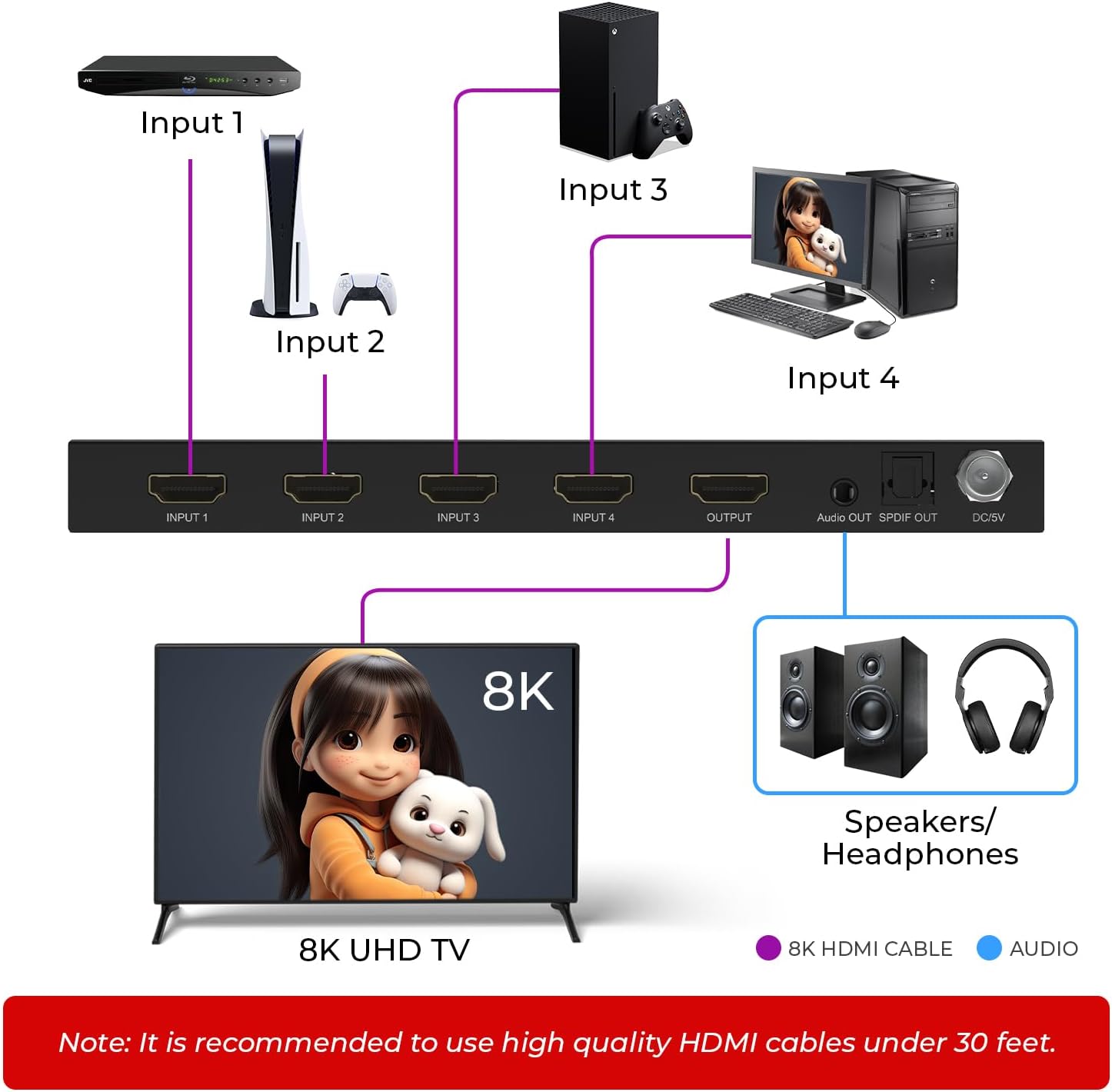
Figura 4: Diagrama de connexió típic

Figure 5: Easy Plug & Play Setup
Video 1: How to Use the 4x1 HDMI Switcher 8K with 4 input 1 Output. This video demonstrates the connection process and basic operation of the OREI BK-41A HDMI Switch, showing how to connect various devices and switch between them.
5. Instruccions de funcionament
5.1 Selecció d'entrada
You can switch between HDMI inputs using one of the following methods:
- Canvi manual: Press the 'SELECT' button on the front panel of the switch to cycle through the HDMI inputs (1-4). The corresponding Input LED will illuminate.
- Control remot IR: Use the included IR remote control to directly select an input (buttons 1-4) or power the device on/off. Ensure a clear line of sight between the remote and the IR Receiver on the front panel.
- Canvi automàtic: Press the 'AUTO' button on the front panel to enable or disable automatic input switching. When enabled, the switch will automatically detect and switch to the most recently activated or powered-on source device.
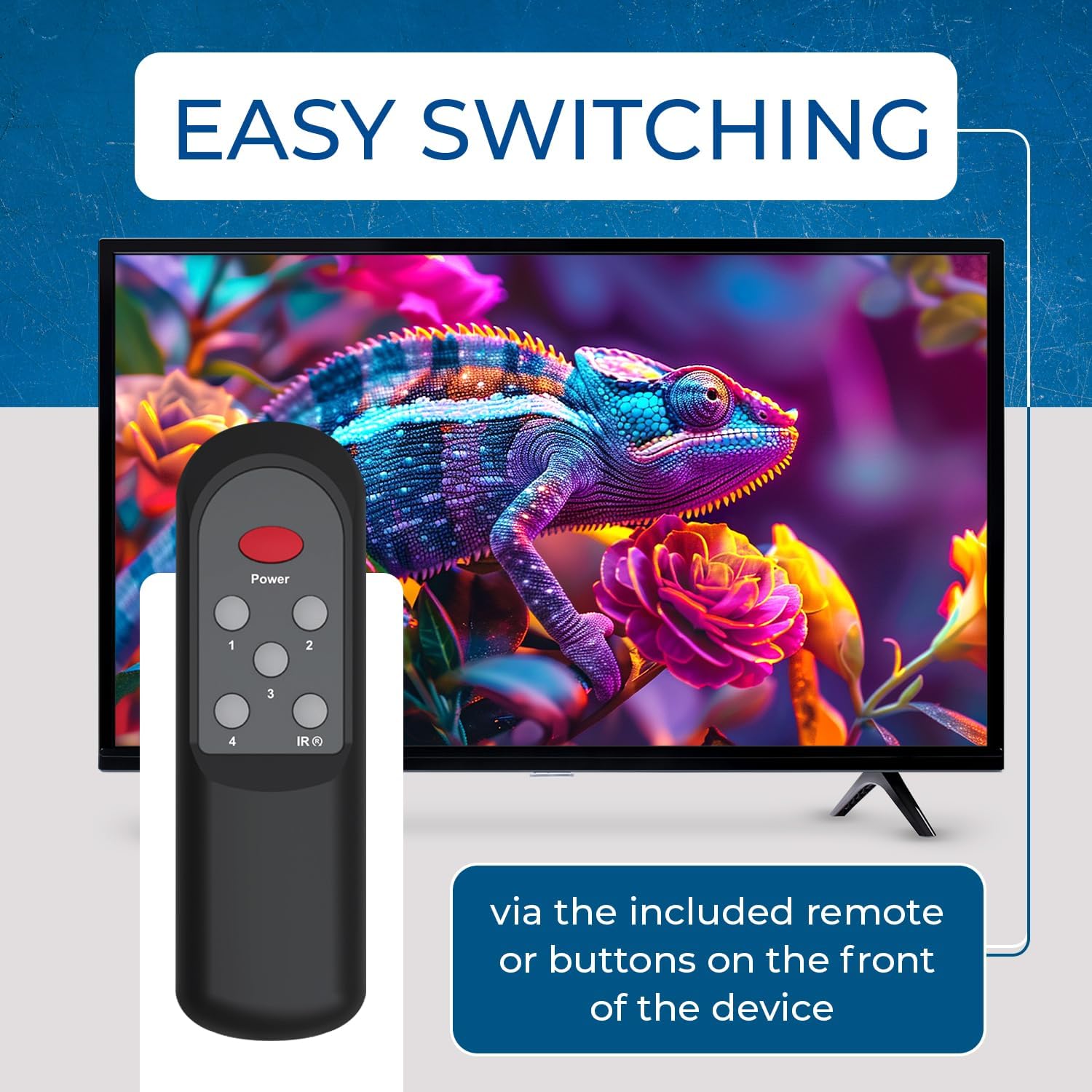
Figure 6: Easy Switching via Remote or Buttons
5.2 Configuració EDID
The EDID (Extended Display Identification Data) dip switches on the front panel allow you to configure the switch's EDID behavior to ensure optimal compatibility between your source devices and display. Refer to the detailed instructions in the included user manual for specific EDID configurations based on your setup requirements (e.g., preferred resolution, refresh rate, or audio format).
5.3 Extracció d'àudio
The OREI BK-41A can extract audio from the selected HDMI input and output it via the 3.5mm analog or optical SPDIF ports. This is useful for connecting to older audio systems or soundbars that do not support HDMI ARC/eARC. Ensure your audio system is connected to the appropriate audio output port on the switch.
6. Manteniment
To ensure the longevity and optimal performance of your OREI BK-41A HDMI Switch, follow these maintenance guidelines:
- Neteja: Feu servir un drap suau i sec per netejar el dispositiu. Eviteu utilitzar netejadors líquids o en aerosol.
- Ventilació: Ensure the ventilation slots on the sides of the unit are not obstructed to allow for proper heat dissipation.
- Gestió de cables: Keep HDMI and power cables organized and free from kinks or excessive tension to prevent damage.
- Actualitzacions de firmware: Only update firmware if instructed by OREI support. Unauthorized firmware updates may void your warranty.
7. Solució De Problemes
If you encounter issues with your OREI BK-41A HDMI Switch, refer to the following troubleshooting tips:
- Sense sortida de vídeo/àudio:
- Verify all HDMI cables are securely connected and are high-quality HDMI 2.1 compliant.
- Ensure the switch is powered on and the Power Indicator LED is lit.
- Confirm the correct input is selected on the switch (check Input LEDs).
- Check the input selection on your display device.
- Adjust EDID settings using the dip switches if compatibility issues persist.
- El control remot no respon:
- Ensure the batteries in the remote control are correctly inserted and not depleted.
- Check for any obstructions between the remote and the IR Receiver on the switch.
- Audio Extraction Issues:
- Verify the audio cable (optical or 3.5mm) is securely connected to both the switch and your audio system.
- Ensure your audio system is set to the correct input source.
- Check the audio settings on your source device to ensure it's outputting a compatible audio format.
8. Especificacions

Figura 7: Característiques principals
| Característica | Descripció |
|---|---|
| Resolució de vídeo | Up to 8K@60Hz, 4K@120Hz, 1080p@240Hz |
| Compatibilitat amb HDMI | HDMI 2.1 |
| Compliment HDCP | HDCP 2.3 |
| Suport HDR | HDR, HDR10, HDR10+, Dolby Vision, HLG |
| Ample de banda de vídeo | 48 Gbps |
| Extracció d'àudio | Optical (SPDIF) & 3.5mm Analog L/R |
| Formats d'àudio compatibles | LPCM, Dolby Digital/Plus/EX, TrueHD, DTS, DTS-EX, DTS-96/24, DTSHighRes, DTS-HDMasterAudio, DSD |
| Canvi de modes | Manual, IR Remote, Auto-Switching |
| Dimensions del producte | 7.4 x 2.76 x 7.4 polzades (188 mm x 70 mm x 18.5 mm) |
| Pes de l'article | 1.23 lliures (284 g / 10.01 oz) |
| Material | Carcassa metàl·lica resistent |
| Font d'alimentació | 5 V/2 A CC |
| Bateries remotes | 2 piles AAA (incloses) |
9. Garantia i Suport
The OREI BK-41A HDMI Switch comes with a 1-year manufacturer's warranty. OREI also provides lifetime technical support for this product. For any technical assistance or warranty claims, please contact OREI customer support.
Important: Do not update firmware without consulting OREI support to avoid potential issues and maintain warranty validity.


