1. Introducció
This manual provides detailed instructions for the LIGE Smart Watch Gift Set, which includes two distinct models: the TX1-G Slivery (round display) and the FV12-H Black (rectangular display). Please read this manual carefully before using your smartwatches to ensure proper operation and to maximize their features. Keep this manual for future reference.
2. Producte acabatview
The LIGE Smart Watch Gift Set offers two versatile smartwatches designed for various lifestyles. Both watches feature advanced health monitoring, fitness tracking, and smart communication capabilities. The TX1-G model presents a classic, elegant round design, while the FV12-H model offers a rugged, sporty rectangular aesthetic.

This image displays the two smartwatches included in the gift set: the LIGE TX1-G with a round, rose gold bezel and black mesh strap, and the LIGE FV12-H with a rectangular, rugged black and silver design and a metal link strap. Both watches show their respective digital interfaces.
3. Configuració
3.1. Càrrega del rellotge intel·ligent
Before initial use, fully charge your smartwatch. Both models typically use a magnetic charging cable.
- Connecteu l'extrem USB del cable de càrrega a un adaptador de corrent (es recomana 5 V/1 A) o al port USB d'un ordinador.
- Align the magnetic pins of the charging cable with the charging contacts on the back of your smartwatch. The cable will snap into place.
- The watch display will indicate charging status. Allow approximately 2-3 hours for a full charge.
3.2. Instal·lació i emparellament de l'aplicació
To unlock the full potential of your LIGE smartwatch, you need to install the companion application on your smartphone.
- Descarrega l'aplicació: Scan the QR code provided in the watch's packaging or search for the designated app (e.g., 'LIGE Smart' or 'Smart Health') in your smartphone's app store (App Store for iOS, Google Play Store for Android).
- Registra't/Iniciar sessió: Obriu l'aplicació i seguiu les instruccions a la pantalla per crear un compte o iniciar sessió.
- Activa el Bluetooth: Assegureu-vos que el Bluetooth estigui habilitat al vostre telèfon intel·ligent.
- Emparellar el rellotge: In the app, navigate to the 'Device' or 'My Watch' section. Tap 'Add Device' or 'Scan for Device'. Select your smartwatch from the list of available devices (e.g., 'LIGE-TX1G' or 'LIGE-FV12H').
- Confirmeu l'aparellament: A pairing request may appear on your watch and/or phone. Confirm the pairing on both devices.
3.3. Configuració Inicial
After successful pairing, configure your personal information and preferences within the app.
- Set your gender, age, height, and weight for accurate fitness tracking.
- Adjust notification settings for calls, messages, and other applications.
- Synchronize time and date with your phone.
4. Instruccions de funcionament
4.1. Navegació bàsica
Both smartwatches feature a full-touch display and physical buttons for navigation.
- Pantalla tàctil: Swipe up/down/left/right to navigate through menus and features. Tap to select.
- Botons laterals: Typically, one button serves as a Power/Back/Menu button, while others might be dedicated to Sports modes or quick access functions. Refer to the on-screen prompts for specific button functionalities.
4.2. Trucades per Bluetooth
The smartwatches support Bluetooth calling, allowing you to make and receive calls directly from your wrist when connected to your smartphone.

This visual guide illustrates the LIGE FV12-H's communication capabilities. It shows the watch interface for Bluetooth calling with a dial pad, contact list, and call records. Below, it depicts message notifications from various social media apps and the activation of the smart voice assistant.

This image focuses on the LIGE TX1-G smartwatch, illustrating its Bluetooth call and message notification functions. It shows the watch receiving an incoming call and displaying notifications from various social media applications, along with options for dial keypad, contact lists, and call records.
- Fer trucades: Access the 'Dial' or 'Phone' icon on your watch. You can dial a number directly, select from your synced contacts, or view registres de trucades recents.
- Recepció de trucades: When a call comes in, the watch will display the caller ID. You can answer or reject the call directly from your wrist.
4.3. Notificacions de missatges
Rep notificacions de les aplicacions del teu telèfon intel·ligent directament al teu rellotge intel·ligent.
- Ensure notification permissions are enabled for the companion app on your smartphone.
- In the app, select which applications you want to receive notifications from (e.g., SMS, WhatsApp, Facebook, Instagram).
- Notifications will appear on your watch screen. Swipe to dismiss or view more details if available.
4.4. Sports Modes and Fitness Tracking
Both watches offer extensive sports tracking capabilities to monitor your physical activity.
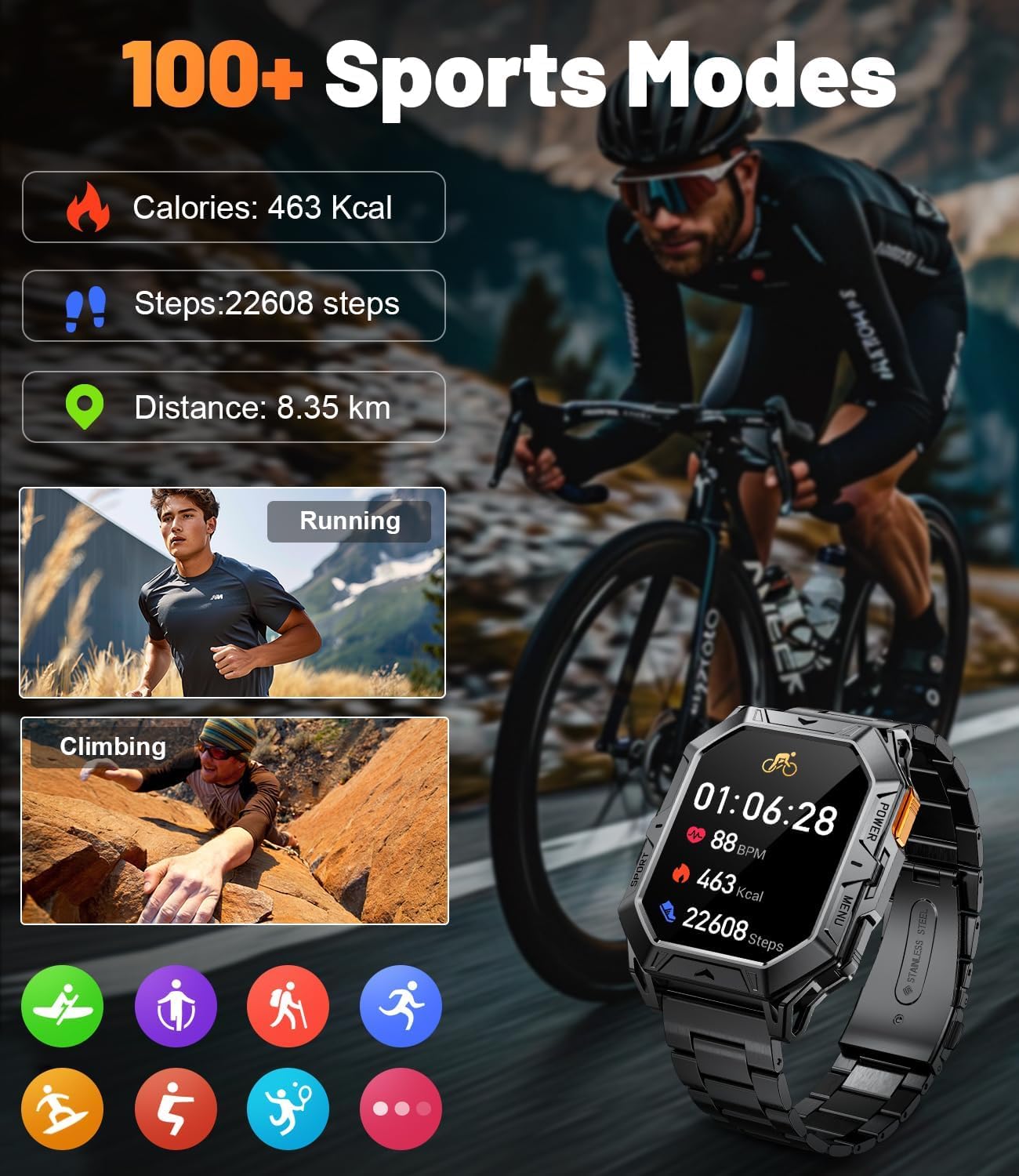
The LIGE FV12-H smartwatch is featured displaying its sports tracking interface, showing calories burned, steps taken, and distance covered. Examples of activities like running and climbing are depicted, emphasizing the watch's ability to monitor over 100 different sports modes.

This image illustrates the LIGE TX1-G smartwatch's capability to track 121 sports modes. It shows the watch interface displaying exercise duration, calories burned, and steps taken, with icons representing various activities like cycling, jump rope, running, and yoga.
- Access Sports Modes: Swipe on the watch face or press the dedicated sports button (if available) to access the list of sports modes (e.g., Running, Walking, Cycling, Climbing, Yoga).
- Start Activity: Select your desired activity. The watch will begin tracking metrics such as duration, calories burned, steps, distance, and heart rate.
- End Activity: Swipe or press the button to pause or end the activity. Data will be synced to the app.
4.5. Monitorització de la salut
Monitoritza les mètriques clau de salut directament des del teu canell.
- Freqüència cardíaca: Access the heart rate monitor feature on your watch. Ensure the watch is snug on your wrist for accurate readings.
- Passos i calories: These metrics are continuously tracked throughout the day. View daily summaries on your watch or in the app.
4.6. Watch Faces and Customization
Personalitza el teu rellotge intel·ligent amb una varietat d'esferes de rellotge.

The LIGE TX1-G smartwatch is highlighted, showcasing its 1.43-inch AMOLED full-screen colorful display with 466*466 high resolution. The image also demonstrates the availability of over 200 free and DIY watch dials, allowing for extensive personalization.
- Canvia la cara del rellotge: Long-press the watch face on your screen to enter the watch face selection menu. Swipe left/right to browse and tap to select.
- More Watch Faces: Access the companion app to download additional watch faces or create custom DIY watch faces using your own photos.
4.7. Smart Voice Assistant
Utilize the integrated smart voice assistant for quick commands and information.
- Ensure your watch is connected to your smartphone and the voice assistant feature is enabled in the app.
- Activate the voice assistant on your watch (usually by a specific swipe gesture or button press).
- Speak your command or question (e.g., "What is the weather like today?", "Call Jack").
5. Manteniment
5.1. Neteja
- Netegeu la pantalla i la carcassa del rellotge amb un drap suau i sense borrissol.
- Per a la brutícia persistent, lleugerament dampRenta el drap amb aigua. Evita utilitzar productes químics agressius o materials abrasius.
- Clean the charging contacts regularly to ensure efficient charging.
5.2. Resistència a l'aigua
The LIGE smartwatches are designed to be splash-proof and resistant to sweat and light rain. They are generally not suitable for swimming, showering, or diving unless explicitly stated otherwise in the product specifications. Avoid exposing the watches to hot water or steam.
5.3. Cura de la bateria

The LIGE FV12-H smartwatch is shown charging, highlighting its 1000mAh battery. The image indicates a standby time of over 100 days, typical usage of over 14 days, and heavy usage of 7 days.
- Eviteu descarregar completament la bateria amb freqüència.
- Carregueu el rellotge amb el cable proporcionat i un adaptador de corrent compatible.
- Guardeu el rellotge en un lloc fresc i sec quan no l'utilitzeu durant períodes prolongats.
6. Solució De Problemes
6.1. El rellotge no s'encén
- Assegura't que el rellotge estigui completament carregat. Connecta'l al carregador durant almenys 30 minuts.
- Manteniu premut el botó d'encesa durant 10-15 segons.
6.2. No es pot emparellar amb el telèfon intel·ligent
- Assegureu-vos que el Bluetooth estigui activat al telèfon intel·ligent i al rellotge.
- Make sure the watch is within the Bluetooth range of your phone (typically 10 meters).
- Reinicieu tant el telèfon intel·ligent com el rellotge intel·ligent.
- Clear the Bluetooth cache on your phone or forget the device in Bluetooth settings, then try pairing again.
- Assegureu-vos que l'aplicació complementària estigui actualitzada.
6.3. Notifications Not Working
- Check if notifications are enabled in the companion app for specific applications.
- Verify that the app has the necessary permissions on your smartphone (e.g., notification access).
- Assegureu-vos que el rellotge estigui connectat per Bluetooth.
6.4. Dades de salut inexactes
- Assegureu-vos de portar el rellotge ben ajustat al canell, ni massa fluix ni massa ajustat.
- Verify that your personal information (height, weight, age) is correctly entered in the app.
- Environmental factors and movement can affect accuracy.
7. Especificacions
7.1. LIGE TX1-G (Round Display)
| Característica | Detall |
|---|---|
| Mostra | 1.43 inch AMOLED Full Screen Colorful |
| Resolució | 466*466 High Resolution |
| Esferes de rellotge | 200+ Free Dials & DIY options |
| Modes esportius | 121 modes esportius |
| Connectivitat | Bluetooth for calls and data sync |
| Característiques clau | Bluetooth Calling, Message Notifications, Health Monitoring, Smart Voice Assistant |
7.2. LIGE FV12-H (Rectangular Display)
| Característica | Detall |
|---|---|
| Capacitat de la bateria | 1000 mAh |
| Temps d'espera | Up to 100+ Days |
| Ús típic | 14+ dies |
| Ús intensiu | 7 dies |
| Modes esportius | Més de 100 modes esportius |
| Connectivitat | Bluetooth for calls and data sync |
| Característiques clau | Bluetooth Calling, Message Reminders, Smart Voice Assistant, Health Monitoring |
8. Garantia i Suport
For warranty information and customer support, please refer to the documentation included with your product packaging or visit the official LIGE website. If you encounter any issues not covered in this manual, please contact LIGE customer service for assistance.


