1. Introducció
Thank you for choosing the FULODE DT-6 6-Channel Professional DJ Audio Mixer. This compact and versatile mixing console is designed for a wide range of audio applications, including live streaming, studio recording, DJ performances, and more. It features multiple input options, advanced DSP effects, a 5-band equalizer, and convenient connectivity features like Bluetooth and USB. Please read this manual carefully to ensure proper operation and to maximize your experience with the DT-6 mixer.
2. Característiques clau
- Entrada de 6 canals: Supports various audio sources including microphones and instruments.
- 99 Efectes DSP: Built-in digital signal processing with a wide range of effects like reverb, delay, chorus, and more.
- Equalitzador gràfic de 5 bandes: Precise control over audio frequencies for the main mix.
- One-Click Vocal Removal: Instantly isolate vocals from instrumental tracks.
- Connectivitat Bluetooth: Seamless wireless audio streaming from smart devices.
- USB Playback & Recording: Direct connection for audio playback from USB drives and computer integration for live streaming/recording.
- Alimentació fantasma +48V: Supports high-quality condenser microphones.
- Monitorització d'auriculars: Dedicated output for monitoring your mix.
- Disseny compacte i durador: Construcció robusta per a un rendiment fiable.
3. Guia de configuració
3.1 Desembalatge
Carefully remove all components from the packaging. Ensure all items listed in the packing list are present and undamaged. Keep the packaging for future storage or transport.
3.2 Connexió d'alimentació
Connect the provided power adapter to the DC 12V input port on the rear of the mixer. Plug the adapter into a suitable power outlet. The mixer can also be powered via a Type-C USB connection from a computer or power bank for portable use.

Imatge: Part posterior view of the FULODE DT-6 mixer showing the DC 12V power input and the Type-C USB port for power supply, indicating compatibility with computers and phones for power.
3.3 Connexions d'entrada
The DT-6 mixer features 6 input channels. Channels 1-4 are equipped with hybrid XLR and 6.35mm (1/4 inch) combo jacks, suitable for microphones and line-level instruments. Channels 5/6 are stereo line inputs.
- Micròfons: Connect dynamic microphones using XLR cables. For condenser microphones, connect via XLR and activate the +48V Phantom Power switch located near the PHONES jack.
- Instruments: Connect instruments like guitars or keyboards using 6.35mm (1/4 inch) TS or TRS cables to the MIC/LINE inputs.
- Dispositius d'àudio externs: Use the USB port for playback from a USB drive or connect via Bluetooth for wireless audio streaming from a smartphone, tablet, or computer.

Image: A visual diagram illustrating typical input connections (microphone, guitar, computer, electronic keyboard) and output connections (headphones, active speaker) to the FULODE DT-6 mixer.
3.4 Connexions de sortida
- Sortida principal: Connect the LEFT and RIGHT main outputs (XLR or 6.35mm TRS) to your ampamplificador, altaveus autoamplificats o interfície de gravació.
- Auriculars: Plug your headphones into the PHONES jack for monitoring.
4. Instruccions de funcionament
4.1 Acabatview de Controls
Familiarize yourself with the various knobs and buttons on the mixer. The following image provides a detailed breakdown of each control.
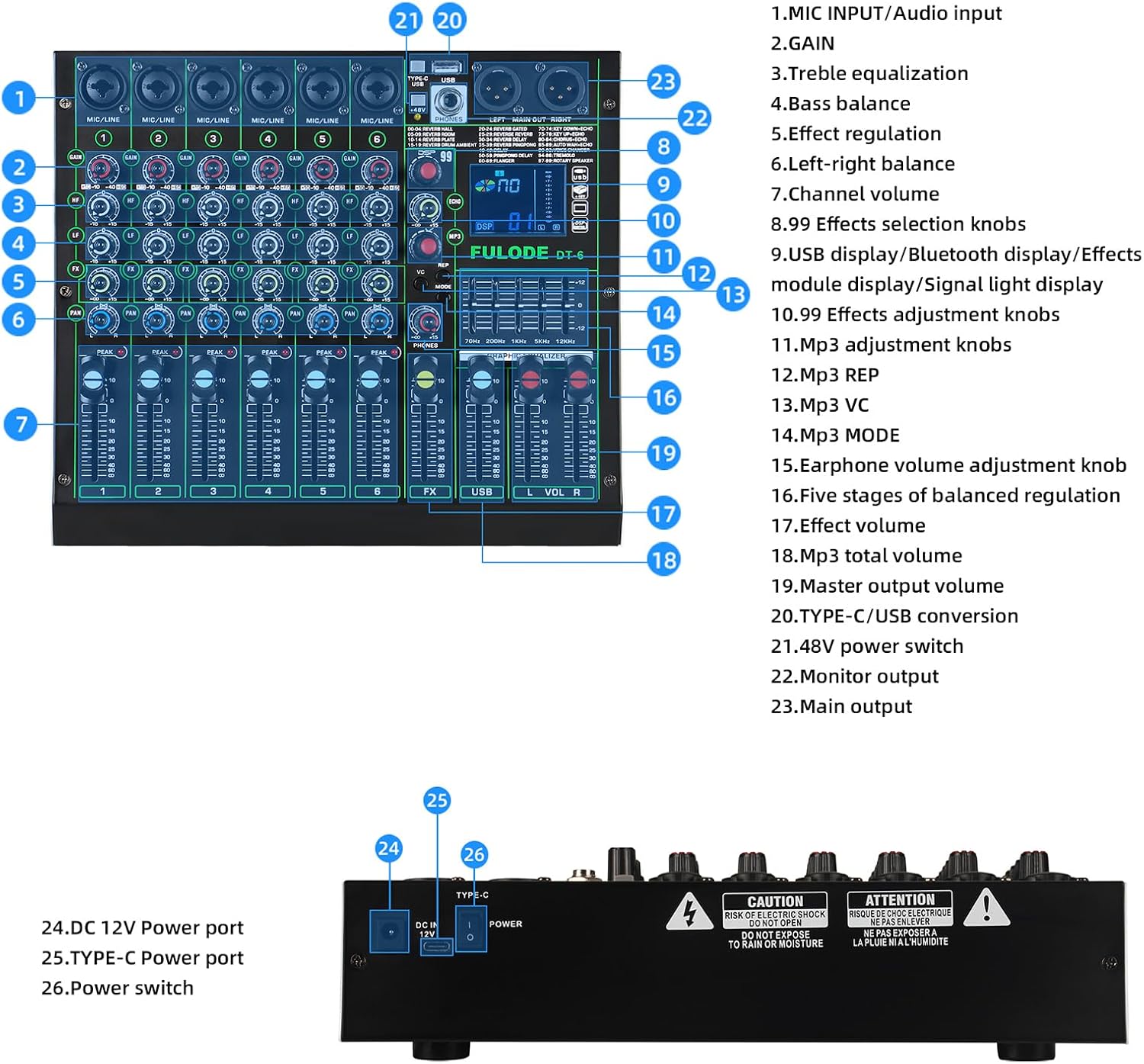
Image: A comprehensive diagram labeling each control on the FULODE DT-6 mixer, including MIC Input, GAIN, Treble/Bass EQ, Effect Regulation, Left-Right Balance, Channel Volume, DSP display, Effect knobs, MP3 controls, Earphone volume, Graphic Equalizer, Master output, and power connections.
4.2 Controls de canal
- GUANY: Adjusts the input sensitivity for each channel. Set it to an appropriate level to avoid clipping (PEAK LED indicator).
- HF (High Frequency) / LF (Low Frequency): Tone controls for adjusting the treble and bass of each channel.
- FX: Controls the amount of effect sent from each channel to the DSP effects processor.
- PA: Adjusts the stereo position (left/right) of the channel in the main mix.
- Atenuador de volum del canal: Controls the individual volume level of each channel in the main mix.
4.3 Efectes DSP
The DT-6 mixer includes 99 preset DSP effects. Use the DSP knob to select an effect number (00-99) displayed on the screen. Adjust the ECHO and REP (Repeat) knobs to fine-tune the effect parameters.

Image: Close-up of the FULODE DT-6 mixer's display showing the selection of 99 preset reverb effects, including various types of reverb, delay, chorus, and voice changer options.
4.4 5-Band Graphic Equalizer
The main output features a 5-band graphic equalizer. Use the sliders to adjust the gain (+/-12dB) for specific frequency bands (70Hz, 200Hz, 1KHz, 5KHz, 12KHz) to shape the overall sound of your mix.

Imatge: Una imatge detallada view of the 5-band graphic equalizer on the FULODE DT-6 mixer, showing the frequency bands and their respective faders for precise sound adjustment.
4.5 One-Click Vocal Removal
Press the 'VC' (Vocal Cut) button to instantly remove vocals from a playing track, creating an instrumental version suitable for karaoke or backing tracks.

Image: A person's hand pressing the 'VC' button on the FULODE DT-6 mixer, highlighting the one-tap vocal elimination feature for live streaming performances.
4.6 Connectivitat Bluetooth
To connect via Bluetooth, press the MODE button until 'bt' appears on the DSP display. On your smart device, search for 'BT_5.0' and pair. Once connected, you can stream audio wirelessly to the mixer.

Image: The FULODE DT-6 mixer shown alongside a smartphone, demonstrating wireless Bluetooth playback. The mixer's display shows 'bt' indicating Bluetooth mode.
4.7 USB Playback & Recording
Inseriu una unitat USB amb àudio files into the USB port for direct playback. Use the MP3 adjustment knobs to control playback. The USB connection also allows for direct plug-and-play connection to a computer for live streaming or recording without additional drivers.

Image: A person setting up the FULODE DT-6 mixer for a live broadcast, connected to a computer and smartphone, illustrating the plug-and-play, driver-free live streaming capability.
4.8 +48V Phantom Power
Activate the +48V phantom power switch when using condenser microphones. This supplies the necessary power for these microphones to operate. Ensure the switch is off when not using condenser microphones to prevent damage to other equipment.

Imatge: Un primer pla view of the +48V phantom power independent switch on the FULODE DT-6 mixer, indicating its function to enable condenser microphones.
5. Manteniment
- Neteja: Feu servir un drap suau i sec per netejar la superfície de la batedora. Eviteu utilitzar netejadors líquids o dissolvents, ja que poden danyar l'acabat o els components interns.
- Emmagatzematge: Guardeu la batedora en un lloc fresc i sec, allunyat de la llum solar directa, de temperatures extremes i d'alta humitat.
- Manipulació: Always handle the mixer with care. Avoid dropping it or subjecting it to strong impacts.
- Ventilació: Assegureu-vos que hi hagi una ventilació adequada al voltant del mesclador per evitar el sobreescalfament. No bloquegeu cap obertura de ventilació.
6. Solució De Problemes
- Sense sortida de so:
- Comproveu totes les connexions dels cables (entrades, sortides, alimentació).
- Ensure the master volume and individual channel faders are turned up.
- Verify that your speakers or headphones are properly connected and powered on.
- If using phantom power, ensure it is activated for condenser microphones.
- So distorsionat:
- Reduce the GAIN for the input channels to prevent clipping (check PEAK indicators).
- Baixa el volum de sortida principal.
- Comproveu la integritat del cable; els cables defectuosos poden causar deformacions.
- Problemes de connexió Bluetooth:
- Ensure the mixer is in Bluetooth mode ('bt' displayed).
- Make sure your smart device's Bluetooth is enabled and searching for devices.
- Prova de desvincular i tornar a vincular el dispositiu.
- Ensure no other devices are actively connected to the mixer via Bluetooth.
- USB Playback Not Working:
- Ensure the USB drive is properly inserted and contains compatible audio files (per exemple, MP3).
- Verify the mixer is in USB playback mode.
7. Especificacions

Image: The FULODE DT-6 mixer with its dimensions clearly labeled: 270mm (10.63 inches) width, 240mm (9.45 inches) depth, and 55mm (2.17 inches) height. The weight is also indicated as 2.1KG / 4.63LB.
| Característica | Especificació |
|---|---|
| Pes de l'article | 4.58 lliures |
| Dimensions del producte | 9.45 x 10.63 x 2.17 polzades |
| Número de model de l'article | DT-6 |
| Font d'alimentació | Elèctric amb cable |
| Voltage | 110 volts (CA) |
| Marca | FULODE |
| Nombre de canals | 6 |
| Tecnologia de connectivitat | Auxiliar, USB, Bluetooth |
8. Vídeo oficial del producte
Vídeo: Presentació oficial del producte en vídeoasing the FULODE DT-6 DJ Mixer, highlighting its 99 DSP effects and 5-band EQ. This video provides a visual demonstration of the mixer's features and capabilities.
9. Garantia i Suport
The FULODE DT-6 mixer comes with a standard manufacturer's warranty. For specific warranty details, please refer to the documentation included with your product or contact FULODE customer support. If you encounter any issues or have questions not covered in this manual, please reach out to our support team for assistance.
Contact information for support can typically be found on the FULODE official weblloc web o a l'embalatge del producte.


