Informació important de seguretat
Please read all safety instructions before using this product to ensure proper and safe operation.
- No exposeu els auriculars ni l'estoig de càrrega a temperatures extremes.
- Eviteu deixar caure o aplicar una força excessiva al dispositiu.
- Mantenir fora de l'abast dels nens i mascotes.
- Use only a 5V adapter to charge the charging case to prevent battery damage.
- Do not use the earbuds in the bath or while swimming.
Contingut del paquet
Verifiqueu que tots els elements siguin presents al vostre paquet:
- ZIUTY A1 Wireless Earbuds (x1 pair)
- Portable Charging Case (x1)
- Cable de càrrega USB-C (x1)
- Eartips (pre-installed size M, plus 2 extra pairs in sizes S & L)
- Manual d'usuari (aquest document)
Producte acabatview
Familiarize yourself with the components of your ZIUTY A1 Wireless Earbuds.
Auriculars i estoig de càrrega
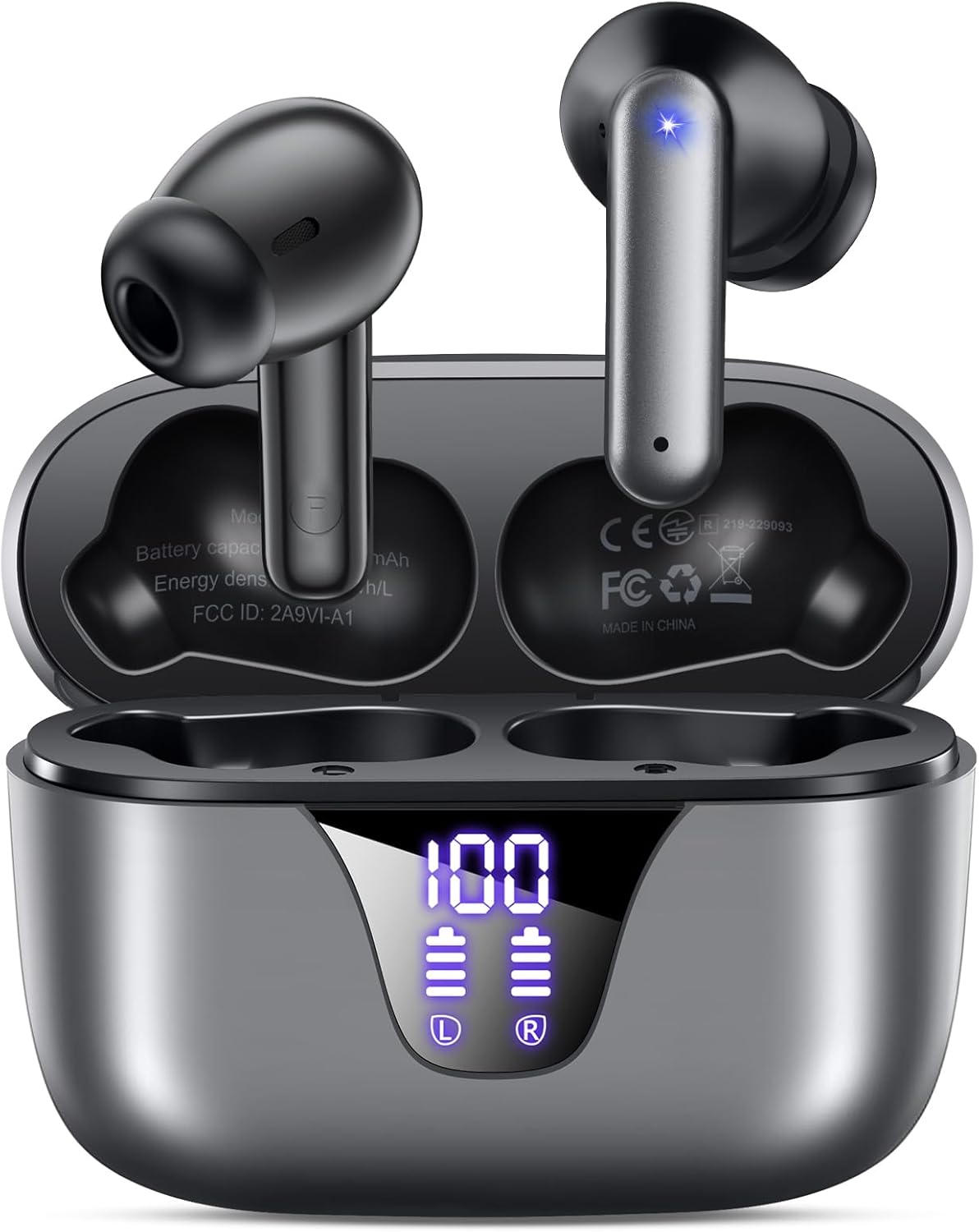
Image: ZIUTY A1 Wireless Earbuds shown inside their open charging case. The case features an LED digital display indicating battery levels for both the case and individual earbuds.
Pantalla LED d'alimentació

Image: Close-up of the ZIUTY A1 charging case's LED display, showing '100' for the case battery and individual battery icons for the left (L) and right (R) earbuds.
The charging case features an LED digital display that shows the exact remaining power percentage (0-100%) for the case and individual battery levels for each earbud.
Configuració
1. Càrrega dels auriculars i l'estoig
Abans del primer ús, carregueu completament els auriculars i l'estoig de càrrega.
- Col·loca els auriculars a l'estoig de càrrega. Assegura't que estiguin correctament col·locats a les seves ranures respectives (E per a l'esquerra, R per a la dreta).
- Connect the USB-C charging cable to the charging port on the case and the other end to a 5V USB power adapter (not included).
- The LED display on the case will show the charging status. A full charge typically takes approximately 2 hours.

Image: ZIUTY A1 earbuds resting in their charging case, with the LED display showing battery levels.

Image: Diagram illustrating how to connect the USB-C cable to the charging case and a 5V power adapter for charging.
2. Posar-se els auriculars
For optimal sound quality and comfort, select the correct ear tip size and ensure a secure fit.
- Choose the ear tips (S, M, L) that provide the best seal and comfort for your ears.
- Insert the earbuds into your ears, gently twisting them to find a snug and stable position.
- The ergonomic semi-in-ear design is intended for a comfortable fit during various activities.

Image: Diagram showing the ergonomic design of the earbuds and the three available ear tip sizes (S, M, L) for a customized fit.

Image: Step-by-step visual guide on how to correctly insert and adjust the earbuds for a secure fit.
3. Vinculació amb un dispositiu Bluetooth
Els auriculars entraran automàticament en mode d'emparellament quan es treguin de l'estoig de càrrega.
- Obre l'estoig de càrrega i treu els dos auriculars. S'encendran automàticament i intentaran emparellar-se entre si.
- Al dispositiu (telèfon intel·ligent, tauleta, ordinador portàtil), activeu el Bluetooth i cerqueu els dispositius disponibles.
- Select "A1" from the list of found devices.
- Un cop connectats, sentireu una confirmació audible i els auriculars estaran llestos per al seu ús.
- Els auriculars es tornaran a connectar automàticament a l'últim dispositiu emparellat quan es treguin de l'estoig.

Image: Illustration showing the ZIUTY A1 earbuds connecting via Bluetooth 5.3 to a smartphone, indicating a stable and fast connection.

Image: Diagram demonstrating the one-step auto-pairing process when the earbuds are removed from the charging case.
Instruccions de funcionament
Controls tàctils
The ZIUTY A1 earbuds feature intuitive touch controls for managing audio playback and calls.

Image: Diagram illustrating the touch control area on the earbuds and various functions like Play/Pause, Voice Assistant, Answer/Hang up, Previous/Next Track, and Volume adjustment.

Image: A more detailed visual guide to the touch controls, showing specific tap and hold gestures for different commands.
| Acció | Funció |
|---|---|
| Toc únic (E/D) | Reproduir/Pausar música, Respondre/Finalitzar trucada |
| Doble Toc (L) | Pista anterior |
| Doble toc (R) | Pista següent |
| Triple Toc (E/D) | Activa l'Assistent de veu (Siri, Google Assistant) |
| Press and Hold (L) | Baixa el volum |
| Press and Hold (R) | Puja el volum |
| Press and Hold (L/R) during incoming call | Rebutja la trucada |
Fer i rebre trucades
Use the touch controls to manage your phone calls:
- Respondre/Finalitzar la trucada: Toqueu un sol cop qualsevol dels auriculars.
- Rebutja la trucada: Prem i mantén premut qualsevol dels auriculars durant una trucada entrant.

Image: Illustration showing a user interacting with a voice assistant (Siri) via the earbuds for clear call support.
Assistent de veu
Activate your device's voice assistant by triple-tapping either earbud. This allows you to issue commands such as making calls or checking information hands-free.
Manteniment
Neteja
Una neteja regular ajuda a mantenir un rendiment i una higiene òptims.
- Clean the charging contacts on both the earbuds and inside the charging case with a dry cotton swab or alcohol pad.
- Gently clean the mesh of the ear tips to remove any dust or earwax that might affect sound volume.
- Wipe the exterior of the earbuds and case with a soft, dry cloth.

Image: Visual guide demonstrating how to clean the earbud charging contacts and ear tip mesh to resolve potential volume or charging issues.
Emmagatzematge
Quan no els utilitzeu, guardeu els auriculars a la seva funda de càrrega per protegir-los i assegurar-vos que es mantinguin carregats.
Resolució de problemes
If you encounter issues with your ZIUTY A1 earbuds, refer to the following common solutions:
- Auriculars que no s'aparellen entre si: Place both earbuds back into the charging case, close the lid, wait a few seconds, then open the lid and remove them again. They should automatically pair.
- Auriculars que no es connecten al dispositiu: Ensure Bluetooth is enabled on your device and the earbuds are in pairing mode. Forget the device from your Bluetooth list and attempt to re-pair.
- Sense so o volum baix: Check the volume levels on both your device and the earbuds. Ensure the ear tips are clean and properly seated in your ears. Refer to the cleaning instructions in the Maintenance section.
- Problemes de càrrega: Ensure the charging cable is securely connected and the power adapter is 5V. Clean the charging contacts on both the earbuds and the case.
- Accidental touch control activation: When adjusting the earbuds in your ear, grasp them by the sides to avoid touching the control area.
Especificacions
Key technical specifications for the ZIUTY A1 Wireless Earbuds:
| Característica | Especificació |
|---|---|
| Nom del model | A1 |
| Tecnologia de connectivitat | Sense fil (Bluetooth 5.3) |
| Interval Bluetooth | Fins a 15 metres (49 peus) |
| Durada de la bateria dels auriculars | Fins a 8 hores |
| Temps de reproducció total (amb estoig) | Fins a 50 hores |
| Caixa de càrrega Capacitat de la bateria | 500 mAh |
| Temps de càrrega | Aproximadament 2 hores |
| Mida del controlador d'àudio | Controlador dinàmic de 14.5 mm |
| Interval de freqüència | 20 Hz - 20,000 Hz |
| Nivell de resistència a l'aigua | IPX7 (resistent a l'aigua) |
| Tipus de control | Control tàctil |
| Pes de l'auricular | Approximately 0.14 oz (3.9g) per earbud |
| Components inclosos | Earbuds, Charging Case, USB-C Cable, Eartips, User Manual |
Garantia i Suport
Informació de la garantia
ZIUTY provides an 18-month battery promise for this product. This warranty covers defects in materials and workmanship under normal use.
Atenció al client
For any questions, technical assistance, or warranty claims, please contact ZIUTY customer service. Refer to the product packaging or the official ZIUTY weblloc web per obtenir dades de contacte actuals.


