1. Introducció
This manual provides detailed instructions for the installation, operation, and maintenance of your JOYING 9-inch Android 13 Car Stereo, model JY-HT123N4, designed specifically for Honda CRV models from 2017 to 2021. Please read this manual thoroughly before installation and use to ensure proper function and to maximize your product experience.
2. Contingut del paquet
Verifiqueu que tots els elements que s'enumeren a continuació s'inclouen al vostre paquet. Si falta algun element o hi ha algun malmès, poseu-vos en contacte amb l'atenció al client.
- 9" Radio Unit x1
- Cable d'alimentació x1
- AR Cable x1
- Screen Ribbon Cable x1
- Micròfon extern x1
- Antena 4G x2
- Antena WiFi x1
- USB cable x2
- Antena GPS x1
- Manual d'usuari x1
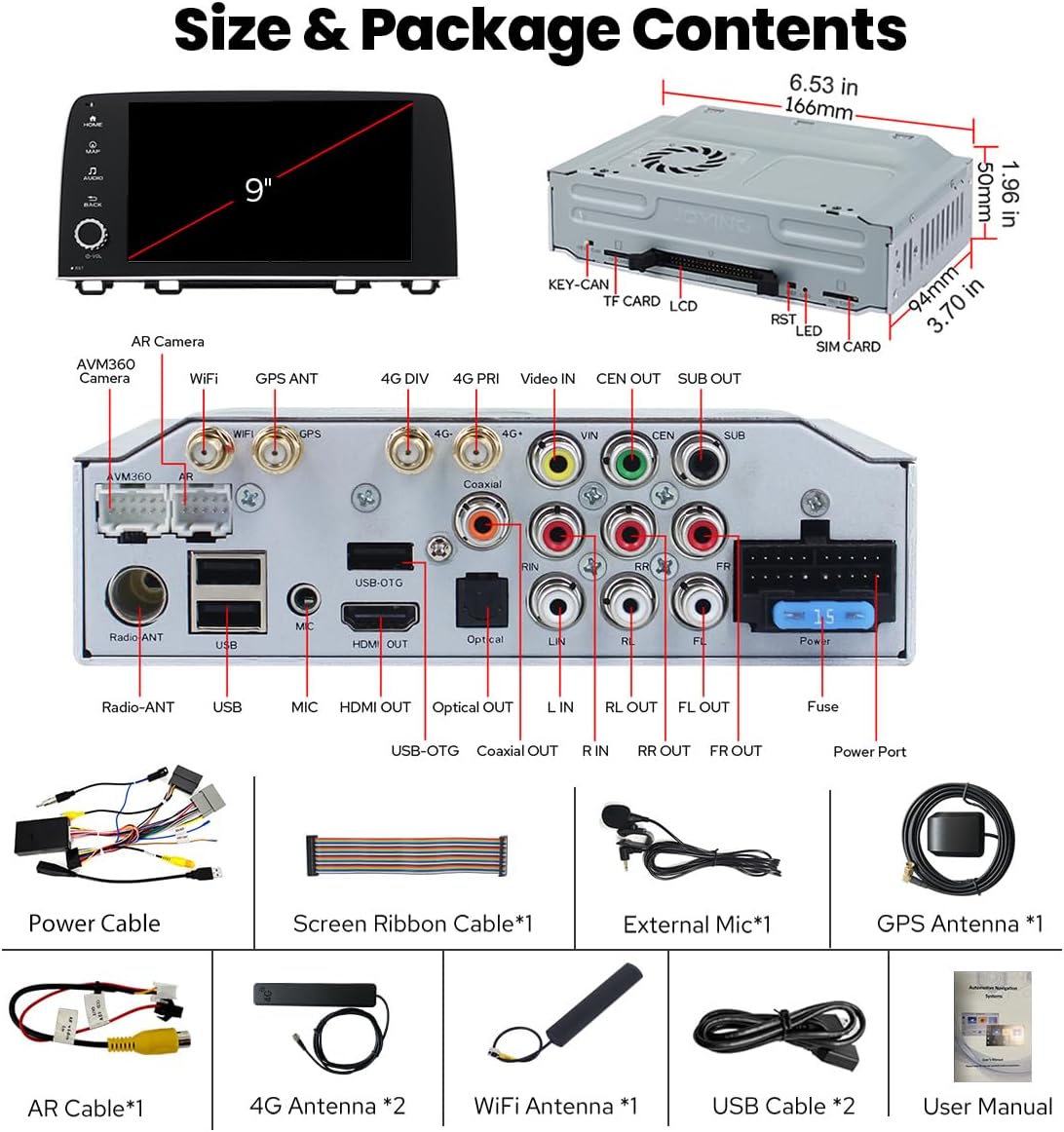
Imatge: Més deview of the car stereo unit dimensions and included package contents.
3. Instal·lació i configuració
3.1 Comprovació prèvia a la instal·lació
- Ensure your vehicle is a Honda CRV manufactured between 2017 and 2021.
- Turn off the vehicle's ignition and disconnect the negative terminal of the car battery before starting installation.
- Reuneix totes les eines necessàries (per exemple, tornavisos, eines per treure guarnicions).
3.2 Wiring Harness Selection
The correct wiring harness is crucial for proper installation and functionality. Please identify your factory radio type and select the corresponding harness (A, B, or C) as shown in the guide below. If unsure, consult a professional or contact customer support with a photo of your factory radio.

Image: Guide for selecting the correct wiring harness based on your factory radio.
3.3 Passos d'instal·lació
- Carefully remove the factory radio and trim panels using appropriate tools to avoid damage.
- Connect the selected wiring harness to the vehicle's existing connectors. Ensure all connections are secure.
- Connect the other end of the wiring harness to the JOYING car stereo unit.
- Connect the GPS antenna, WiFi antenna, and 4G antennas to their respective ports on the new unit. Position the antennas in a location that provides optimal signal reception.
- If applicable, connect the external microphone and USB cables.
- Carefully slide the JOYING car stereo into the dashboard opening, ensuring all cables are tucked away and not pinched.
- Secure the unit in place and reattach any removed trim panels.
- Reconnect the car battery's negative terminal.
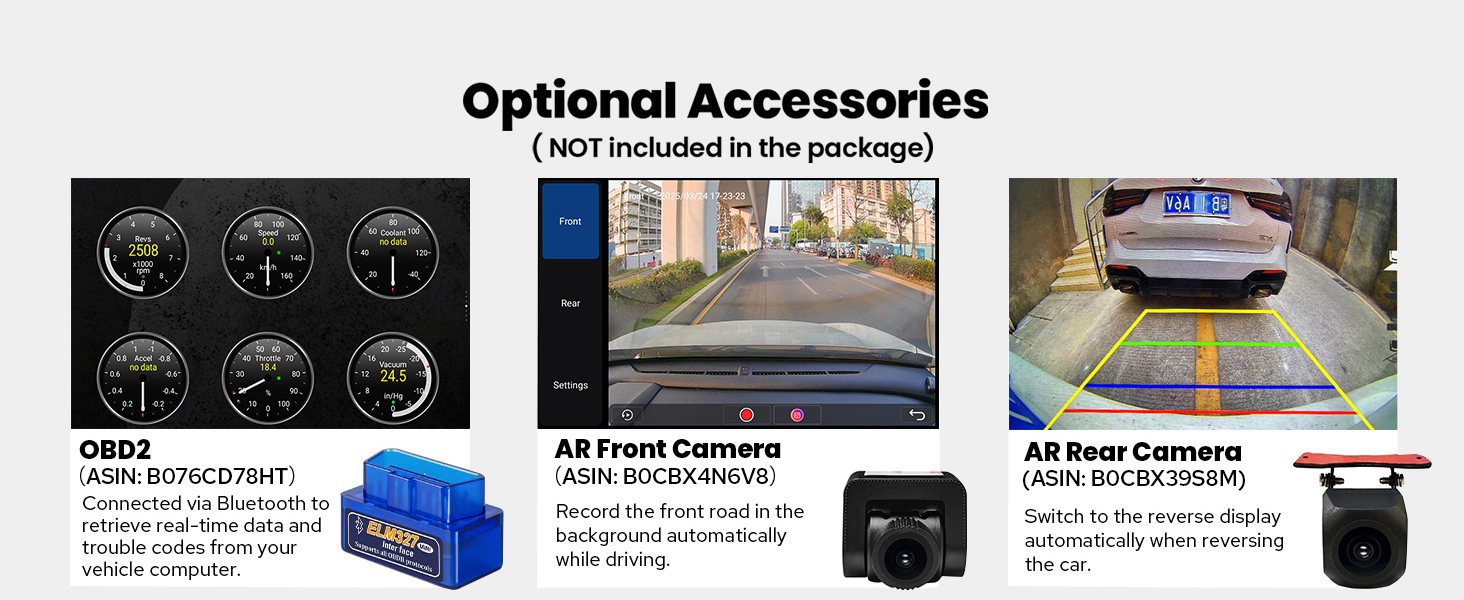
Image: Visual comparison of the dashboard before and after the car stereo installation.
4. Funcionament inicial
4.1 Primer arrencada
After installation, turn on your vehicle's ignition. The system will perform an initial boot-up, which may take approximately 30-40 seconds. Subsequent boot-ups will be faster, typically within 2 seconds after the car key is inserted.
4.2 Navegació bàsica de la interfície
The JOYING car stereo features an intuitive Android 13 interface. Use the touchscreen to navigate through applications and settings. The main screen typically displays navigation, audio, and other frequently used functions.

Image: Main user interface of the JOYING Android 13 car stereo.

Image: Android 13 user interface and system specifications.
5. Característiques i funcions principals
5.1 CarPlay sense fil i Android Auto
Connect your smartphone via USB cable or Bluetooth to access CarPlay or Android Auto. This allows for seamless integration of your phone's navigation, communication, and entertainment apps directly on the car stereo display.

Image: CarPlay and Android Auto integration.
5.2 Navegació GPS
The unit includes precise GPS engines and an antenna for accurate positioning and real-time navigation. It supports offline maps, allowing you to download map data for specific areas and use navigation without an internet connection. You can also synchronize mobile phone map data via CarPlay/Android Auto.
5.3 Enhanced Sound System Integration
The stereo features an integrated TDA7851 DSP chip and a 48-band graphic equalizer for high-quality audio output, with a maximum output power of 4x50W. It provides 4 audio outputs and 1 subwoofer output. For external amplifiers with Optical Fiber or Coaxial Digital Input, the unit offers direct digital output for superior sound quality.
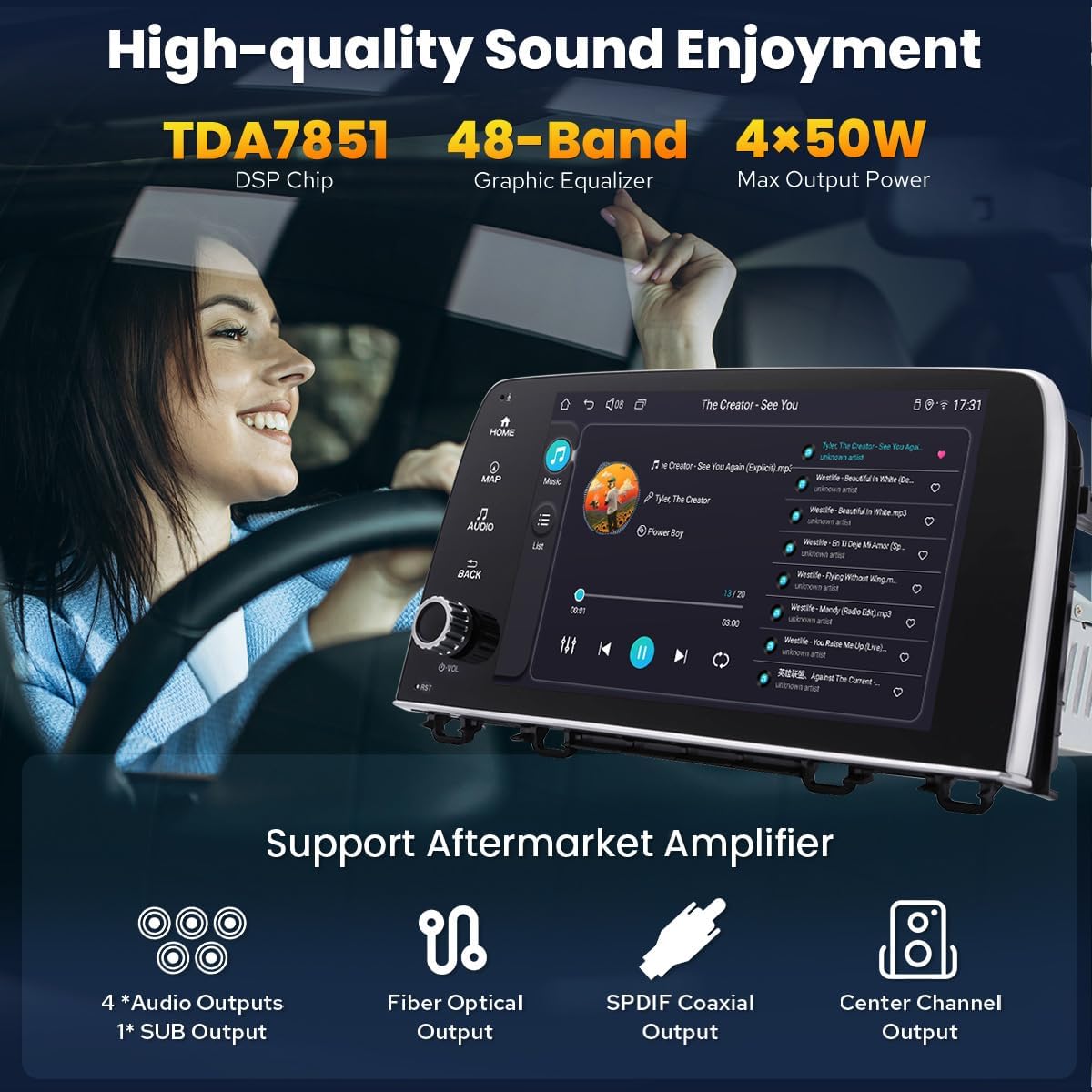
Image: Audio features and ampsuport vitalitzador.
5.4 4G Module and Wi-Fi Connectivity
A built-in 4G module allows for internet access by inserting a SIM card (data only, no calls or SMS). The unit also features an independent WiFi antenna for stable signal quality and fast internet access, supporting 802.11a/b/g/n/AC standards across 2.4GHz/5GHz spectral bands.

Image: WiFi signal enhancement and antenna details.
5.5 Split-screen Multitasking
The split-screen feature allows you to run two applications simultaneously on the display. To activate, tap the recent apps icon, then find the app you want to split, tap the split-screen button, and select the second app from your recent applications.
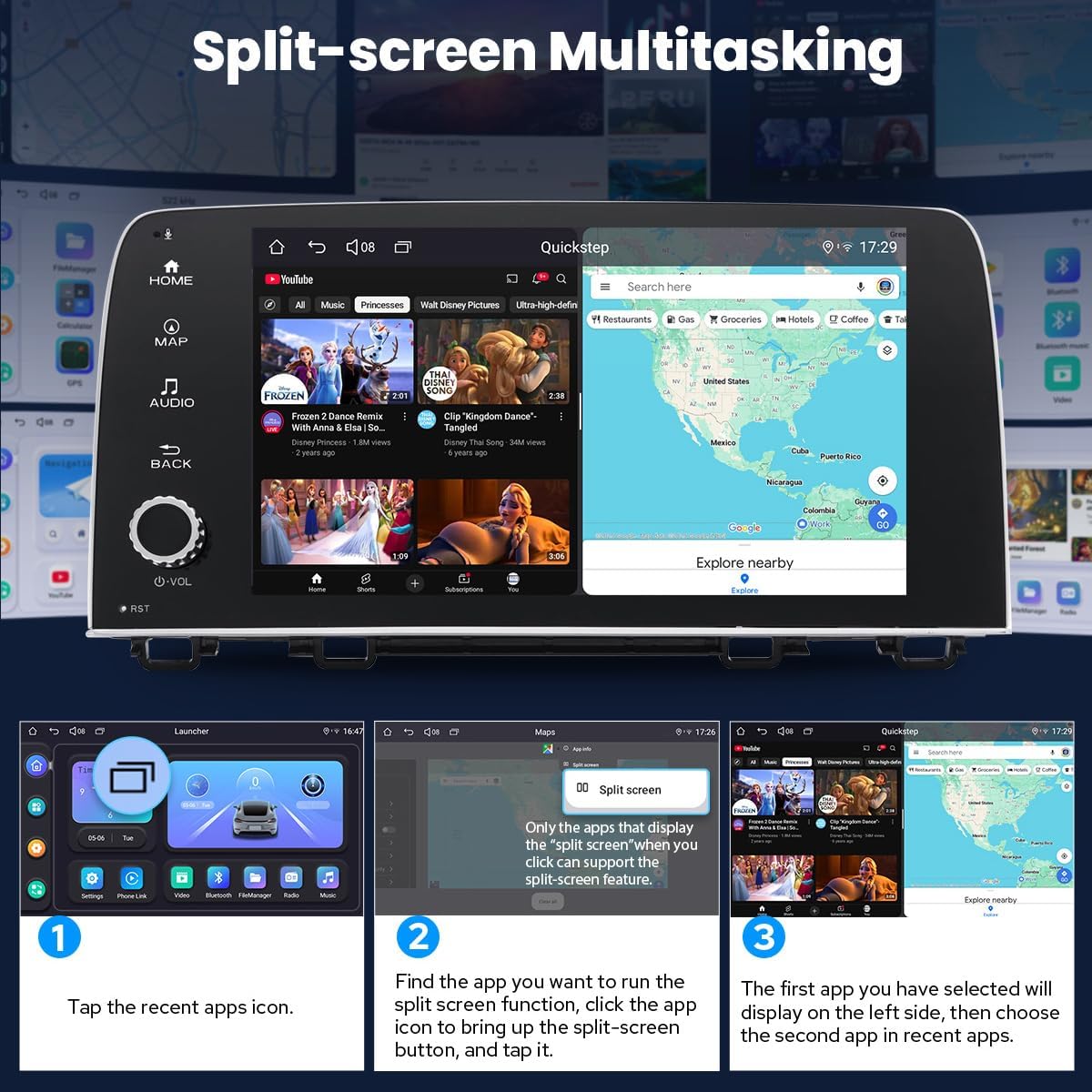
Image: Steps for using split-screen multitasking.
5.6 sortida HDMI
The unit includes an HDMI output, providing a full digital image and sound-sending interface. This allows for synchronous output of uncompressed audio and video signals to external displays, such as headrest monitors, without manual adjustment. The HDMI cable is not included.

Image: HDMI output functionality for external displays.
5.7 OEM Feature Retention
The JOYING car stereo is designed to integrate with and support several factory features of your Honda CRV, including the factory reverse camera, steering wheel controls (SWC), and factory USB ports. This ensures a seamless upgrade while retaining essential vehicle functionalities.

Image: Retention of original equipment manufacturer (OEM) features.
5.8 Personalized Settings
Customize your car stereo experience with various personalized settings, including changing the car boot logo, selecting from customizable wallpapers, and adjusting the button colors to match your vehicle's interior lighting or personal preference.

Image: Options for personalizing the car stereo's appearance and settings.
6. Manteniment
6.1 Sistema de refrigeració
The unit features a dual heat sink design for superior heat dissipation and improved temperature control, enhancing performance stability. The system can be configured to automatically turn on a cooling fan if the CPU temperature or radio volume exceeds a set warning value, preventing overheating.

Image: Cooling system design and functionality.
6.2 Actualitzacions de programari
Periodically check for available software updates to ensure optimal performance, access new features, and maintain system security. Instructions for updating the software can typically be found in the system settings or on the manufacturer's support weblloc.
7. Solució De Problemes
If you encounter issues with your JOYING car stereo, refer to the following common troubleshooting steps:
- Sense energia: Check all power cable connections. Ensure the vehicle's fuse for the stereo is intact. Verify the car battery is properly connected and charged.
- Sense so: Confirm speaker connections are secure. Check the volume level and mute settings. If an external amplifier is used, verify its power and connections.
- Problemes amb el senyal GPS: Ensure the GPS antenna is placed in an unobstructed location, typically on the dashboard with a clear view del cel.
- CarPlay/Android Auto no es connecta: Try a different USB cable. Ensure Bluetooth is enabled on both the stereo and your phone. Check your phone's settings for CarPlay/Android Auto permissions.
- Pantalla tàctil que no respon: Perform a soft reset by pressing the RST button (usually a small pinhole button). If the issue persists, disconnect and reconnect the car battery.
For persistent issues or problems not listed here, please contact JOYING customer support for further assistance.
8. Especificacions
| Característica | Especificació |
|---|---|
| Dimensions del producte | 5.91 x 7.99 x 4.72 polzades |
| Pes de l'article | 2.65 lliures |
| Número de model | JY-HT123N4 |
| Marca | ALEGRANT |
| Tecnologia de connectivitat | Bluetooth, Ethernet, HDMI, USB, Wi-Fi |
| Tipus de controlador | Android |
| Característiques especials | DSP, Equalizer, Front View Camera Input, RCA, RDS |
| Dispositius compatibles | Amplifier, telèfon intel·ligent, altaveu |
| Ports HDMI totals | 1 |
| Tipus de connector | Coaxial, Òptic |
| Mode de sortida d'àudio | estèreo |
| Configuració del canal de so envoltant | 5.1 |
| Suport de codificació de vídeo | H264/H265/MP4/AVI/MKV/FLV |
9. Accessoris opcionals
The following accessories are not included in the standard package but can enhance your car stereo experience:
- OBD2 Scanner: Connects via Bluetooth to retrieve real-time vehicle data and diagnostic trouble codes.
- AR Front Camera: Records the front road automatically while driving.
- AR Rear Camera: Provides a reverse display automatically when backing up the vehicle.

Image: Optional accessories for the car stereo system.
10. Garantia i Suport
For warranty information, technical support, or any questions regarding your JOYING car stereo, please refer to the warranty card included in your package or visit the official JOYING website. Customer support contact details are typically available on the product packaging or the brand's online resources.


