1. Introducció
This manual provides detailed instructions for the installation, operation, and maintenance of your Joying 8-inch Car Stereo RCD330 (Model JY-VT130N4). This unit is designed for specific Volkswagen MQB system vehicles manufactured between 2016 and 2021. Please read this manual thoroughly before installation and use to ensure proper function and safety.
2. Contingut del paquet
Verifiqueu que tots els elements que s'enumeren a continuació s'inclouen al vostre paquet:
- 8-inch Car Stereo Unit (x1)
- Cable d'alimentació (x1)
- AR Cable (x1)
- Screen Ribbon Cable (x1)
- External Microphone (x1)
- Antena 4G (x2)
- WiFi Antenna (x1)
- Cable USB (x2)
- GPS Antenna (x1)
- Manual d'usuari (x1)

Figura 2.1: Dimensions of the head unit and a visual representation of all included accessories.
3. Configuració i instal·lació
3.1 Comprovació de compatibilitat
This unit is specifically designed for Volkswagen, Skoda, and Seat vehicles. Please refer to the compatibility list below to ensure your vehicle is supported.

Figura 3.1: Applicable vehicle models and a visual comparison of the dashboard before and after installation.
3.2 Identifying Your Vehicle's System (MQB vs. PQ)
For vehicles manufactured between 2016 and 2021, it is crucial to determine if your car uses an MQB or PQ (non-MQB) system. This unit requires the correct CANBUS decoder for proper functionality. You can identify your system type by checking the original radio sticker, as illustrated below.

Figura 3.2: Guide to identifying MQB and PQ systems for correct cable selection.
3.3 Fascia Panel Requirements
Depending on your vehicle's original dashboard design, an additional fascia panel may be required for a seamless fit. Please compare your vehicle's center console with the images provided to determine if an extra panel is necessary. These panels are not included in the package.
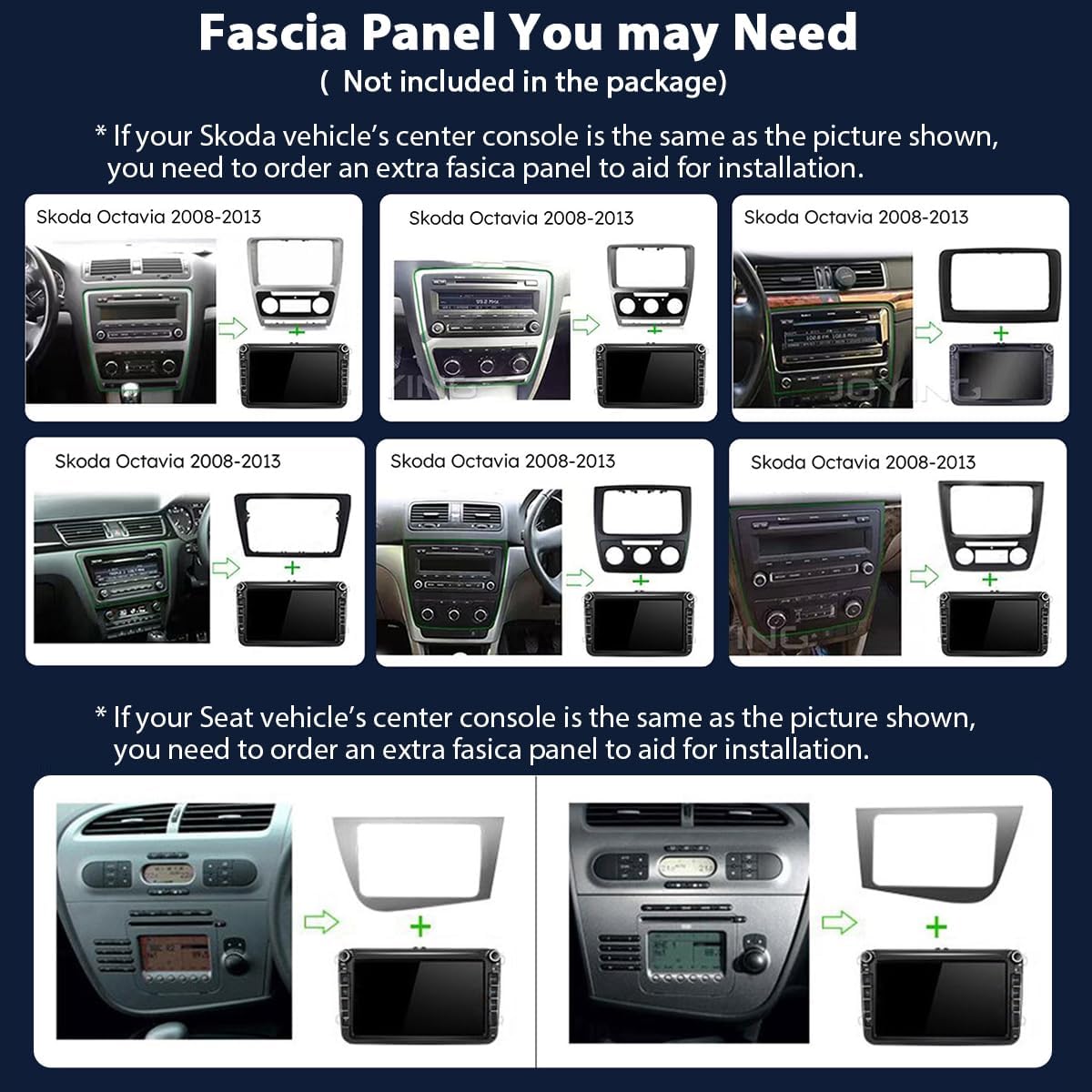
Figura 3.3: Examples of fascia panels that may be required for specific Skoda and Seat models.
3.4 Cablejat i connexions
The Joying car stereo is designed for plug-and-play installation, minimizing the need for cutting original vehicle wires. Connect the supplied cables to their corresponding ports on the head unit and your vehicle's wiring harness. Ensure all connections are secure.
- Cable de corrent: Connects the head unit to the vehicle's power supply.
- AR Cable: For specific auxiliary functions.
- Screen Ribbon Cable: Connects the display.
- External Mic: Per a trucades de mans lliures i ordres de veu.
- 4G Antennas: For cellular data connectivity.
- Antena WiFi: Per a l'accés a Internet sense fil.
- Cables USB: Per connectar dispositius USB.
- Antena GPS: Per a la funcionalitat de navegació.
The unit supports various factory features including air conditioning display, parking sensor display, steering wheel controls, door information display, factory amplifier, and factory reverse camera. Ensure these connections are made if your vehicle is equipped with them.

Figura 3.4: Integration with OEM features such as parking sensors and steering wheel controls.
4. Instruccions de funcionament
4.1 Initial Startup and Interface
Upon inserting the car key, the unit will initiate a fast boot sequence, entering the user interface within 2 seconds. The very first boot-up may take approximately 30-40 seconds.

Figura 4.1: Main user interface of the Joying car stereo.

Figura 4.2: System specifications and LHD/RHD user interface options.
4.2 Navegació
The unit features precise GPS engines and includes a dedicated GPS antenna for accurate positioning and faster real-time navigation. Offline maps are supported; if your area allows, you can download map data to the stereo for offline use. You can also synchronize mobile phone map data via Carplay or Android Auto.
4.3 Connectivitat
- Built-in 4G Module: Insert a SIM card for internet access. Note that this module does not support making phone calls or sending SMS messages. Supported FDD-LTE types: B2/B4/B5/B7/B12/B13/B14/B17/B25/B26/B38/B66/B71. Supported TDD-LTE type: B41.
- WiFi: An independent WiFi antenna ensures stable signal quality and fast internet access, supporting 802.11a/b/g/n/AC standards across 2.4GHz and 5GHz bands.
- Bluetooth: For hands-free calls and audio streaming.
- Ports USB: Three USB ports are available for connecting external devices.
- Ranura per a targetes Micro SD: For additional storage.
4.4 Funcions d'àudio
Experience high-quality sound with the integrated TDA7851 DSP chip, a 48-band graphic equalizer, and a maximum output power of 4x50W. The unit supports aftermarket amplifiers with 4 audio outputs and 1 SUB output. For ultimate sound quality, it offers Fiber Optical and SPDIF Coaxial digital outputs if your external amplifier has compatible inputs.

Figura 4.3: Advanced audio processing and output options.
4.5 Carplay & Android Auto
The unit features built-in Carplay and Android Auto. Connect your mobile phone via USB cable or Bluetooth to mirror your phone's apps on the larger screen, enabling access to navigation, phone calls, and music playback.

Figura 4.4: Carplay and Android Auto functionality.
4.6 Split-screen Multitasking
The split-screen feature allows you to run two applications simultaneously on the display. To use this feature:
- Tap the recent apps icon.
- Find the app you want to run in split-screen, then click the split-screen button.
- The first app will display on the left, and you can select a second app from recent apps for the right side.
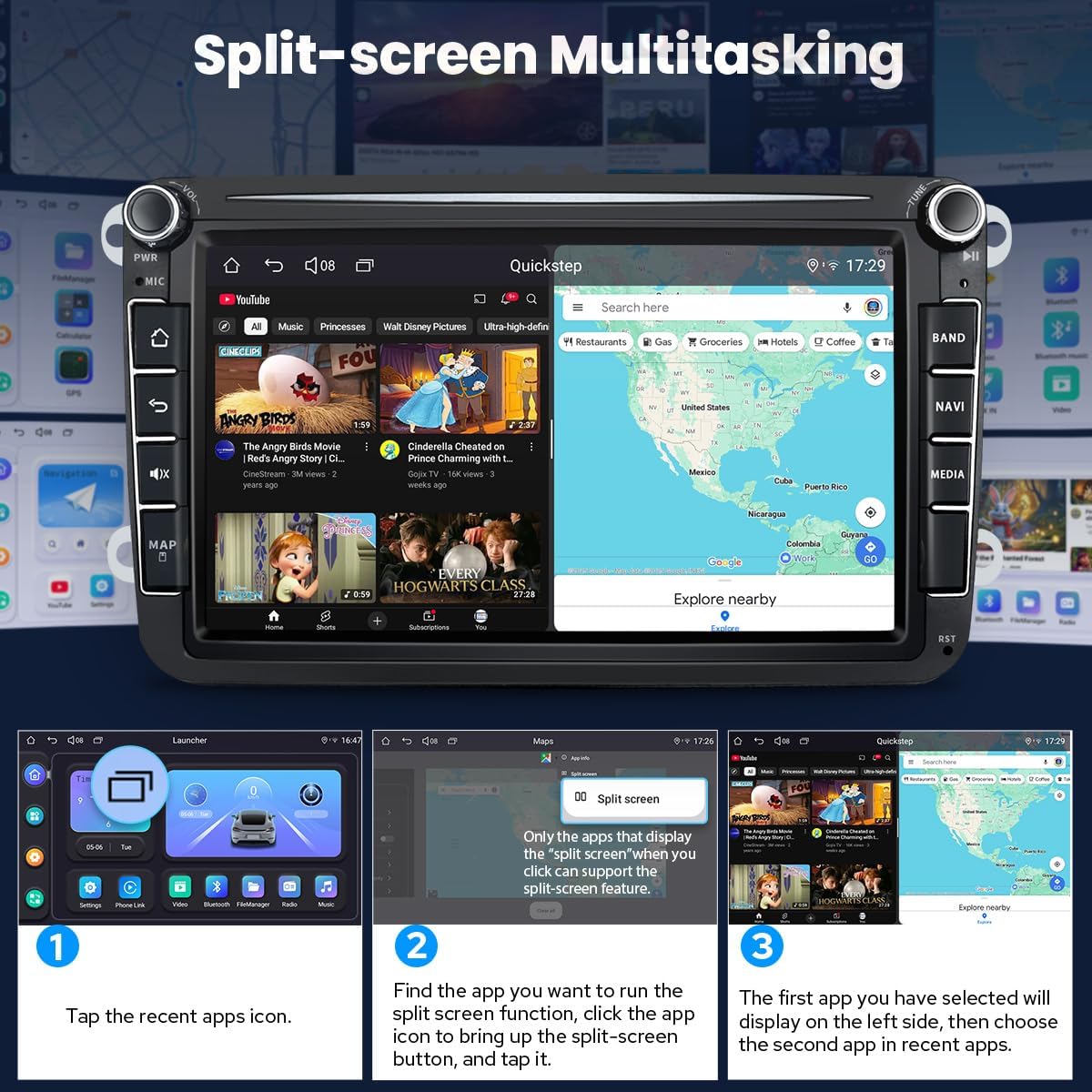
Figura 4.5: Split-screen multitasking in action.
4.7 sortida HDMI
The unit includes an HDMI output, providing a full digital image and sound-sending interface. This allows for synchronized audio and video output to external displays, such as headrest monitors, without manual adjustment. Passengers can enjoy movies on projection screens, while the driver uses the main screen for navigation.

Figura 4.6: HDMI output for external displays. Note: HDMI cable is not included.
4.8 Personalització
Customize your car stereo experience with various settings:
- Car Boot Logo: Set a custom logo for startup.
- Customizable Wallpapers: Choose from various wallpapers to personalize your interface.
- Changeable Button Color: Adjust the color of the physical buttons.
- Brillantor de pantalla ajustable: Optimize display visibility for different lighting conditions.

Figura 4.7: Personalization options for the user interface.
4.9 Altres funcions

Figura 4.8: Acabatview of additional features.
5. Manteniment
To ensure the longevity and optimal performance of your Joying car stereo, follow these maintenance guidelines:
- Neteja: Use a soft, dry cloth to clean the screen and exterior surfaces. For stubborn smudges, lightly dampRenta el drap amb aigua. Evita productes de neteja o dissolvents abrasius.
- Temperatura: Operate the unit within recommended temperature ranges. Extreme heat or cold can affect performance and lifespan.
- Actualitzacions de programari: Reviseu periòdicament el fabricant weblloc web per a actualitzacions de programari per assegurar-vos que disposeu de les darreres funcions i correccions d'errors.
- Sistema de refrigeració: The unit features a dual heat sink design and a fan for improved temperature control. Ensure the fan vents are not obstructed to allow for proper airflow. You can set warning values for CPU temperature, and the fan will activate automatically if thresholds are exceeded.

Figura 5.1: Cooling system design and fan control interface.
6. Solució De Problemes
If you encounter issues with your Joying car stereo, please refer to the following common troubleshooting steps:
- Sense energia: Check all power connections. Ensure the vehicle's ignition is on. Verify the fuse in the power cable is intact.
- Sense so: Check speaker connections. Ensure the volume is not muted or set too low. Verify audio output settings.
- Problemes amb el senyal GPS: Assegureu-vos que l'antena GPS estigui instal·lada correctament i que tingui una vista clara view of the sky. Try moving the antenna to a different location.
- Pantalla tàctil que no respon: Perform a soft reset by pressing the RST (Reset) button, usually located in a small pinhole on the front panel.
- Problemes de connexió Bluetooth: Ensure Bluetooth is enabled on both the stereo and your mobile device. Delete previous pairings and try reconnecting.
- Carplay/Android Auto no es connecta: Ensure your phone is compatible and the USB cable is functioning correctly. Try a different USB port.
For persistent issues, please contact Joying customer support.
7. Especificacions
| Característica | Especificació |
|---|---|
| Número de model | JY-VT130N4 |
| Mida de la pantalla | 8 polzades / 21 cm |
| Sistema operatiu | Android 13 |
| Processador | Qualcomm Snapdragon 6125, Octa Core 2.0GHz |
| Resolució de visualització | IPS 1280x720 |
| Mode de sortida d'àudio | Stereo, 5.1 Surround Sound Channel Configuration |
| Potència de sortida màxima | 4 x 50W |
| Equalitzador | Equalitzador gràfic de 48 bandes |
| Tecnologia de connectivitat | Bluetooth, Ethernet, HDMI, USB, Wi-Fi, 4G |
| Estàndard WiFi | 802.11a/b/g/n/AC (2.4GHz/5GHz) |
| Bandes 4G LTE | FDD-LTE: B2/B4/B5/B7/B12/B13/B14/B17/B25/B26/B38/B66/B71; TDD-LTE: B41 |
| Característiques especials | DSP, Equalizer, Front View Camera Input, RCA, RDS, Carplay, Android Auto, Split-screen, HDMI Output |
| Dispositius compatibles | Amplifier, telèfon intel·ligent, altaveu |
| Suport de codificació de vídeo | H264/H265/MP4/AVI/MKV/FLV |
| Pes de l'article | 5 lliures |
| Dimensions del paquet | 13 x 9 x 8 polzades |
8. Accessoris opcionals
Enhance your driving experience with these optional accessories (not included in the package):
- OBD2 Scanner: Connects via Bluetooth to retrieve real-time vehicle data and diagnostic trouble codes.
- AR Front Camera: Records the road ahead automatically while driving.
- AR Rear Camera: Proporciona un clar view when reversing, automatically switching the display.
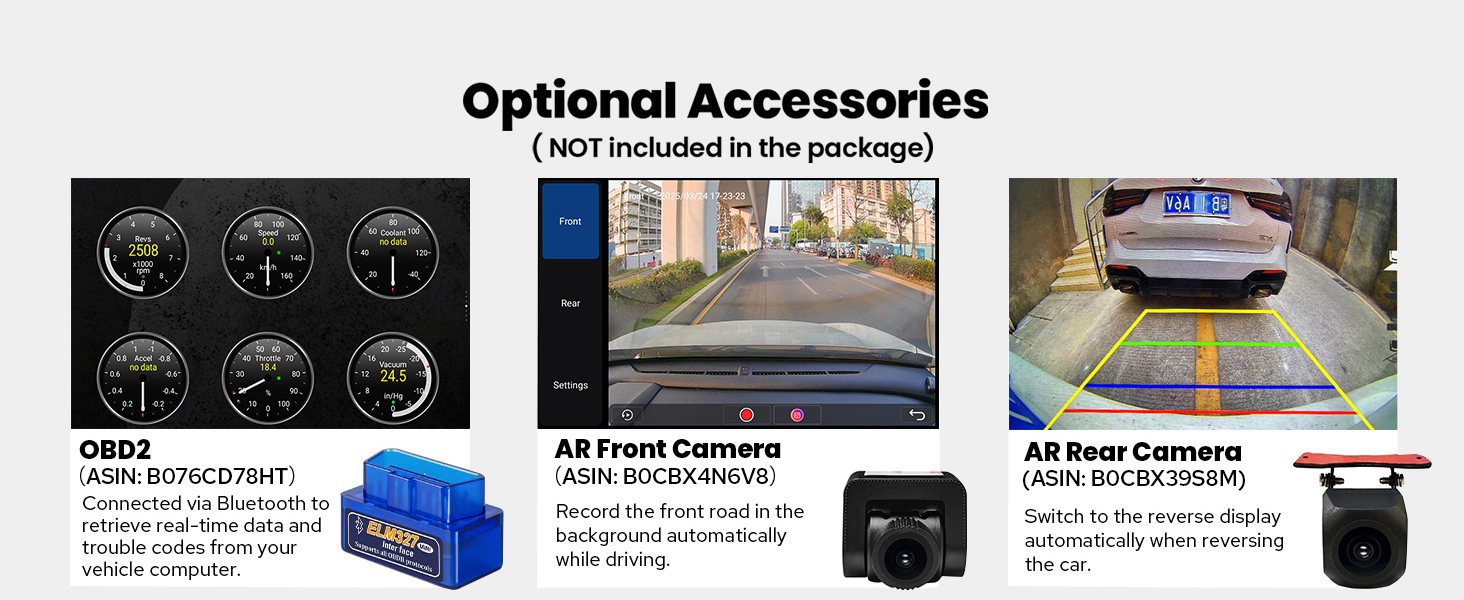
Figura 8.1: Optional accessories for the car stereo.
9. Garantia i Suport
For warranty information, please refer to the documentation provided with your purchase or visit the official JOYING website. For technical support, troubleshooting assistance, or inquiries about your product, please contact JOYING customer service through their official channels.
Fabricant: ALEGRANT
Data de primera disponibilitat: 13 de maig de 2025


