1. Introducció
This manual provides comprehensive instructions for the operation and maintenance of your ZEALOT P12 60W Portable Bluetooth Speaker. Please read this manual thoroughly before using the device to ensure proper function and to maximize your listening experience. Retain this manual for future reference.
2. Producte acabatview
2.1 Característiques clau
- 60W total audio output for clear and powerful sound.
- Integrated deep bass subwoofer for enhanced low frequencies.
- Disseny portàtil i lleuger per a un fàcil transport.
- Classificació d'impermeabilitat IPX5, apte per a ús a l'aire lliure.
- 8000mAh built-in battery providing up to 28 hours of playtime.
- Multiple connectivity options: Bluetooth 5.3, TF card, AUX input, USB drive.
- EQ modes for customizable sound effects (Bass, Vocal, Normal).
2.2 Contingut del paquet
- ZEALOT P12 Bluetooth Speaker
- Cable d'alimentació
- Manual d'usuari (aquest document)
2.3 Identificació de components

Figura 1: Frontal view of the ZEALOT P12 Bluetooth Speaker, showing the main grille and control panel.
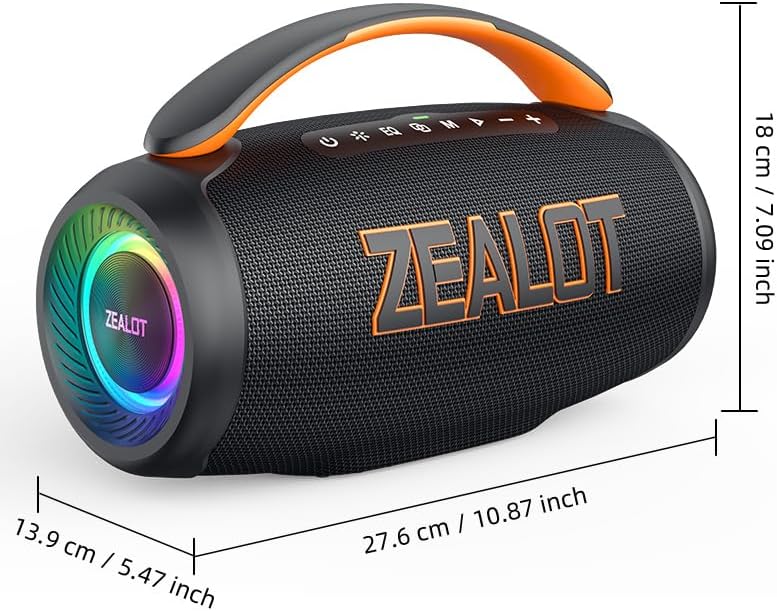
Figura 2: posterior view of the ZEALOT P12 Bluetooth Speaker, illustrating the protective flap covering the TF card slot, AUX input, DC5V charging port, and USB port.

Figure 3: Close-up of the control panel, highlighting the power, EQ, mode, play/pause, and volume buttons.
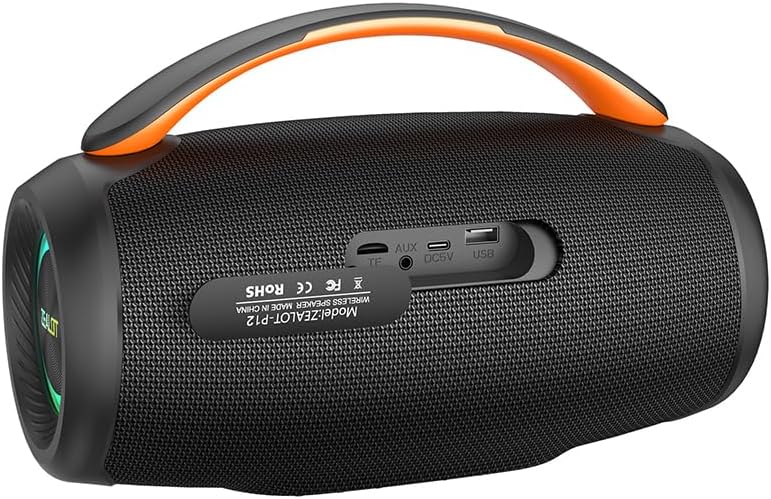
Figure 4: Diagram illustrating the internal acoustic components of the ZEALOT P12, including a 10W tweeter, 50W woofer, and two independent bass passive diaphragms for 360-degree sound.
The speaker features a top-mounted control panel with buttons for power, EQ mode selection, input mode switching (M), play/pause, and volume adjustment. The rear panel houses protected ports for charging, auxiliary input, TF card, and USB drive.
3. Configuració
3.1 Càrrega inicial
- Abans del primer ús, carregueu completament l'altaveu.
- Locate the DC5V charging port on the rear of the speaker, typically under a protective flap.
- Connect the provided power cable to the speaker's charging port and a suitable USB power adapter (not included).
- El llum indicador de càrrega s'il·luminarà. Un cop completament carregat, el llum pot canviar de color o apagar-se, segons el model.
3.2 Engegada/apagada
- Per engegar: premeu i manteniu premut el botó Botó d'encesa (
 ) for approximately 3 seconds until you hear an audible prompt or see the indicator lights activate.
 - Per apagar: premeu i manteniu premut el botó Botó d'encesa () for approximately 3 seconds until the indicator lights turn off.
4. Instruccions de funcionament
4.1 Vinculació Bluetooth
- Assegureu-vos que l'altaveu estigui encès i en mode Bluetooth. Si no, premeu el botó Botó de mode (M) to switch to Bluetooth mode. The Bluetooth indicator light will flash, indicating it is ready for pairing.
- On your smartphone, tablet, laptop, or other Bluetooth-enabled device, navigate to the Bluetooth settings.
- Cerca available devices. The speaker will appear as "ZEALOT P12".
- Select "ZEALOT P12" to connect. Once connected, the Bluetooth indicator light will become solid, and you may hear a confirmation tone.
- Si se us demana una contrasenya, introduïu "0000".
Reproducció d'àudio 4.2
- Reproduir/pausa: Premeu el botó Botó Reproduir/Pausa () per iniciar o pausar la reproducció.
- Pujar el volum: Premeu el botó botó "+" per augmentar el volum.
- Baixar el volum: Premeu el botó botó "-" per reduir el volum.
- Pista següent: Manteniu premut el botó botó "+" durant aproximadament 2 segons.
- Pista anterior: Manteniu premut el botó botó "-" durant aproximadament 2 segons.
4.3 modes d'equalització
The ZEALOT P12 offers three distinct EQ sound effects to optimize your listening experience:
Figure 5: Illustration of the EQ button and its three modes: Bass, Vocal, and Normal.
- Premeu el botó Botó EQ () to cycle through the available modes:
- Baix: Enhances low-frequency sounds for a deeper, richer bass experience.
- Vocal: Optimizes mid-range frequencies for clearer vocals.
- Normal: Proporciona un so equilibrat professionalfile suitable for general listening.
4.4 True Wireless Stereo (TWS) Pairing (Optional)
If you have two ZEALOT P12 speakers, you can pair them together for a stereo sound experience.
- Assegureu-vos que tots dos altaveus estiguin encesos i no connectats a cap dispositiu Bluetooth.
- En un altaveu (aquest serà l'altaveu principal), premeu i manteniu premut el botó Botó de mode (M) for approximately 3 seconds. You will hear a prompt indicating TWS pairing mode.
- The primary speaker will automatically search for the secondary speaker. Once connected, you will hear a confirmation tone, and the indicator lights on both speakers will synchronize.
- Now, connect your Bluetooth device to the primary speaker as described in section 4.1. Audio will play in stereo through both speakers.
- Per desconnectar TWS, manteniu premut el botó Botó de mode (M) on either speaker for 3 seconds.
5. Connectivitat
In addition to Bluetooth, the ZEALOT P12 supports several other audio input methods:
- Reproducció de la targeta TF: Inseriu una targeta TF (microSD) que contingui àudio MP3 files a la ranura de la targeta TF. L'altaveu canviarà automàticament al mode de targeta TF i començarà la reproducció.
- Entrada AUX: Connect an audio device (e.g., MP3 player, PC) to the speaker's AUX port using a 3.5mm audio cable (not included). Press the Botó de mode (M) per canviar al mode AUX.
- Reproducció des d'una unitat USB: Inseriu una unitat flash USB que contingui àudio MP3 files al port USB. L'altaveu canviarà automàticament al mode USB i començarà la reproducció.
6. Càrrega i bateria
The ZEALOT P12 is equipped with an 8000mAh rechargeable battery, providing extended playtime.
- Durada de la bateria: A full charge provides up to 28 hours of continuous music playback, depending on volume level and audio content.
- Càrrega: Use the provided power cable and a standard USB power adapter (DC5V) to charge the speaker. The charging port is located on the rear panel.
- Indicador de bateria baixa: When the battery level is low, the speaker may emit an audible warning or an indicator light may flash. Charge the speaker promptly to avoid interruption.
7. Manteniment
Classificació d'impermeabilitat 7.1 (IPX5)
The ZEALOT P12 speaker has an IPX5 waterproof rating, meaning it is protected against low-pressure water jets from any direction. This makes it suitable for outdoor use and resistant to splashes, rain, and sweat.
- Important: IPX5 rating does not mean the speaker can be submerged in water. Do not immerse the speaker in water.
- Ensure the protective flap covering the charging and input ports on the rear is securely closed when using the speaker near water or in wet conditions.
7.2 Atenció general
- Netegeu l'altaveu amb un drap suau i sec. No utilitzeu productes de neteja abrasius ni dissolvents.
- Avoid exposing the speaker to extreme temperatures, direct sunlight for prolonged periods, or high humidity.
- Guardeu l'altaveu en un lloc fresc i sec quan no l'utilitzeu.
- No intenteu desmuntar ni reparar l'altaveu vosaltres mateixos, ja que això anul·larà la garantia.
8. Solució De Problemes
| Problema | Causa possible | Solució |
|---|---|---|
| L'altaveu no s'encén. | Bateria baixa. | Carregueu l'altaveu completament. |
| Sense so. | Volum massa baix; mode d'entrada incorrecte; dispositiu no connectat. | Increase volume; press 'M' button to select correct input mode; ensure Bluetooth device is paired or AUX/USB/TF card is properly inserted. |
| La connexió Bluetooth és inestable o falla. | Speaker too far from device; interference; device's Bluetooth off. | Move speaker closer to device (within 10 meters); avoid obstacles; ensure Bluetooth is enabled on your device; try re-pairing. |
| L'emparellament TWS falla. | Altaveus ja connectats a altres dispositius; procediment d'emparellament incorrecte. | Ensure both speakers are disconnected from all Bluetooth devices before initiating TWS pairing. Follow TWS pairing instructions carefully. |
9. Especificacions

Figure 6: Dimensions of the ZEALOT P12 Bluetooth Speaker: 27.6 cm (10.87 inch) length, 13.9 cm (5.47 inch) width, 18 cm (7.09 inch) height.
| Característica | Detall |
|---|---|
| Nom del model | ZEALOT P12 |
| Tipus d'altaveu | Altaveu portàtil |
| Tecnologia de connectivitat | Bluetooth 5.3, Auxiliary (3.5mm), TF Card Slot, USB Port |
| Mode de sortida d'àudio | estèreo |
| Potència de sortida màxima dels altaveus | 60 watts |
| Resposta de freqüència | 20 Hz - 20 kHz |
| Capacitat de la bateria | 8000 mAh |
| Hora de joc | Fins a 28 hores |
| Classificació impermeable | IPX5 |
| Dimensions del producte | 27.6P x 13.9A x 18A cm (10.87P x 5.47A x 7.09A polzades) |
| Pes de l'article | 1.55 kg (1550 grams) |
| Material | Acrilonitril butadiè estirè (ABS) |
| Dispositius compatibles | Smartphone, Tablet, Laptop, PC, Television, Projector |
| Components inclosos | Cable d'alimentació |
| Fabricant | ZELOT |
| País d'origen | Xina |
10. Garantia i Suport
For warranty information and technical support, please refer to the warranty card included with your product or contact ZEALOT customer service directly. Contact details can typically be found on the manufacturer's official weblloc web o a l'embalatge del producte.
Conserveu el vostre comprovant de compra per a reclamacions de garantia.


