1. Introducció
Thank you for choosing the HARDELL Mini Cordless Rotary Tool Kit. This manual provides essential information for the safe and effective operation, maintenance, and troubleshooting of your new tool. Please read this manual thoroughly before first use and retain it for future reference.
2. Producte acabatview
2.1 Característiques clau
- Compatibilitat: Compatible with 3/32-inch (2.3 mm) accessories.
- Control de precisió: 6 variable speeds ranging from 18,000 to 38,000 RPM for diverse tasks.
- Motor actualitzat: Brushless coreless motor for lower noise, powerful performance, and reduced heat.
- Portabilitat: Lightweight design (0.25 pounds) with a durable, rust-resistant aluminum casing.
- USB-C recarregable: 2000mAh battery, fully charges in 60 minutes via universal Type-C port.
2.2 Contingut del paquet
The HARDELL Mini Cordless Rotary Tool Kit includes the following items:
- 1 x HARDELL 4V Mini Cordless Rotary Tool
- 1 x cable de càrrega USB-C
- 1 x clau clau
- 1 x clau Allen
- 2 x Built-in Grinding Heads (set screws)
- 10 bandes de polir
- 10 x Sanding Paper discs
- 1 x Sanding Drum
- 1 x Wheel Mandrel
- 6 x Diamond Bits (Cutting)
- 1 x Diamond Bit (Cutting)
- 2 x Grinding Stones
- 2 x Wool Polishing Wheels
- 1 x Mandrel for Felt Wheel
- 1 x Nylon Brush
- Additional set screws for collet
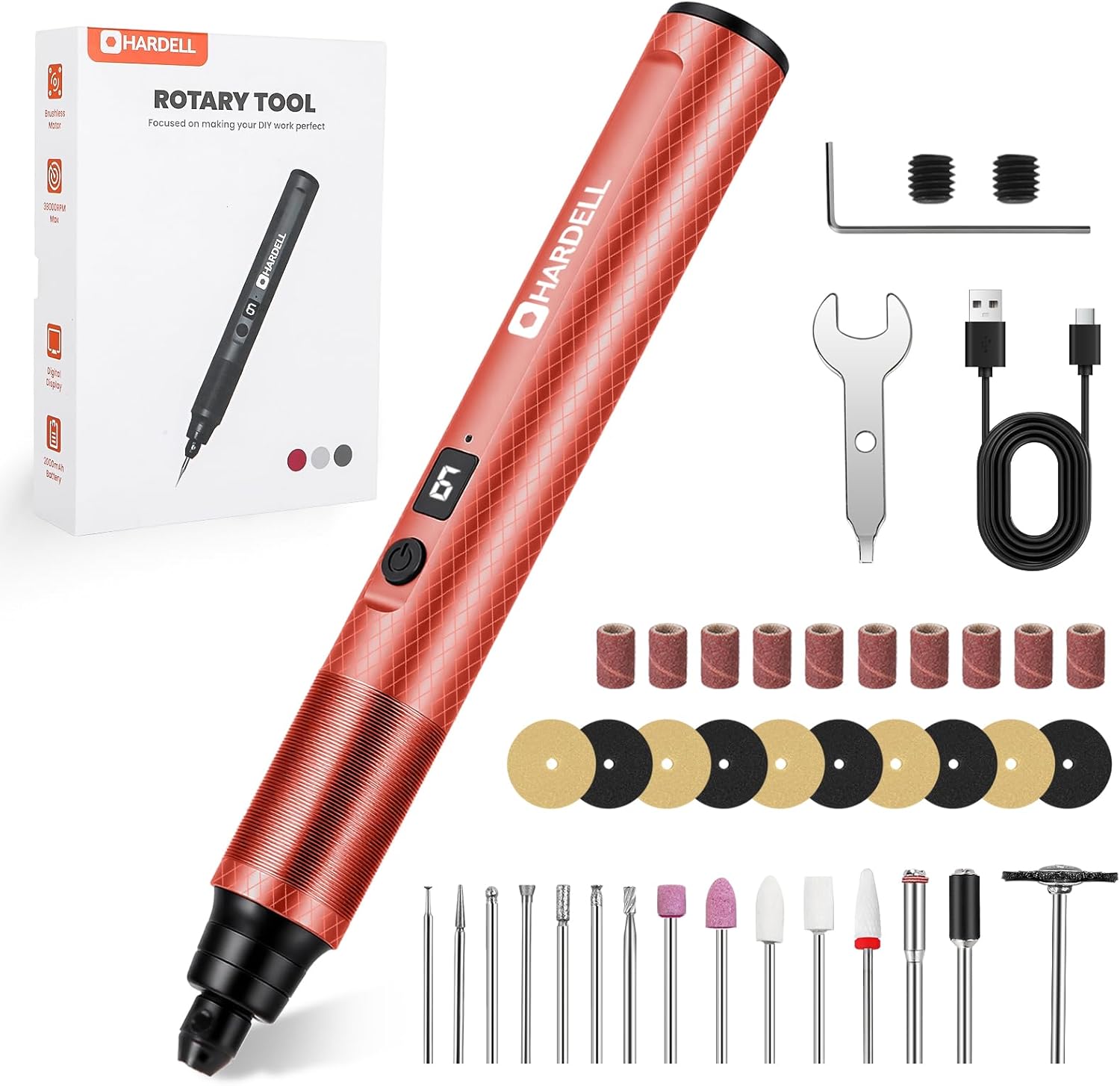
Figure 1: HARDELL Mini Cordless Rotary Tool Kit with all components.
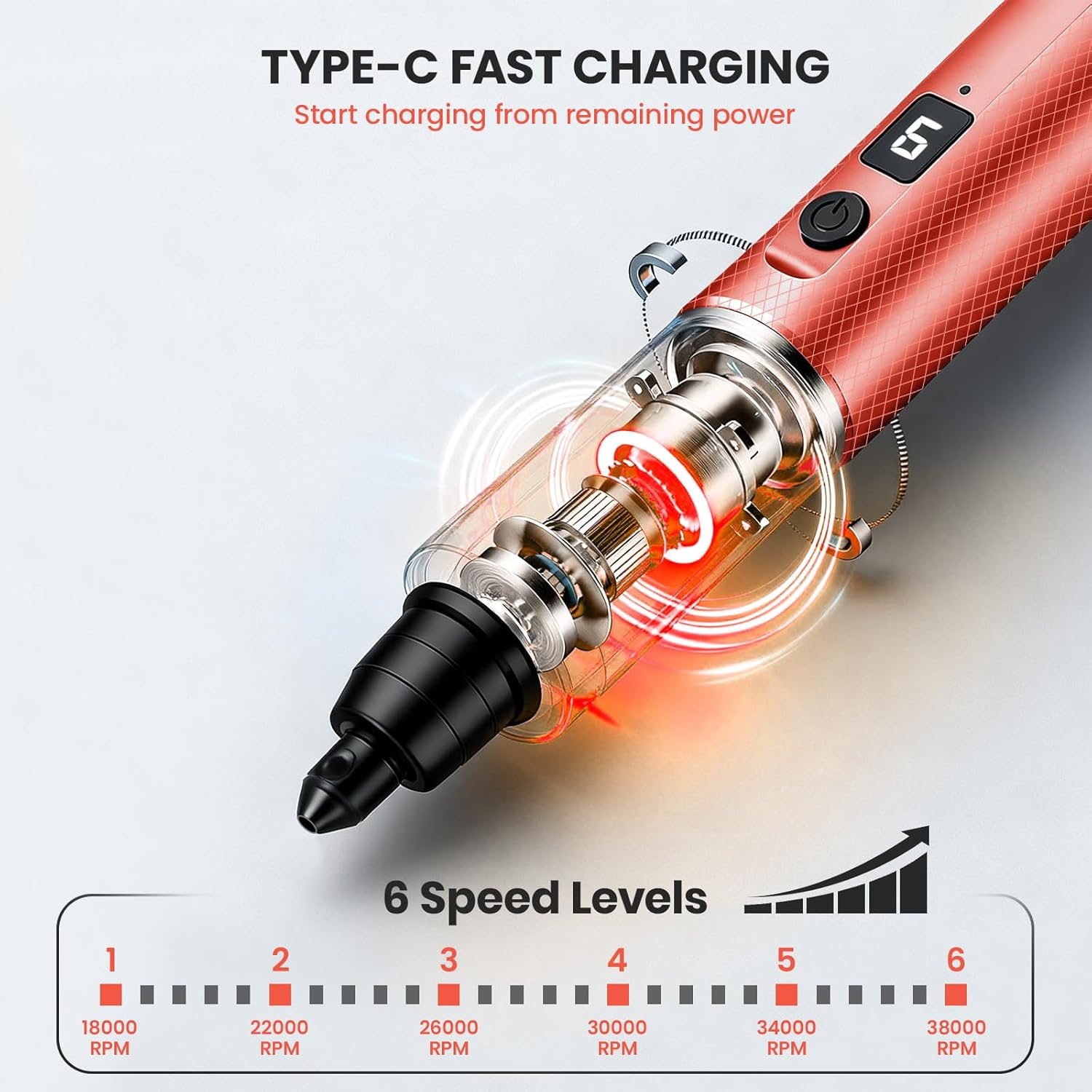
Figure 2: A comprehensive display of the 35 accessories included for various applications like sanding, cutting, grinding, and polishing.
3. Instruccions de seguretat
Always follow basic safety precautions to reduce the risk of fire, electric shock, and personal injury when using this tool.
- Protecció ocular: Utilitzeu sempre ulleres o ulleres de seguretat per protegir els ulls de les deixalles que suren volant.
- Peça de treball segura: Always secure your workpiece in a vise or with clamps to prevent movement during operation.
- Ventilació adequada: Work in a well-ventilated area, especially when grinding or sanding materials that produce dust.
- Inspeccionar els accessoris: Before each use, inspect accessories for damage. Do not use damaged accessories.
- Unplug/Power Off: Always turn off the tool and disconnect it from power (if charging) before changing accessories or performing maintenance.
- Eviteu la sobrecàrrega: Do not force the tool. Let the tool work at its own pace.
- Mantenir clar: Keep hands, hair, and loose clothing away from rotating parts.
- Emmagatzematge: Store the tool and accessories in a dry, secure place out of reach of children.
4. Configuració
4.1 Càrrega de l'eina
The HARDELL Mini Cordless Rotary Tool is equipped with a 2000mAh rechargeable battery. Before first use, fully charge the tool.
- Locate the USB-C charging port on the tool.
- Connect the provided USB-C cable to the tool and to a compatible USB power adapter (not included).
- The digital display will indicate charging status. A full charge takes approximately 60 minutes.
- Un cop estigui completament carregat, desconnecteu el cable.

Figura 3: Mésview of the tool's features, including the Type-C charging port.
4.2 Col·locació d'accessoris
The tool uses a collet system secured by set screws. Ensure the tool is powered off before changing accessories.
- Identify the two small set screws on the collet at the tip of the tool.
- Using the provided Allen wrench, carefully loosen both set screws. Do not remove them completely to avoid losing them.
- Insert the desired 3/32-inch (2.3mm) accessory shank into the collet until it is seated firmly.
- Tighten both set screws securely with the Allen wrench. Ensure the accessory is held firmly and does not wobble.

Figure 4: Step-by-step guide for securely attaching accessories using the collet and set screws.
Nota: The kit includes additional set screws. Store them in a secure place to prevent loss, as they are very small.
5. Instruccions de funcionament
5.1 Encès/Apagat
- To power on, press and hold the power button until the digital display illuminates.
- Per apagar l'aparell, premeu i manteniu premut el botó d'engegada de nou fins que la pantalla s'apagui.
5.2 Control de velocitat
The tool features 6 variable speed settings, indicated on the digital display.
- Press the power button briefly to cycle through the speed settings (1 to 6).
- Velocitat 1: 18,000 RPM
- Velocitat 2: 22,000 RPM
- Velocitat 3: 26,000 RPM
- Velocitat 4: 30,000 RPM
- Velocitat 5: 34,000 RPM
- Velocitat 6: 38,000 RPM

Figure 5: Digital display illustrating the 6 available speed settings.
Recomanació: Start with a lower speed setting and gradually increase it as needed for your specific task and material. Higher speeds are generally for finer work or harder materials, while lower speeds are for polishing or delicate tasks.
5.3 Consells d'ús
- Pressió lleugera: Apply light, consistent pressure. Excessive force can cause the tool to stall, overheat, or damage the workpiece.
- Compatibilitat de materials: This tool is suitable for various materials including wood, plastic, soft metals, and ceramics. Always test on a scrap piece first.
- Aplicacions: Ideal for polishing, sanding, engraving, drilling, and finishing 3D printed models.

Figura 6: Example of using the rotary tool for engraving on glass.

Figure 7: Various applications of the rotary tool including sanding, carving, grinding, and polishing.
6. Manteniment
- Neteja: After each use, wipe down the tool with a clean, dry cloth. Use a soft brush to remove dust and debris from the collet area.
- Emmagatzematge d'accessoris: Store accessories in their designated container to prevent damage and loss.
- Cura de la bateria: For optimal battery life, avoid fully discharging the battery frequently. Charge the tool regularly, even if not in use for extended periods.
- Inspecció general: Periodically check the tool for any signs of wear or damage. Do not attempt to repair the tool yourself; contact customer support if issues arise.
7. Solució De Problemes
| Problema | Causa possible | Solució |
|---|---|---|
| L'eina no s'encén. | Bateria baixa o sense càrrega. | Charge the tool fully using the provided USB-C cable. |
| Accessory wobbles or falls out. | Set screws are loose or accessory is not properly seated. | Ensure the accessory is fully inserted and both set screws are tightened securely. |
| Tool stalls or loses power during use. | Excessive pressure applied or low battery. | Reduce pressure on the workpiece. Check battery level and recharge if necessary. |
| Tool does not start at lower speed settings (1 or 2). | Motor requires higher initial torque to start rotation. | Start the tool at speed setting 3 or higher, then adjust down if desired. |
| L'eina s'escalfa massa. | Ús intensiu prolongat o ventilació bloquejada. | Allow the tool to cool down. Ensure ventilation slots are clear. Reduce usage time for heavy tasks. |
8. Especificacions
| Característica | Detall |
|---|---|
| Marca | HARDELL |
| Número de model | DM62501REDHD-1 |
| Voltage | 4 Volts |
| Font d'alimentació | Funciona amb bateria (sense fils) |
| Tipus de bateria | Ió de liti de 2000 mAh (inclosa) |
| Temps de càrrega | Approx. 60 minutes (via USB-C) |
| Velocitat de rotació mínima | 18,000 RPM |
| Velocitat de rotació màxima | 38,000 RPM |
| Nombre de velocitats | 6 velocitats variables |
| Collet Size Compatibility | 3/32 de polzada (2.3 mm) |
| Pes de l'article | 0.25 lliures (uns 113 grams) |
| Dimensions del producte (L x A x A) | 9.5 x 3.8 x 1.2 polzades (aprox. 24.1 x 9.7 x 3.0 cm) |
9. Garantia i Suport
For warranty information or customer support, please refer to the product packaging or contact HARDELL directly through their official channels. You can visit the HARDELL Store for more information: HARDELL Store.


