Introducció
This manual provides essential information for the proper use, setup, and maintenance of your The G-Lab K-Pad Helium WL Wireless PC Controller. Please read this manual thoroughly before using the product to ensure optimal performance and longevity.
Contingut del paquet
Verifiqueu que tots els elements siguin presents al paquet:
- The G-Lab K-Pad Helium WL Wireless PC Controller
- USB 2.4 GHz Receiver Dongle
- Cable de càrrega USB-C a USB-A
- Manual d'usuari (Aquest document)

Image: The retail packaging for the K-Pad Helium WL Wireless PC Controller, showing the controller and its accessories.
Producte acabatview
The K-Pad Helium WL features an ergonomic design with 12 buttons and 4 triggers, including 2 customizable rear triggers, designed for comfortable and precise control during gaming sessions.
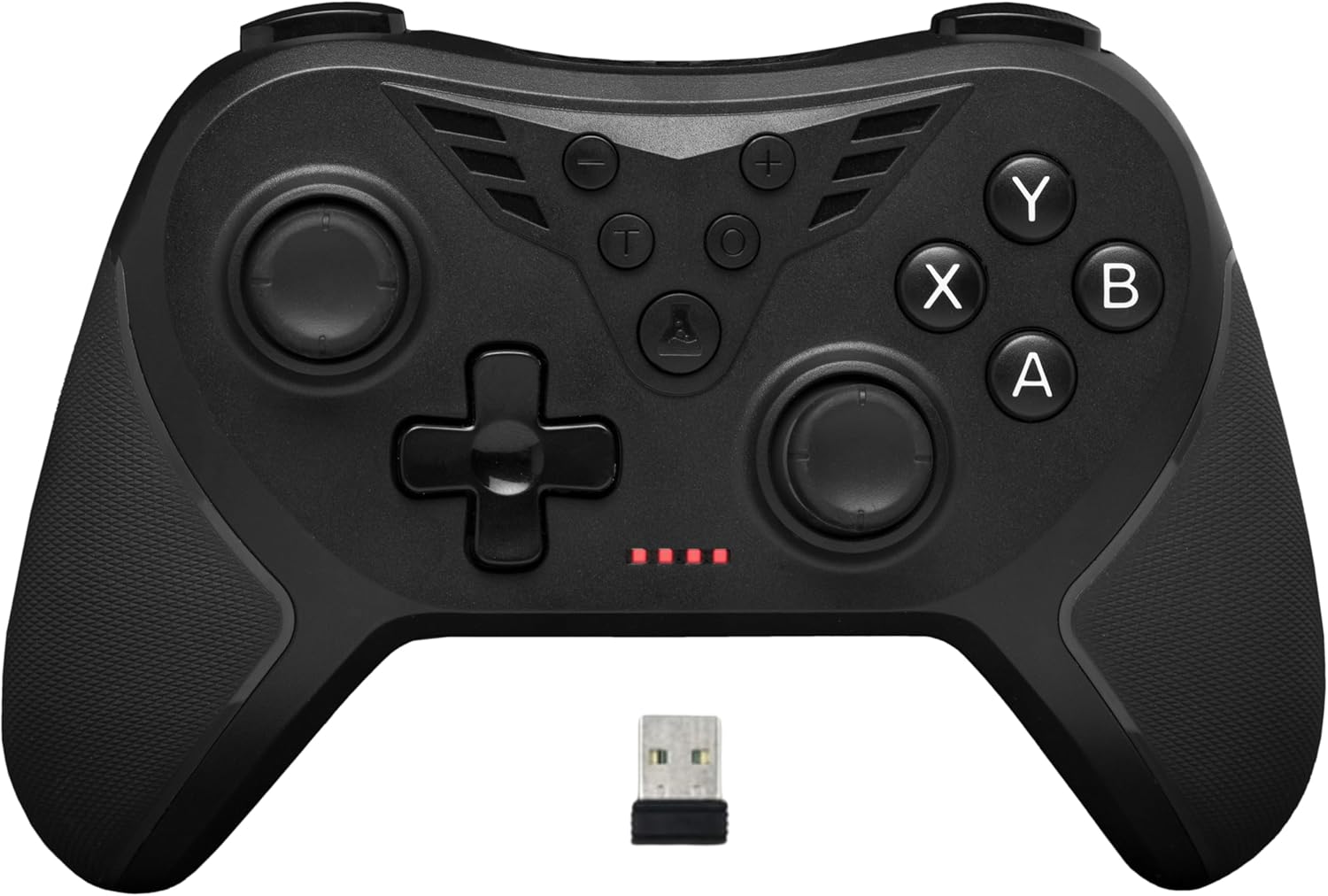
Imatge: Frontal view of the K-Pad Helium WL controller, displaying its buttons, joysticks, D-pad, and the included USB 2.4 GHz receiver dongle.
Disposició dels botons:
- Stick analògic esquerre: Per al moviment i el control de la càmera.
- Stick analògic dret: Per al control de la càmera i l'apuntament.
- D-Pad: Entrada direccional.
- Botons d'acció (A, B, X, Y): Primary game actions.
- Botons d'espatlla (L1, R1): Top triggers.
- Triggers (L2, R2): Analog triggers for precise input.
- Customizable Rear Triggers (LM, RM): Two additional buttons on the back for custom assignments.
- Start/Menu Button: Access in-game menus.
- Select/View Botó: Additional game functions.
- Botó d'inici: Returns to system menu.
- Turbo Button (T): Activates Turbo mode.
- Botó de macro: For programming custom macros.

Imatge: Part posterior view of the K-Pad Helium WL controller, highlighting the two customizable triggers (LM and RM) located on the back.
Configuració
1. Charging the Controller:
Before first use, fully charge the controller. Connect the USB-C end of the charging cable to the controller and the USB-A end to a powered USB port (e.g., PC, USB wall adapter). The charging indicator lights will show the charging status. A full charge takes approximately 2 hours and provides 8 to 10 hours of playtime.

Image: Illustration showing the controller's charging via USB-C cable and indicating battery life.
2. Connecting to a Device (Plug and Play):
The K-Pad Helium WL uses a 2.4 GHz wireless connection via a dedicated USB receiver.
- Insert the USB 2.4 GHz receiver dongle into an available USB port on your PC (Windows 10, 11) or PS3 console.
- Turn on the controller. It will automatically connect to the receiver. The indicator lights on the controller will confirm a successful connection.
- No additional drivers are typically required for Windows 10/11 or PS3 due to its Dual Mode (Direct-Input + X-Input) compatibility.

Image: The K-Pad Helium WL controller shown with its USB 2.4 GHz receiver, illustrating the wireless connection for stable and fast gameplay.
Instruccions de funcionament
Feedback de vibració:
The controller features integrated vibration motors for enhanced immersion. The intensity of vibrations can be adjusted or disabled. Refer to your game's settings for specific vibration options, or the controller's manual for hardware-level adjustments if available.

Image: The K-Pad Helium WL controller with an overlay illustrating four levels of vibration intensity: 0%, 30%, 70%, and 100%.
Customizable Rear Triggers (LM, RM):
The two rear triggers (LM and RM) can be programmed to replicate other button inputs, allowing for personalized control schemes.
Mode turbo:
La funció Turbo permet prémer un botó repetidament mentre es mantingui premut, cosa que pot ser útil en certs jocs.
- Per activar Turbo: Manteniu premut el botó Turbo (T) button, then press the desired action button (e.g., A, B, X, Y, L1, R1, L2, R2). The button will now have Turbo functionality.
- To deactivate Turbo for a specific button: Repetiu el pas d'activació.
- To clear all Turbo settings: Premeu el botó Turbo (T) botó dues vegades.
Programació de macros:
Macros allow you to record a sequence of button presses and assign them to a single button (LM or RM), executing complex actions with one press.
- To program a Macro: Simultàniament, manteniu premut el botó Macro button and either the LM or RM button for 3 seconds. The indicator light will flash to indicate recording mode.
- Perform the desired sequence of button presses.
- Premeu el botó LM or RM button again to save the macro. The indicator light will stop flashing.
- To clear a Macro: Premeu el botó Macro botó tres vegades.
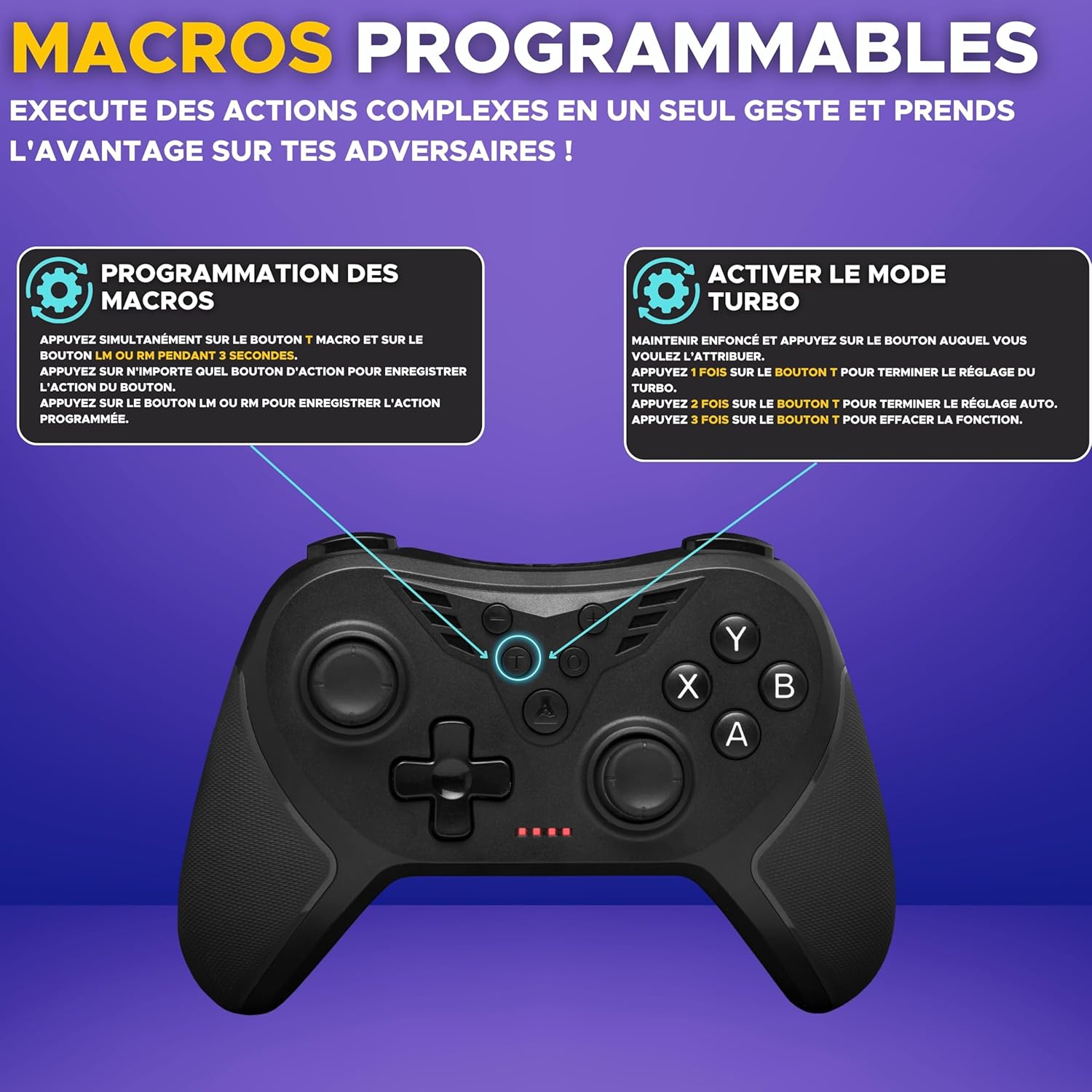
Image: Diagram showing instructions for programming macros and activating Turbo mode on the K-Pad Helium WL controller.
Compatibilitat
The G-Lab K-Pad Helium WL Wireless PC Controller is compatible with the following platforms:
- Windows 10
- Windows 11
- PlayStation 3 (PS3)
- Android (Smartphones/Tablets with OTG support)
Nota: Aquest controlador és no compatible with Xbox consoles, PlayStation 4 (PS4), PlayStation 5 (PS5), Mac OS, or iOS devices.
Manteniment
Neteja:
Per netejar el controlador, utilitzeu un drap suau i sec. Per a la brutícia resistent, netegeu lleugerament.ampen the cloth with water. Do not use harsh chemicals, solvents, or abrasive cleaners, as these can damage the surface and internal components.
Emmagatzematge:
Guardeu el controlador en un lloc fresc i sec, allunyat de la llum solar directa i de temperatures extremes. Eviteu col·locar objectes pesats a sobre del controlador per evitar danys.
Resolució de problemes
- El controlador no es connecta:
- Assegureu-vos que el receptor USB estigui ben connectat a un port USB que funcioni.
- Assegureu-vos que el controlador estigui carregat.
- Try restarting your PC or console.
- Ensure no other 2.4 GHz wireless devices are causing interference.
- Input lag or dropped connection:
- Apropa't al receptor USB.
- Ensure there are no large metallic objects or other wireless devices between the controller and the receiver.
- Check for battery level; low battery can affect wireless performance.
- La vibració no funciona:
- Revisa la configuració del joc per assegurar-te que la vibració estigui activada.
- Alguns jocs poden no admetre la vibració.
- Botons que no responen:
- Assegureu-vos que el controlador estigui connectat correctament.
- Test the controller on another compatible device if possible.
- If a specific button is not working, it might indicate a hardware issue.
Especificacions
| Marca | THE G-LAB |
| Nom del model | K-PAD-HELIUM-WL |
| Connectivitat | Sense fil de 2.4 GHz (receptor USB) |
| Compatibilitat | Windows 10, Windows 11, PS3, Android (with OTG) |
| Nombre de botons | 12 |
| Number of Triggers | 4 (2 customizable rear triggers) |
| Característiques especials | Adjustable Vibrations, Turbo Mode, Macro Programming |
| Font d'alimentació | Funciona amb bateria (recarregable) |
| Temps de càrrega | Aprox. 2 hores |
| Durada de la bateria | Aprox. 8-10 hores |
| Dimensions (L x A x A) | 15.5 x 10 x 6.1 cm |
| Pes | 220 grams |
| Color | Negre |
Garantia i Suport
Garantia:
Aquest producte ve amb un 2 any de garantia des de la data de compra. Aquesta garantia cobreix els defectes de fabricació i els defectes de material en condicions d'ús normal. No cobreix els danys causats per un mal ús, accidents, modificacions no autoritzades o desgast normal.
Atenció al client:
For technical assistance, warranty claims, or any questions regarding your The G-Lab K-Pad Helium WL Wireless PC Controller, please contact The G-Lab customer support. Support is available 7 days a week and aims to respond within 24 hours.
Please refer to the official The G-Lab weblloc per obtenir informació de contacte: www.the-g-lab.tech


